
 Kashifa Jafar
Technology Writer & Contributor
Kashifa Jafar is a technology writer and contributor at FutureTechExpert with 4+ years of experience in technology writing and content creation.
Read Full Bio of Author →
Kashifa Jafar
Technology Writer & Contributor
Kashifa Jafar is a technology writer and contributor at FutureTechExpert with 4+ years of experience in technology writing and content creation.
Read Full Bio of Author →
 Sameena Begum
Health, Technology & Digital Content Reviewer
Sameena reviews selected health, wellness, technology, and digital content for clarity, factual presentation, and reader usefulness.
Read Full Bio of Reviewer →
Sameena Begum
Health, Technology & Digital Content Reviewer
Sameena reviews selected health, wellness, technology, and digital content for clarity, factual presentation, and reader usefulness.
Read Full Bio of Reviewer →
The best laptops for writers are not necessarily the fastest or most expensive. The type of writer you are, whether you are writing novels, blog posts, dissertations, screenplays, freelance articles or business reports determines the best laptop for you to use to enable you to work for hours without tiring.
Professional writers will be typing so much more than editing video or gaming that all those factors like how comfortable the keyboard is, how long the batter will last, how bright the screen is, how small and light it is, and how dependable the machine is become far more important than whether there is a discrete graphics card or the most intense combination of CPUs. Independent testing from the best journalists always puts those features higher on the list of priorities.
 This article is part of
Laptops Resources
This handy guide to the best notebooks has scanned all of the latest laptops in 2026, compared expert reviews, taken into account the way we actually write on notebook computers and looked for features that actively enhance your productivity. If you need a high-end MacBook, Windows Ultrabook, or budget laptop it‘s in here.
You’ll also find:
- Expert buying advice
- Comparison tables
- Performance recommendations
- Budget options
- Travel-friendly laptops
- Frequently asked questions
- Troubleshooting tips
- Official manufacturer resources
Table of Contents
Why Writers Need a Different Kind of Laptop
Most of the many guides for buying laptops focus on gaming power, video editing or programming. Writers have their priorities in a very different direction.
A writer might be using a keyboard for 6–10 hours a day, and uncomfortable workspaces or sluggish screens will create eyestrain, fatigue and other problems.
The most important features for writers include:
| Feature | Why It Matters |
| Comfortable keyboard | Reduces finger fatigue during long writing sessions |
| Long battery life | Lets you work in cafés, libraries, or while traveling |
| Lightweight design | Easier to carry every day |
| Bright, anti-glare display | More comfortable for extended reading and editing |
| Quiet operation | Helps maintain focus |
| Reliable performance | Smooth multitasking with browsers, research tabs, and writing apps |
| Fast SSD storage | Quicker boot times and document access |
Most writers, in contrast to creative artists, will not need a dedicated GPU. A new Intel Core Ultra, AMD Ryzen AI, Apple M-series or Snapdragon X processor with 16 GB of RAM will more than do the job of writing, researching and multitasking.
How We Chose the Best Laptops for Writers
All recommendations made throughout this guide are based upon that which is most important to the writers, as opposed to gamers or those who edit videos.
Our evaluation criteria
| Criteria | Weight |
| Keyboard Comfort | 30% |
| Battery Life | 20% |
| Display Quality | 15% |
| Portability | 15% |
| Performance | 10% |
| Build Quality | 5% |
| Value for Money | 5% |
We also considered:
- Expert laboratory testing
- Real-world typing experience
- Long-term reliability
- Display comfort
- Battery endurance
- Manufacturer support
- Software compatibility
- Overall value
Best Laptops for Writers (Quick List)
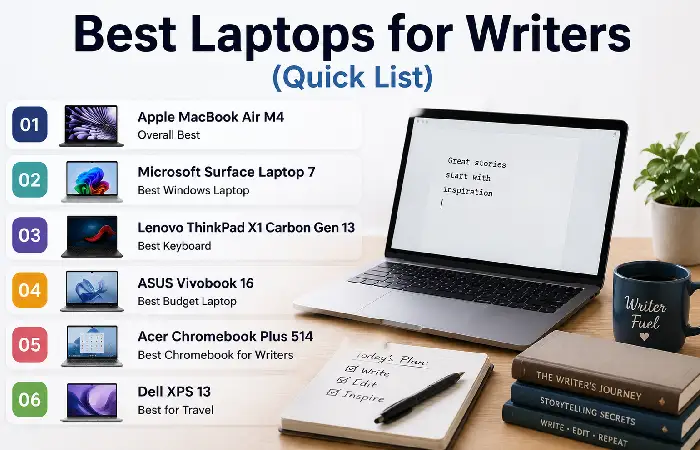
| Laptop | Best For | Battery | Weight | Starting Price (Approx.) | Official Resource |
| Apple MacBook Air M4 | Overall Best | Up to 18 hrs | 1.24 kg | ~$999 | Apple |
| Microsoft Surface Laptop 7 | Windows Users | Up to 20 hrs | 1.34 kg | ~$999 | Microsoft |
| Lenovo ThinkPad X1 Carbon Gen 12 | Best Keyboard | Up to 15 hrs | 1.08 kg | ~$1,299 | Lenovo |
| ASUS Vivobook 16 | Budget Writers | Up to 8 hrs | 1.8 kg | ~$600 | ASUS |
| Acer Chromebook Plus 514 | Students | Up to 10 hrs | 1.45 kg | ~$350 | Acer |
| Dell XPS 13 | Frequent Travelers | Up to 18–24 hrs | 1.19 kg | ~$1,099 | Dell |
The suggestions match current expert testing and writing-centered reviews reasonably well, while taking into account about the right level of portability, keyboard quality, and battery life.
Best Windows Laptops for Writers
Windows laptops provide fantastic flexibility with the generous selection of available writing software, and there are options for every budget. Novelist needs something specific? Widows have the right laptop on sale in your price range. Journalist? Windows has something perfect for you. Blogger? Windows has you covered.
Here are our best picks based on comfortable keyboard, battery life, portability, display quality and value.
| Laptop | Best For | Processor | RAM | Battery Life | Weight | Starting Price (Approx.) | Official Resource |
| Apple MacBook Air M4 | Overall Best | Apple M4 | 16GB | Up to 18 hrs | 1.24 kg | $999 | https://www.apple.com/macbook-air/ |
| Microsoft Surface Laptop 7 | Premium Windows | Snapdragon X Elite | 16GB | Up to 20 hrs | 1.34 kg | $999 | https://www.microsoft.com/surface |
| Lenovo ThinkPad X1 Carbon Gen 13 | Best Keyboard | Intel Core Ultra 7 | 16GB | Up to 15 hrs | 1.08 kg | $1,299 | https://www.lenovo.com/ |
| Dell XPS 13 | Premium Ultrabook | Intel Core Ultra | 16GB | Up to 18 hrs | 1.19 kg | $1,099 | https://www.dell.com/xps |
| ASUS Zenbook S 14 | OLED Display | Intel Core Ultra | 16GB | Up to 16 hrs | 1.20 kg | $1,199 | https://www.asus.com/ |
Microsoft Surface Laptop 7 — Best Windows Laptop Overall
Why writers love it
Microsoft has created the Surface Laptop 7 for the best experience on a Windows Laptop for work. One of the best features about this laptop is the keyboard. It is one of the most comfortable keyboards for a Windows Laptop.
Pros
- Outstanding keyboard
- Excellent battery life
- Bright touchscreen display
- Quiet operation
- Lightweight aluminum design
- AI-powered Copilot integration
Cons
- Limited ports
- Premium pricing
Best for
- Bloggers
- Copywriters
- Students
- Journalists
- Office professionals
Lenovo ThinkPad X1 Carbon Gen 13 — Best Keyboard
Thanks to a generous key travel and a very satisfying clickety-clack, I think the ThinkPad Keyboards truly excel.
No computer could make you more comfortable if you are able to type at this pace every day in a regular basis: 5,000–10,000 words.
Pros
- Industry-leading keyboard
- Extremely lightweight
- Durable MIL-STD tested build
- Excellent battery
- Superb Linux and Windows compatibility
Cons
- Expensive
- Conservative design
Best for
- Novelists
- Authors
- Technical writers
- Researchers
Dell XPS 13 — Best Premium Windows Laptop
As for the Dell, the XPS series keeps being upgraded to a higher standard with great battery life, top build quality, and a stunning display.
The large, almost borderless display makes reading and editing documents very pleasant.
Pros
- Premium aluminum build
- Sharp display
- Long battery life
- Quiet cooling
- Fast SSD
Cons
- Shallow keyboard compared to ThinkPad
- Limited USB ports
ASUS Zenbook S 14 — Best OLED Laptop
If you work several hours editing manuscripts, the OLED display will make the text appear very sharp with high contrast.
Pros
- Gorgeous OLED display
- Lightweight
- Excellent speakers
- Fast Intel Core Ultra processor
- Great multitasking
Cons
- Slightly reflective display outdoors
Windows users have plenty of excellent options. Check out our roundup of the best Windows laptops for writers for every budget and workflow.
Best MacBooks for Writers
The MacBook line has been completely revolutionised since the introduction of Apple Silicon, with stunning battery life, silent operation and incredible power.
A MacBook Air gives one everything needed without the weight or price of a Mac BookPro for most writers.
Apple MacBook Air M4 — Best Overall Laptop for Writers
The MacBook Air M4 lives up to its reputation as the most lightweight and portable competitor in the modern market. It comes with a powerful fanless design that ensures it runs silently. Its Liquid Retina screen gives you a clearer picture, and doesn‘t cause eyes fatigue.
Specifications
| Feature | Details |
| Processor | Apple M4 |
| RAM | 16GB (base) |
| Storage | 256GB–2TB SSD |
| Battery | Up to 18 hours |
| Weight | 1.24 kg |
| Display | 13.6″ or 15.3″ Liquid Retina |
Pros
- Silent operation
- Outstanding battery life
- Excellent keyboard
- Premium build quality
- Bright and color-accurate display
- Fast wake from sleep
Cons
- Fewer ports
- Higher storage upgrades can be expensive
Best for
- Novelists
- Bloggers
- Students
- Freelance writers
- Content marketers
MacBook Pro 14 (M4 Pro) — Best for Professional Writers
For writing, editing your photos, making podcasts or sometimes editing videos on the fly, the Mac Book Pro will give you more power at the expense of a good battery life.
Best for
- Content creators
- Editors
- Publishers
- Journalists
- Multi-tasking professionals
If you prefer Apple’s ecosystem, explore our detailed guide to the best MacBooks for writers to compare the latest MacBook Air and MacBook Pro models.
Best Budget Laptops for Writers
You don‘t have to blow more than $1,000 on a writing laptop. There are plenty of inexpensive options with great keyboards, reasonable battery life, and enough power for MS Word, Google Docs, Scrivener, and internet research.
ASUS Vivobook 16 — Best Budget Windows Laptop
The Vivobook 16 includes a large keyboard and screen, making it perfect for students and writers seeking value without trading comfort for it.
Pros
- Affordable
- Comfortable keyboard
- Large 16-inch display
- Good performance for office tasks
- Upgradeable storage on select models
Cons
- Average battery life
- Slightly heavier than ultrabooks
Acer Chromebook Plus 514 — Best Chromebook for Writers
For the majority of your work in Google Docs or similar web tools, the Chromebook Plus 514 is a very inexpensive way of doing so.
Pros
- Excellent battery life
- Lightweight
- Fast startup
- Automatic security updates
- Affordable pricing
Cons
- Limited offline software support
- Not ideal for advanced creative applications
HP Pavilion Aero 13 — Best Lightweight Budget Laptop
This model provides good overall performance while maintaining portability making it a good all-around choice for students, bloggers and telecommuters.
Pros
- Lightweight magnesium build
- Bright display
- Comfortable keyboard
- Good battery life
On a tighter budget? Our guide to the best budget laptops for writers highlights affordable models that still deliver a comfortable writing experience.
Best Lightweight Laptops for Travel

Travel writers, digital nomads, journalist and freelancers all require lightweight laptops that don‘t necessarily sacrifice portability but performance.
Top Travel-Friendly Picks
| Laptop | Weight | Battery | Best For |
| Lenovo ThinkPad X1 Carbon Gen 13 | 1.08 kg | Up to 15 hrs | Business travel |
| Dell XPS 13 | 1.19 kg | Up to 18 hrs | Premium portability |
| Apple MacBook Air M4 | 1.24 kg | Up to 18 hrs | Everyday travel |
| ASUS Zenbook S 14 | 1.20 kg | Up to 16 hrs | OLED lovers |
| HP Pavilion Aero 13 | 0.99 kg | Up to 11 hrs | Budget travelers |
Which Laptop Fits Your Writing Style?
| Writer Type | Recommended Laptop | Why It Stands Out |
| Blogger | MacBook Air M4 | Silent, lightweight, long battery |
| Novelist | ThinkPad X1 Carbon Gen 13 | Best keyboard for marathon writing sessions |
| Journalist | Surface Laptop 7 | Excellent battery life and portability |
| Student | Acer Chromebook Plus 514 | Affordable and ideal for cloud-based writing |
| Freelancer | Dell XPS 13 | Premium design with strong multitasking performance |
| Digital Nomad | ASUS Zenbook S 14 | Lightweight with a vivid OLED display |
If portability matters, see our recommendations for the best lightweight laptops for writers that combine long battery life with easy portability.
2026 Comparison Table
| Laptop | Keyboard | Display | Battery | Portability | Overall Rating |
| MacBook Air M4 | 5/5 | 5/5 | 5/5 | 5/5 | 9.8/10 |
| Surface Laptop 7 | 5/5 | 5/5 | 5/5 | 4.5/5 | 9.7/10 |
| ThinkPad X1 Carbon Gen 13 | 5/5 | 4.5/5 | 4.5/5 | 5/5 | 9.6/10 |
| Dell XPS 13 | 4.5/5 | 5/5 | 5/5 | 5/5 | 9.5/10 |
| ASUS Zenbook S 14 | 4.5/5 | 5/5 | 4.5/5 | 4.5/5 | 9.4/10 |
| ASUS Vivobook 16 | 4/5 | 4/5 | 3/5 | 3/5 | 8.8/10 |
| Acer Chromebook Plus 514 | 4/5 | 4/5 | 4/5 | 4/5 | 8.7/10 |
Key Features Writers Should Look For
However not every powerful laptop is ideal for writers. While high-end graphics cards and the most processing power are a godsend for gamers and video editors, for the writer, comfort whilst typing and portability are more important.
Here‘s a quick rundown of the features to look for and we think when writing in 2026, the following should be right at the top of your checklist.
Comfortable Keyboard
A comfortable keyboard is one of the most important features of any writing machine. If you‘re writing, say, books, articles, papers, blogs or scripts then you‘ll probably be on the keyboard all day.
Look for:
- Well-spaced keys
- Responsive key travel
- Comfortable typing angle
- Quiet key presses
- Adjustable keyboard backlighting
Recommended Keyboard Features
| Feature | Benefit |
| 1.3–1.5 mm key travel | Comfortable long typing sessions |
| Backlit keyboard | Easier writing in low-light environments |
| Spacious key layout | Reduces typing errors |
| Responsive feedback | Improves typing speed and accuracy |
Long Battery Life
Battery life can‘t be left out if you‘re often on the move away from your desk. Even a day job will greatly benefit from a laptop‘s using-time when working in cafes, libraries, airports or on flights, without the need to find a socket.
Aim for:
- At least 10 hours of real-world battery life
- Fast charging support
- Energy-efficient processors
Average Battery Life Comparison (2026)
| Laptop | Estimated Battery Life |
| Surface Laptop 7 | Up to 20 hours |
| MacBook Air M4 | Up to 18 hours |
| Dell XPS 13 | Up to 18 hours |
| ASUS Zenbook S 14 | Up to 16 hours |
| ThinkPad X1 Carbon Gen 13 | Up to 15 hours |
| HP Pavilion Aero 13 | Up to 11 hours |
| ASUS Vivobook 16 | Up to 8 hours |
Lightweight and Portable Design
If you have to travel a lot or drive to work every day, portability is a concern.
A less-heary laptop can lessen the strain when, and allow you to work practically anywhere.
Ideal Weight
| Weight | Recommended For |
| Under 1.1 kg | Frequent travelers |
| 1.1–1.3 kg | Most writers |
| 1.3–1.6 kg | Home and office use |
| Above 1.8 kg | Desktop replacement |
Display Quality
Another important area is display quality as many writers spend long hours reading it through and editing.
Choose:
- Full HD (1920×1080) or higher
- IPS or OLED display
- Anti-glare coating
- Brightness above 350 nits
- Comfortable color temperature
A good screen also alleviates eye fatigue when using the computer continuously for hours.
Processor Performance
A high-end processor is not a necessity for most writing tasks, but smooth multitasking is important.
Recommended processors include:
| Processor | Recommended |
| Apple M4 | Excellent |
| Intel Core Ultra 5 | Excellent |
| Intel Core Ultra 7 | Excellent |
| AMD Ryzen AI 7 | Excellent |
| Snapdragon X Elite | Excellent |
These processors can comfortably handle:
- Microsoft Word
- Google Docs
- Scrivener
- Grammarly
- Dozens of browser tabs
- AI writing assistants
- Video meetings
RAM
Modern browsers consume significant memory.
For the best experience:
| RAM | Recommendation |
| 8 GB | Minimum |
| 16 GB | Recommended |
| 32 GB | Heavy multitasking and content creation |
SSD Storage
Solid-state drives improve overall responsiveness.
Recommended capacities:
| Storage | Best For |
| 256 GB | Students |
| 512 GB | Most writers |
| 1 TB | Professional authors and creators |
Connectivity
Useful ports include:
- USB-C
- USB-A
- HDMI
- Headphone jack
- Wi-Fi 7 or Wi-Fi 6E
- Bluetooth 5.4 or newer
Laptop Buying Guide for Writers
Picking the right laptop is one of the best investments a writer can make. Whether blogging, novel writing, writing the next great American screenplay, or stringing words together for a portfolio or assignment, your writing laptop needs to allow you to work for hours on end in comfort, uninterrupted by performance issues. Unlike gaming and video editing laptops, it is not necessary to have the best graphics card or fastest processor.
Don‘t go shopping for a new laptop before you consider your writing practices and environment. If you work mostly at home, a bigger screen could boost your productivity. If you spend a lot of time on the road or in coffee shops and libraries, portability and longer battery life are much higher priorities. By considering your work routine you can select the laptop that best suits your writing needs without overspending.
Best Laptop by Writer Type
| Writer Type | Recommended Laptop | Why It’s a Good Fit |
| Blogger | MacBook Air M4 | Excellent battery life and portability |
| Novelist | ThinkPad X1 Carbon Gen 13 | Outstanding keyboard for long writing sessions |
| Journalist | Surface Laptop 7 | Lightweight with long battery life |
| Student | Acer Chromebook Plus 514 | Affordable and ideal for cloud-based writing |
| Freelancer | Dell XPS 13 | Strong multitasking and premium build |
| Digital Nomad | ASUS Zenbook S 14 | Lightweight with a vibrant OLED display |
| Technical Writer | ThinkPad X1 Carbon Gen 13 | Comfortable keyboard and durable design |
| Copywriter | MacBook Air M4 | Quiet operation and reliable performance |
Best Laptop by Budget
| Budget | Recommendation |
| Under $500 | Acer Chromebook Plus 514 |
| $500–$800 | ASUS Vivobook 16 |
| $800–$1,100 | Surface Laptop 7 |
| $1,100–$1,500 | Dell XPS 13 |
| Above $1,500 | MacBook Pro 14 (M4 Pro) |
Windows vs macOS for Writers
| Feature | Windows | macOS |
| Hardware Variety | Excellent | Limited to Apple devices |
| Software Compatibility | Excellent | Excellent |
| Battery Efficiency | Very Good | Excellent |
| Typing Experience | Excellent | Excellent |
| Gaming | Better | Limited |
| Value at Lower Prices | Better | Premium pricing |
| Integration with Phones | Android support | Best with iPhone and iPad |
Which should you choose?
Choose Windows if you:
- Want more hardware choices.
- Need a lower-cost option.
- Use specialized Windows software.
Choose macOS if you:
- Already own Apple devices.
- Value long battery life.
- Prefer a quiet, fanless laptop.
- Want seamless ecosystem integration.
Bloggers often need a balance of performance and portability. Read our guide to the best laptops for bloggers for content creation and publishing.
Performance Comparison (2026)
| Laptop | Boot Time | Multitasking | Typing Comfort | Battery | Overall Productivity |
| MacBook Air M4 | Excellent | Excellent | Excellent | Excellent | 9.8/10 |
| Surface Laptop 7 | Excellent | Excellent | Excellent | Excellent | 9.7/10 |
| ThinkPad X1 Carbon Gen 13 | Excellent | Excellent | Excellent | Very Good | 9.6/10 |
| Dell XPS 13 | Excellent | Excellent | Very Good | Excellent | 9.5/10 |
| ASUS Zenbook S 14 | Excellent | Very Good | Very Good | Very Good | 9.4/10 |
| ASUS Vivobook 16 | Very Good | Good | Good | Fair | 8.8/10 |
| Acer Chromebook Plus 514 | Good | Good | Good | Good | 8.7/10 |
Common Mistakes to Avoid When Buying a Writing Laptop
Many buyers focus on specifications that have little impact on writing productivity. Avoid these common mistakes:
- Paying extra for a dedicated graphics card when you only need a writing laptop.
- Choosing 8 GB of RAM if you regularly multitask with many browser tabs.
- Ignoring keyboard comfort in favor of a thinner design.
- Buying the cheapest model without considering battery life.
- Selecting a glossy display if you often work outdoors.
- Overlooking warranty coverage and after-sales support.
- Purchasing a heavy laptop if you travel frequently.
Expert Buying Tips
- Test the keyboard before buying whenever possible.
- Choose at least 16 GB RAM for better longevity.
- Opt for 512 GB SSD if you store large documents locally.
- Prioritize battery life if you work remotely.
- Consider an external monitor and ergonomic keyboard for a home office setup.
- Compare warranty options and customer support before making a purchase.
Looking for premium performance without overspending? Compare the best writing laptops under $1000 available this year.
Frequently Asked Questions
What is the best laptop for writers in 2026?
The Apple Mac Book Air M4 is our number one in overall performance, due to its long-lasting battery, decent keyboard, silent running and amazing portability. If you prefer a Windows device, the Microsoft Surface Laptop 7 is another very good option.
Is 8 GB RAM sufficient?
Yes, 8 GB is enough for simple writing, but I recommend getting 16 GB if you want more comfortable multitasking with multiple browser tabs, AI-writing tools, and communication applications.
Is it necessary for writers to have their own graphics card?
No. The typical writing program uses the computer ‘s processor and memory and is not graphics intensive. Integrated graphics are sufficient for blogging, novel writing, researching and office work.
Which size screen is best for writing?
A 13- or 14-inch computer strikes the ideal compromise between size and ease of use. If you do most of your work at a desk, it might be useful to have a 15- or 16-inch display to spread out some windows and browsing.
Is a Mac Book more effective than a Windows laptop for writers?
Both are wonderful. Mac Books have long battery life, no noise and excellent appliances for the “Apple world.” The Windows notebook offers a greater choice of hardware, wider price ranges and more possibilities for in-built software.
What is the writing software that runs on each of these laptops?
All recommended laptops support popular writing tools, including:
- Microsoft Word
- Google Docs
- Scrivener
- LibreOffice
A free open-source passage to high quality office standards; an evolution of Sadap2. More under the ‘Free and Open-Source Office’ as a whole.
- Apple Pages
- grammatlfy
- 0 Notion
- Obsidian
- Ulysses (a Mac based application)
- Evernote
What storage required for writers?
- 256 GB: Small storage of comfortable for few students or low users.
- 512 GB: Suitable for most writers.
- 1 TB or greater: Best suited for users like researchers, graphic designers and video editors.
Can be good as notSo are Chromebooks good for writers?
Certainly. If you mainly work using cloud applications such as Google Apps, then a Chromebook could be ideal for you. They are cheap, light, and have a long battery life, although some desktop applications are not supported.
Conclusion
The ideal laptop for writers needs to be compatible with your workflow, comfortable to sit in front of for hours on end, and portable enough to take to the coffee shop. Power is a consideration, but writers need a responsive keyboard, good battery life, a bright screen, and lightweight.
On the whole, the best all-rounder for most is the Apple Mac Book Air M4. The Microsoft Surface Laptop 7 will be the choice for Windows fans who want a premium experience and the Lenovo ThinkPad X1 Carbon 13 is the most comfortable for those who spend long time typing. Those watching their budget are still equipped; the ASUS Vivo book 16 and the Acer Chromebook Plus 514 will both do the job.
Kashifa Jafar is a technology writer and contributor at FutureTechExpert with 4+ years of experience in technology writing and content creation.
Read Full Bio of Author →Sameena reviews selected health, wellness, technology, and digital content for clarity, factual presentation, and reader usefulness.
Read Full Bio of Reviewer →