


 Kashifa Jafar
Technology Writer & Contributor
Kashifa Jafar is a technology writer and contributor at FutureTechExpert with 4+ years of experience in technology writing and content creation.
Read Full Bio of Author →
Kashifa Jafar
Technology Writer & Contributor
Kashifa Jafar is a technology writer and contributor at FutureTechExpert with 4+ years of experience in technology writing and content creation.
Read Full Bio of Author →
 Sameena Begum
Health, Technology & Digital Content Reviewer
Sameena reviews selected health, wellness, technology, and digital content for clarity, factual presentation, and reader usefulness.
Read Full Bio of Reviewer →
Sameena Begum
Health, Technology & Digital Content Reviewer
Sameena reviews selected health, wellness, technology, and digital content for clarity, factual presentation, and reader usefulness.
Read Full Bio of Reviewer →
If you only blog, getting the Best Laptops for Bloggers will just make you more productive. If you manage multiple blogs or work on websites professionally, the needs are even greater.
As a Blogger today, you not only have to write, but you also have to edit images, work on your SEO, polish your WordPress, make graphics, attend meetings and publish each day. It helps to have a fast laptop with a good battery and a great keyboard.
We tell you what hardware you really should buy, find the best laptop for your budget, and guide you through the purchase so you get years of reliable performance.
 This article is part of
Laptops Resources
Best Blogging Laptops Comparison (2026)
| Laptop | Processor | RAM | Battery | Weight | Best For | Official Resource |
| Apple MacBook Air M4 | Apple M4 | 16GB | Up to 18 hrs | 1.24 kg | Professional Bloggers | https://www.apple.com/macbook-air/ |
| Dell XPS 13 | Intel Core Ultra 7 | 16GB | Up to 16 hrs | 1.17 kg | Productivity | https://www.dell.com/ |
| ASUS Zenbook 14 OLED | Ryzen AI / Intel Ultra | 16GB | Up to 15 hrs | 1.2 kg | Content Creators | https://www.asus.com/ |
| Lenovo Yoga Slim 7 | Ryzen AI | 16GB | Up to 14 hrs | 1.35 kg | Travel Bloggers | https://www.lenovo.com/ |
| Acer Aspire 5 | Intel Core i5 | 16GB | Up to 10 hrs | 1.7 kg | Budget Bloggers | https://www.acer.com/ |
If your work includes both blogging and long-form content creation, our guide to the best laptops for writers covers the top options for every budget and writing style.
Table of Contents
Blogging Hardware Requirements
Second, blogging is less power hungry than video editing and playing games, but more than normal office work. As though we are not using many computer programs at the same time in blogging but we do use a wide range of them.
Recommended Specifications (2026)
| Component | Minimum | Recommended |
| Processor | Intel i5 / Ryzen 5 | Intel Core Ultra or Apple M4 |
| RAM | 8GB | 16GB |
| Storage | 256GB SSD | 512GB SSD |
| Display | Full HD | OLED or Retina |
| Battery | 8 Hours | 15+ Hours |
| Webcam | 720p | 1080p AI Camera |
16GB RAM is now the new joy point for bloggers in the age of AI-enabled applications, Canva, Photoshop, and dozens of browser tabs.
Writing and Content Creation
The majority of a blogger’s day is spent writing.
Important features include:
- Comfortable keyboard
- Quiet keys
- Bright display
- Long battery life
- Fast browser performance
- Excellent trackpad
MacBooks have remained the primary choice for professional writers due to their keyboard quality and battery life, whereas Windows Ultrabooks offer a larger variety in hardware at different prices.
If you primarily use:
- WordPress
- Google Docs
- Grammarly
- ChatGPT
- Canva
- Notion
- Ahrefs
- SEMrush
Almost any mid range laptop of today is good.
Apple users looking for exceptional battery life and a distraction-free writing experience should explore our guide to the best MacBook for writers before making a purchase.
Photo Editing Performance
Today‘s Blogger creates far more than articles; featured images, Facebook and Twitter images, product shot, infographics are also created. From rattle your way around Canva for a quick application to Adobe Photoshop or Lightroom for finishing touches, your laptop needs to be able to function without any lag.
For the majority of bloggers, an affordable machine with an Intel Core Ultra 5 or Ultra 7 Processor, 16GB of RAM and a quick SSD offers good performance for money, offering a balance between speed, multitasking and affordability. With high resolution RAW photographs or editing in Photoshop or Final Cut, or running several creative programs at once, 32GB of RAM will make even more of a difference.
Performance Comparison
| Task | 8GB RAM | 16GB RAM | 32GB RAM |
| Canva | Excellent | Excellent | Excellent |
| Photoshop | Good | Excellent | Excellent |
| Lightroom | Moderate | Excellent | Professional |
| Figma | Good | Excellent | Excellent |
For most bloggers, 16GB RAM offers the best balance of performance and cost.
If you prefer Windows over macOS, check out our recommendations for the best Windows laptops for writers with excellent keyboards and multitasking performance.
Portability
Having a blogging laptop is having the potential to take it everywhere you go. Whether a hotel, caf, on the way to the airport to another country, a conference, or even a co-working space a small portable laptop allows you to write at any time without it being a hassle.
The majority of bloggers will be better off with a 13 inch or 14 inch laptop that weighs less than 1.4kg (3.1 lbs). Not only are they a convenient size for portability, but they will provide a balance between screen area, battery and portability. Coupled with USB-C charging and all-day battery life they are perfect for on-the-move use.
Ideal Travel Specifications
| Feature | Recommendation |
| Weight | Under 1.4 kg |
| Battery | 12–18 Hours |
| Charger | USB-C Fast Charging |
| Screen | 13–14 inches |
| Wi-Fi | Wi-Fi 7 Ready |
Ultrabooks are particularly good machines for digital nomads and travel bloggers!
Bloggers who travel frequently can benefit from our roundup of the best lightweight laptops for writers, featuring portable models with long battery life.
Best Budget Choices
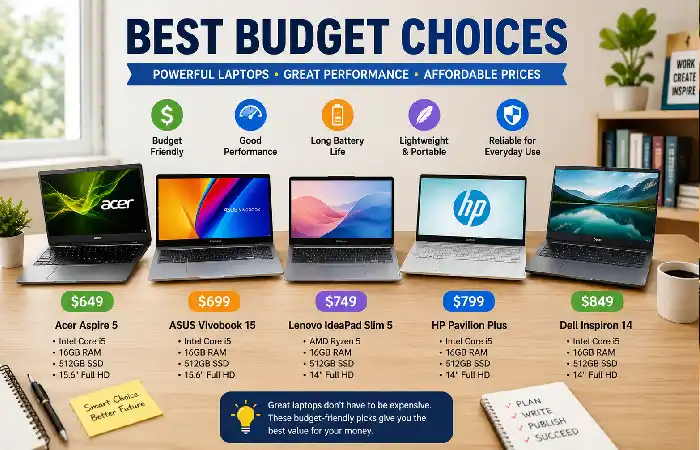
A high-end laptop isn‘t required for all bloggers.
Best Budget Options (2026)
| Laptop | Approx. Price (USD) | Suitable For |
| Acer Aspire 5 | $650 | Beginner Bloggers |
| ASUS Vivobook 15 | $700 | Students |
| Lenovo IdeaPad Slim 5 | $750 | Freelancers |
| HP Pavilion Plus | $800 | WordPress Bloggers |
| Dell Inspiron 14 | $850 | Business Blogging |
These laptops comfortably handle:
- WordPress
- Google Docs
- Canva
- SEO tools
- Email marketing
- Zoom meetings
If affordability is your priority, our guide to the best budget laptops for writers highlights reliable options for students, bloggers, and freelance writers.
Buying Guide
It is easier to pick the “best” blogging laptop for your needs if you look at the specifications that have the most impact on your work flow. If you are primarily working with WordPress, managing images, and researching then gaming PC power is less important.
Choose Based on Your Blogging Style
| Blogger Type | Recommended Laptop |
| Beginner Blogger | Acer Aspire 5 |
| Affiliate Marketer | ASUS Zenbook 14 OLED |
| Professional Blogger | Apple MacBook Air M4 |
| Travel Blogger | Dell XPS 13 |
| Content Creator | Lenovo Yoga Slim 7 |
Looking for premium performance without overspending? See our list of the best writing laptops under $1000 for excellent value.
Frequently Asked Questions
Which is the best blog writing laptop in 2026?
The Apple Mac Book Air M4 is an overall great choice because of great battery life and performance, its light weight and comfortable keyboard.
Do bloggers require a lot of RAM?
16GB RAM is the advised specification for most current blogging workflow including multiple browser tabs, AI tools, photoshop, image editor and applications.
Is a gaming laptop good for blogging?
A gaming laptop should be capable of blogging, but it will be slightly heavier, shorter battery life and have more graphics power than most blogging would need.
Are bloggers able to utilize a Chromebook?
A Chromebook can be used for simple writing and web browsing. But for editing photos on the go, using Adobe applications or mimicking multitasking a Windows laptop or MacBook would be more useful.
What is the cost of a laptop for the new bloggers?
Most entry-level bloggers should be able to purchase a decently powerful laptop for somewhere in the range of $650–$900 which can handle blogging, SEO programs, WordPress and light photo editing.
Conclusion
Selecting the perfect blogger laptop is about determining the right one for you based on your workflow, budget and future plans. Whether you‘re writing and Publishing WordPress articles, doing seo research, managing graphics in Canva, photo editing or using ai based text tools having a reliable laptop can boost your efficiency.
Should be available to most bloggers in 2026, a there a top of range laptop Intel Core Ultra, AMD Ryzen AI or Apple M4 with 16GB of RAM and a 512GB SSD, is a perfect box for the job, delivering crucial speed, mighty storage and the mobility and ruggedness. If a blogger is frequently on-the-run, they need a slimline model that can run for longer, while bloggers who are doing a lot of content creation will want a keyboard aimed at editing high-res images not typing down decisions.
Kashifa Jafar is a technology writer and contributor at FutureTechExpert with 4+ years of experience in technology writing and content creation.
Read Full Bio of Author →Sameena reviews selected health, wellness, technology, and digital content for clarity, factual presentation, and reader usefulness.
Read Full Bio of Reviewer →