

 Kashifa Jafar
Technology Writer & Contributor
Kashifa Jafar is a technology writer and contributor at FutureTechExpert with 4+ years of experience in technology writing and content creation.
Read Full Bio of Author →
Kashifa Jafar
Technology Writer & Contributor
Kashifa Jafar is a technology writer and contributor at FutureTechExpert with 4+ years of experience in technology writing and content creation.
Read Full Bio of Author →
 Sameena Begum
Health, Technology & Digital Content Reviewer
Sameena reviews selected health, wellness, technology, and digital content for clarity, factual presentation, and reader usefulness.
Read Full Bio of Reviewer →
Sameena Begum
Health, Technology & Digital Content Reviewer
Sameena reviews selected health, wellness, technology, and digital content for clarity, factual presentation, and reader usefulness.
Read Full Bio of Reviewer →
So, if you’ve been looking for the best MacBook for writers, I guess you’re after great battery life, a great keyboard, solid performance, and portability. To be a blogger, novelist, journalist, student, copywriter or freelance content writer, choosing the right MacBook couldn’t be more important.
It’s in the new Macs with Apple Silicon, uber long battery life, near silent operation, and seamless integration with all Apple applications for maximum work productivity. For most writers, the MacBook Air offers the best combination of speed and price, but you’ll want to go for the MacBook Pro if you’re really doing a lot of multitasking.
All of the writing experts have recently crowed that the Mac Book Air is the best all-around writing computer for most users and that the Mac Book Pro is more suitable for advanced professional use.
If you’re still comparing Apple laptops with other options, explore our complete guide to the best laptops for writers covering every budget, operating system, and writing style.
 This article is part of
Laptops Resources
Table of Contents
Why Writers Choose MacBooks
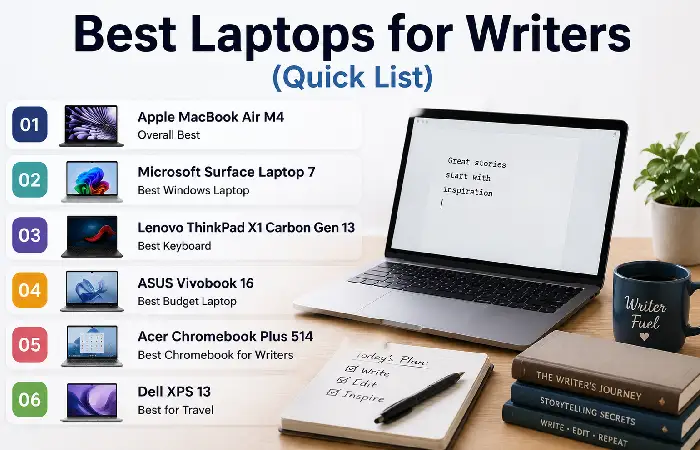
Even today, writers still prefer using MacBooks because they offer the ideal combination of mobility, reliability and battery life.
Benefits include:
- Quiet fanless design (MacBook Air)
- Excellent Retina display
- Comfortable keyboard
- Premium trackpad
- Long software support
- Fast wake from sleep
- Reliable Apple Silicon performance
- Strong battery optimization in macOS
Popular writing applications include:
- Microsoft Word
- Apple Pages
- Google Docs
- Scrivener
- Ulysses
- Notion
- Obsidian
- Grammarly
- IA Writer
While MacBooks are popular among writers, some users prefer Windows for software compatibility and upgrade options. See our guide to the best Windows laptops for writers for top alternatives.
MacBook Air vs MacBook Pro
Choosing if you should go for a Mac Book Air or a Mac Book Pro is really work dependent. Both of them are surprisingly robust, long-lasting and efficient, due to the operating system they house.
Quick Comparison
| Feature | MacBook Air | MacBook Pro |
| Best For | Bloggers, students, authors, journalists, & freelancers | Professional writers, content creators, & video editors |
| Weight | Lightweight and highly portable | Slightly heavier |
| Cooling System | Fanless (silent operation) | Active cooling with fans |
| Performance | Excellent for writing and everyday tasks | Superior for demanding creative workloads |
| Battery Life | All-day battery life | Longer battery life under heavy workloads |
| Display | Bright Liquid Retina display | Brighter display with advanced features |
| Price | More budget-friendly | Premium pricing |
| Noise | Completely silent | Fans may activate during intensive tasks |
MacBook Air: Best for Most Writers
The MacBook Air is the ideal choice if your daily work involves:
- Writing articles and blog posts
- Creating reports and documents
- Researching on the web
- Using Google Docs or Microsoft Word
- Writing books or novels in Scrivener
- Managing emails and productivity apps
- Working remotely or while traveling
Pros
- Lightweight and easy to carry
- Silent fanless design
- Excellent battery life
- Fast Apple Silicon performance
- Lower purchase cost
- Comfortable keyboard for long typing sessions
Cons
- Not designed for prolonged heavy workloads such as 4K video editing or large software development projects.
If portability is your highest priority, our roundup of the best lightweight laptops for writers highlights travel-friendly models with long battery life.
Keyboard Experience
One of the single most important features of a laptop for writers is its keyboard. No matter if you‘re writing a blog, a novel, or editing six-page documents, having a keyboard you can type comfortably on and that responds well over hundreds or thousands of words can significantly increase your productivity. Apple has been improving the MacBook keyboard over the years and the current Magic Keyboard is a fantastic performer for long stretches of writing.
Comfortable Typing for Long Sessions
Has larger keys that are separated enough to provide a satisfying and accurate feedback, preventing fatigue of the fingers over long typing sessions. The keys have a very predictable feeling that makes it straightforward to keep up speed and accuracy.
Key benefits include:
- Comfortable key travel for natural typing
- Responsive and accurate keystrokes
- Quiet operation, ideal for libraries and shared workspaces
- Spacious key layout that minimizes typing errors
- Durable design built for everyday use
Backlit Keyboard for Any Environment
Two of the biggest benefits of the backlit keyboard is how it adjusts itself without you even having to say a word. How you can work in a pitch black room, on board an aircraft and type till dawn all of a sudden no longer seem such a pain.
Large Precision Trackpad
It is operated mainly through the keyboard; the size of the Force Touch trackpad on the MacBook makes the computer easy to work with. The trackpad allows for good navigation and can be used for multi-touch gestures, making it convenient to switch between websites, documents, research links and writing applications.
Excellent Compatibility with Writing Apps
The keyboard performs seamlessly with popular writing and productivity applications, including:
- Microsoft Word
- Google Docs
- Apple Pages
- Scrivener
- Ulysses
- Notion
- Obsidian
- IA Writer
- Grammarly
The keyboard shortcuts in MacOS can ensure that editing, formatting, copying and putting documents together is also much quicker.
Writers who also manage websites and publish online should check out our recommendations for the best laptops for bloggers, optimized for content creation and multitasking.
Battery Life
Battery life is one of the top reasons writers will purchase a MacBook. How good is the battery life on the MacBooks? The budget-conscious Apple Silicon chips run the MacBook Air and the MacBook Pro very well indeed.
Why Battery Life Matters for Writers
Writers often spend hours researching, drafting, editing, and reviewing documents. A laptop with excellent battery life allows you to:
- Write for extended periods without charging.
- Work remotely or while traveling.
- Attend meetings or classes without carrying a charger.
- Stay productive during power outages or long commutes.
- Reduce interruptions and maintain your workflow.
MacBook Air vs MacBook Pro Battery Comparison
| Feature | MacBook Air | MacBook Pro |
| Everyday Writing Battery Life | Up to a full workday | Up to a full workday and beyond |
| Power Efficiency | Excellent | Excellent |
| Best For | Students, bloggers, freelancers | Professional creators and power users |
| Fast Charging | Supported (with compatible adapter) | Supported (with compatible adapter) |
| Travel-Friendly | 5/5 | 4.5/5 |
Real-World Battery Performance
Battery life will vary based on your usage of your MacBook. Watching your average Word or Google Docs or Apple Pages documents while reviewing your essays or notetaking while working in Scrivener and Notion, while surfing the web and listening to music might last either one of these over a standard 8-hour work day.
Activities that consume more battery include:
- Editing videos
- Running multiple creative applications
- Using dozens of browser tabs simultaneously
- High screen brightness
- Continuous video calls
- Connecting several external devices
For work-flow with writing-heavy tasks, when the heat isn‘t noticeable the drain is also very low either Mac Book is an excellent partner for working away from home.
Looking for a more affordable alternative to a MacBook? Compare our picks for the best laptops for writers under $1000 to find excellent value without sacrificing performance.
Performance for Writing Apps
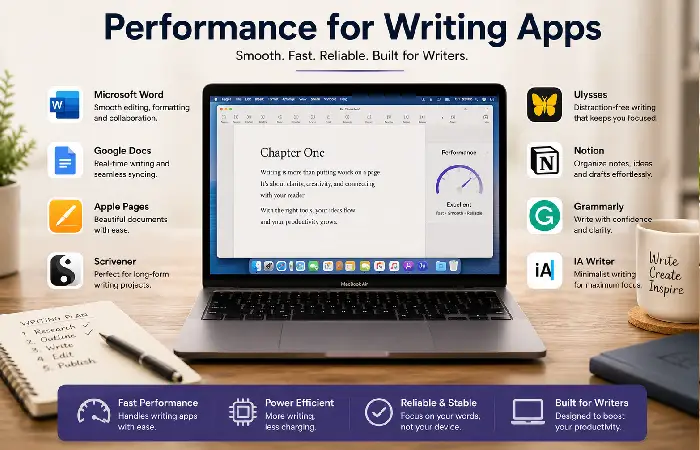
Most writing software requires very little processing power.
Performance Comparison
| Application | MacBook Air | MacBook Pro |
| Microsoft Word | Excellent | Excellent |
| Google Docs | Excellent | Excellent |
| Scrivener | Excellent | Excellent |
| Ulysses | Excellent | Excellent |
| Notion | Excellent | Excellent |
| Grammarly | Excellent | Excellent |
| Browser Research | Excellent | Excellent |
| 100+ Browser Tabs | Very Good | Excellent |
Writing is comfortably done on the Mac Book Air.
Which MacBook Is Right for You?
| User | Recommended MacBook |
| Blogger | MacBook Air |
| Student | MacBook Air |
| Journalist | MacBook Air |
| Freelance Writer | MacBook Air |
| Author | MacBook Air |
| Technical Writer | MacBook Air |
| Screenwriter | MacBook Air |
| Content Agency Owner | MacBook Pro |
| Writer + Video Creator | MacBook Pro |
If you’re shopping on a tighter budget, our guide to the best budget laptops for writers features dependable options for students, freelancers, and beginners.
Frequently Asked Questions
Best Mac Book for Writers?
For general travel use this is the best all-rounder for most writers, it is portable, long battery life and offers high performance at a reasonable price.
Is MacBook Air good to write?
YES. It handles word processors, research, note-taking, and multitasking without a hitch.
Do writers need a MacBook Pro?
Only using if they also use create video shave or run professional software.
16 GB RAM job?
Yes, 16 GB should be sufficient for multitasking needs and for not going outdated for a while.
What size screen is ideal?
The 13-inch is very portable and the 15 inch has a longer desktop for writing on two screens or conducting research.
Conclusion
For most writers the Best Mac Book for Writers in 2026will be the Mac Book Air. Excellent keyboard, amazing battery life, feather-light and well above specs needed for writing applications and half-baked multi-tasking. If you‘re a type of wizard using professional creative software or high-production workflows then consider the Mac Book Pro. Kind your model to your workflow, budget and portability needs and you‘ll have a trusty writing partner for years.
Kashifa Jafar is a technology writer and contributor at FutureTechExpert with 4+ years of experience in technology writing and content creation.
Read Full Bio of Author →Sameena reviews selected health, wellness, technology, and digital content for clarity, factual presentation, and reader usefulness.
Read Full Bio of Reviewer →