
 Kashifa Jafar
Technology Writer & Contributor
Kashifa Jafar is a technology writer and contributor at FutureTechExpert with 4+ years of experience in technology writing and content creation.
Read Full Bio of Author →
Kashifa Jafar
Technology Writer & Contributor
Kashifa Jafar is a technology writer and contributor at FutureTechExpert with 4+ years of experience in technology writing and content creation.
Read Full Bio of Author →
 Sameena Begum
Health, Technology & Digital Content Reviewer
Sameena reviews selected health, wellness, technology, and digital content for clarity, factual presentation, and reader usefulness.
Read Full Bio of Reviewer →
Sameena Begum
Health, Technology & Digital Content Reviewer
Sameena reviews selected health, wellness, technology, and digital content for clarity, factual presentation, and reader usefulness.
Read Full Bio of Reviewer →
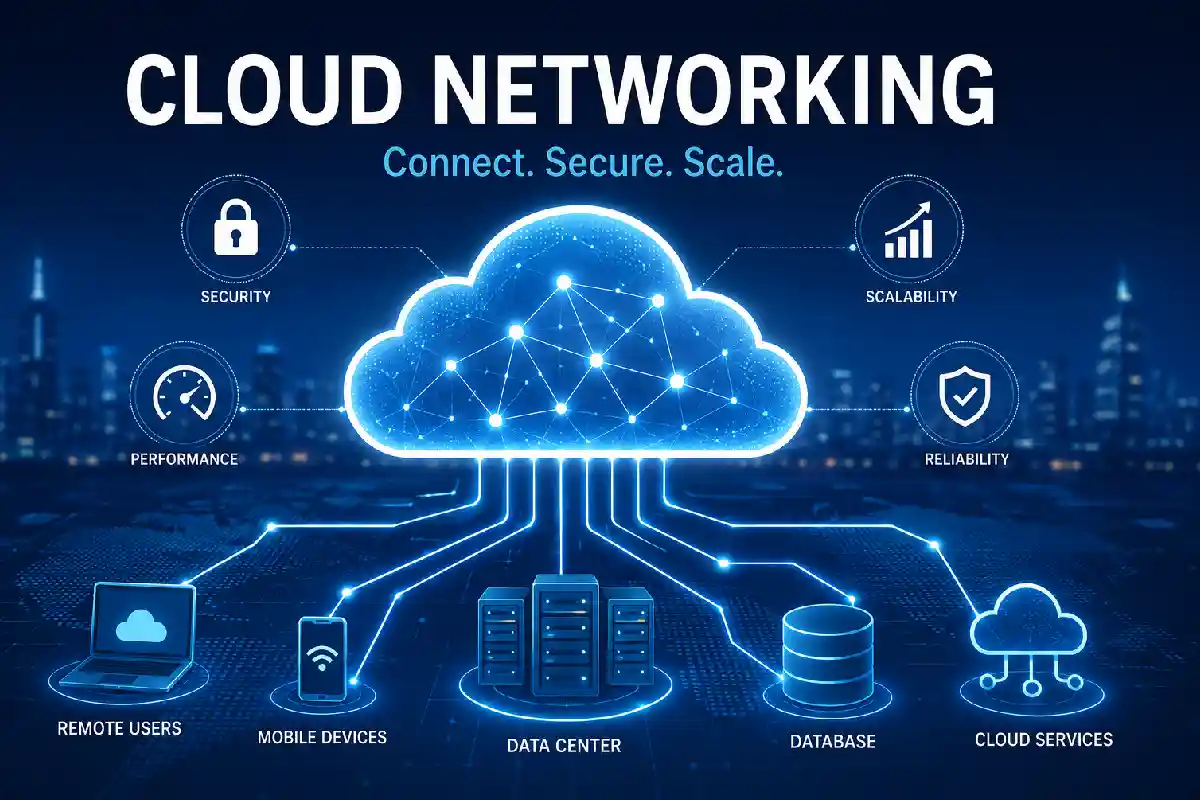
Cloud networking is the foundation of the cloud era. It allows companies to securely connect their applications, people, devices and data in the public, private or hybrid cloud. Gone are physical routers, switches and enterprise data centers; instead companies leverage software defined networks, VPCs, VPNs and cloud native networking services to create scalable, flexible, resilient and global networks.
From a small business deploying its first cloud application to an enterprise running workloads across various cloud providers, cloud networking knowledge can help improve performance, lower costs, and enhance security. As AI applications, remote workforces, edge compute, and multi-cloud become more prominent in 2026, cloud networking is increasingly an integral element of IT strategy.
In this detailed book, you will discover what is cloud networking, its fundamental building blocks, several deployment models, cloud networking security best practices and how to select the suitable cloud networking service for your organization.
 This article is part of
Networking Resources
Table of Contents
What Is Cloud Networking?
Cloud Networkingis about designing, deploying, and managing computer networks based on the infrastructure available in the cloud not by preponderantly using networking hardware.
In traditional networking, an organization or business has to buy, and be responsible for, routers, switches, firewalls, networking appliances and their upgrades and maintenance, in addition to the hardware hosting the applications they want to run. Cloud networking substitutes this hardware for virtual counterparts provided by a cloud service provider.
These services include:
- Virtual Private Clouds (VPCs)
- Virtual Networks (VNets)
- Cloud Firewalls
- VPN Gateways
- Load Balancers
- DNS Services
- Network Monitoring
- Content Delivery Networks (CDNs)
Instead of manually configuring physical devices, you can create a complete virtual network in just a few minutes through a cloud provider‘s management console or APIs.
How Cloud Networking Works
Cloud networking virtualizes existing networking services and services them out of cloud-managed services. It is not necessary to sit down in front of real hardware and configure something that would be stored as a policy within some software and have the cloud provider take care of everything else.
At a high level, cloud networking follows this flow:
Users & Devices
│
Internet / Private Connection
│
Cloud Gateway
│
Virtual Private Cloud (VPC)
│
Routing Tables
│
Firewall Rules
│
Load Balancer
│
Applications
│
Databases & Storage
Using a cloud environment, any packet destined for a specific application or service must go through several virtual network layers.
Step 1: Users Connect to the Cloud
Users connect through:
- Home broadband
- Corporate networks
- Mobile networks
- Private leased connections
- VPNs
- SD-WAN appliances
Step 2: Traffic Enters the Cloud Gateway
A Cloud Gateway is the first point into the cloud network. It authenticates traffic, applies routing rules, and passes the request into the appropriate virtual network
Common gateway services include:
- Internet Gateway
- VPN Gateway
- Transit Gateway
- ExpressRoute Gateway
- Cloud Router
Step 3: Virtual Private Cloud (VPC)
The Virtual Private Cloud is the isolated virtual network within the cloud provider.
A VPC contains:
- Subnets
- Routing tables
- Firewalls
- Network ACLs
- Private IP addresses
- Public IP addresses
Step 4: Routing and Traffic Management
Routing tables decide where to send the packets.
For example:
- Internal application traffic remains within private subnets.
- Internet-bound traffic passes through an Internet Gateway.
- Database traffic stays isolated in private networks.
- Remote office traffic travels through VPN tunnels.
Cloud computing platforms now automatically determine the best routing options to maximize bandwidth and minimize latency.
Step 5: Security Controls
Various security layers filter and check a request before it gets to the application.
Typical security controls include:
- Security Groups
- Network ACLs
- Web Application Firewalls (WAF)
- DDoS Protection
- Intrusion Detection Systems (IDS)
- Intrusion Prevention Systems (IPS)
These controls restrict access in order to have only authorized access.
Step 6: Load Balancing
Cloud load balancer balance the incoming request to various server, or containers.
Benefits include:
- Improved application availability
- Automatic failover
- Better performance during traffic spikes
- Horizontal scaling
Popular examples include:
- AWS Elastic Load Balancer
- Azure Load Balancer
- Google Cloud Load Balancer
Step 7: Continuous Monitoring
The cloud networks as they stand today are open, all the time they are always on, always capturing telemetry, logs, and performance statistics, they are iterated.
Administrators monitor:
- Network latency
- Packet loss
- Throughput
- Firewall events
- VPN health
- Application response times
Artificial intelligence enabled monitoring utilities can automatically detect unusual activities and suggest measure for optimal operation.
Modern enterprises are increasingly adopting software-defined wide area networking (SD-WAN) to improve application performance, reduce WAN costs, and simplify network management across distributed locations. Explore the benefits of SD-WAN in cloud networking for branch offices and remote teams.
Types of Cloud Networking
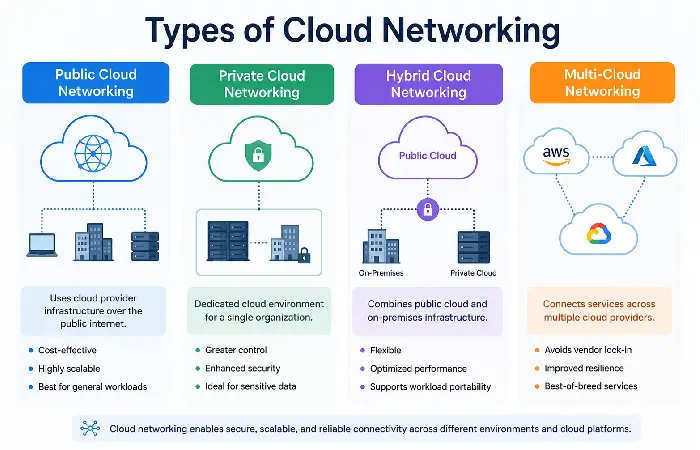
Not all companies have identical network needs. A SaaS start-up launching a new product will have very different networking needs than the global multi-national with hundreds of branch offices. Cloud networking provides several deployment models that provide many options from which companies can select the configuration that meets their security, performance, and budget needs.
Public Cloud Networking
Public cloud networking involves the use of the infrastructure that is owned and operated by some third-party cloud provider such as AWS, Microsoft Azure or Google Cloud. Various customers co-tenant the providers globally distributed infrastructure with their isolated virtual networks, logically.
Best For
- Small businesses
- Startups
- Web applications
- Development and testing
- SaaS platforms
Advantages
- Low upfront costs
- Rapid deployment
- Virtually unlimited scalability
- Managed infrastructure
- Global availability
Limitations
- Less control over physical infrastructure
- Compliance may require additional configurations
- Shared responsibility for security
Private Cloud Networking
Private Cloud Networking This type of networking provides dedicated hardware for a single organization. It can be hosted within a company (on-premises) or externally, by a cloud service provider.
Best For
- Government agencies
- Financial institutions
- Healthcare organizations
- Large enterprises
- Businesses with strict compliance requirements
Advantages
- Greater control
- Enhanced privacy
- Custom networking configurations
- Strong compliance support
- Dedicated resources
Limitations
- Higher costs
- More management responsibilities
- Longer deployment times
Hybrid Cloud Networking
Hybrid cloud networking, integrates the on-premise infrastructure and at least one cloud environment. Workloads are shifted securely between private infrastructure and the public cloud.
Common Use Cases
- Disaster recovery
- Cloud bursting
- Legacy application integration
- Regulatory compliance
- Data backup
Benefits
- Flexible workload placement
- Lower infrastructure costs
- Improved business continuity
- Easier migration to cloud.
As businesses move workloads between on-premises infrastructure and public cloud platforms, hybrid networking becomes essential for maintaining secure and reliable connectivity. Learn more about hybrid cloud networking strategies and how they support flexible IT operations.
Multi-Cloud Networking
Multi-cloud networking. An approach to interconnect services on several cloud providers instead of a single supplier.
For example:
- AWS hosts customer-facing applications.
- Azure manages Microsoft workloads.
- Google Cloud powers AI and analytics.
Benefits
- Avoids vendor lock-in
- Improves resilience
- Enables best-of-breed services
- Better geographic coverage
Challenges
- Increased management complexity
- Higher networking costs
- Cross-cloud security policies
- More sophisticated monitoring requirements
Benefits of Cloud Networking
Cloud networking offers benefits above and beyond the substitution of physical equipment. It allows businesses to create a flexible, scalable and secure digital framework in which new-type applications and remote working may flourish.
Faster Deployment
Longer in terms of project timescales traditional networking projects usually take weeks or a couple of months, as they require the ordering, shipping, installation and configuration of physical hardware.
With cloud networking, the administrators have access to a web console or a API to create a new virtual network in seconds.
Example
Getting a new application environment off the ground no longer involves waiting for the network gear to be shipped. A VPC, subnets, routing tables and security groups can be spun up instantaneously.
Improved Scalability
Cloud networking scales easily as your business expands.
Moreover, it will be reshuffle to use clouds resources rather than to change hardware to respond to the increasing demands.
This flexibility is particularly valuable during:
- Seasonal sales
- Marketing campaigns
- Product launches
- Unexpected traffic spikes
Lower Infrastructure Costs
Traditional networks require significant capital investment in:
- Routers
- Switches
- Firewalls
- Network appliances
- Data center space
Cloud networking transfers much of this expense into a pay-as-you-go operating business, minimizing up front capital expenditure and making it easier to budget.
Global Connectivity
The top providers of Cloud manage hundreds of data centers and edge locations across the globe.
Organizations can:
- Deploy applications closer to users
- Reduce latency
- Improve customer experiences
- Support international expansion
Better Business Continuity
Cloud networking enhances resilience through:
- Multiple availability zones
- Geographic redundancy
- Automated failover
- Disaster recovery capabilities
Enhanced Security
Modern cloud networking includes built-in security capabilities such as:
- Identity-based access control
- Network segmentation
- Encryption in transit
- Distributed denial-of-service (DDoS) protection
- Web application firewalls
- Continuous monitoring
This minimizes the absence of network by resources are falling. This features provide a way to reductions in network outage outages or failure of resources.
Simplified Network Management
Cloud providers offer centralized dashboards that allow administrators to:
- Configure virtual networks
- Monitor traffic
- Analyze performance
- Automate routine tasks
- Manage security policies
Automation minimizes human error and increases operational efficiency.
Cloud Networking Components
Cloud networking is a collection of connected services that support the secure delivery of communications between users, applications, and data.
Once you are familiar with this elements, it will become much easier to design, it and troubleshoot Cloud,
Virtual Private Cloud (VPC)
A VPC is a private virtual network that resides within the infrastructure of a cloud provider.
A VPC contains:
- Subnets
- Routing tables
- Security groups
- Private IP addresses
- Public IP addresses
It acts as the foundation for most cloud deployments.
Subnets
These subnets (called subnetworks) are furtherdivided intosmaller networks within a VPC.
Public Subnets
Used for:
- Web servers
- Load balancers
- Internet gateways
Private Subnets
Used for:
- Databases
- Internal applications
- Backend services
Sensitive resources are isolated in private subnets to minimize the attack surface: exposed to the public internet.
Route Tables
Route tables determine how network traffic moves between:
- Subnets
- Internet gateways
- VPNs
- Transit gateways
- Other VPCs
Prevention of unauthorized access, through correct routing.
Internet Gateway
Internet Gateway allows communication between cloud resources and the public internet.
No Internet Gateway, resources in a VPC do not send requests outbound and do not receive requests inbound.
NAT Gateway
A NAT Gateway enables outbound communication from resources in private subnets to the internet, for updates or downloads, while still preventing inbound internet communication.
This will reduce security with respect to key access and still it will be functional.
Virtual Private Network (VPN)
A VPN creates a secure, encrypted connection from on-premises infrastructure to cloud.
Typical use cases include:
- Remote employees
- Branch offices
- Hybrid cloud deployments
- Secure administrative access
Load Balancer
The load balancer is responsible for distributing the arriving traffic to Server(s) or container(s).
Benefits include:
- High availability
- Automatic failover
- Improved application performance
- Horizontal scaling
Domain Name System (DNS)
The Domain Name System (DNS) converts the domain name that humans read into IP addresses.
Cloud providers offer managed DNS services that support:
- High availability
- Low latency
- Traffic routing
- Health checks
Firewalls and Security Groups
They (Cloud firewalls) inspect and control network access against rules.
Whereas security groups operate at the instance level, network ACLs operate at the subnet level.
These layers net the least-privilege policy as follows.
Content Delivery Network (CDN)
Depending CDNs second source are storing all content locallyat the points of presence (Cold locations) close to the user.
Benefits include:
- Faster page loads
- Reduced latency
- Lower bandwidth costs
- Improved global performance
Choosing the right cloud networking services can significantly improve scalability, security, and operational efficiency. Our detailed overview of cloud networking services explains the core solutions that help organizations build and manage modern cloud networks.
Cloud Networking vs Traditional Networking
Cloud networking and traditional networking are created to connect people, devices and applications. Yet their methods differ considerably in architecture, scalability, management and cost. The following is a quick comparison of both.
Side-by-Side Comparison
| Feature | Cloud Networking | Traditional Networking |
| Infrastructure | Virtualized | Physical hardware |
| Deployment Time | Minutes | Days to weeks |
| Scalability | Automatic and elastic | Manual hardware upgrades |
| Initial Cost | Low (pay-as-you-go) | High capital investment |
| Maintenance | Managed by cloud provider | Managed by in-house IT |
| Accessibility | Global, internet-enabled | Primarily on-premises |
| Disaster Recovery | Built-in options | Requires separate infrastructure |
| Automation | Extensive | Limited |
| Updates | Automatic | Manual |
| Flexibility | High | Moderate |
When to Choose Cloud Networking
Cloud networking is ideal if your organization:
- Supports remote or hybrid employees
- Needs rapid deployment
- Wants to reduce infrastructure costs
- Requires automatic scalability
- Uses cloud-native applications
- Plans to adopt AI or machine learning
- Operates across multiple regions
When Traditional Networking Still Makes Sense
Traditional networking may still be appropriate when:
- Applications require specialized hardware
- Strict regulatory requirements mandate on-premises systems
- Internet connectivity is unreliable
- Legacy applications cannot migrate to the cloud
- Extremely low-latency local communication is required
Organizations that still rely on legacy infrastructure can benefit from understanding how traditional networking architectures compare with modern cloud-based environments. Read our guide on traditional networking in cloud networking to explore the limitations and use cases of conventional network models.
Cloud Networking Security Best Practices
As organizations and its critical workloads are migrated to the cloud, the security of the network infrastructure becomes critical. Although the cloud providers ensure the security of its infrastructure, the customers should ensure the configuration and management of the Virtual networks, access controls & workloads.
Adopt a Zero Trust Security Model
Zero Trust takes the position that not a single user or device should be trusted by default, even if it is within the network.
Core principles include:
- Verify every request
- Enforce least-privilege access
- Continuously monitor activity
- Segment network resources
Enabling Zero trust greatly lessens the exposure to un authorized access.
Implement Identity and Access Management (IAM)
Set up IAM policies to determine user‘s permissions to cloud resources.
Best practices include:
- Role-based access control (RBAC)
- Temporary credentials
- Least-privilege permissions
- Regular permission reviews
Never share administrator accounts.
Enable Multi-Factor Authentication (MFA)
Password are falling short by themselves.
Require MFA for:
- Cloud administrator accounts
- Remote employees
- VPN users
- Third-party contractors
MFA greatly reduces the risk of account compromise.
Encrypt Data in Transit and at Rest
Protect sensitive information by using encryption for all communications and stored data.
Recommended protocols include:
- TLS 1.3
- HTTPS
- IPsec VPN
- AES-256 encryption
Encrypt all communications and stored information to safeguard sensitive data.
Segment Your Network
A network segment is defined as a security boundary.
Separate workloads into different network segments such as:
- Public applications
- Internal services
- Databases
- Development environments
- Production environments
Chronic separation leads to micro-segmentation, which isolates even more.
Monitor Network Activity Continuously
Use cloud-native monitoring tools to detect:
- Suspicious login attempts
- Unusual traffic spikes
- Unauthorized configuration changes
- Malware communication
- Data exfiltration
Enable alerts for critical security events.
Secure APIs
APIs are in high demand, and in the modern cloud environment cloud applications depends on APIs.
Protect APIs by:
- Using authentication tokens
- Enabling rate limiting
- Encrypting communications
- Validating input
- Monitoring API usage
Keep Configurations Updated
Regularly review:
- Firewall rules
- Security groups
- Route tables
- VPN settings
- IAM policies
The misconfiguration of a cloud resource is still one of the top causes of cloud security breaches.
To build a resilient and high-performing network, organizations should follow proven cloud networking best practices such as network segmentation, automation, continuous monitoring, and zero-trust security principles. Review our recommended cloud networking best practices for long-term success.
Common Cloud Networking Challenges
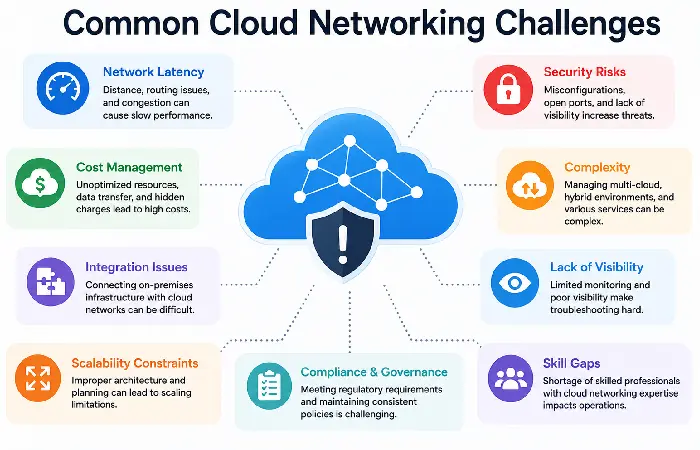
While cloud computing provides extensive advantages, organizations face many technical and operational issues during implementation and operation.
- Network Latency
Applications may experience delays due to:
- Geographic distance
- Poor routing
- Congested internet connections
- Large data transfers
Solutions
- Deploy workloads closer to users
- Use CDNs
- Optimize routing paths
- Enable edge computing
- Vendor Lock-In
Heavy reliance on a single provider for cloud services can make future migrations a costly and complex undertaking.
Solutions
- Adopt open standards
- Use containers
- Implement multi-cloud architectures
- Document configurations
- Security Misconfigurations
Examples include:
- Open storage buckets
- Overly permissive firewall rules
- Public databases
- Weak IAM policies
Solutions
- Conduct regular security audits
- Use automated compliance tools
- Apply infrastructure-as-code validation
- Cost Management
Cloud networking costs can increase unexpectedly due to:
- Data transfer charges
- Idle resources
- Cross-region traffic
- Excessive logging
Solutions
- Monitor billing dashboards
- Remove unused resources
- Optimize network architecture
- Use budgeting alerts
- Skills Gap
Cloud networking requires expertise in:
- Virtual networking
- Automation
- Security
- Cloud architecture
- Infrastructure as Code (IaC)
Solutions
- Train existing staff
- Pursue cloud certifications
- Standardize deployment templates
- Compliance Requirements
Industries like health and finance have to meet regulations of data handling or privacy.
Solutions
- Select compliant cloud regions
- Encrypt sensitive information
- Maintain audit logs
- Perform regular compliance assessments
Despite its advantages, cloud networking introduces security, latency, visibility, and compliance challenges that IT teams must address proactively. Discover the most common cloud networking challenges and practical ways to overcome them.
How to Choose a Cloud Networking Solution
Choosing the ‘best’ cloud networking offering will be based on your organization size, workload demand, security needs, regulatory requirements, and future growth plans. Rather than be blinded by the vendor that has the most bells and whistles, is the one that bests meets your technical/business requirements.
Evaluate Your Business Requirements
First, it‘s important to assess what kind of networking you need currently and will in the future.
Consider questions such as:
- How many users will access the network?
- Will employees work remotely?
- Do you require global connectivity?
- Are you migrating existing applications?
- Will you use AI or machine learning workloads?
- Do you have strict compliance requirements?
Having a clear idea of your needs allows you to eliminate the irrelevant cloud networking architectures.
Compare Major Cloud Providers
| Provider | Networking Service | Best For | Key Strengths | Official Resource |
| Amazon Web Services (AWS) | Amazon VPC | Large enterprises & startups | Largest global infrastructure, mature networking ecosystem | https://aws.amazon.com/vpc/ |
| Microsoft Azure | Azure Virtual Network | Microsoft-centric organizations | Excellent hybrid cloud integration | https://learn.microsoft.com/azure/virtual-network/ |
| Google Cloud Platform | Google Cloud VPC | AI, analytics & Kubernetes | High-performance global backbone network | https://cloud.google.com/vpc |
| Oracle Cloud Infrastructure | Virtual Cloud Network (VCN) | Enterprise databases | Strong Oracle workload optimization | https://docs.oracle.com/en/cloud/ |
| IBM Cloud | Virtual Private Cloud | Regulated industries | Enterprise-grade security and compliance | https://cloud.ibm.com/docs |
Consider Security Features
Your cloud networking platform should provide:
- Zero Trust support
- Identity and Access Management (IAM)
- Multi-Factor Authentication (MFA)
- DDoS protection
- Encryption in transit and at rest
- Network segmentation
- Security monitoring
- Compliance certifications (ISO 27001, SOC 2, HIPAA, PCI DSS, etc.)
Taking Security into account. Security must be taken into account when designing the network rather than as an afterthought.
Evaluate Scalability
A solution that adapts to your progress.
Look for features such as:
- Auto Scaling
- Elastic Load Balancing
- Global regions and availability zones
- High bandwidth support
- API-driven network automation
Scalable networking helps eliminate downtime and lower expensive infrastructure upgrades.
Review Pricing Models
Cloud providers generally use a pay-as-you-go pricing model, but costs can vary depending on:
- Data transfer
- Load balancer usage
- VPN connections
- Public IP addresses
- NAT Gateway usage
- Cross-region traffic
- Dedicated network connections
Calculate your anticipated usage so you don‘t receive a large bill in the mail.
Frequently Asked Questions (FAQ)
What is cloud networking?
Cloud networking is defined as the integration of cloud based infrastructure with virtual networking services, which facilitates people, devices, applications, and data to communicate securely across internet or private transmission.
Security in cloud networking?
Yes. Cloud computing network can be secured under the appropriate use of encryption, IAM, Zero Trust, firewall and continuous monitoring.
What is? a Virtual Private Cloud (VPC)?
A VPC stands for Virtual Private Cloud, which is a secure, isolated, virtual network on the cloud environment. These virtual cloud networks provide a platform on which we can run any number of virtual services and VM instances, sandboxed from the other users in the cloud.
What is the distinction between cloud networking and conventional networking?
In conventional networking, the network hardware is placed in the local network (physical infrastructure), whereas in cloud networking, it is provisioned by the cloud network (virtual infrastructure).
What is SD- WAN?
Software-Defined Wide Area Networking (SDWAN) dynamic routing of traffic over multiple network links for optimized performance, availability, and security.
Can small businesses take advantage of cloud networking?
Exactly. SMBs enjoy the level of enterprise networking at a fraction of typical high end networking hardware.
Can you work remotely with cloud networking?
Yes. Things like Virtual Private Networks, ZTNA, identity management and secure remote connections are an excellent fit for hybrid and remote workforces cloud networking is a great fit.
Final Thoughts
Cloud networking has changed the common approach to the enterprise infrastructure. By enabling hardware-based network frameworks to be replaced by a software-defined and cloud-native service, companies can accelerate application deployment, and rapidly scale and expand their userbase across geographies.
No matter what type of cloud you are deploying public, private, hybrid, or multi-cloud the Key to success lies in the careful planning, secure implementation and ongoing management. Zero Trust, SD-WAN, artificial intelligence for cloud, and Infrastructure as Code will soon be expected to be a part of successful cloud networks.
With cloud adoption predicted to grow even faster in 2026 and beyond, organizations that deploy flexible, reliable, and secure networking architecture will be better equipped to innovate, operate more efficiently, and serve customer needs more effectively.
Kashifa Jafar is a technology writer and contributor at FutureTechExpert with 4+ years of experience in technology writing and content creation.
Read Full Bio of Author →Sameena reviews selected health, wellness, technology, and digital content for clarity, factual presentation, and reader usefulness.
Read Full Bio of Reviewer →