


 Kashifa Jafar
Technology Writer & Contributor
Kashifa Jafar is a technology writer and contributor at FutureTechExpert with 4+ years of experience in technology writing and content creation.
Read Full Bio of Author →
Kashifa Jafar
Technology Writer & Contributor
Kashifa Jafar is a technology writer and contributor at FutureTechExpert with 4+ years of experience in technology writing and content creation.
Read Full Bio of Author →
 Sameena Begum
Health, Technology & Digital Content Reviewer
Sameena reviews selected health, wellness, technology, and digital content for clarity, factual presentation, and reader usefulness.
Read Full Bio of Reviewer →
Sameena Begum
Health, Technology & Digital Content Reviewer
Sameena reviews selected health, wellness, technology, and digital content for clarity, factual presentation, and reader usefulness.
Read Full Bio of Reviewer →
Companies are bringing in leads from their websites, social networks, e-mail campaigns and others available advertising opportunities. Without a central system, customers are spread out in a multitude of spreadsheets and communications.
CRM Business Apps allow companies to organize leads and contacts, track sales opportunities, automate follow-ups and track customer relationships from one platform.
No matter if you‘re a startup, small or growing business, CRM software can help increase productivity, provide better sales insight, and deliver improved customer experience.
Table of Contents
What Are CRM Business Apps?
CRM (customer relationship management) business apps are software applications built to manage all customer contact, sales activity, marketing campaigns and support.
A CRM app acts as a centralized customer database where teams can:
- Store customer information
- Track conversations
- Monitor sales opportunities
- Automate repetitive tasks
- Analyze customer behavior
- Improve customer retention
Popular CRM business apps include:
| CRM Platform | Best For | Official Website |
| HubSpot CRM | Startups & SMBs | HubSpot CRM |
| Salesforce | Enterprise Businesses | Salesforce |
| Zoho CRM | Cost-Conscious Teams | Zoho CRM |
| Freshsales | Growing Sales Teams | Freshworks |
| Pipedrive | Sales-Focused Organizations | Pipedrive |
CRM systems enable organizations to capture and access all customer interactions and facilitate the sharing of information within sales, marketing, and customer service departments.
How CRM Apps Work
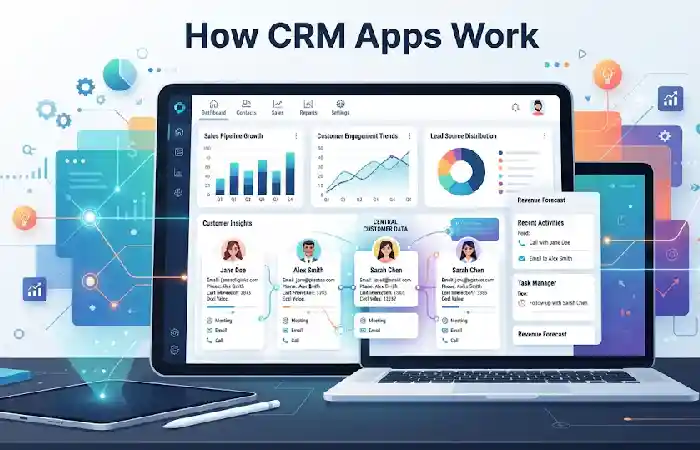
CRM applications gather customer data from various sources then organizes them into a single dashboard.
Typical CRM Workflow
Lead Capture
↓
Contact Creation
↓
Sales Pipeline Tracking
↓
Communication History
↓
Task Automation
↓
Deal Closure
↓
Customer Retention
Most CRM platforms integrate with:
- Websites
- Email systems
- Social media platforms
- Marketing tools
- Customer support software
- Accounting applications
This ensures a seamless experience for the customer from initial contact all the way through to enduring loyalty.
Customer Contact Management
Managing contacts is at the heart of every CRM business application.
CRM systems store:
- Customer names
- Email addresses
- Phone numbers
- Company details
- Purchase history
- Communication records
- Meeting notes
Benefits
| Feature | Benefit |
| Centralized Database | Easy access to customer information |
| Interaction History | Complete customer context |
| Contact Segmentation | Better targeting |
| Duplicate Prevention | Cleaner data management |
A healthy contact database enables teams to create tailored experiences and to foster customer happiness.
Sales Pipeline Management
The visualization of each step of the sale can be achieved using sales pipeline which enables firms to represent:
Typical Pipeline Stages
| Stage | Description |
| New Lead | Initial inquiry |
| Qualified Lead | Potential buyer identified |
| Proposal Sent | Pricing shared |
| Negotiation | Discussion underway |
| Closed Won | Deal completed |
| Closed Lost | Opportunity lost |
CRM apps help sales teams:
- Track deal progress
- Identify bottlenecks
- Forecast revenue
- Improve conversion rates
Today‘s CRM systems offer graphical dashboards that enable managers to track sales progress in real-time.
Lead Tracking
Lead tracking helps businesses manage prospects throughout the buying journey.
CRM systems automatically track:
- Website form submissions
- Email engagement
- Calls and meetings
- Social interactions
- Lead source attribution
Lead Tracking Benefits
| Benefit | Impact |
| Faster Follow-Up | Higher conversions |
| Better Qualification | Improved sales efficiency |
| Source Tracking | Optimized marketing spend |
| Lead Scoring | Prioritized opportunities |
Businesses using effective lead tracking often experience improved sales productivity and better marketing ROI.
Customer Communication
CRM apps centralize customer communication across multiple channels.
Supported communication methods include:
- Phone calls
- SMS
- Live chat
- Social messaging
- Video meetings
Why Communication Tracking Matters
Without communication tracking, teams may:
- Miss follow-ups
- Duplicate outreach
- Lose customer context
CRM systems maintain a complete communication history, ensuring every team member understands previous interactions.
Marketing Automation
Marketing automation is one of the most valuable CRM features in 2026.
CRM marketing tools can automate:
- Email campaigns
- Lead nurturing sequences
- Customer onboarding
- Promotional offers
- Event invitations
- Follow-up reminders
Marketing Automation Examples
| Automation | Business Benefit |
| Welcome Emails | Improved engagement |
| Lead Nurturing | Higher conversions |
| Customer Follow-Ups | Better retention |
| Re-engagement Campaigns | Increased revenue |
These including equalizers are a platform to realize automation workflows integrated into the platform. Such platforms as Hub Spot, Salesforce or Zoho already offer preefined automation workflows embedded to the platform decreasing manual efforts and increasing performance of the campaign.
CRM Analytics and Reporting
Businesses need business decisions driven by the data.
CRM analytics provide insights into:
- Sales performance
- Conversion rates
- Revenue trends
- Customer behavior
- Marketing effectiveness
- Team productivity
Essential CRM Reports
| Report Type | Purpose |
| Sales Performance | Track revenue growth |
| Pipeline Reports | Monitor opportunities |
| Lead Conversion | Measure effectiveness |
| Customer Activity | Understand engagement |
| Forecast Reports | Predict revenue |
CRM reporting allows businesses to see trends, enhance strategy, and make quality decisions.
CRM Apps for Small Businesses
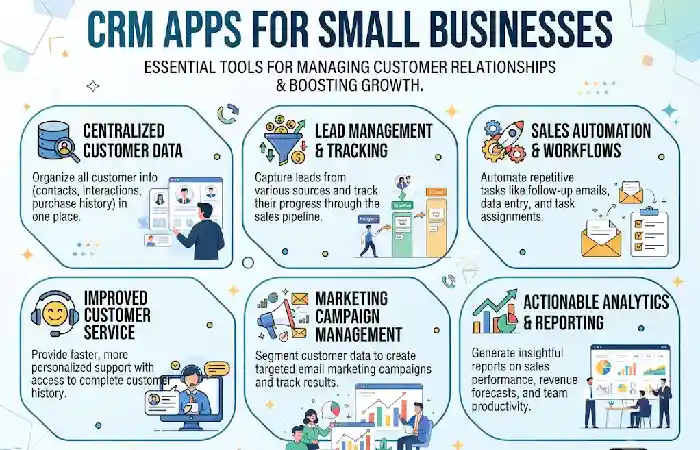
The small businesses seem to be the largest beneficiaries of implementing CRM as they don‘t have large administrative teams but require a rudimentary yet efficient system.
Recommended CRM Apps for SMBs
| CRM Solution | Ideal Business Size | Resource Link |
| HubSpot CRM | Startups & SMBs | HubSpot CRM |
| Zoho CRM | Small Businesses | Zoho CRM |
| Freshsales | Growing Teams | Freshsales |
| Pipedrive | Sales Teams | Pipedrive |
| Salesforce Starter | Scaling Businesses | Salesforce CRM |
Comparison Table (2026)
| Feature | HubSpot | Salesforce | Zoho CRM |
| Free Plan | Yes | Limited | Yes |
| Ease of Use | Excellent | Moderate | Good |
| Automation | Strong | Advanced | Strong |
| Reporting | Excellent | Advanced | Good |
| Best For | SMBs | Enterprise | Budget-Friendly Teams |
The small businesses seem to be the largest beneficiaries of implementing CRM as they don‘t have large administrative teams but require a rudimentary yet efficient system.
How to Choose a CRM App
The most appropriate CRM will be influenced by the size of the company, its available budget and the degree of complexity in its daily operations.
- Business Size
Select software for now and the foreseeable future.
- Ease of Use
These types of system often have bad take-up.
- Automation Features
Identify options for workflow automation.
- Reporting Tools
Improve the context of the data that the CRM provides or at the very least make it useful
- Integration Support
Ensure it is compatible with the software already used.
- Budget
Think about costs for implementation, trained staff, and subscriptions.
CRM Selection Checklist
Contact Management
Lead Tracking
Pipeline Management
Automation
Reporting
Mobile Access
Third-Party Integrations
Customer Support
FAQ
What actually is a CRM business app?
A CRM business app refers to the software used by the companies to administer the customer relationship, sales activities, marketing campaigns and customer support through single application.
What is the reason behind the necessity of CRM application for small enterprises?
The CRM software is designed to assist small companies in managing customer information, strengthen the sales process, automate certain activities and retain their customers.
Which CRM feature is most crucial?
Managing contacts and tracking the sales pipeline are usually the most important functions of a CRM.
Is it possible for CRM applications to carry out marketing automatically?
Yes. The majority of contemporary customer relationship management platforms come standard with lead nurturing, campaign management and email automation tools.
Are CRM applications financially worthwhile?
Most companies think that CRM software is a good tool to enhance efficiency, customer retention and selling power.
Conclusion
CRM Business Apps are now critical applications for delivering customer relationship management, improving sales productivity and supporting efficient operation. Today’s CRM tools (from contact management and forecasting tools to marketing automation and analytics) are providing everything needed to manage the customer experience.
Identifying the most suitable CRM app is all about understanding your business objectives, the size of your team, available investment and the path you plan to take in scaling. The investment in CRM software is a prudent choice in 2026 and the years to follow.
Kashifa Jafar is a technology writer and contributor at FutureTechExpert with 4+ years of experience in technology writing and content creation.
Read Full Bio of Author →Sameena reviews selected health, wellness, technology, and digital content for clarity, factual presentation, and reader usefulness.
Read Full Bio of Reviewer →