
 Kashifa Jafar
Technology Writer & Contributor
Kashifa Jafar is a technology writer and contributor at FutureTechExpert with 4+ years of experience in technology writing and content creation.
Read Full Bio of Author →
Kashifa Jafar
Technology Writer & Contributor
Kashifa Jafar is a technology writer and contributor at FutureTechExpert with 4+ years of experience in technology writing and content creation.
Read Full Bio of Author →
 Sameena Begum
Health, Technology & Digital Content Reviewer
Sameena reviews selected health, wellness, technology, and digital content for clarity, factual presentation, and reader usefulness.
Read Full Bio of Reviewer →
Sameena Begum
Health, Technology & Digital Content Reviewer
Sameena reviews selected health, wellness, technology, and digital content for clarity, factual presentation, and reader usefulness.
Read Full Bio of Reviewer →
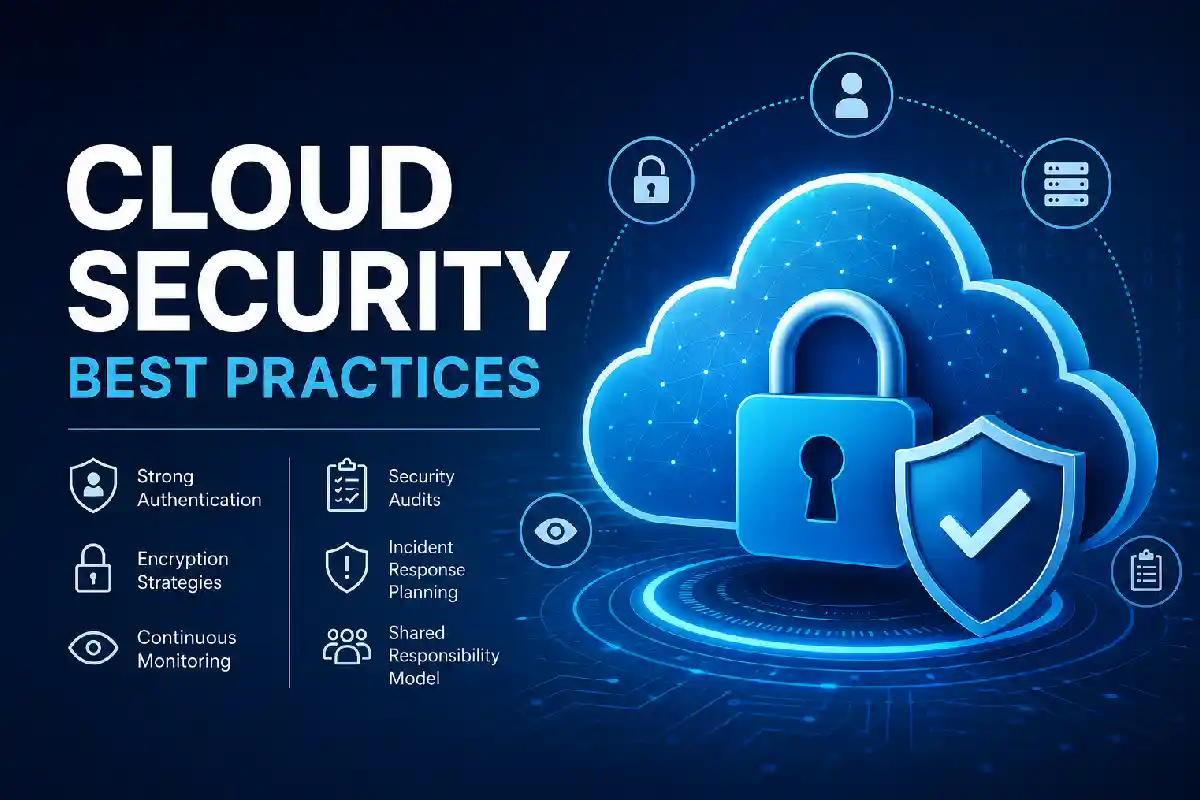
Cloud computing drives current organizations, yet presents additional security issues. By adhering to Cloud Security Best Practices, the organization will take steps to secure sensitive data, minimize cyber-attacks, stay compliant and back-up/guarantee business continuity through Public, Private and Hybrid clouds.
As highlighted in recent best practice reports, current adoption levels of the cloud by more than 94% of enterprises are escalating when data-security attacks are likewise increasing because of misconfigured storage, weak authentication, and insufficient monitoring. As a result, a thorough security framework is essential not optional.
Following proven cloud data security principles helps organizations protect sensitive information across public, private, and hybrid cloud environments.
No matter you‘re working with AWS, Microsoft Azure, Google Cloud platform (GCP) or multiple cloud providers, this article will help you understand the fundamental best practices for cloud security all organizations should implement in 2026.
 This article is part of
Security Resources
Cloud Security Best Practices Overview
| Best Practice | Importance | Business Impact | Resource |
| Shared Responsibility Model | Critical | Prevents configuration mistakes | https://aws.amazon.com/compliance/shared-responsibility-model/ |
| Multi-Factor Authentication | Critical | Stops account compromise | https://learn.microsoft.com/azure/active-directory/authentication/ |
| Encryption | Critical | Protects sensitive data | https://cloud.google.com/security/encryption |
| Continuous Monitoring | High | Detects threats early | https://docs.aws.amazon.com/securityhub/ |
| Security Audits | High | Ensures compliance | https://learn.microsoft.com/azure/defender-for-cloud/ |
| Incident Response | Critical | Reduces downtime | https://cloud.google.com/security-command-center |
Implementing strong cloud data encryption ensures sensitive files remain protected both in transit and at rest.
Table of Contents
Shared Responsibility Model
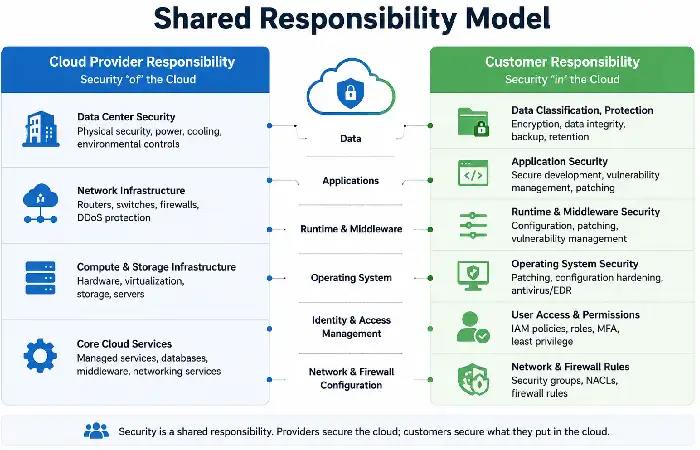
The Shared Responsibility Model is one of the most fundamental concepts to cloud security, as it clearly describes what security responsibilities lay with the cloud service provider (CSP) and what security responsibilities are left to the customer. Awareness of a similar model can greatly reduce security holes, data leakage and compliance issues.
Put simply, cloud providers (for example AWS, Microsoft Azure, Google Cloud) secure the cloud foundations (physical data centers, networking and hardware) for their customers, who in turn are asked to remain responsible for their data, customer and user identities, application, OS and cloud settings. Not getting this right ranks very highly amongst the causes of cloud security incidents.
A reliable cloud backup and disaster recovery strategy minimizes downtime and allows businesses to recover quickly after unexpected incidents.
How the Shared Responsibility Model Works
| Cloud Provider Responsibilities | Customer Responsibilities |
| Physical data center security | Data protection and privacy |
| Networking infrastructure | Identity and Access Management (IAM) |
| Servers and storage hardware | Operating system updates (IaaS) |
| Virtualization layer | Application security |
| Core cloud services availability | Security configurations |
| Infrastructure maintenance | Encryption keys and backups |
| DDoS protection for cloud infrastructure | User accounts and permissions |
Strong Authentication
Strong Authentication is an essential best practice, stronger than relying on a simple password, that ensures who is using cloud services remain confirmed. Given the fact that stolen login credentials are still one of the top causes of cloud security breaches, it makes sense to set up as many types of authentications as possible to secure cloud accounts, applications and data.
All major cloud platforms that have remain developed today (e.g. AWS, Microsoft Azure, Google Cloud etc.) also have their own authentication and identity management systems that prevents such unauthorized access.
Even more with the implementation of Multi-Factor Authentication, Single Sign-On, Password less authentication and Role-Based Access Control, the likelihood of a business account being hacked, is very low.
Key Authentication Methods
| Authentication Method | Security Level | Best Use Case | Benefits |
| Password Only | Low | Basic user accounts | Easy to use but vulnerable to attacks |
| Multi-Factor Authentication (MFA) | High | All cloud users | Requires an additional verification factor |
| Passwordless Authentication | Very High | Enterprise environments | Eliminates password-related attacks |
| Single Sign-On (SSO) | High | Multiple cloud applications | Simplifies login while improving security |
| Biometric Authentication | Very High | Mobile devices and secure workstations | Uses fingerprints or facial recognition |
| Hardware Security Keys | Very High | Administrator and privileged accounts | Protects against phishing attacks |
Encryption Strategies
Encryption Strategies are one of the fundamental prongs of cloud security, because they offer a way to ensure that sensitive data remains confidential whether sitting on the disk, moving around the network, or being manipulated by running algorithms. If data is properly encrypted, then even if malicious users break into cloud resources, they should not be able to read the protected data.
In 2026, with compliance mandates and cyber threats rising, more organizations are turning to end-to-end encryption and centralized key management.
Cloud providers like Amazon Web Services, Microsoft Azure, Google Cloud and other have incorporated this feature, but it is then the responsibility of the companies using the cloud services to set it to be active, control and administer the key management and implement your security controls on the data through all its phases.
Adopting Zero Trust cloud security strengthens access controls by continuously verifying users and devices before granting permissions.
Types of Cloud Encryption
| Encryption Type | Protects | Common Technologies | Best Use Case |
| Encryption at Rest | Stored files, databases, backups | AES-256, Cloud KMS | Protecting stored cloud data |
| Encryption in Transit | Data moving across networks | TLS 1.3, HTTPS, SSL | Securing communication between users and cloud services |
| Encryption in Use | Data being processed | Confidential Computing, Trusted Execution Environments (TEEs) | Processing highly sensitive workloads securely |
Key Encryption Best Practices
Follow these best practices to strengthen cloud data protection:
- Make sure that AES-256 encryption remain enabled for all clouds storage, back up and databases.
- Should utilise TLS 1.3 for encrypting all transmitted data.
- Store and transport encryption keys using specialized Key Management Services (KMS).
- Load keys in & out, therefore not load the key in the memory all the time.
- Restrict access to the encryption keys through Role Based Access Control (RBAC) and least privilege.
- Encrypt backups and disaster recovery data.
- Avoid keeping encryption keys in the same media where data remain stored.
- Regularly check encryption polices for all systems are compliant with industry regulations.
Continuous Monitoring
Continuous Monitoring Is a proactive Cloud Security method that involves real time monitoring to identify challenges like malicious activities, security mispractices, or any other potential anomalies before a data breach occurs.
It is different from security audits or checks which remain conducted once in a while; Continuous Monitoring provides a consistent visibility into a company‘s cloud infrastructure, applications, user behaviour, traffic, for timely response to security incidents.
In 2026, every cloud environment is an increasingly dynamic place, which is where automated AI and ML based monitoring is now a requirement for anomalies, for rapid response, and for compliance across AWS, Azure, and Google Cloud Platform (GCP).
Businesses should deploy cloud data loss prevention (DLP) solutions to prevent unauthorized sharing of confidential information.
What Should Be Continuously Monitored?
| Monitoring Area | Purpose | Example Threats Detected |
| User Login Activity | Detect unauthorized access | Brute-force attacks, compromised accounts |
| Identity and Access Management (IAM) | Monitor permissions and role changes | Privilege escalation, excessive access |
| Network Traffic | Identify unusual communication patterns | DDoS attacks, malware communication |
| Cloud Storage | Detect unauthorized file access | Public storage exposure, data theft |
| Virtual Machines & Containers | Monitor workload health and vulnerabilities | Malware, unpatched systems |
| API Activity | Track cloud service usage | Unauthorized API calls, credential abuse |
| Security Logs | Collect and analyze events | Suspicious behavior, policy violations |
Security Audits
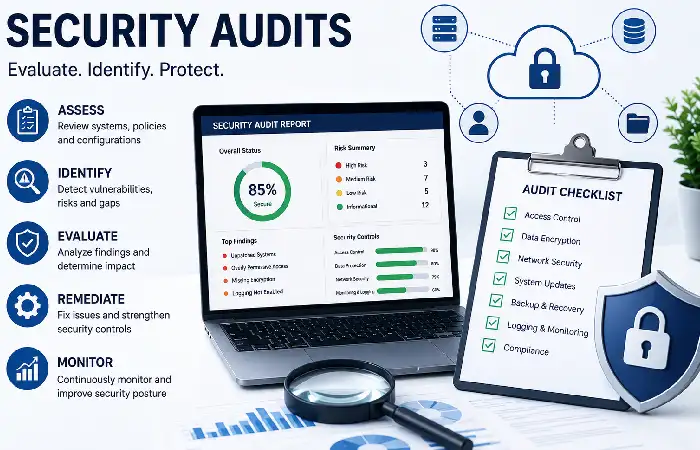
Security Audits remain systematic reviews of you cloud environment conducted to check security controls and identify potential weaknesses that may remain exploited by an attacker, also to ensure industry compliance. Regular audits allow organisations to discover misconfigurations, high user level permissions, outdated software and other weaknesses to address it before.
As cloud environments change rapidly in 2026 (as many deployments, configuration update and service provisioning), it is crucial to regularly review security audit to monitor that the security policy works and the cloud resources still comply to other regulations like ISO 27001, SOC 2, HIPA, PCI DSS, GDPR.
What Should a Cloud Security Audit Cover?
| Audit Area | Purpose | Common Issues Found |
| Identity and Access Management (IAM) | Verify user permissions | Excessive privileges, inactive accounts |
| Cloud Storage | Ensure secure access | Public storage buckets, weak permissions |
| Network Security | Review firewalls and security groups | Open ports, unrestricted inbound traffic |
| Encryption | Verify data protection | Unencrypted storage or databases |
| Logging & Monitoring | Confirm audit trails | Disabled logs, incomplete monitoring |
| Backup & Disaster Recovery | Validate recovery readiness | Missing backups, failed backup tests |
| Compliance | Check regulatory adherence | Policy violations, missing documentation |
Incident Response Planning
Incident Response planning When work remain carried out that involves the creation of plans to respond to, detect and recover from a cloud security incident (eg data theft, ransomware, unauthorised access, denial of service, leak of data etc.).
Preparation for incident response can also reduce the downtime and the cost involved in the Organization, and help us to reduce the chance loss of the one we serving some them.
As cloud complexity increases by 2026, so too will cyberattacks become more frequent and advanced. Documented and tested incident response plans will enable organizations to respond efficiently, minimizing the impact of a breach and respond in time for reporting deadlines.
The Six Phases of Incident Response
| Phase | Purpose | Key Activities |
| Preparation | Build readiness before an incident | Create policies, train employees, deploy security tools |
| Identification | Detect and verify incidents | Analyze alerts, monitor logs, investigate suspicious activity |
| Containment | Prevent the threat from spreading | Isolate affected systems, disable compromised accounts |
| Eradication | Remove the root cause | Eliminate malware, patch vulnerabilities, remove unauthorized access |
| Recovery | Restore normal operations | Recover systems from backups, validate system integrity |
| Lessons Learned | Improve future responses | Document findings, update procedures, strengthen security controls |
Choosing the right cloud security tools helps automate monitoring, threat detection, and compliance management.
Frequently Asked Questions
What are all of the best practices for cloud security?
Follow the best practices regarding security which include: strong authentication, data encryption, shared responsibility model, continuous monitoring, regular security audits and an incident response plan.
Significance of MFA for cloud security?
Multi-Factor Authentication offers an extra verification step, thus substantially increasing the difficulty for an attacker to succeed even if he has compromised the passwords.
What exactly is the Shared Responsibility Model?
This defines what security controls are the responsibility of the provider, versus the customer for example the security of identities, data and application configurations.
Frequency of cloud security audits?
The majority of organizations would remain expected to do ongoing monitoring, vulnerability scans on a monthly basis, security review on a quarterly basis and annual penetration tests (with audits carried out after major infrastructure changes).
What other cloud provider is the most secure?
All three (AWS, Microsoft Azure and Google Cloud) offer enterprise-grade security and a practical decision will remain made depending upon workload, compliance requirements, current ecosystem and operational capabilities.
Conclusion
Aspires for a long-term aim of business support which remain accelerated by the Cloud infrastructure, this paper wraps up that organizations should apply the Cloud Security Best Practices in 2026 as follows. They are, understanding and leveraging the Shared Responsibility Model, enforcing strong Authentication, encrypting data, ongoing workload monitoring and management, undertaking comprehensive Security Audits and updates, develop and maintain an Incidence Response plan and test that it is up to date.
Each of them, together with employee training, compliance monitoring and adoption of contemporary Security Solutions can help reduce cyber risks in cloud environments for business continuity.
Kashifa Jafar is a technology writer and contributor at FutureTechExpert with 4+ years of experience in technology writing and content creation.
Read Full Bio of Author →Sameena reviews selected health, wellness, technology, and digital content for clarity, factual presentation, and reader usefulness.
Read Full Bio of Reviewer →