
 Kashifa Jafar
Technology Writer & Contributor
Kashifa Jafar is a technology writer and contributor at FutureTechExpert with 4+ years of experience in technology writing and content creation.
Read Full Bio of Author →
Kashifa Jafar
Technology Writer & Contributor
Kashifa Jafar is a technology writer and contributor at FutureTechExpert with 4+ years of experience in technology writing and content creation.
Read Full Bio of Author →
 Sameena Begum
Health, Technology & Digital Content Reviewer
Sameena reviews selected health, wellness, technology, and digital content for clarity, factual presentation, and reader usefulness.
Read Full Bio of Reviewer →
Sameena Begum
Health, Technology & Digital Content Reviewer
Sameena reviews selected health, wellness, technology, and digital content for clarity, factual presentation, and reader usefulness.
Read Full Bio of Reviewer →
Web applications are the heart of today‘s digital experiences. From Gmail and Google Docs to Netflix and Microsoft 365, almost every online service used today is a web application. It‘s important for companies, programmers, students, and techies to know how web applications work.
In this detailed tutorial, you will discover what web applications are, how they function, their various types, technologies involved in web application development, security concerns and standards, testing and QA approaches, and the emerging trends in web application development for 2026.
 This article is part of
Web Apps Resources
Table of Contents
What Are Web Applications?
A web application is a software application which runs on the web. It is hosted on web server and can be accessed through any web browser via internet. It is a web based application which can accessed directly from the web browser without downloaded and installed to the user’s computer. Web supported browsers includes Google Chrome, Microsoft Edge, Mozilla Firefox, Safari and Opera.
Web applications enable users to access data and information, accomplish tasks, work along with other and make use of various services using almost any device, which could be reached from the internet. For instance, Gmail, Google Docs, Microsoft 365, Trello, Dropbox, Canva and digital banking.
In the light of growing cloud-based and remote working trends businesses are turning towards using Web applications to power their digital infrastructure. Web applications have long been vital in today‘s technology-driven environment, offering businesses the flexibility, scalability and easy availability needed. Web applications also offer advantages such as state-of-the-art automation and the removal of software installation or manual update requirements.
Unlike traditional desktop applications, web applications operate on remote servers and are accessed using web browsers such as:
- Google Chrome
- Microsoft Edge
- Mozilla Firefox
- Safari
- Opera
Users simply enter a URL and interact with the application online.
Modern web applications come in many forms, including dynamic web apps, single-page applications (SPAs), and progressive web applications, which combine the accessibility of websites with app-like functionality. Understanding the differences between these solutions can help businesses choose the right platform for their needs. You can also explore the detailed comparison of web applications vs websites to better understand their unique capabilities.
Key Characteristics of Web Applications
| Feature | Description |
| Browser-Based | Runs through a web browser |
| Cross-Platform | Works on Windows, macOS, Linux, Android, and iOS |
| Internet Access | Requires network connectivity |
| Centralized Updates | Updates occur on the server |
| Cloud Integration | Easily integrates with cloud services |
| Scalable | Supports growth in users and functionality |
Why Web Applications Matter in 2026
Modern organizations increasingly rely on web applications because they:
- Reduce software installation requirements
- Simplify maintenance
- Enable remote work
- Support cloud computing
- Improve accessibility
- Reduce IT costs
How Do Web Applications Work?
Web Application It is a complex communication system that allows interaction between user’s Web browser, Web server, Application server, and the database. Whenever I want to do something on internet, a request is sent to the server and based on the request, server processes the request, make necessary changes to the database if required and reaches back the browser within a second.
Web applications differ from traditional software as they are mainly processed on the server instead of the local device. With this technology a user is able to use an application on any device without necessity to install software or copy and update data by hand.
Web applications function through communication between:
- Client (Browser)
- Web Server
- Application Server
- Database
Basic Workflow
| Step | Process |
| 1 | User opens browser |
| 2 | Browser sends request |
| 3 | Server receives request |
| 4 | Application processes data |
| 5 | Database provides information |
| 6 | Server returns response |
| 7 | Browser displays results |
Web Application Architecture
User Browser
↓
Web Server
↓
Application Server
↓
Database
Example
When a user logs into Gmail:
- Credentials are entered.
- Browser sends request.
- Google servers validate credentials.
- User mailbox data is retrieved.
- Messages appear instantly.
The success of any web app depends on its underlying structure. A well-designed web application architecture improves performance, scalability, security, and maintainability while ensuring a seamless user experience across devices and platforms.
Web Applications vs Websites
Despite the fact that web application and website are two terms that are often used interchangeably; however, they do refer to different functionalities. A website is created to give information to its visitors and a web application is built for enabling users to perform operations, tasks and actions with the data online.
Knowing the difference between a website and a web application is useful for companies designing their online presence and in helping customers find the most appropriate table for their needs.
Comparison Table
| Feature | Website | Web Application |
| Purpose | Information delivery | User interaction |
| Login Required | Usually No | Usually Yes |
| Database | Optional | Typically Required |
| User Input | Limited | Extensive |
| Functionality | Read-focused | Task-focused |
| Complexity | Lower | Higher |
| Examples | Blogs, News Sites | Gmail, Trello, Canva |
Website Examples
- Company websites
- News portals
- Educational blogs
- Portfolio sites
Web Application Examples
- Google Docs
- Slack
- Dropbox
- Salesforce
- Shopify
Modern applications rely on a wide range of web application technologies, including HTML, CSS, JavaScript frameworks, APIs, databases, and cloud computing services. These technologies work together to deliver interactive and responsive digital experiences.
Types of Web Applications
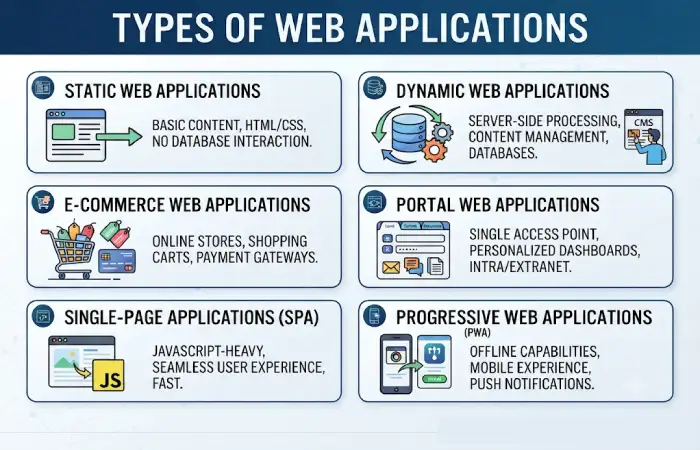
A web application can take many forms and can be selected depending on the type of business requirements, users, technical aspects etc. For example, different business requirements of the web application can determine the choice of a particular web application.
History of web applications. Web applications are versatile and have grown in complexity from basic static pages to complex cloud based systems used by millions of users. With a knowledge of the different types of web application, developers are able to build solutions providing an optimal end user experience.
Main Categories
| Type | Best For |
| Static | Informational pages |
| Dynamic | Interactive websites |
| SPA | Fast user experiences |
| PWA | Mobile-like experiences |
| E-Commerce | Online stores |
| Portal Apps | Customer dashboards |
| CMS Apps | Content management |
Static Web Applications
A static web application is the most basic form of web application. Static websites aim to directly serve static content to users in their web browser. Static web applications do not generate content dynamically and are made up of pre-determined pages displayed as is for every users.
While the majority of web development is now dynamic and event driven, static web applications still have their place in the modern web because of their performance, security, reliability and value. They are still used for landing pages, company websites, portfolios and documentation sites.
Features
- Fast loading
- Simple architecture
- Low hosting costs
- High reliability
Technologies
- HTML
- CSS
- JavaScript
Use Cases
- Landing pages
- Company websites
- Portfolios
- Documentation websites
Advantages
Faster performance
Easy deployment
Strong security
Lower development costs
Limitations
Limited functionality
Manual updates
Minimal user interaction
As cyber threats continue to evolve, organizations must prioritize web application security to protect sensitive information, maintain user trust, and comply with industry regulations. Security measures such as encryption, authentication, and vulnerability testing are essential components of modern web development.
Dynamic Web Applications
Dynamically generated web applications are interactive web based software program that generate dynamically content based upon user interactions, preferences, and information stored in the database. In other words, dynamic web applications are capable of interacting with website user dynamically. Static web application is one that sends the same information to each and every user.
Currently, most websites and internet applications such as social sites, ecommerce, online banking and the full range of SaaS applications are developed as dynamic web applications. Their capacity to tailor content and features to specific users is fundamental to our modern internet use.
Characteristics
- Database-driven
- User authentication
- Personalized experiences
- Real-time updates
Examples
| Application | Function |
| Social networking | |
| Amazon | E-commerce |
| Professional networking | |
| Netflix | Streaming platform |
Benefits
- Personalization
- Better engagement
- Scalable architecture
- Enhanced functionality
Learning from successful web application examples can provide valuable insights into how businesses use web technologies to improve customer engagement, collaboration, and operational efficiency across different industries.
Single-Page Applications (SPAs)
Single-Page Applications (SPAs) are new generation of web applications. They load only one web page and dynamically change content from that single page in response to user interaction. Rather than jumping between different pages, SPAs load all the information into a single page and update it dynamically.
SPAs are among the most popular web application architectures because they allow for native-like performance in a web application. Essentially, it provides users with the performance benefits of a native mobile app as the entire application is still available through a web browser. Platforms like Gmail, Google Maps, Trello, and Airbnb are examples of sites that use SPA architecture.
What Is a Single-Page Application?
An SPA (Single-Page Application) The application loads a single HTML page and dynamically updates as the user interacts with the app. It largely relies on JavaScript.
For a traditional website, each user interaction would load a new page from the server. A SPA instead loads data from the API asynchronously and updates its user interface on the fly.
This minimizes the number of times the page needs to go back to the server.
Popular SPA Frameworks
| Framework | Popularity |
| React | Very High |
| Angular | High |
| Vue.js | High |
| Svelte | Growing |
Advantages
- Faster navigation
- Better user experience
- Reduced server requests
- Mobile-app-like feel
Examples
- Gmail
- Trello
- Google Maps
- Airbnb
Challenges
- SEO optimization
- Initial load size
- Browser memory consumption
Progressive Web Applications (PWAs)
PWAs are innovative web applications that are designed to combine the best features of best web applications and native mobile applications. They utilize standard web technologies HTML, CSS and JavaScript to provide intensive user experience similar to native applications.
With companies looking for affordable solutions to mobile and desktop platforms for providing support, web applications are gaining higher momentum than ever before. Already named as one of the fastest growing trends of 2012, plans for 2026 include many operations delivering PWAs to operate in a more engaging model for consumers; one that expands web usage without the cost associated with a mobile app.
What Is a Progressive Web Application?
Progressive Web Application is a mashup of the latest technologies to give a web application a more native-like experience through the website.
Unlike traditional websites, PWAs can:
- Be installed on a device’s home screen
- Work offline or with limited connectivity
- Send push notifications
- Load quickly even on slower networks
- Access certain device features
Users may download an available PWA through a URL, and add the app directly without visiting a store.
Key Features
- Offline access
- Push notifications
- App-like experience
- Installable on devices
PWA vs Native Apps
| Feature | PWA | Native App |
| Installation | Optional | Required |
| Updates | Automatic | Store updates |
| Development Cost | Lower | Higher |
| Platform Support | Universal | Platform-specific |
| Offline Support | Yes | Yes |
Popular PWAs
- Starbucks
- Uber
- Spotify Web Player
Why PWAs Are Growing
More and more companies have been adopting PWAs, which can lower the cost of development with high quality.
Common Examples of Web Applications
Web applications are used in daily life to let users talk to each other and collaborate, shop, study, control money, and be entertained from the comforts of their web browsers. They include simple productivity tools as well as enterprise level solutions.
The use of web applications is increasing as they allow cross-platform operation, are cloud-enabled, update in the background, and provide a better user experience. To understand web applications better, some common types are described below.
Productivity Applications
Productivity applications are among the most widely used web applications in the world. They help individuals and teams create, organize, and manage work efficiently.
| Application | Purpose |
| Google Docs | Document editing |
| Notion | Collaboration |
| Trello | Project management |
| Asana | Task tracking |
Communication Applications
| Application | Purpose |
| Gmail | |
| Slack | Team communication |
| Microsoft Teams | Collaboration |
| Zoom Web | Video meetings |
E-Commerce Applications
| Application | Purpose |
| Shopify | Online stores |
| Amazon | Marketplace |
| eBay | Auctions |
| Etsy | Handmade goods |
Entertainment Applications
| Application | Purpose |
| Netflix | Streaming |
| YouTube | Video platform |
| Spotify | Music streaming |
| Disney+ | Entertainment |
Technologies Used to Build Web Applications
All practical web applications are comprised of a collection of different technologies of front end, back end, databases, API, cloud services and security solutions. These technologies were mainly used to develop a scalable, fast, secured and smart application for millions of customers using different devices.
The choice of framework relies heavily on the project requirements, that is, the scope of the project, the scaling requirements and the performance considerations. Other factors include the number of developers and the budget constraints. By 2026, developers tend to use the following to build a modern web application, cloud native architecture, API first development, using AI enabled tools etc.
Frontend Technologies
| Technology | Purpose |
| HTML5 | Structure |
| CSS3 | Styling |
| JavaScript | Interactivity |
| React | UI Development |
| Angular | Enterprise Apps |
| Vue.js | Flexible UI |
Backend Technologies
| Technology | Use Case |
| Node.js | Real-time applications |
| Python | AI and automation |
| PHP | CMS platforms |
| Java | Enterprise systems |
| .NET | Business applications |
Databases
| Database | Type |
| MySQL | Relational |
| PostgreSQL | Relational |
| MongoDB | NoSQL |
| Redis | Cache |
| Firebase | Cloud database |
Cloud Platforms
| Platform | Resource |
| AWS | https://aws.amazon.com |
| Microsoft Azure | https://azure.microsoft.com |
| Google Cloud | https://cloud.google.com |
| Cloudflare | https://www.cloudflare.com |
Web Application Development Process
Web application development process is a methodical way of creating web applications. It comprises designing, developing, testing, deploying and maintaining a web application. Irrespective of whether it is a small business portal application or a large SaaS application, adhering to web application development process will make sure that the application created is scalable, secure, easy to use and meets business goals.
In terms of development, the development of web applications involves business users, designers, developers, testers and devOps teams. By 2026, Agile, DevOps and CI/CD principles and practices will become the standard in the web developer society to deliver high qualityweb applications faster.
Phase 1: Planning
Activities:
- Requirement gathering
- Competitor analysis
- Feature prioritization
- User research
Phase 2: Design
Deliverables:
- Wireframes
- User journeys
- UI mockups
- Prototypes
Phase 3: Development
Tasks:
- Frontend coding
- Backend development
- Database setup
- API integration
Phase 4: Testing
Includes:
- Functional testing
- Security testing
- Performance testing
- Compatibility testing
Phase 5: Deployment
Common deployment platforms:
| Platform | Best For |
| AWS | Enterprise |
| Azure | Microsoft environments |
| Vercel | React applications |
| Netlify | JAMstack websites |
Phase 6: Maintenance
Ongoing activities:
- Updates
- Security patches
- Monitoring
- Optimization
Web Application Security

Web application security is the set of strategies, technologies, and operating procedures designed to safeguard web applications from cyber threats, unauthorized access and modification, data breaches, and malicious attacks. It manage a lot of sensitive information and have become a primary target for all businesses.
By the year 2026, web application security would have to become more sophisticated as web application cyber-attack will keep increasing in number. In this way, it is important that security is applied at every phase of the application development life cycle.
Why Web Application Security Is Important
Web applications are nowadays being accessible over the internet, and can be reached from any part of the world. Although this enables users to access applications in increased timeframe and the business opportunities to broaden, at the same time it makes applications vulnerable to new exploits available on the internet.
Risks of Poor Security
Organizations that fail to secure their web applications may face:
- Data breaches
- Financial losses
- Service disruptions
- Regulatory penalties
- Reputational damage
- Customer trust issues
Benefits of Strong Security
| Benefit | Description |
| Data Protection | Safeguards sensitive information |
| Regulatory Compliance | Meets legal and industry requirements |
| Customer Trust | Improves user confidence |
| Business Continuity | Reduces downtime and disruptions |
| Reduced Risk | Minimizes exposure to cyberattacks |
Implementing good security principles allows an organization to gain some form of security for themselves and their users.
Common Security Threats
| Threat | Description |
| SQL Injection | Database manipulation |
| XSS | Malicious script execution |
| CSRF | Unauthorized requests |
| DDoS | Traffic overload attacks |
| Credential Stuffing | Automated login attempts |
Security Best Practices
Use HTTPS
Encrypt all communications using SSL/TLS certificates.
Implement Authentication
Use:
- Multi-factor authentication
- Strong passwords
- OAuth
- Single Sign-On
Input Validation
Always validate:
- Forms
- API requests
- User-generated content
Regular Security Audits
Conduct:
- Vulnerability assessments
- Penetration testing
- Dependency scanning
Recommended Security Tools
| Tool | Purpose |
| Cloudflare WAF | Web application firewall |
| Snyk | Vulnerability scanning |
| OWASP ZAP | Security testing |
| Burp Suite | Penetration testing |
Web Application Testing
Web application testing is the process of verification and validation of a web application for its functionality, performance, security and user experience across wide range of browsers, platform and operating systems.
Testing is a crucial and essential step of web application development cyclone, since it allows to find the defects, vulnerabilities, performance bottlenecks and usability concerns before the application is deployed.
In today‘s fast paced digital world, web application users demand good performance, availability, security and usability. Testing thoroughly allows organizations to satisfy these requirements, reduce operation costs and business risks.
Why Web Application Testing Is Important
Even the smallest bug can cause delays or system performance issues, which can boost costs, damages brand reputation and impactsend user satisfaction. Testing is part of the application assurance to confirm the application working correctly.
Benefits of Web Application Testing
| Benefit | Description |
| Improved Quality | Identifies and fixes defects before launch |
| Better User Experience | Ensures smooth functionality and usability |
| Enhanced Security | Detects vulnerabilities and risks |
| Increased Reliability | Reduces crashes and failures |
| Better Performance | Improves speed and responsiveness |
| Lower Maintenance Costs | Fixing issues early is more cost-effective |
Testing helps deliver a stable and dependable application that users can trust.
Types of Testing
| Testing Type | Purpose |
| Functional Testing | Verify features |
| Unit Testing | Test code components |
| Integration Testing | Test modules together |
| Performance Testing | Measure speed |
| Load Testing | Simulate traffic |
| Security Testing | Identify vulnerabilities |
Popular Testing Tools
| Tool | Function |
| Selenium | Browser automation |
| Cypress | Frontend testing |
| Playwright | Cross-browser testing |
| JMeter | Performance testing |
Testing Workflow
Code Development
↓
Unit Testing
↓
Integration Testing
↓
Security Testing
↓
Performance Testing
↓
Deployment
Benefits and Limitations of Web Applications
Web applications have become revolutionaries of access to software for business and consumers, it is now possible to work cooperatively via the internet, and to have web-based utilities and services. Many applications are now designed to be explored and used via web browsers, from mail systems and project centers to retail and corporate software.
There are many benefits in having web applications. But there are some setbacks as well. Weighing the pros and cons is the key in deciding on web applications, desktop software, mobile applications or, a combination of any two.
Benefits
Web applications are the most common application because of flexibility, accessibility, scalability and cost.
| Benefit | Explanation |
| Accessibility | Available anywhere |
| Cost Efficiency | Reduced installation costs |
| Automatic Updates | Centralized management |
| Scalability | Easy expansion |
| Cross-Platform Support | Universal compatibility |
Limitations
Despite their advantages, web applications also present several challenges.
| Limitation | Impact |
| Internet Dependency | Connectivity required |
| Browser Compatibility | Different browser behavior |
| Security Risks | Online exposure |
| Performance Constraints | Browser limitations |
Web Applications Trends for 2026
Web application context by 2026 will be changing fast today powered by 3 major trends: artificial intelligence, cloud native, and increased security needs along with continued data-stemming demands for app-like user experiences. It providers will be concentrating on producing faster, smarter and scalable web apps that will be providing to be a consistent experience across devices of all types.
Emerging Technologies
| Trend | Impact |
| AI Integration | Smart automation |
| Low-Code Platforms | Faster development |
| Edge Computing | Reduced latency |
| Serverless Architecture | Improved scalability |
| Web Assembly | Near-native performance |
| Zero Trust Security | Stronger protection |
Market Direction
Organizations increasingly prioritize:
- AI-powered user experiences
- Cloud-native development
- Enhanced cybersecurity
- Real-time collaboration
- Mobile-first design
Frequently Asked Questions About Web Applications
Can you define a web application?
The web application is a software application which can be used through a web browser, it will allow to the user one or many of following functions or services.
Are web applications superior to desktop applications?
It really depends on the use case. Web-based apps are often more accessible and easier to maintain, whereas desktop apps may perform better when specialized tasks are involved.
How do developers develop web applications?
Some of the most popular tools involved are HTML, CSS, JavaScript, React, Angular, Node.js, Python, Java, PHP, MySQL, PostgreSQL, and MongoDB.
What is PWA?
PWA stands for Progressive Web Application which is similar to web applications and it can provide app-like features such as offline availability and push notifications.
Are web applications inherently safe?
Yes, providing it is built to security best practices such as HTTPS, authentication, encryption and testing.
How much does web application development cost?
The costs over time can be variable depending upon complexity, features, integrations, security needs, and development resources.
Conclusion
Web applications have changed the way businesses and customers use the internet. They can be easy browser based tools or complicated enterprise solutions running on AI, cloud computing and collaborative platforms allowing digital transformation.
With a good knowledge of the architecture of web application, the development, security, testing and the new trends, organizations can develop scalable, secured and user-friendly solutions to face 2026 market and ensure real users experience.
Kashifa Jafar is a technology writer and contributor at FutureTechExpert with 4+ years of experience in technology writing and content creation.
Read Full Bio of Author →Sameena reviews selected health, wellness, technology, and digital content for clarity, factual presentation, and reader usefulness.
Read Full Bio of Reviewer →