

Last Updated: June 22, 2026
Cloud computing is the new backbone of business technology today. Knowing the Types of Cloud Computing Models enables organizations to select suitable infrastructure, optimize scalability and minimize information technology (IT) cost. As a startup owner, software developer or IT manager, this would be very helpful to differentiate deployment and service models for cloud computing decision making.
Industry experts have believed that worldwide cloud market will reach to over $947 billion in the year 2026, because many companies adopting cloud-first strategy.
In this guide you‘ll learn about public, private and hybrid clouds and IaaS, Paa S and Saa S service models.
Table of Contents
Understanding Public, Private, and Hybrid Clouds
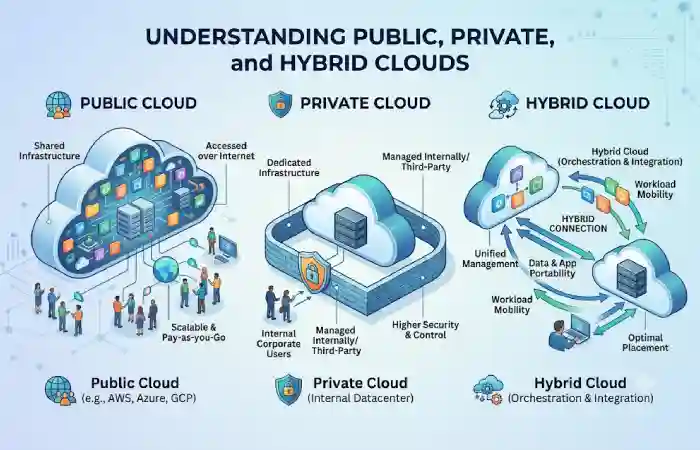
Deployment models for cloud computing decides on how the cloud resources are hosted, managed, and accessed. There are three deployment models namely public cloud, private cloud and hybrid cloud with different degree of control, security, scalability and cost effectiveness. A good knowledge of different cloud environments is a step closer to the right infrastructure for your business.
Cloud Deployment Models Comparison
| Model | Description | Advantages | Best For | Resource |
| Public Cloud | Infrastructure shared across multiple users via the internet | Low cost, scalability | Startups, SMEs | https://cloud.google.com/discover/types-of-cloud-computing |
| Private Cloud | Dedicated cloud environment for one organization | Security, control | Healthcare, Finance | https://www.ibm.com/think/topics/cloud-computing |
| Hybrid Cloud | Combination of public and private clouds | Flexibility, compliance | Large enterprises | https://www.itpro.com/hybrid-cloud/29668/what-is-hybrid-cloud |
Public Cloud
Public cloud services are available via the internet from vendors such as Amazon Web Services (AWS), Microsoft Azure, Google Cloud etc. The organizations will only pay for the resource they use. This makes the service highly economical.
Private Cloud
A private cloud can be (or be within) and enterprise data-centre, with dedicated infrastructure that is specific to a single organization. Private clouds give greater control and security than a shared (public) cloud, but usually at greater cost.
Hybrid Cloud
The hybrid cloud involves the combined use of public and private environments. It is where mission critical applications and sensitive data workloads are handled within private clouds and applications that need scaling are handled within public clouds. Approximately 68% of organizations are using hybrid cloud.
Infrastructure as a Service (IaaS) Explained
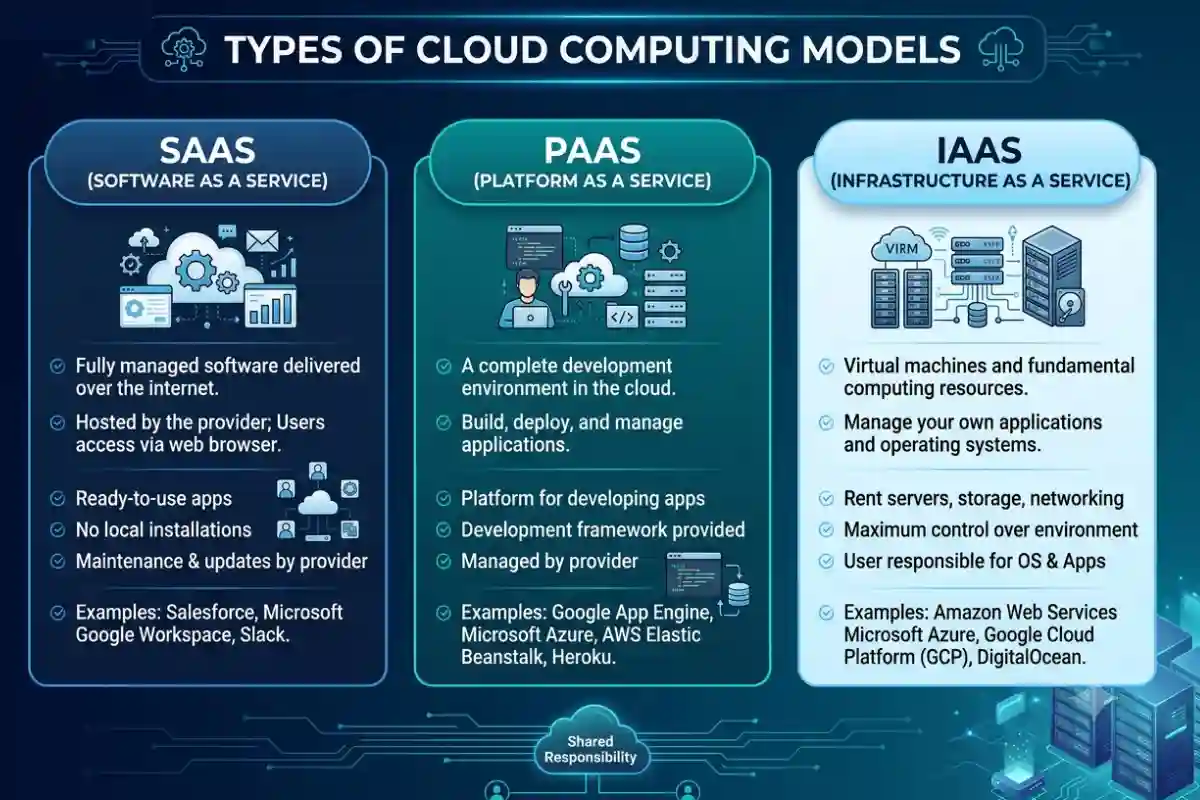
‘Infrastructure-as-a-service’ (IaaS) is the instant, Provisioned, virtualized delivery of computer hardware.
How IaaS Works
The cloud provider manages:
- Physical servers
- Storage
- Networking
- Virtualization
Customers manage:
- Operating systems
- Applications
- Databases
- Security configurations
Popular IaaS Providers
| Provider | Key Service | Resource |
| AWS | EC2 | https://aws.amazon.com/ec2 |
| Microsoft Azure | Virtual Machines | https://azure.microsoft.com |
| Google Cloud | Compute Engine | https://cloud.google.com |
| IBM Cloud | Virtual Servers | https://www.ibm.com/cloud |
Benefits of IaaS
- Maximum flexibility
- Pay-as-you-go pricing
- Rapid scalability
- Reduced hardware investment
Best Use Cases
- Web hosting
- Disaster recovery
- Enterprise applications
- Development environments
Platform as a Service (PaaS) Benefits
Platform as a Service (PaaS)-displays virtual platform, applications and tools needed by developer in order to develop, deploy and administer application.
Advantages of PaaS
| Benefit | Description |
| Faster Development | Preconfigured environments |
| Reduced Complexity | No server management |
| Automatic Updates | Managed by provider |
| Better Collaboration | Shared development tools |
Popular PaaS Platforms
| Platform | Resource |
| Google App Engine | https://cloud.google.com/appengine |
| Azure App Service | https://azure.microsoft.com |
| Heroku | https://www.heroku.com |
| Red Hat OpenShift | https://www.redhat.com |
Best Use Cases
- Web application development
- Mobile app development
- API creation
- DevOps workflows
Software as a Service (SaaS) Use Cases
The applications are remotely accessed over the web interface, no installation and maintainance is needed. This is the most popular platform for cloud service now.
SaaS Examples
| Application | Provider | Resource |
| Gmail | https://workspace.google.com | |
| Microsoft 365 | Microsoft | https://www.microsoft.com/microsoft-365 |
| Salesforce CRM | Salesforce | https://www.salesforce.com |
| Zoom | Zoom | https://zoom.us |
Benefits of SaaS
- No infrastructure management
- Automatic updates
- Subscription-based pricing
- Quick deployment
Common SaaS Use Cases
- Customer relationship management (CRM)
- Email services
- Collaboration tools
- Accounting software
- Project management
IaaS vs PaaS vs SaaS Comparison
| Feature | IaaS | PaaS | SaaS |
| Control Level | High | Medium | Low |
| Infrastructure Management | Customer | Provider | Provider |
| Development Flexibility | High | Medium | Low |
| Setup Complexity | High | Medium | Very Low |
| Ideal Users | IT Teams | Developers | End Users |
According to 2026 cloud adoption trends, most organizations will have a mix of several service models instead of a single model.
Choosing the Right Cloud Deployment Model
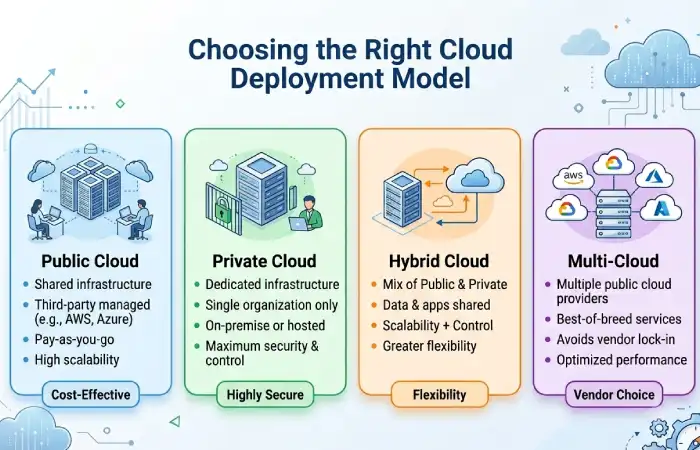
Selection of suitable type of cloud deployment is one of the most fundamental decisions while en planning about the cloud computing. The right selection of deployment model is based on the factor like budget, security needs, regulation compliances, need of scalability, work loads nature, and prognosis of future business needs etc.
Public, private and hybrid clouds all bring advantages but no single option is ideal for all types of organizations. Gaining clarity about your company‘s needs will enable you to select the type of cloud that strikes the ideal balance of performance and affordability and security.
Choose Public Cloud If:
- Budget is limited
- Rapid scaling is needed
- Workloads are non-sensitive
Select Private Cloud If:
- Strict compliance requirements exist
- Sensitive data is involved
- Full infrastructure control is required
Choose Hybrid Cloud If:
- You need flexibility
- Some workloads require private infrastructure
- You want gradual cloud migration
Decision Matrix
| Requirement | Recommended Model |
| Lowest Cost | Public Cloud |
| Maximum Security | Private Cloud |
| Balanced Approach | Hybrid Cloud |
| Fastest Deployment | SaaS |
| Custom Applications | PaaS |
| Infrastructure Control | IaaS |
Common Cloud Computing Challenges and Troubleshooting
Challenge: Rising Cloud Costs
Solution: Implement monitoring tools and auto-scaling policies.
Challenge: Security Concerns
Solution: Use encryption, IAM policies, & multi-factor authentication.
Challenge: Vendor Lock-In
Solution: Consider hybrid or multi-cloud strategies.
Challenge: Performance Issues
Solution: Optimize workloads & use CDN services.
Frequently Asked Questions
How many types of cloud computing do we have?
Not all the existing clouds computing models are; Public Cloud Private Cloud Hybrid Cloud, Infrastructure as a Service (IaaS), Platform as a Service (PaaS), & Software as a Service (SaaS).
Which cloud model is secure?
Private Cloud provides the most control & security, as only one organisation is using the infrastructure.
Is SaaS better than PaaS?
Both are fine. PaaS is for developers so PaaS is better end user.
Why are hybrid clouds becoming popular?
A hybrid cloud offers flexibility, compliance advantage and cost benefits by bringing together the private and public clouds.
Conclusion
A knowledge of the types of cloud computing deployment models will be vital to creating a successful cloud strategy in 2026. Infrastructure requirements are solved by public, private and hybrid types of deployment whereas IaaS, PaaS and SaaS describe the way in which the service will be supplied. Using the cost, security, performance and the level of technical skills within your organization as guide posts you can select the most appropriate model for your needs.