
 Kashifa Jafar
Technology Writer & Contributor
Kashifa Jafar is a technology writer and contributor at FutureTechExpert with 4+ years of experience in technology writing and content creation.
Read Full Bio of Author →
Kashifa Jafar
Technology Writer & Contributor
Kashifa Jafar is a technology writer and contributor at FutureTechExpert with 4+ years of experience in technology writing and content creation.
Read Full Bio of Author →
 Sameena Begum
Health, Technology & Digital Content Reviewer
Sameena reviews selected health, wellness, technology, and digital content for clarity, factual presentation, and reader usefulness.
Read Full Bio of Reviewer →
Sameena Begum
Health, Technology & Digital Content Reviewer
Sameena reviews selected health, wellness, technology, and digital content for clarity, factual presentation, and reader usefulness.
Read Full Bio of Reviewer →
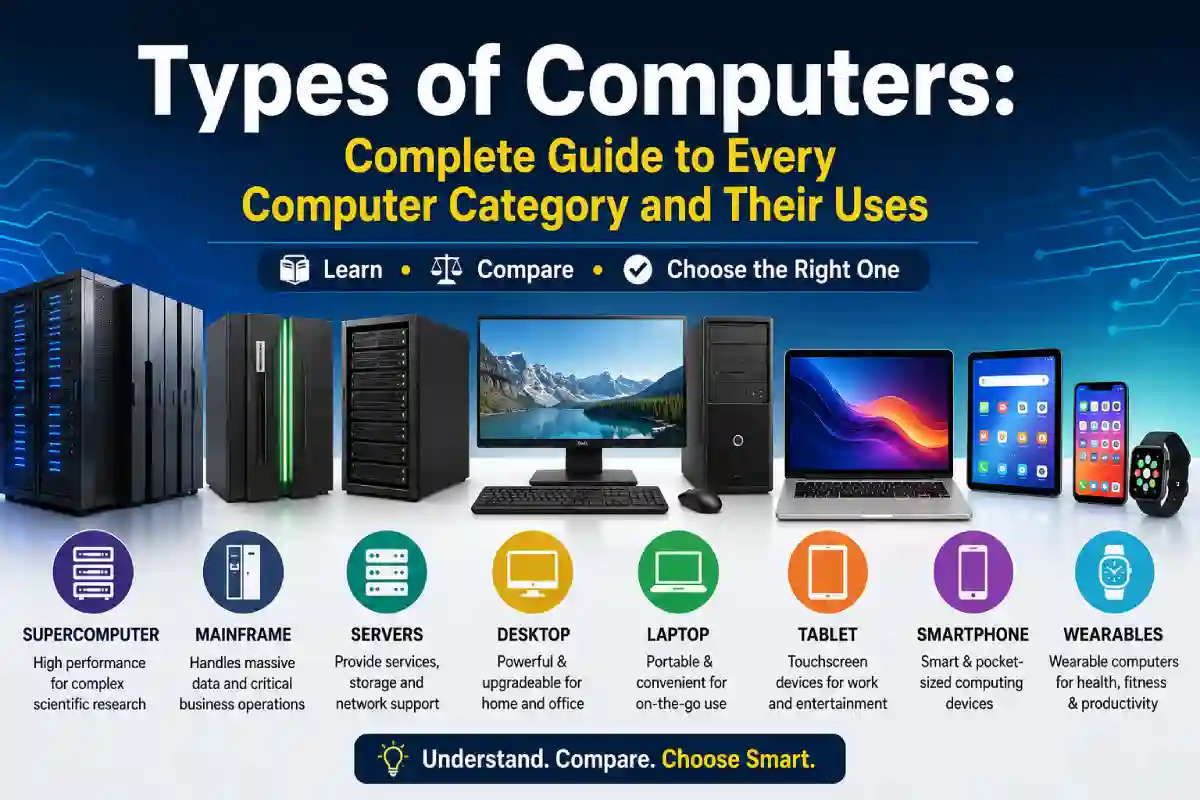
Computers are an integral part of our daily lives. When you open a laptop to work away from your office, check your Facebook account on your smartphone or use a supercomputer for your research project, you are actually using a different type of computer.
The differences between computer types can be confusing, and it can be helpful to understand the range of options available. The different categories of computer make it easier to select the right one to meet individual and corporate needs, whether it is fast speed, portability, processing or storage capabilities, or some other factor. No matter whether they are being used at home or in a large corporation, each computer has a specific use.
This detailed guide explains, you will discover how computers are categorized, cover all principal computer types, include a comparison chart between different categories, discuss their strengths and weaknesses, and look at future developments.
 This article is part of
Computers Resources
Quick Comparison of Computer Types
| Computer Type | Performance | Users | Main Purpose | Cost |
| Supercomputer | Extremely High | Research Organizations | Scientific Calculations | $$$$$ |
| Mainframe | Very High | Large Enterprises | Process Millions of Transactions | $$$$ |
| Server | High | Businesses | Host Applications & Websites | $$$ |
| Workstation | High | Engineers & Designers | Professional Computing | $$$ |
| Desktop PC | Medium-High | Home & Office | Daily Computing | $$ |
| Laptop | Medium | Students & Professionals | Portable Computing | $$ |
| Tablet | Medium | Casual Users | Entertainment & Productivity | $$ |
| Smartphone | Medium | Everyone | Communication & Apps | $ |
Table of Contents
What Is a Computer?
A computer is an electronic machine that accepts data as input, processes it according to a list of instructions stored in it and presents the output as a useful result.
Every computer performs four essential operations:
- Input
- Processing
- Storage
- Output
For example:
| Input | Processing | Output |
| Keyboard | CPU | Monitor |
| Mouse | Memory | Printer |
| Camera | Software | Speakers |
Latest generation of computers are connected to clouds, to AI systems and to the Internet of things. This makes a computer smarter than any other.
Main Components of a Computer
Having knowledge of computer hardware enables one to get a clear picture of various kinds of computers.
| Component | Function |
| CPU | Executes instructions |
| RAM | Temporary memory |
| Storage (SSD/HDD) | Stores files permanently |
| Motherboard | Connects all hardware |
| GPU | Processes graphics |
| Power Supply | Powers the system |
| Cooling System | Prevents overheating |
| Operating System | Runs software |
How Computers Are Classified
Computers can be classified in many different ways depending on their intended purpose, size, performance and architecture.
The most common classifications include:
- By Size
- By Purpose
- By Performance
- By Portability
- By Processing Method
- By Generation
Each classification allows users to select the most appropriate computer for their needs.
Computer Classification Overview
| Classification | Types |
| Size | Supercomputer, Mainframe, Minicomputer, Microcomputer |
| Purpose | General Purpose, Special Purpose |
| Performance | High Performance, Mid-range, Entry-level |
| Portability | Desktop, Laptop, Tablet, Smartphone |
| Industry | Gaming, Business, Scientific, Medical |
Types of Computers by Size
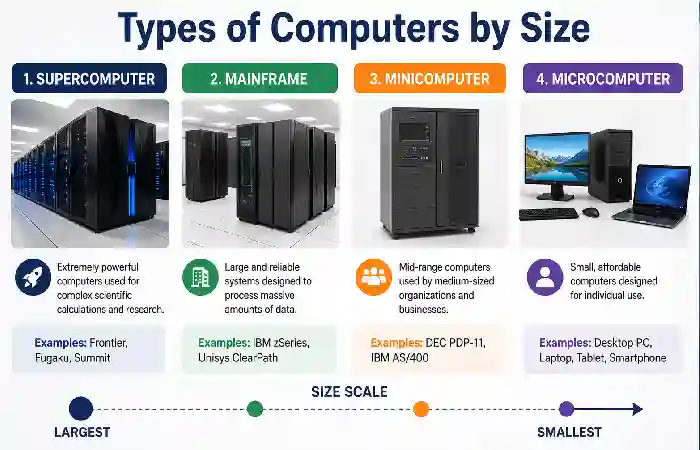
One of the oldest ways of classifying computers is based on their physical size and computational power.
The four primary categories are:
- Supercomputer
- Mainframe Computer
- Minicomputer
- Microcomputer
Let’s explore each in detail.
1. Supercomputer
Supercomputers are the most powerful and speedy computers in the world.
They output trillions possibly even quadrillions of operations every single second.
Supercomputers as opposed to conventional computers are comprised of thousands of processors working in parallel.
Key Features
- Massive parallel processing
- Extremely high processing speed
- Petabytes of storage
- Advanced cooling systems
- High energy consumption
Common Uses
- Climate modeling
- Weather forecasting
- Space exploration
- Artificial Intelligence
- Genomics
- Drug discovery
- Nuclear simulations
- Quantum research
Advantages
- Fastest processing available
- Handles enormous datasets
- Ideal for scientific research
- Supports AI model training
Limitations
- Extremely expensive
- Requires specialized facilities
- High electricity consumption
- Complex maintenance
Supercomputer Specifications
| Feature | Typical Value |
| CPU Cores | Hundreds of thousands |
| RAM | Several Petabytes |
| Storage | Petabytes |
| Users | Thousands |
| Cost | Millions of dollars |
2. Mainframe Computer
Mainframes are built to run millions of transactions safely and securely.
Mainframes are very different from supercomputers as they are directed towards the handling of many users at the same time and also business activities. This is totally different from supercomputers which are focused on computation speed.
Industries relying on mainframes include:
- Banking
- Insurance
- Airlines
- Government
- Healthcare
For instance, when thousands of customers insert their ATM cards at the ATM simultaneously the mainframe continues to process that transaction.
Features
- High reliability
- Continuous uptime
- Advanced security
- Massive storage
- Virtualization support
Advantages
- Handles millions of users
- Excellent reliability
- Strong data security
- Long operational lifespan
Disadvantages
- High purchase cost
- Requires skilled administrators
- Large physical footprint
Mainframe vs Supercomputer
| Feature | Supercomputer | Mainframe |
| Main Goal | Speed | Transaction Processing |
| Users | Few Researchers | Millions of Users |
| Applications | Scientific Research | Banking & Enterprise |
| Processing | Parallel Computing | Large-scale Transactions |
While both systems handle massive workloads, understanding the supercomputer vs mainframe comparison helps explain their different roles in scientific research and enterprise computing.
3. Minicomputer
Minicomputers were invented to fill the gap between mainframes and PCs.
More prevalent in the past yet still used today, they became a part of work environments and schools before high-end servers became common.
Typical uses included:
- Manufacturing
- Universities
- Medium-sized businesses
- Laboratories
Characteristics
- Multi-user support
- Moderate processing power
- Lower cost than mainframes
- Network connectivity
Actually, a large number of very modern servers.
4. Microcomputer
The most popular computers used today are the microcomputer.
Almost all of us have at least one microcomputer.
Examples include:
- Desktop computers
- Laptops
- Tablets
- Smartphones
These devices are adapted to a microprocessor, so they are inexpensive and can be a tool for personal use.
Features
- Compact size
- Affordable
- Easy to use
- Supports thousands of software applications
- Internet connectivity
Uses
- Office work
- Education
- Gaming
- Web browsing
- Programming
- Video editing
- Graphic design
- Entertainment
Comparison of Computer Types by Size
| Feature | Supercomputer | Mainframe | Minicomputer | Microcomputer |
| Processing Power | Extremely High | Very High | Medium | Standard |
| Users | Thousands | Millions | Hundreds | One |
| Cost | Very High | Very High | Medium | Affordable |
| Size | Huge | Large | Medium | Small |
| Purpose | Research | Business | Organizations | Personal Use |
Evolution of Computer Sizes
| Era | Dominant Computer Type | Primary Users |
| 1940s–1950s | Mainframes | Government |
| 1960s | Mainframes & Minicomputers | Universities |
| 1980s | Desktop PCs | Homes & Offices |
| 2000s | Laptops | Professionals |
| 2010s | Smartphones & Tablets | Consumers |
| 2020s | AI PCs & Cloud Devices | Everyone |
Each category serves a unique purpose, and understanding the applications of different computer types makes it easier to select the best system for work, education, gaming, or business.
Which Computer Size Is Best?
Your choice of computer size should be based on your needs, not on trying to own the most powerful computer.
| Need | Recommended Type |
| Scientific Research | Supercomputer |
| Banking | Mainframe |
| Medium Business | Server/Minicomputer |
| Home Use | Desktop |
| Students | Laptop |
| Travel | Ultrabook |
| Entertainment | Tablet |
| Communication | Smartphone |
Key Takeaways
- Computers are classified based on size, purpose, performance, and portability.
- Supercomputers are built for complex scientific calculations.
- Mainframes excel at processing millions of business transactions.
- Minicomputers served medium-sized organizations and have largely been replaced by servers.
- Microcomputers, including desktops, laptops, tablets, and smartphones, are the most widely used computers today.
Types of Computers by Purpose
Computers can also be classified depending on the function that they are built to carry out, although this together with size is an easier classification to make. Some computers have general design to cover many a task, sometimes the majority of day-to-day activities; other computers are designed with one task in mind.
This classification helps users find a computer that best fits their personal or professional needs.
General-Purpose Computers
A general-purpose computer would be suitable for carrying out a number of different tasks using various software applications. It is a flexible, programmable computer suitable for personal or business use.
Common Examples
- Desktop computers
- Laptops
- Tablets
- Smartphones
- Workstations
Common Uses
- Internet browsing
- Office work
- Programming
- Graphic design
- Video editing
- Online learning
- Gaming
- Business management
Advantages
- Can run thousands of applications
- Easy to upgrade (especially desktops)
- Suitable for home and office
- Cost-effective
Limitations
- Not optimized for one specific task
- Performance depends on hardware configuration
Special-Purpose Computers
Special-purpose computers are that can only perform one specific task. This computer is programmed to carry out limited operations.
You will typically see these computers in those appliances, cars, factories, hospitals, and industrial machinery.
Examples
- ATM machines
- Traffic control systems
- Medical imaging devices
- Industrial robots
- Smart TVs
- Washing machines
- Car engine control units (ECUs)
- Air traffic control systems
Advantages
- Highly reliable
- Fast execution
- Energy efficient
- Minimal maintenance
Limitations
- Cannot perform unrelated tasks
- Difficult to upgrade
- Limited flexibility
General-Purpose vs. Special-Purpose Computers
| Feature | General-Purpose | Special-Purpose |
| Flexibility | High | Low |
| Software | Multiple applications | Dedicated software |
| Upgradeability | Easy | Limited |
| Users | Individuals & Businesses | Industries |
| Cost | Moderate | Varies |
Types of Computers by Performance
Another significant classification of computers is according to their level of processing capacity and hardware configurations.
Entry-Level Computers
Basic computers are well-suited for those who will use a computer for simple everyday activities.
Best For
- Students
- Home users
- Internet browsing
- Video streaming
- Online classes
Typical specifications include:
- Entry-level processors
- 8GB RAM
- 256GB SSD
- Integrated graphics
Mid-Range Computers
Mid-range systems are a compromise based on performance/time ratio and price.
Suitable For
- Office professionals
- Small businesses
- Programming
- Content writing
- Photo editing
- Light gaming
Typical configuration:
- Intel Core i5 / AMD Ryzen 5
- 16GB RAM
- 512GB SSD
- Dedicated or integrated graphics
High-Performance Computers
High performance computers are intended to work under heavy loads.
Common Applications
- AI development
- Software engineering
- CAD
- Architecture
- Scientific simulations
- Machine learning
- Professional video editing
- 3D rendering
Typical specifications include:
- Multi-core processors
- 32GB–128GB RAM
- High-end GPUs
- Multiple SSDs
- Advanced cooling systems
Performance Comparison
| Category | CPU Power | RAM | Best For |
| Entry-Level | Basic | 8GB | Browsing, Office |
| Mid-Range | Moderate | 16GB | Productivity |
| High-End | Excellent | 32GB+ | Professional Work |
Types of Personal Computers
The most common computers most people use every day are Personal computers (PC). These are available in several shapes and sizes, each constructed and optimized for certain habitats and workloads.
Among the most widely used categories are personal computers (PCs), which include desktops, laptops, mini PCs, and all-in-one systems designed for everyday users.
Desktop Computer
Despite the increasing popularity of laptops and note pads, traditional desktop computers are still one of the most popular choice of computing machines due to their performance, upgradability and durability.
Desktop components are simple to replace and upgrade, unlike laptop components.
Components
- Monitor
- CPU cabinet
- Keyboard
- Mouse
- Speakers (optional)
Advantages
- Excellent performance
- Easy hardware upgrades
- Better cooling
- Lower cost per performance
- Larger displays
Disadvantages
- Not portable
- Requires dedicated workspace
- Higher power consumption
Best For
- Offices
- Businesses
- Students
- Video editing
- Programming
- Gaming
Laptop Computer
Laptop provides the ultimate combination of portability and performance in a compact design.
They have now clearly established themselves as the choice of students, professionals, freelancers and telecommuting workers.
Features
- Built-in display
- Keyboard
- Touchpad
- Battery
- Webcam
- Wi-Fi
- Bluetooth
Advantages
- Portable
- Battery powered
- Energy efficient
- Suitable for travel
Disadvantages
- Limited upgrades
- Smaller screens
- Costlier repairs
Desktop vs Laptop
| Feature | Desktop | Laptop |
| Portability | No | Yes |
| Performance | Higher | Moderate |
| Upgradeability | Excellent | Limited |
| Battery | No | Yes |
| Price | Better value | Slightly higher |
If you’re deciding between a desktop and a portable device, explore the desktop vs laptop differences to choose the right computer for your needs.
Workstation Computer
A Workstation is a high-powered computer used for demanding application.
It provides more stability, processing power and graphics capabilities of a standard desktop.
Industries
- Engineering
- Architecture
- Animation
- Artificial Intelligence
- Scientific research
- Data science
Features
- Multi-core CPUs
- ECC memory
- Professional GPUs
- Large RAM capacity
- High-speed SSD storage
Gaming Computer
Gaming PCs are aimed at delivering faster frame rates, stunning graphics and total immersion.
Key Features
- Powerful graphics card
- Fast processor
- RGB lighting
- High-refresh-rate monitor support
- Advanced cooling
Common Uses
- AAA gaming
- Game development
- Live streaming
- VR gaming
- Content creation
Mini PC
A Mini PC offers the functionality of a desktop computer in a very small package.
They are perfect for people whose desks are limited in space.
Advantages
- Space-saving
- Energy efficient
- Quiet operation
- Affordable
Best For
- Offices
- Digital signage
- Home entertainment
- Small businesses
All-in-One Computer
An All-in-One (AIO) computer is where the monitor and the internal hardware are combined into one machine.
Benefits
- Minimal cable clutter
- Modern appearance
- Easy setup
- Space efficient
Drawbacks
- Limited upgrades
- Costlier repairs
Thin Client
The processing and storing on thin clients is done centrally in a server.
They‘re often implemented by organizations to lower hardware costs, and make IT administration more straightforward.
Common Industries
- Schools
- Banks
- Hospitals
- Call centers
Advantages
- Low maintenance
- Improved security
- Lower energy consumption
- Centralized management
Personal Computer Comparison Table
| Computer Type | Portability | Performance | Upgradeability | Best For |
| Desktop | Low | High | Excellent | Home & Office |
| Laptop | High | Medium-High | Limited | Students & Professionals |
| Workstation | Low | Very High | Excellent | Engineers |
| Gaming PC | Low | Very High | Excellent | Gamers |
| Mini PC | Medium | Medium | Limited | Small Offices |
| All-in-One | Low | Medium | Limited | Home Users |
Which Personal Computer Should You Choose?
| User Type | Recommended Computer |
| Student | Laptop |
| Office Employee | Desktop or Laptop |
| Graphic Designer | Workstation |
| Video Editor | High-End Workstation |
| Gamer | Gaming PC |
| Programmer | Desktop or Laptop |
| Business Owner | Desktop |
| Remote Worker | Laptop |
| Family | All-in-One PC |
| Small Office | Mini PC |
Buying Checklist Before Choosing a Computer
Before purchasing a computer, consider the following factors:
- Purpose of use
- Processor performance
- RAM capacity
- Storage type (SSD preferred)
- Graphics requirements
- Display quality
- Battery life (for laptops)
- Upgrade options
- Warranty and support
- Budget
Key Takeaways
- Computers are classified by purpose into general-purpose and special-purpose systems.
- Performance categories range from entry-level devices for everyday tasks to high-performance machines for professional workloads.
- Personal computers include desktops, laptops, workstations, gaming PCs, mini PCs, all-in-one computers, and thin clients.
- Selecting the right computer depends on your workload, mobility needs, and budget rather than simply choosing the most powerful hardware.
Modern Computing Devices
Computing has moved well beyond desktops and laptops. Increasingly, people are using other smart devices, which provide high powered computing ina portable, connectedand specialized form. These modern computing devices have revolutionized communication, business, healthcare, education, entertainment and industrial automation.
Smartphones
Smart phones are also some of the most prolific computers in the world. They offer all the computing power of a traditional computer, as well as the ability to access the internet and communicate from anywhere.
Common Uses
- Internet browsing
- Video conferencing
- Mobile banking
- GPS navigation
- Social media
- Gaming
- Photography
Advantages
- Highly portable
- Internet connectivity anywhere
- Thousands of applications
- Built-in cameras and sensors
Limitations
- Smaller screens
- Limited battery life
- Less powerful than desktops for demanding tasks
Tablets
Tablets are suited to fill the niche between smartphones and laptops. They offer the benefit of larger screens for portability. Perfect for education, reading, media consumption, and light workstation.
Best For
- Students
- Business presentations
- Note-taking
- Streaming videos
- Digital art
Wearable Computers
Wrist computers are small computer, which can be worn on the body. It does data collection, health monitoring, alerts and virtual keyboard.
Examples include:
- Smartwatches
- Fitness trackers
- Smart glasses
- Medical monitoring devices
Popular Applications
- Heart rate monitoring
- Fitness tracking
- Sleep analysis
- Contactless payments
- Voice assistants
Embedded Computers
Embedded computers are small computer systems inside larger systems. They control a specific function automatically without user interaction.
Examples
- Smart TVs
- Microwave ovens
- Washing machines
- Cars
- Security systems
- Industrial robots
- Medical equipment
Designed as they are for low power consumption, continuous operation, real-time, reliability.
Beyond traditional PCs, embedded computers power everyday devices such as vehicles, medical equipment, industrial machines, and smart home products.
Servers
Computers providing services/files/databases/applications etc to other computers via a network.
Unlike personal computer, servers are designed to work for long time, size up and scope security.
Types of Servers
- Web Server
- Database Server
- File Server
- Email Server
- Application Server
- Cloud Server
- Virtual Server
Common Business Uses
- Website hosting
- Cloud storage
- Business applications
- Email management
- Data backup
- Enterprise software
Cloud Computing
Cloud computing, enables users to access computing resources over internet instead of local hardware such as storage, software and processing power.
Benefits
- Lower infrastructure costs
- Automatic updates
- Scalability
- Remote access
- Improved collaboration
- Disaster recovery
With the advent of Cloud Computing has also come the availability of a virtual work environment, eliminating the cost and space requirements for additional infrastructure.
Choosing the Right Type of Computer
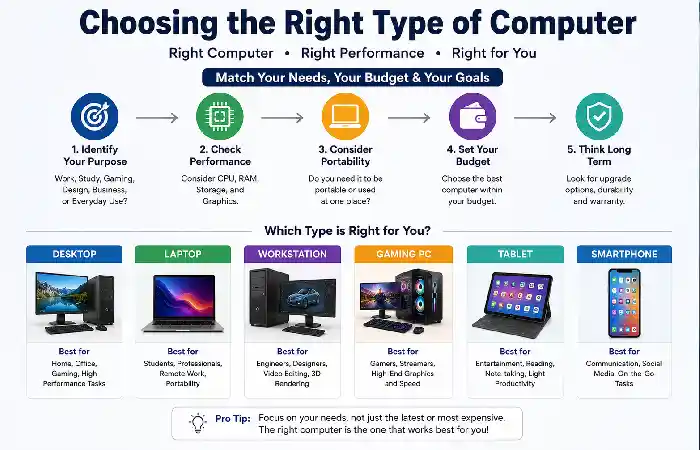
What computer you buy really depends on what you want to use it for. Don‘t go out and buy the most expensive computer just because it is the best. Think about what you‘re going to use it for, what the best choice is for your price range and what it will need to be upgraded for in the future.
Best Computer by User Type
| User | Recommended Computer | Why |
| Student | Laptop | Portable for classes and assignments |
| Office Worker | Desktop or Laptop | Productivity and multitasking |
| Programmer | Laptop or Workstation | Efficient software development |
| Graphic Designer | Workstation | Powerful graphics performance |
| Video Editor | High-End Workstation | Fast rendering and editing |
| Gamer | Gaming PC | High-performance graphics |
| Business Owner | Desktop or Server | Reliable business operations |
| Traveler | Ultrabook Laptop | Lightweight and portable |
| Home User | Desktop or All-in-One | Everyday tasks and entertainment |
Factors to Consider Before Buying
Before choosing a computer, evaluate the following:
- Purpose: Work, study, gaming, or creative tasks.
- Processor (CPU): Determines overall speed and performance.
- Memory (RAM): More RAM improves multitasking.
- Storage: SSDs provide faster performance than HDDs.
- Graphics (GPU): Essential for gaming, design, and video editing.
- Display: Consider size, resolution, and color accuracy.
- Battery Life: Important for portable devices.
- Upgradeability: Especially valuable for desktop computers.
- Warranty and Support: Look for reliable after-sales service.
- Budget: Balance performance with affordability.
Advantages and Limitations of Different Computer Types
| Computer Type | Advantages | Limitations |
| Desktop | High performance, easy upgrades | Not portable |
| Laptop | Portable, battery-powered | Limited upgrades |
| Tablet | Lightweight, touchscreen | Lower performance for demanding tasks |
| Smartphone | Highly portable, versatile | Small display |
| Workstation | Professional-grade performance | Expensive |
| Gaming PC | Excellent graphics and speed | Higher power consumption |
| Server | Reliable, scalable | Requires technical management |
| Embedded System | Efficient and reliable | Limited functionality |
Future of Computer Technology
The world of computing is changing rapidly. A few technologies lead the way in defining the next generation of computers.
Artificial Intelligence (AI)
AI enabled computers can. optimize and speed processes eliminate human error, automate mundane or repetitive task manage security better provide useful intelligent assistant.
Quantum Computing
A quantum computer is a use of the theory of quantum mechanics to perform calculations more quickly than a normal, classical computer. They are still in development but have major implications for possibilities such as cryptography, drug discovery and research.
Edge Computing
Edge computing provides computing capability at the locations where data is collected and data analysis takes place, thereby reducing the latency in data processing and transmission.
Green Computing
More and more, manufacturers are providing energy saving hardware and components, utilizing recyclable materials and adopting manufacturing procedures that have no impacts on the environment.
AI PCs
Artificial Intelligence (AI) PCs employ special neural processing units (NPUs) to speed up AI processing from instant language translation and image improvements, to productivity improvements.
Rapid advances in AI, quantum computing, and edge computing are shaping the future of computers and emerging technologies.
Comparison of Modern Computer Technologies
| Technology | Primary Benefit | Typical Use Cases |
| AI Computing | Intelligent automation | Productivity, content creation |
| Quantum Computing | Extreme computational power | Scientific research |
| Cloud Computing | Scalable infrastructure | Business applications |
| Edge Computing | Low latency | IoT, autonomous systems |
| Green Computing | Sustainability | Energy-efficient devices |
Frequently Asked Questions (FAQs)
- What are the main types of computers?
Major types are supercomputers, mainframes, servers, workstations, PC‘s (personal computers), notebooks, tablets, smart phones and embedded systems.
- Which type of computer is best for students?
A laptop is by far the best choice as it is portable, can do what I need and has good enough battery life for the time I spend doing work and studying.
- What is the difference between a desktop and a laptop?
Desktops generally have higher performance and greater upgrade options than laptops.
- What is a workstation?
A workstation is a form of a computer optimized for professional use, , such as 3D animation, architecture and engineering.
- What is a server?
A server is a computer that “serves” files, services or programs to other computers on a network.
- What is cloud computing?
The provision of computer services including storage and applications remotely over the internet rather than locally with a computer‘s own hardware.
- Are smartphones considered computers?
Yes. Because they have processors, memory, storage, operating systems and software applications, smartphones are essentially just a computer.
- Which computer is best for gaming?
Any gaming PC with a high-end CPU, dedicated GPU, enough RAM and quick SSD storage would be ideal.
- What is an embedded computer?
An embedded computer can be built into another device for carrying out a particular task (e.g. automation of a washing machine, the electronic control system in a vehicle).
- What is the future of computers?
Looking ahead, future computers will be smarter, energy-efficient, AI-enabled and frame the best use of quantum and edge computerance.
Conclusion
Knowing about the various types of computers available helps you with making some of those technology-related decisions in 2026. You may find a need for the large capacity of a super computer or the ability to carry that new phone in your pocket.
Kashifa Jafar is a technology writer and contributor at FutureTechExpert with 4+ years of experience in technology writing and content creation.
Read Full Bio of Author →Sameena reviews selected health, wellness, technology, and digital content for clarity, factual presentation, and reader usefulness.
Read Full Bio of Reviewer →