
 Kashifa Jafar
Technology Writer & Contributor
Kashifa Jafar is a technology writer and contributor at FutureTechExpert with 4+ years of experience in technology writing and content creation.
Read Full Bio of Author →
Kashifa Jafar
Technology Writer & Contributor
Kashifa Jafar is a technology writer and contributor at FutureTechExpert with 4+ years of experience in technology writing and content creation.
Read Full Bio of Author →
 Sameena Begum
Health, Technology & Digital Content Reviewer
Sameena reviews selected health, wellness, technology, and digital content for clarity, factual presentation, and reader usefulness.
Read Full Bio of Reviewer →
Sameena Begum
Health, Technology & Digital Content Reviewer
Sameena reviews selected health, wellness, technology, and digital content for clarity, factual presentation, and reader usefulness.
Read Full Bio of Reviewer →
Cloud Data Backup and Disaster Recovery are two very crucial elements of cloud security in the modern world. Given the security needs of protecting corporate applications or personal files, data backups and disaster recovery mechanisms are crucial in combating cyberattacks, accidental deletions, hardware failure and downtime, to state few.
Backup alone is no longer sufficient as we progress through 2026, as more and more workloads are being migrated to the cloud. Company specific cloud backup combined with disaster recovery enables rapid restoration of applications, databases, and services following a disaster.
A reliable backup strategy is only one component of a complete cloud data security framework that protects sensitive business information.
In simple words this guide describes backup strategies, disaster recovery planning, RTO, RPO, testing strategies, best practices etc.
 This article is part of
Security Resources
Table of Contents
Why Backup Matters
In our cloud-first world, data is among the most valuable assets for both businesses and individuals. From customer data, financials, application data to important documents, data loss can result in business interruption, a financial hit and damage to your reputation. Having a robust cloud backup strategy is the way to go.
Key Reasons Cloud Backup Is Important
- Adds an extra layer of Security: Accidental deletion, hardware failure, software bugs and malicious software. All pose a threat to the safety of your data. Backing up your data to the cloud is vital!
- Reduces Downtime: A dependable back up system can help restore files, databases and applications more quickly by reducing business downtime.
- Helps with Disaster Recovery: Disasters, power failures, and cloud failure may impact an entire system, but remote cloud backups enable the restoration of data when the system cannot access its local environment.
- Enhances Business Continuity: Consistent backups enable organizations to provide uninterrupted service to customers following unforeseen events, minimizing the cost of downtime.
Before storing backups in the cloud, enable cloud data encryption to ensure your files remain protected from unauthorized access.
Backup Strategies
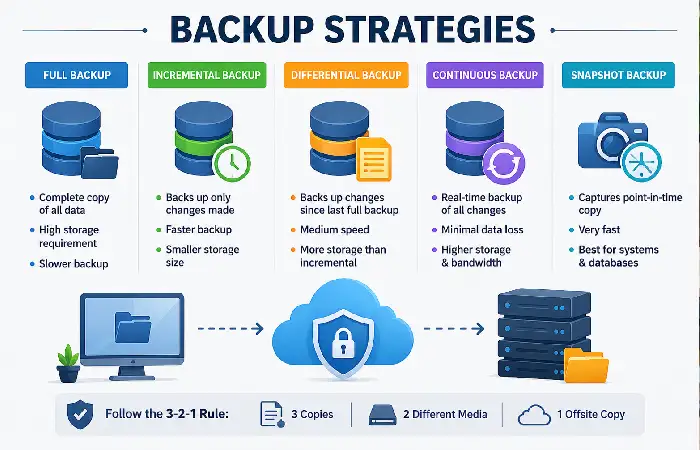
Selecting the appropriate backup method is critical for the protection and subsequent quickly recovery of cloud data following data loss or failure. The best backup method for your organization will depend on the size of the organization, the amount of data stored and the Recovery Time Objectives. In 2026 most organizations are using a combination of backup methods for higher resiliency.
Full Backup
A full backup makes a copy of everything if it‘s selected for backup. So, every time you run the full backup it makes a complete copy of all your files, applications and databases.
Advantages
- Simplest backup and recovery process
- Complete copy of all data
- Faster restoration during emergencies
Disadvantages
- Requires the most storage space
- Longer backup windows
- Higher bandwidth consumption
Best For: Small businesses, critical servers, and periodic weekly or monthly backups.
Incremental Backup
Incremental backup saves the files that has been modified the last (Create, Modify and Delete) from the last complete or incremental backup.
Advantages
- Very fast backup process
- Uses minimal storage space
- Reduces network bandwidth usage
Disadvantages
- Recovery can take longer because multiple backup files must be restored in sequence.
- Slightly more complex backup management
Best For: Organizations performing daily or hourly backups.
Differential Backup
Differential backup.txt A differential backup backs up only updated files. A differential backup backs up only the updated files since last full backup.
Advantages
- Faster recovery than incremental backups
- Requires fewer backup files during restoration
- Good balance between speed and storage
Disadvantages
- Consumes more storage than incremental backups
- Backup size increases until the next full backup
Best For: Medium-sized businesses seeking a balance between recovery speed and storage efficiency.
Continuous Data Protection (CDP)
Continuous Data Protection (CDP) provides real time updating backup. This means CDP program will routinely copy every change to ensure the backup is current.
Advantages
- Minimal data loss
- Very low Recovery Point Objective (RPO)
- Ideal for mission-critical applications
Disadvantages
- Higher storage and infrastructure costs
- More complex to implement
Best For: Financial institutions, healthcare organizations, and e-commerce platforms.
Snapshot Backups
A snapshot defines what state a virtual machine, storage volume or database was in at one point in time.
Advantages
- Extremely fast creation
- Quick recovery
- Excellent for cloud-native workloads
Disadvantages
- Not a replacement for long-term backups
- May rely on the underlying storage platform
Best For: Virtual machines, cloud databases, and development environments.
Following proven cloud security best practices helps reduce the risk of backup failures and accidental data exposure.
Disaster Recovery Planning
A Disaster Recovery Plan (DRP) is a formal plan to help a business recover its IT systems, applications and data following a disaster such as a malicious cyberattack, server hardware failure, cloud outage or natural disaster. You may have copies of your data saved in the cloud, but having a disaster recovery plan will help you return your business to normal operation straight away.
Disaster recovery is now a fundamental element of every cloud security approach. Organizations are adopting automated recovery, multi-region cloud deployment and frequent testing in order to achieve higher business continuity through lowered service interruption.
Why Disaster Recovery Planning Is Important
Without a disaster recovery plan, even a short outage can result in:
- Extended business downtime
- Loss of critical data
- Reduced employee productivity
- Financial losses due to interrupted operations
- Regulatory compliance issues
- Damage to customer trust and brand reputation
A sound DR plan reduces the chance of such risks by clearly defining the recovery plan and who is responsible for what until an incident occurs.
Organizations adopting Zero Trust cloud security can further strengthen backup environments by continuously verifying users and devices.
Recovery Time Objectives (RTO)
The Recovery Time Objective (RTO) is the maximum length of time an organization can have abusiness application, system or service unavailable after a disruption or disaster. Simply put, RTO is a time period that responds to the question:
“How quickly must we restore operations?”
A well defined RTO enables the prioritization of recovery and its efficient recovery, reducing down time and ensures business continuity. The lower the RTO, higher would be backup & disaster recovery infrastructure.
Why RTO Is Important
Dead time translates into revenue loss, productivity downturns, and customer dissatisfaction so every minute saved is money earned. With a well-defined RTO, your company can:
- Minimize operational downtime
- Improve business continuity
- Prioritize recovery of critical systems
- Meet Service Level Agreements (SLAs)
- Reduce financial and reputational damage
- Support compliance with industry regulations
How RTO Works
Now assume the online shop is run by a web business. A server crashed at 10 am.
- If the business has an RTO of 1 hour, all critical systems should be fully restored by 11:00 AM.
- If recovery takes longer than the defined RTO, the business may face significant operational and financial consequences.
Pair your disaster recovery plan with cloud data loss prevention solutions to stop sensitive information from being leaked or deleted.
Recovery Point Objectives (RPO)
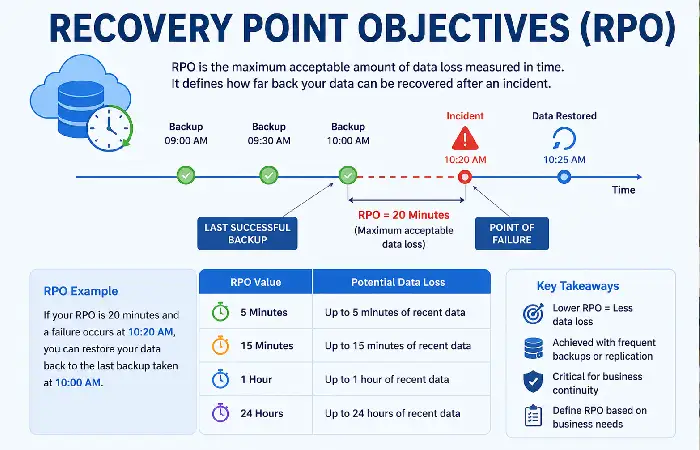
Recovery Point objective (RPO): Identifies the amount of information that can be lost for the business after such as a system failure, disaster or cyber attack. The question that identifies the time in which data is recoverable.
“How much data can we afford to lose?”
RPO is measured in minutes/hours. The smaller the RPO the more frequent backups need to be taken, or the more data that needs to be replicated or written to disk. A larger RPO allows for a larger window between backups.
Why RPO Is Important
Data is a critical business asset, and even a small amount of data loss can disrupt operations. Defining an appropriate RPO helps organizations:
- Minimize data loss during unexpected incidents
- Improve business continuity
- Meet regulatory and compliance requirements
- Protect customer and financial information
- Support faster disaster recovery
- Reduce operational and financial risks
How RPO Works
Assuming that your business is taking cloud backups and they‘ve been doing so every half an hour.
- A server crashes at 3:00 PM.
- The last successful backup was completed at 2:30 PM.
In this case:
- RPO = 30 minutes
- The organization may lose up to 30 minutes of newly created or modified data.
If losing 30 mins of data is unacceptable to your business then you will require more frequent backups or CDP.
Testing Recovery Plans
Formulating a disaster recovery plan is only the beginning testing is what proves that the DR plan actually functions when needed. After all, a DR plan that has not been tested may have obsolete procedures, failed backup jobs, or incorrect configurations which could hinder recovery.
According to the offers of cases of use, testing of plans of disaster recovery must be done at minimum twice by year (by the norms of cybersecurity and by the providers of cloud), but the companies that count with more mission critical systems execute recovery tests to the minimum of once a week or quarterly.
Why Testing Recovery Plans Is Important
Regular recovery testing helps organizations:
- Verify that backups can be successfully restored.
- Ensure applications and databases recover within the defined Recovery Time Objective (RTO).
- Confirm that data loss stays within the acceptable Recovery Point Objective (RPO).
- Identify configuration errors before they become critical issues.
- Validate employee roles and communication procedures.
- Meet industry compliance and audit requirements.
- Improve overall business continuity and disaster preparedness.
Modern cloud security tools often include automated backup monitoring, threat detection, and recovery management features.
FAQ
How does cloud backup differ from disaster recovery?
The data is protected by cloud backup and undone, the whole IT infrastructure and the business full operation will be recovered after the service life out.
What is this 3-2-1 backup policy?
It advises having three copies of data on two different media, one copy offsite/cloud.
What is a “good” RTO?
It really depends on the business. Business critical applications usually need an RTO of less than 30 minutes while less business-critical applications may be acceptable with several hours.
What is RPO?
Recovery Point Objective describes the amount of data a company can afford to lose in the aftermath of an incident.
How typically does a disaster recovery plan require testing?
The majority of organization should test their recovery plans twice a year, while the mission critical environment should be tested quarterly.
Conclusion
In 2026, Cloud Data Backup and Disaster Recovery will be critical to the success of a business. Defining it is not enough, hardening it is also a necessity. When implementing Backup and Recovery strategies, organizations should follow time-protected policies and apply best practices, like the 3-2-1 backup rule.
The definition of aggressive yet realistic RTO and RPO targets, the use of backups encryption, and the testing of recovery plans and procedures often. This way, the amount of downtime and the impact of a ransomware attack will be greatly diminished. In addition, the cloud environment will be prepared for any kind of disaster.
Kashifa Jafar is a technology writer and contributor at FutureTechExpert with 4+ years of experience in technology writing and content creation.
Read Full Bio of Author →Sameena reviews selected health, wellness, technology, and digital content for clarity, factual presentation, and reader usefulness.
Read Full Bio of Reviewer →