
 Kashifa Jafar
Technology Writer & Contributor
Kashifa Jafar is a technology writer and contributor at FutureTechExpert with 4+ years of experience in technology writing and content creation.
Read Full Bio of Author →
Kashifa Jafar
Technology Writer & Contributor
Kashifa Jafar is a technology writer and contributor at FutureTechExpert with 4+ years of experience in technology writing and content creation.
Read Full Bio of Author →
 Sameena Begum
Health, Technology & Digital Content Reviewer
Sameena reviews selected health, wellness, technology, and digital content for clarity, factual presentation, and reader usefulness.
Read Full Bio of Reviewer →
Sameena Begum
Health, Technology & Digital Content Reviewer
Sameena reviews selected health, wellness, technology, and digital content for clarity, factual presentation, and reader usefulness.
Read Full Bio of Reviewer →
Home internet has become mandatory for our daily lives, with remote working, online learning, 4k streaming, cloud gaming, skype calls and smart home devices all running on our home networks. In 2026, the average home will have dozens of internet enabled devices connected at the same time, making it more important than ever to have a fast, stable and secure connection.
No matter if you are surfing the web, video conferencing, uploading and storing data in the cloud, or running a smart home, quality home internet makes a difference. Fortunately, home internet services have improved extensively in recent years.
Fiber-optic networks are still increasing, 5G home internet is a feasible option for many regions, Wi-Fi 7 is providing quicker wireless speeds, and contemporary mesh networking systems can help you quite easily do away with dead areas in your house. Still, selecting an appropriate internet plan and hardware can sometimes be quite baffling, especially with the range of types of connections, providers, speeds and prices.
 This article is part of
Internet Resources
Table of Contents
What Is Home Internet?
Home internet refers to broadband internet that is used for providing internet access at residences. Unlike mobile internet which is depended on mobile phone signals, home internet is used through various dedicated transmission mediums. The mediums may include, fiber-optic cables, coaxial cables, telephone lines, satellites or fixed wireless connections.
After setup is complete, internet access is sent throughout your home using a combination of a modem and a Wi-Fi router (or Wi-Fi gateway). The following devices have the ability to access the internet at the same time and in one place: laptop, cellphone, tablet, smart TV, game console, security cameras, IoT devices.
Today people‘s home internet needs are more than just surfing the web. Today‘s households rely on broadband for entertainment, communication, work, schooling, home automation, online banking, health consultations and cloud computing. With the ever growing number of connected devices by each household, selecting the right package has become an important task for each.
When choosing a reliable home internet connection, it’s important to understand the differences between fiber, cable, and DSL internet options so you can compare speed, latency, and overall performance for streaming, gaming, and remote work.
How Home Internet Works
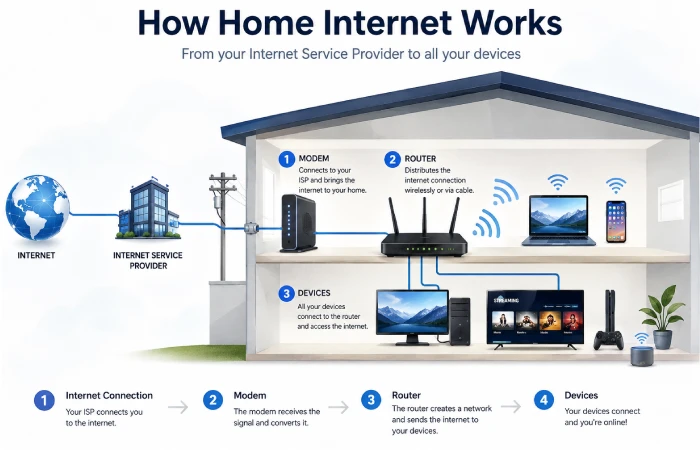
While surfing on the internet seems to happen so quickly, there are lots of technologies running under the hood that bring information from different websites and online services to your computer or mobile device. Learn the basics of how home internet operates so you could better troubleshoot your issues, select the appropriate hardware and fine-tune your network.
Home internet essentially means the link between your home networks and your internet service provider (ISP). When you browse a website, watch a video or whack out an email it is being sent via your modem, router, your ISPs infrastructure and across the internet back to you in just a matter of milliseconds.
How Data Travels Across the Internet
Every online activity follows a similar process:
- You enter a website address or open an app.
- Your device sends a request to your router.
- The router forwards the request to your modem.
- The modem communicates with your ISP.
- The ISP routes the request through the internet.
- The destination server processes the request.
- The requested data travels back through the same path to your device.
This whole process usually only takes a fraction of a second, depending on your internet connection speed and network latency.
From the ISP to Your Home
How internet actually arrives at your use is determined by your connection type (fiber, cable, DSL, satellite, fixed wireless, 5G). The technology itself is similar. The process is:
- The ISP’s Core Network
All of the Internet Service Providers (ISPs) have huge data storage facilities and multiple network centers that link up to the worldwide internet using parallel fiber-optic backbone links. - Neighborhood Distribution
The ISP gets to the neighborhoods through underground fiber cables, coaxial, through the telephone lines, or by the use of transmission equipment. - Connection to Your Home
Your home‘s internet connection is delivered by a cable or wireless receiver, which varies according to the type of service. - Modem or Gateway
The modem will convert the data information which is the World Wide Web, and it‘ll turn into the type of internet that your home can use. - Router
Your router is responsible for setting up your local network and providing internet access for both wired and wireless products. - Connected Devices
Smartphones, laptops, tablets, smart TV, gaming console, printers or other devices such as smart home devices connect and use internet at the same time along with the router.
Types of Home Internet Connections
Amongst many at home, selecting the appropriate connection type is undoubtedly the most vital decision for setting up a home internet. The available options provide various benefits in terms of throughputs, availability and costs.
The six most common home internet technologies in 2026 are:
- Fiber Internet
- Cable Internet
- DSL Internet
- Satellite Internet
- Fixed Wireless Internet
- 5G Home Internet
Let’s explore each one.
Fiber Internet
Fiber internet transmits data as pulses of light through strands of glass or plastic.
As light moves so quickly through minimal obstructions the fiber has the highest bandwidth and the lowest latency that a residence user can attain.
Advantages
- Extremely fast download speeds
- Excellent upload speeds
- Very low latency
- Highly reliable
- Ideal for multiple devices
- Perfect for 4K streaming and gaming
- Supports future internet demands
Disadvantages
- Limited availability in some rural areas
- Installation may take longer
- Slightly higher monthly cost in some regions
Best For
- Large families
- Remote workers
- Gamers
- Content creators
- Businesses operating from home
The speed varies from provider to provider but the usual rate is from 300 Mbps up to 10 Gbps.
Cable Internet
Use the subject ‘Cable Internet’ ‘The same coaxial cable that was (originally) intended for Cable TV’.
Still one of the most broadly accessible providers of broadband.
Advantages
- Widely available
- High download speeds
- Affordable plans
- Easy installation
- Good for streaming
Disadvantages
- Upload speeds lower than fiber
- Performance may slow during peak hours
- Shared neighborhood bandwidth
Best For
- Families
- Streaming
- General internet use
Typical speeds:
100 Mbps to 2 Gbps
DSL Internet
DSL (Digital Subscriber Line) The different kind of system which provides internet via existing telephone lines.
While it is not as fast as cable or fiber, DSL technology is still used in much of the rural and suburbia areas.
Advantages
- Widely available
- Lower cost
- Stable connection
- Doesn’t require cable infrastructure
Disadvantages
- Slower speeds
- Performance decreases with distance
- Limited upload bandwidth
Best For
- Small households
- Web browsing
- Basic streaming
Typical speeds:
10–100 Mbps
Satellite Internet
Instead of being wired to a cable, internet from satellites use those orbiting the earth.
Especially where there is no broadband connection available, so where broadband is not available (for example in remote locations).
Advantages
- Available almost everywhere
- Excellent rural coverage
- Easy installation
Disadvantages
- Higher latency
- Weather can affect performance
- More expensive equipment
- Data limits with some providers
Best For
- Rural homes
- Farms
- Remote cabins
Typical speeds:
50–250 Mbps
Fixed Wireless Internet
Fixed wireless depends on several existing communication towers around the area; hence, no underground cables are required.
A receiver on your property often supplied to you communicates directly with the tower of the provider.
Advantages
- Fast installation
- No underground cables
- Good rural option
- Reliable where fiber isn’t available
Disadvantages
- Requires line-of-sight in some locations
- Weather may affect performance
- Availability varies
Typical speeds:
100–500 Mbps
5G Home Internet
5G Home Internet is a new type of broadband service that runs over cellular 5 G networks. It provides service via a dedicated gateway that you keep inside your home.
Coverage has grown quickly and is becoming a viable option in most urban and suburban locations.
Advantages
- Quick self-installation
- Competitive pricing
- Good speeds
- No drilling or cable installation
- Flexible service options
Disadvantages
- Performance depends on tower proximity
- Speeds may fluctuate during network congestion
- Coverage not yet universal
Typical speeds:
100 Mbps–1 Gbps
How Much Internet Speed Do You Need?
Determining the appropriate internet speed is arguably the most important factor when purchasing a home internet plan. Although the majority of the ISPs sell boastfully high gigabit speeds, not every household can benefit from it. The right speed should correspond to the number of users, the number of devices connected and what is being used over the internet at the same time.
For instance, a single individual using the web mostly and checking emails consumes much less bandwidth than a family that is running multiple four K videos, streaming online meetings, playing online games and operating internet-connected home appliances simultaneously.
Use the definitions below to become familiar with the terminology that will allow you to better gauge the value of your internet connection in a plan upgrade.
Recommended Internet Speeds by Activity
Various levels of bandwidth are needed for different online activities.
| Activity | Recommended Speed | Resource |
| Email and Web Browsing | 10 Mbps | https://www.fcc.gov |
| Social Media | 10–25 Mbps | https://www.fcc.gov |
| HD Video Streaming | 25 Mbps | https://help.netflix.com/en/node/306 |
| 4K Video Streaming | 50 Mbps | https://help.netflix.com/en/node/306 |
| Online Gaming | 100 Mbps+ | https://support.xbox.com |
| Video Conferencing | 25–50 Mbps | https://support.microsoft.com |
| Remote Work | 100 Mbps | https://support.microsoft.com |
| Smart Home Devices | 100–300 Mbps | https://www.cisco.com |
| Large File Downloads | 300 Mbps+ | https://www.fcc.gov |
How to Test Your Internet Speed
Testing your internet speed will clarify if you are getting what you pay for from your ISP.
When running a speed test:
- Connect using Ethernet if possible.
- Close unnecessary applications.
- Pause downloads and updates.
- Test at different times of day.
- Compare results over several days.
Checking the wired and Wi-Fi connections may also assist in determining if your internet is the problem or your wireless network.
Choosing the Best Home Internet Plan
If you are having problem selecting a plan, do not just go for the fastest speed. Check out the price, reliability, equipment, help line and how your family uses the web.
Consider Your Internet Usage
Ask yourself:
- How many people use the internet?
- How many devices are connected?
- Do you work remotely?
- Do you stream 4K videos?
- Are there online gamers in the household?
- Do you upload large files?
These will assist in assessing the best strategy.
Compare Download and Upload Speeds
As an example, some providers really talk up their download speeds but their upload speeds are a lot slower.
If you frequently:
- Attend video meetings
- Upload videos
- Use cloud storage
- Stream live content
Select a plan that has good upload speeds. The best option for this would be a fiber plan.
Check for Data Caps
Some internet providers impose monthly data limits.
After exceeding the limit, they may:
- Reduce speeds
- Charge additional fees
- Restrict certain services
Small business or heavy internet user (more than 10 calls per day or more than 150 text messages per day) accounts tend to be for the unlimited data usage plans.
Contract vs No-Contract Plans
Contract Plans
Advantages
- Lower monthly pricing
- Promotional discounts
- Equipment bundles
Disadvantages
- Early termination fees
- Limited flexibility
No-Contract Plans
Advantages
- Greater flexibility
- Easy cancellation
- No long-term commitment
Disadvantages
- Slightly higher monthly costs
Consider Customer Support
When internet is down it is even more important to offer a reliable customer service.
Look for providers offering:
- 24/7 technical support
- Online troubleshooting
- Mobile apps
- Fast repair response times
- Clear billing policies
Compare Internet Providers
Rather than focusing only on price, compare:
- Maximum speeds
- Upload performance
- Reliability
- Coverage
- Equipment fees
- Installation costs
- Customer satisfaction
- Security features
Home Internet Equipment Explained
Your internet service is only as fast as your equipment supports. Even with a high-speed account your ‘modem’ and other equipment may not support the speed.
Learn about each of the other technologies so you can evaluate the benefits to your home network. With your understanding you will be able to choose the best solution and design a home network that is faster and more reliable.
What Is a Modem?
A modem links your home directly to your Internet Service Provider.
Its primary functions include:
- Receiving internet signals
- Converting signals into digital data
- Sending requests back to the ISP
- Maintaining a stable internet connection
Most providers include a modem with your internet package, either that or they give you the option of buying your own compatible one.
What Is a Router?
The home router, takes your internet connection and shares it out among your computers and other devices in your home.
Modern routers provide:
- Wi-Fi connectivity
- Ethernet ports
- Firewall protection
- Device management
- Guest networks
- Parental controls
- Quality of Service (QoS)
Most of the time it‘s more beneficial to buy a better router than increase your connection speed.
What Is a Gateway?
A Gateway integrates the functions of a modem and a router into one device.
Advantages include:
- Simpler installation
- Fewer cables
- Lower equipment cost
- Easier maintenance
This is not the situation with separate modem and router combinations.
Mesh Wi-Fi Systems
Mesh Wi-Fi are a series of devices working together to provide a more complete wireless coverage of your house.
They’re ideal for:
- Large homes
- Multi-story houses
- Homes with thick walls
- Smart homes
- Large families
Wi-Fi Extenders and Mesh Systems. While extenders form a separate network, mesh systems form one network.Therefore, devices can transfer seamlessly between nodes, unlike extenders.
Wi-Fi Extenders
A Wi-Fi extender. For extension of a wireless signal.
Best suited for:
- Small dead zones
- Apartments
- Budget-friendly upgrades
In large homes, mesh networks usually outperform other types of home networking systems.
For larger homes, understanding mesh Wi Fi vs. range extenders can help you decide whether a whole-home mesh system or a traditional extender is the better solution for eliminating dead spots.
Ethernet Switches
If your router doesn’t have enough Ethernet ports, an Ethernet switch allows you to connect additional wired devices such as:
- Desktop PCs
- Gaming consoles
- Smart TVs
- Network Attached Storage (NAS)
- Printers
Improving Wi-Fi Performance
Whether you subscribe to a fast home internet plan or not, if your wi-fi isn‘t performing well, you might encounter delays, frozen videos, slow downloads, or signals that just don‘t reach to some parts of your house. Luckily, many wi-fi problems are easily fixed.
Here are a few tips on how to enhance your wireless network and use your home internet connection efficiently.
Place Your Router in a Central Location
The location of the router greatly affects the coverage of the Wi-Fi.
For the best signal:
- Position the router near the center of your home.
- Keep it elevated on a shelf or table.
- Avoid placing it inside cabinets or behind furniture.
- Keep it away from thick concrete walls and metal objects.
- Maintain distance from microwave ovens, cordless phones, and baby monitors, which can interfere with wireless signals.
Place a router in the center of your home. If your router is in the middle of your house, then it will give greater coverage than if it were in the far end of the house.
Upgrading your network starts with selecting the right hardware, and our guide to the best Wi Fi routers for home internet explains which features matter most for speed, device capacity, and future-proof connectivity.
Upgrade to a Modern Wi-Fi Standard
Older routers might lack the necessary support for current high-speed internet plans.
If you’re using a router that’s several years old, upgrading to a Wi-Fi 6, Wi-Fi 6E, or Wi-Fi 7 model can provide:
- Faster wireless speeds
- Better performance with multiple devices
- Improved security
- Lower latency
- Greater range and coverage
Recent Wi-Fi standards are also more helpful for the multiple devices in homes.
Use a Mesh Wi-Fi System
Conventional routers have difficulty covering larger homes or multi-story dwellings.
A mesh Wi-Fi system consists of several units distributed around your house to provide one unified wireless network.
Benefits include:
- Elimination of dead zones
- Better coverage across multiple floors
- Automatic connection to the strongest node
- Improved performance for smart home devices
- Easy expansion by adding additional nodes
The Mesh systems are best suited to properties of over 2,000ft 2 or 185 m 2.
If you’re experiencing slow speeds or dead zones, these Wi Fi signal improvement tips can help you optimize router placement, reduce interference, and boost wireless coverage throughout your home.
Connect High-Priority Devices with Ethernet
Although Wi-Fi is very usable, Ethernet wired connections are best for performance.
Consider connecting the following devices directly to your router:
- Gaming consoles
- Desktop computers
- Smart TVs
- Network Attached Storage (NAS)
- Streaming devices
- Home office workstations
Ethernet offers:
- Lower latency
- More stable speeds
- Reduced interference
- Improved reliability
Online gamers should pay close attention to latency, bandwidth, and router settings, so be sure to read our home internet gaming optimization guide for practical ways to reduce lag and improve multiplayer performance.
Change Wi-Fi Channels
In areas where many wireless networks are present, channel contention can degrade performance.
The majority of current routers can automatically switch to the best channel, but if the interference is too high, it may be worth switching channels manually.
The 5 GHz and the 6 GHz frequency ranges (where frequency supports) can also help reduce congestion especially when the 2.4 GHz frequency range is very crowded.
Enable Quality of Service (QoS)
The quality of service (QoS) is a router feature which give priority to important Internet traffic.
For example, QoS can prioritize:
- Video conferencing
- Online gaming
- Voice calls
- Streaming services
- Remote work applications
This ensures continued smooth operation when several computers use the network concurrently.
Keep Router Firmware Updated
Router manufacturers regularly release firmware updates that improve:
- Security
- Stability
- Performance
- Compatibility
- Bug fixes
Automatic firmware update is enabled if available, or periodically check for updates through your router‘s management interface.
Reduce Network Congestion
Having too many active devices can bog down your bandwidth.
To improve performance:
- Disconnect unused devices.
- Schedule large downloads during off-peak hours.
- Limit background cloud backups.
- Pause unnecessary software updates.
- Restart your router occasionally.
Common Home Internet Problems and Solutions
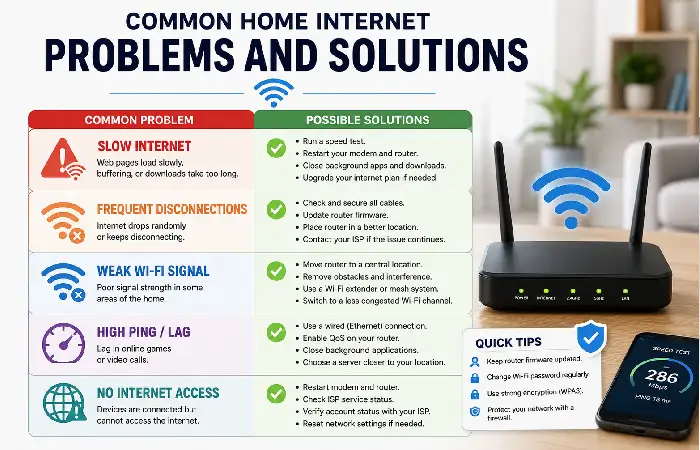
Home internet connections can sometimes go bad. Knowing what to look for if your connection goes bad can reduce the time to getting it back online.
Protecting your connected devices is just as important as achieving fast speeds, and this home network security guide covers password security, router settings, firmware updates, and other essential steps to keep your Wi Fi network safe.
Slow Internet Speeds
Possible Causes
- Network congestion
- Outdated router
- ISP issues
- Background downloads
- Too many connected devices
Solutions
- Restart your modem and router.
- Run an internet speed test.
- Disconnect unused devices.
- Upgrade your router.
- Contact your ISP if speeds remain consistently below your plan.
Weak Wi-Fi Signal
Possible Causes
- Poor router placement
- Thick walls
- Large home
- Signal interference
Solutions
- Move the router to a central location.
- Upgrade to a mesh Wi-Fi system.
- Use Wi-Fi extenders for small dead zones.
- Switch to the 5 GHz or 6 GHz band where available.
Frequent Disconnections
Possible Causes
- ISP outages
- Loose cables
- Router overheating
- Firmware issues
Solutions
- Check all cable connections.
- Restart networking equipment.
- Update router firmware.
- Verify whether your ISP is experiencing an outage.
Buffering While Streaming
Possible Causes
- Slow internet speeds
- High network traffic
- Congested Wi-Fi
- Streaming during peak usage times
Solutions
- Lower the streaming resolution temporarily.
- Pause other downloads.
- Connect your streaming device using Ethernet.
- Upgrade your internet plan if necessary.
High Ping During Gaming
Possible Causes
- Congested Wi-Fi
- Background downloads
- Long-distance servers
- ISP routing
Solutions
- Use a wired Ethernet connection.
- Close background applications.
- Choose game servers closer to your location.
- Enable QoS for gaming devices.
DNS Errors
Possible Causes
- ISP DNS issues
- Router configuration problems
Solutions
- Restart your router.
- Try a different DNS provider.
- Flush your DNS cache.
- Contact your ISP if the issue persists.
Home Internet Security Best Practices
Protect your home network Your home network accounts for storing passwords, financial details, work information, and personal details. Protecting your home internet helps to act against malware, phishing attacks, invasion of privacy and cyberattacks.
Use WPA3 Encryption
WPA3 is the newest of Wi-Fi security standards and provides significantly improved encryption from prior standards.
Use the WPA3 option, if available, to secure your router.
Create a Strong Wi-Fi Password
Use a password that includes:
- Uppercase letters
- Lowercase letters
- Numbers
- Special characters
Do not include names, birthdays or simple-to-remember information.
Change Default Router Credentials
Many routers arrive with pre-set administrator user names and passwords.
Changing these allows an immediate reduction in risk.
Keep Firmware Updated
The firmware on many of these devices is in fact upgraded, bringing it up to date with new vulnerabilities that have been discovered.
Automate updates whenever feasible.
Enable a Guest Network
Create a console fine between the guest network and your main network.
Guest networks are useful for:
- Visitors
- Temporary devices
- Smart home gadgets that don’t require access to personal files
Use a VPN
A VPN enables you to encrypt your Internet traffic, and protect your personal privacy should you need to access sensitive data.
Benefits include:
- Enhanced online privacy
- Encrypted connections
- Protection on public Wi-Fi
- Reduced tracking by third parties
Enable Your Router’s Firewall
All modern computer routers (which are the primary chokepoints for internet access in the world today) have a built-in firewall to sort out unwanted incoming packets.
Check to make sure this is turned on, unless your ISP or network administrator states otherwise.
Secure Smart Home Devices
Protection should be put in place for internet-enabled devices.
Recommendations:
- Change default passwords.
- Keep software updated.
- Disable unused features.
- Use unique passwords for each device.
Recognize Phishing Attempts
Cybercriminals frequently employ fake websites or emails to trick users into revealing their login details.
Always:
- Verify website addresses.
- Avoid clicking suspicious links.
- Enable multi-factor authentication where available.
Frequently Asked Questions
Which home internet connection is fastest?
Fiber-optic internet usually offers the highest speeds, as several providers now offer plans from 1 Gbps to 10 Gbps, along with low latency and symmetrical upload and download speeds.
How fast is fast enough for home use? How much internet speed do I need for a family of four?
For a family of 4, a link between 300 Mbps and 500 Mbps (depending on the number of devices and concurrent uses) is generally enough.
Is fiber better than cable?
In most conditions yes. Fiber internet provides faster upload speeds, lower latency, more reliable connection, and more effective.
How fast is a good Wi-Fi?
The most suitable downloaded speed for browsing, streaming and video conferencing for the vast majority of households is between 100 Mbps and 300 Mbps.
Will my internet be slower with more devices?
Yes, very much depends on the number of devices supported by the band type, and whether the travelers are suckering the entire bandwidth.
Final Thoughts
A solid internet connection at home is a key element of today‘s connected world. If you‘re working from home, watching movies or TV, going to school online, playing games or monitoring devices in a smart home, choosing the best connection type, speeds and hardware can make the difference.
First, consider what your household will need. This includes the number of people accessing the network, connected devices, and the type of activity each supports. Where applicable fiber internet has the best speed, reliability, and is the most future-proof. If fiber isn’t an option, then cable, 5g home internet, fixed wireless and satellite internet fall into the capable category.
Kashifa Jafar is a technology writer and contributor at FutureTechExpert with 4+ years of experience in technology writing and content creation.
Read Full Bio of Author →Sameena reviews selected health, wellness, technology, and digital content for clarity, factual presentation, and reader usefulness.
Read Full Bio of Reviewer →