
 Kashifa Jafar
Technology Writer & Contributor
Kashifa Jafar is a technology writer and contributor at FutureTechExpert with 4+ years of experience in technology writing and content creation.
Read Full Bio of Author →
Kashifa Jafar
Technology Writer & Contributor
Kashifa Jafar is a technology writer and contributor at FutureTechExpert with 4+ years of experience in technology writing and content creation.
Read Full Bio of Author →
 Sameena Begum
Health, Technology & Digital Content Reviewer
Sameena reviews selected health, wellness, technology, and digital content for clarity, factual presentation, and reader usefulness.
Read Full Bio of Reviewer →
Sameena Begum
Health, Technology & Digital Content Reviewer
Sameena reviews selected health, wellness, technology, and digital content for clarity, factual presentation, and reader usefulness.
Read Full Bio of Reviewer →
Android Applications fuel billions of smartphones, tablets, smart TV‘s, wearables and connected devices around the globe. From social media, online shopping and checking the latest YouTube video to controlling a high-powered business operation, Android Applications are the backbone of modern life. Knowledge about an Android Application‘s behavior can assist users, developers and businesses better use the Android platform.
As industry reports indicate, the Android platform remains the most popular mobile operating system across the world in 2026, and the development of Android applications will be among the most sought after skills by companies and developers.
 This article is part of
Mobile Apps Resources
Table of Contents
What Are Android Applications?
Android apps are pieces of software that are designed to run on an android device. These are often widely referred to as Android apps.
These are installed on smart phones, tablets, smart TV‘s, smart watches, within automobiles, and conveniently available for download from the Google Play Store and other app stores.
Common Examples of Android Applications
| Application Type | Examples | Purpose |
| Social Media Apps | Facebook, Instagram, X | Communication |
| Messaging Apps | WhatsApp, Telegram | Instant messaging |
| Productivity Apps | Google Docs, Microsoft Office | Work and collaboration |
| Entertainment Apps | YouTube, Netflix | Media consumption |
| E-commerce Apps | Amazon, Flipkart | Online shopping |
| Banking Apps | PayPal, Google Pay | Financial services |
Key Benefits
- Easy installation through app stores
- User-friendly interfaces
- Cloud synchronization
- Push notifications
- Offline functionality
- Access to device hardware
Android applications have become a dominant force in the mobile industry, powering billions of devices worldwide. To better understand the broader ecosystem, readers can explore our complete guide to mobile applications covering app types, technologies, and industry trends.
How Android Applications Work
Android applications operate through a combination of software components and system services.
Android App Architecture
- User interacts with the app interface
- App processes requests using business logic
- Android framework manages resources
- Data is retrieved from local storage or cloud servers
- Results are displayed to the user
Core Components
| Component | Function |
| Activities | User interface screens |
| Services | Background processing |
| Broadcast Receivers | Event handling |
| Content Providers | Data sharing |
Today you can enhance your Android applications with API, cloud presence and databases providing real time experience.
The process of building Android apps involves planning, coding, deployment, and maintenance. Businesses and developers can learn more about the mobile app development process used to create successful mobile solutions.
Types of Android Applications
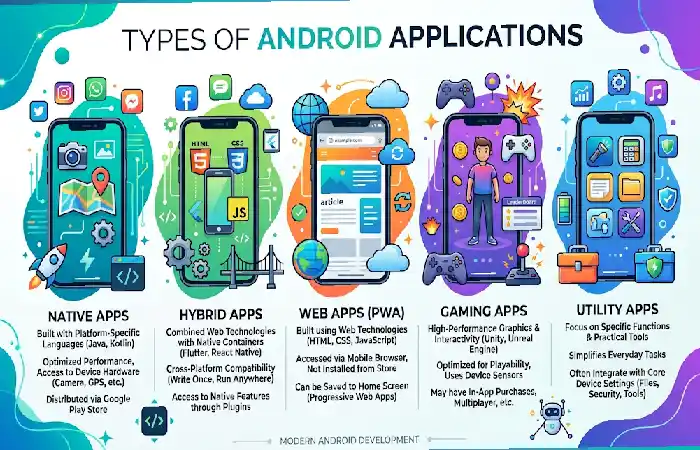
Android applications are divided according to task and development style.
Native Android Apps
It is designed for use with Android platform, either developed with Kotlin or Java.
Advantages:
- Best performance
- Full hardware access
- Better security
- Improved user experience
Web Apps
In the context of applications that are used within mobile browsers.
Advantages:
- Lower development cost
- Easy maintenance
- Cross-platform compatibility
Hybrid Apps
Constructed with platforms such as Flutter and React Native.
Advantages:
- Faster development
- Shared codebase
- Reduced costs
Progressive Web Apps (PWAs)
Apps web apps that provide an app-like experience.
Advantages:
- No installation required
- Lightweight
- Easy updates
A well-designed interface improves usability, engagement, and retention. Following proven mobile app design best practices helps developers create intuitive Android experiences.
Common Android App Features
There are a number of key features which effective Android applications tend to have.
| Feature | Purpose |
| User Authentication | Secure login |
| Push Notifications | User engagement |
| Offline Mode | Improved accessibility |
| Cloud Sync | Data consistency |
| Search Functionality | Better navigation |
| Analytics | Performance tracking |
| Payment Integration | Monetization |
| Security Controls | Data protection |
Essential User Experience Features
- Fast loading speed
- Responsive design
- Intuitive navigation
- Accessibility support
- Dark mode options
Android App Development Basics
Creating an application for android refers to program an application and use the development tools and programming languages for android.
Popular Development Technologies
| Technology | Purpose |
| Kotlin | Official Android language |
| Java | Legacy Android development |
| Android Studio | Development environment |
| Flutter | Cross-platform apps |
| React Native | Hybrid app development |
Development Process
- Requirement gathering
- Wireframing and planning
- UI/UX design
- Development
- Testing
- Deployment
- Maintenance
Knowing the basics of Mobile App Development and Mobile App Design can be very useful information for a company who is thinking about developing an application.
Many businesses choose to launch applications on multiple platforms. Understanding the differences between Android and iOS applications can help organizations select the right development strategy.
Designing Android Applications
Design is essential for app adoption and retention.
Android Design Principles
Material Design by Google helps developers provide a cohesive experience across Android devices.
Design Best Practices
- Keep navigation simple
- Use readable typography
- Maintain visual consistency
- Optimize touch targets
- Design for multiple screen sizes
Design Comparison
| Good Design | Poor Design |
| Clear navigation | Complex menus |
| Fast interactions | Slow response times |
| Consistent layouts | Inconsistent UI |
| Accessibility support | Limited usability |
Testing Android Applications
Testing is the process of verifying that applications work as expected prior to their being released.
Types of Testing
| Testing Type | Purpose |
| Functional Testing | Verify features |
| Performance Testing | Check speed |
| Security Testing | Identify vulnerabilities |
| Compatibility Testing | Test devices |
| Usability Testing | Improve experience |
Common Testing Tools
- Android Emulator
- Firebase Test Lab
- Espresso
- JUnit
- Appium
Troubleshooting Common Issues
| Problem | Solution |
| App crashes | Review logs and debugging reports |
| Slow performance | Optimize code and resources |
| Battery drain | Reduce background activity |
| Network errors | Improve API handling |
| Installation failures | Verify permissions and compatibility |
Publishing Android Applications
Publishing makes the Android application accessible to users on Google Play.
Google Play Publishing Process
- Create Google Play Developer Account
- Prepare app assets
- Upload APK or AAB
- Complete store listing
- Configure pricing
- Submit for review
- Release application
Google Play Optimization Factors
It takes into account the quality and usefulness of an application, its relevance, performance and user experience.
Publishing Checklist
- App icon
- Screenshots
- Privacy policy
- App description
- Content rating
- Security compliance
Before publishing an Android application, developers should conduct thorough quality assurance checks. Implementing effective mobile app testing techniques helps identify bugs, improve security, and enhance performance.
Maintaining Android Apps
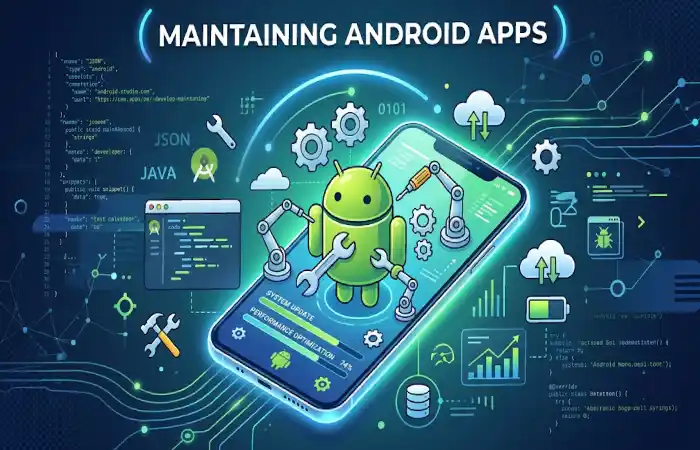
Maintaining an application Keeping it current and healthy.
Maintenance Activities
| Activity | Importance |
| Bug Fixes | High |
| Security Updates | Critical |
| Performance Optimization | High |
| Feature Enhancements | Medium |
| OS Compatibility Updates | Critical |
Why Maintenance Matters
Regular maintenance helps:
- Improve security
- Increase user satisfaction
- Maintain Play Store rankings
- Support new Android versions
- Reduce crashes
Android Applications Comparison by Development Approach (2026)
| Factor | Native Apps | Hybrid Apps | Web Apps |
| Performance | Excellent | Good | Moderate |
| Development Cost | High | Medium | Low |
| User Experience | Excellent | Good | Moderate |
| Offline Access | Full | Partial | Limited |
| Maintenance | Higher | Medium | Easy |
The Android ecosystem continues to evolve with innovations such as AI, AR, and 5G connectivity. Staying informed about the latest mobile app trends can help businesses remain competitive in a rapidly changing market.
Frequently Asked Questions
What uses are available for Android?
Android applications are software programs that function on any of the Android-powered devices, including: smartphones, tablets, TV‘s, and other wearables.
What is the most suitable language for Android application development?
Kotlin is a programming language supported by the developers of Android, Google. Java is still also a widely used language for android applications.
Is it possible to use Android apps without internet?
Yes. Apps such as Twitter allow you to use the app while you are not connected to the internet since it includes local data storage.
Do Android apps generate revenue?
Popular monetization techniques involve advertisement, subscription, in-application purchase, paid downloads, etc.
Is developing applications on Android a daunting task?
It is possible for runners to get started on Android development using Android Studio and Kotlin, but more complex projects will necessitate greater programming skills and knowledge.
Conclusion
Android Applications have become an essential part of modern digital life, powering communication, entertainment, productivity, education, healthcare, and business operations. Understanding how Android apps work, how they are developed, tested, published, and maintained provides valuable insight for both users and businesses. As Android continues to evolve in 2026, organizations that invest in high-quality Android applications will be better positioned to reach mobile-first audiences, improve customer engagement, and drive digital growth.
Kashifa Jafar is a technology writer and contributor at FutureTechExpert with 4+ years of experience in technology writing and content creation.
Read Full Bio of Author →Sameena reviews selected health, wellness, technology, and digital content for clarity, factual presentation, and reader usefulness.
Read Full Bio of Reviewer →