
 Kashifa Jafar
Technology Writer & Contributor
Kashifa Jafar is a technology writer and contributor at FutureTechExpert with 4+ years of experience in technology writing and content creation.
Read Full Bio of Author →
Kashifa Jafar
Technology Writer & Contributor
Kashifa Jafar is a technology writer and contributor at FutureTechExpert with 4+ years of experience in technology writing and content creation.
Read Full Bio of Author →
 Sameena Begum
Health, Technology & Digital Content Reviewer
Sameena reviews selected health, wellness, technology, and digital content for clarity, factual presentation, and reader usefulness.
Read Full Bio of Reviewer →
Sameena Begum
Health, Technology & Digital Content Reviewer
Sameena reviews selected health, wellness, technology, and digital content for clarity, factual presentation, and reader usefulness.
Read Full Bio of Reviewer →
IOS Applications are applications that run on the Apple operating systems including iPhone, iPad, Apple Watch and Apple TV. There are millions of applications used worldwide for everything from work to entertainment.
While over 2.5 million 1 apps are available from the Apple App Store, the iOS ecosystem continues to be one of the most profitable and trusted mobile platforms for developers and businesses. 2
With a business owner building a mobile app or a iOS beginner who wants to learn how to develop an app, the world is becoming a mobile first one.
 This article is part of
Mobile Apps Resources
Table of Contents
What Are iOS Applications?
An app on iOS refers to a programmed application that works on Apple devices such as the iPhone, iPad, Apple Watch and Apple TV. Such applications are required to be designed using Apple technologies such as Swift, SwiftUI,UIKit and Xcode. These applications are then made available on the Apple App Store.
Whether it is social networking, mobile banking, gaming or productivity, iOS apps enable users to carry out all sorts of tasks directly through their Apple device. Being designed for Apple platform, iOS apps are highly secured, reliable and provide excellent experience.
Mobile applications, on the other hand, are installed on the device rather than running inside a web browser. This presents advantages for developers as they have access to the hardware including camera, GPS, microphone, Face ID, and push notifications.
These applications are built using Apple’s development technologies such as:
- Swift
- SwiftUI
- UIKit
- Xcode
Apps for iOS are proprietary to Apple, indeed unlike Android apps they cannot be used on other platforms, and are very well integrated into the Apple platform (UI/UX designing specifically).
Common Examples of iOS Applications
| App Type | Examples |
| Social Media | Instagram, Threads, Snapchat |
| Productivity | Notion, Microsoft Office |
| Entertainment | Netflix, Spotify |
| E-Commerce | Amazon, Flipkart |
| Banking | PayPal, Revolut |
| Education | Duolingo, Coursera |
Apple organizes all apps into various App Store categories such as Business, Education, Utilities, Productivity, Finance, Lifestyle, Health & Fitness, just to name a few.
iOS applications are designed specifically for Apple’s ecosystem, delivering excellent performance, security, and user experiences. To fully understand where iOS apps fit within the digital landscape, readers can explore this comprehensive guide to mobile applications.
How iOS Applications Work
All iOS applications run in a controlled, sandboxed environment.
Core Workflow
User Interaction
↓
iOS Application
↓
iOS Frameworks
↓
Apple Operating System
↓
Device Hardware
When a user taps an app:
- The application launches.
- iOS allocates system resources.
- The app communicates with APIs.
- Data is processed locally or in the cloud.
- Results appear on screen.
In addition, Apple has a rigorous security architecture that causes applications to operate inside fully controlled areas called sandboxes. This feature makes computing more secure and more stable.
Businesses often evaluate both iOS and Android applications before deciding which platform best aligns with their target audience and business goals.
Types of iOS Applications
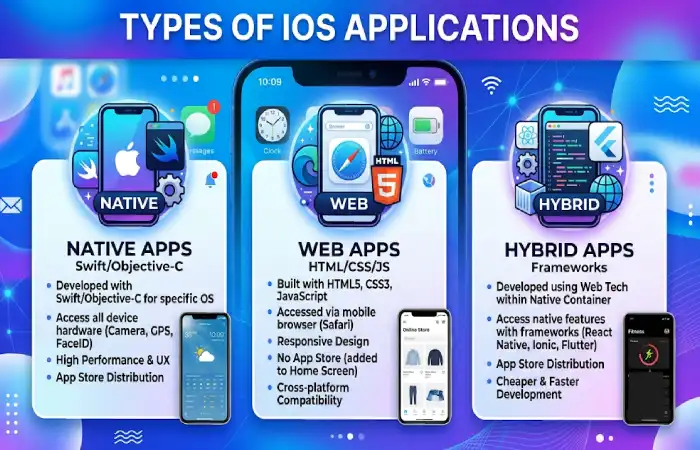
There are several classifications of iOS applications used for various business and consumer purposes.
Comparison Table: Types of iOS Apps
| Type | Description | Examples |
| Native Apps | Built specifically for iOS | WhatsApp, Uber |
| Hybrid Apps | Web technologies wrapped in native shell | Ionic Apps |
| Web Apps | Browser-based applications | Progressive Web Apps |
| Enterprise Apps | Internal business tools | CRM Systems |
| Gaming Apps | Entertainment-focused applications | PUBG Mobile |
| Utility Apps | Productivity and system tools | Calculator Apps |
Most Popular App Categories in 2026
| Category | Share of Apps |
| Games | 12.7% |
| Business | 10.4% |
| Education | 9.1% |
| Lifestyle | 8.5% |
| Utilities | 8.0% |
Common iOS App Features
Modern iOS applications are equipped with a wide range of features.
Essential Features
- User Authentication
- Push Notifications
- In-App Purchases
- Cloud Synchronization
- Location Services
- Camera Integration
- Biometric Security (Face ID & Touch ID)
- Dark Mode Support
- Offline Access
- AI-Powered Recommendations
Advanced Features in 2026
- Generative AI Integration
- Voice Assistants
- Augmented Reality (AR)
- Real-Time Analytics
- Personalized Experiences
These abilities assist companies in increasing user involvement and retention.
Building successful iOS apps requires a structured mobile app development process that includes planning, coding, testing, deployment, and ongoing maintenance.
iOS App Development Basics
The process of developing an ios application consists of many steps.
Required Tools
| Tool | Purpose |
| Xcode | Official IDE |
| Swift | Programming Language |
| SwiftUI | UI Framework |
| TestFlight | Beta Testing |
| App Store Connect | App Management |
Development Process
- Idea Validation
- Market Research
- Wireframing
- UI/UX Design
- Development
- Testing
- Deployment
- Maintenance
An example of a business using the MVP approach is to produce only a basic version of a product before it is launched. This allows the businesses to keep development costs and risks to a minimum.
Designing iOS Applications
The design determines how great an app is.
Apple has released its Human Interface Guidelines for ensuring the best possible user experience.
Design Best Practices
- Maintain visual consistency
- Use clear navigation
- Optimize touch targets
- Support accessibility
- Follow Apple design standards
- Minimize loading times
UI Components Commonly Used
- Tab Bars
- Navigation Menus
- Cards
- Search Interfaces
- Interactive Buttons
- Widgets
Apple places significant emphasis on user experience, making mobile app design principles a critical factor in the success of any iOS application.
Testing iOS Applications
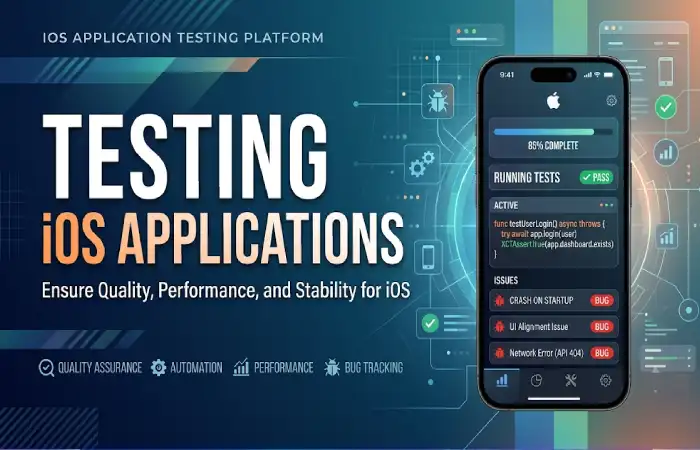
Requirement testing- Make sure that your app does actually work and will continue to work after being submitted to shop.
Testing Types
| Testing Method | Purpose |
| Functional Testing | Verify features |
| UI Testing | Validate interface |
| Performance Testing | Measure speed |
| Security Testing | Identify vulnerabilities |
| Device Testing | Check compatibility |
| Beta Testing | Gather feedback |
Popular Testing Tools
- XCTest
- TestFlight
- Firebase Test Lab
- BrowserStack
It‘s important to note that testing across multiple iPhones and iPads is necessary to ensure that your app/website is compatible across devices.
Before publishing an app to the App Store, comprehensive mobile app testing is essential to identify bugs, optimize performance, and ensure compatibility across Apple devices.
Publishing iOS Applications
Publish app-it must be approved by Apple for publishing.
Publishing Process
- Join Apple Developer Program
- Create App Store Listing
- Upload Build
- Complete Metadata
- Submit for Review
- Receive Approval
- Launch Application
App Store Requirements
- Privacy Compliance
- Security Standards
- Accurate Descriptions
- Performance Optimization
- App Review Guideline Compliance
The choice of category in which you submit your app has a big influence on whether potential users will be able to find your app in the App Store.
Maintaining iOS Applications
When you release an app it‘s just the start of it.
Ongoing Maintenance Activities
- Bug Fixes
- Security Updates
- Performance Optimization
- Feature Enhancements
- iOS Compatibility Updates
- User Feedback Implementation
Maintenance Checklist
- Monitor App Store reviews
- Track crash reports
- Update SDKs
- Optimize performance
- Improve user experience
- It also helps maintain rankings and user satisfaction.
As technology evolves, developers must stay informed about the latest mobile app trends to build innovative and competitive iOS applications.
FAQ About iOS Applications
What are iOS applications?
IOS Apps are applications for iOS, the operating system used by the iPhone, iPod Touch and iPad.
Which language is used for iOS app development?
The modern programming language used by Apple and utilized in the development of iOS applications is Swift.
How much does it cost to publish an iOS app?
By default, developers will need to enroll in the Apple Developer Program to be able to submit apps to the App Store.
What is the difference between Android and iOS applications?
Android apps are for Android devices. iOS apps only work in Apple‘s environment.
Can businesses create custom iOS applications?
Yes. Custom-built iOS apps are common for enterprise use from customers and employees to internal operations.
Conclusion
The importance of iOS App is still very crucial to mobile technology industry. iOS app has provided the opportunity to all businesses and developers to access to millions of users at the lowest cost and highst security through its robust and most highly optimized platform. The complete lifecycle covering how an app is designed, developed, tested, published and maitained is important to know for its future.
As the penetration of touch-enabled devices increases and become integrated with innovative technologies like AI, cloud computing or augmented reality, iOS apps will keep being innovating and pioneering for new solutions and new business models.
Kashifa Jafar is a technology writer and contributor at FutureTechExpert with 4+ years of experience in technology writing and content creation.
Read Full Bio of Author →Sameena reviews selected health, wellness, technology, and digital content for clarity, factual presentation, and reader usefulness.
Read Full Bio of Reviewer →