
 Kashifa Jafar
Technology Writer & Contributor
Kashifa Jafar is a technology writer and contributor at FutureTechExpert with 4+ years of experience in technology writing and content creation.
Read Full Bio of Author →
Kashifa Jafar
Technology Writer & Contributor
Kashifa Jafar is a technology writer and contributor at FutureTechExpert with 4+ years of experience in technology writing and content creation.
Read Full Bio of Author →
 Sameena Begum
Health, Technology & Digital Content Reviewer
Sameena reviews selected health, wellness, technology, and digital content for clarity, factual presentation, and reader usefulness.
Read Full Bio of Reviewer →
Sameena Begum
Health, Technology & Digital Content Reviewer
Sameena reviews selected health, wellness, technology, and digital content for clarity, factual presentation, and reader usefulness.
Read Full Bio of Reviewer →
A mobile network is the unseen infrastructure of towers, antennas, switches, and satellites that allows your mobile to make calls, send messages, and even stream video without ever having to plug into the wall. Whether you‘re looking at google maps on the go, ordering through your smart car, or having a video call with someone on the other side of the world, a mobile network is busy directing that connectivity across radio waves, fiber-optic cable, and data centers in hundreds of milliseconds.
Most people don’t even ever give it a second thought until their bars vanish in an elevator, basement, or the middle of nowhere. This guide explains what exactly is a mobile network, how it works, the generations (2G-5G, & what 6 G will be in 2026), how to compare networks, and, most importantly, what you can do when your signal fails you.
The current speed data 2026, we‘ve collected it all – the latest from Ookla, Opensignal, real operator comparison data and solutions to the problems – so if you are a newbie, student or just someone who is trying to figure out which operator to switch to, we‘ve got everything in one place.
 This article is part of
Mobile Networks Resources
Table of Contents
What Is a Mobile Network?
A Mobile Network is a form of wireless communication network that enables mobile devices (smartphones, tablets, smart watches, IOT device, etc.) to communicate each other and to access services such as voice, text, email and internet. Mobile network communicates using radio signals instead of cables.
Mobile networks are made up of a grid of cell towers, antennas, base stations and core network components that connect them to deliver the potential of connectivity for clients in urban, suburban and rural environments. When you want to make a call or access the internet your mobile device talks to the closest cell tower and sends the data through the network of the operator.
In plain terms, a mobile network does three jobs:
- Connects your device wirelessly to a nearby antenna using radio frequencies
- Routes your call, text, or data through a chain of switches and servers
- Delivers it to the other person’s phone, a website, or an app server — often in under 50 milliseconds
How Does a Mobile Network Work?
Every call, text, or streamed video follows roughly the same path. Here’s the step-by-step journey of a single piece of data leaving your phone:
- Your device connects to the nearest cell tower. Your phone constantly scans for the strongest, closest signal and locks onto it using a specific radio frequency band.
- The signal travels to a base station. This is the physical tower or small antenna box you see on rooftops, poles, or hidden inside stadium seating.
- The base station forwards it to the core network. Using fiber-optic cable (or, in remote areas, microwave links between towers), your data reaches the operator’s core network — the “brain” that authenticates your SIM, manages your session, and decides where the data needs to go.
- The core network routes it. If it’s a call, it’s routed to the Public Switched Telephone Network (PSTN) or another mobile network. If it’s internet data, it’s routed out to the open internet.
- The response comes back the same way — in reverse. All of this typically happens in under 50 milliseconds on 4G, and under 10 milliseconds on 5G.
Types of Mobile Networks
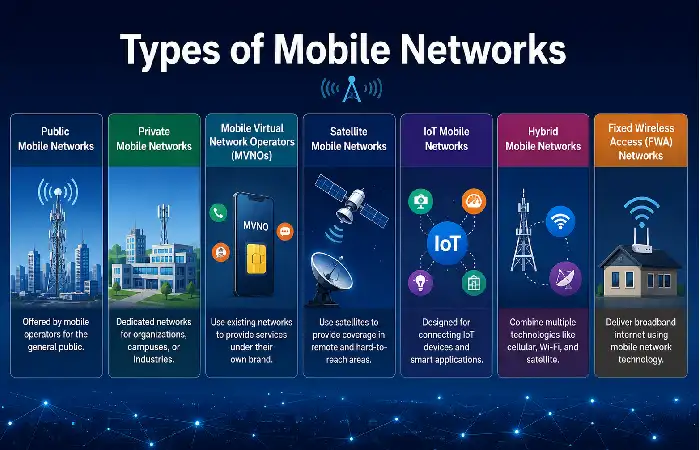
Mobile networks are meant for different telecommunication requirements like individual use of mobile phones or for communication on an industrial scale. Different types of mobile networks make it easier for users and businesses to select the best one.
Public Mobile Networks
Cellular public mobile networks. Celluar public mobile network is the common type of cellular network. It‘s provided by the mobile providers which offer to general users the services such as voice, text message and data.
Key Features:
- Coverage extended to nationwide/regional
- Available to consumers via the use of a SIM cards
- Supports calls, messaging and mobile internet
- Operated by Mobile Network Operators (MNOs)
Examples:
- Jio
- Airtel
- Verizon
- Vodafone
- AT&T
Best For: Smartphone users who use their phones on a daily basis, for organizations, and for individuals and consumers.
Private Mobile Networks
Private mobile networks: This is a devoted cellular network developed for some particular organization, campus, factory or enterprise. These networks can be more controlled, secure and reliable as compared to the public networks.
Key Features:
- Dedicated infrastructure
- A Stronger security and data privacy.
- Provision for customized network configurations
- Robust connectivity for industrial applications
Common Uses:
- Manufacturing Facilities
- Warehouses
- Airports
- Healthcare campuses
Mobile Virtual Network Operators (MVNOs)
Mobile virtual network operators (MVNOs): They resell mobile services and don‘t own the network infrastructure. They rent network access from major operators and resell the service under their own brand name
Examples:
- Google Fi
- Mint Mobile
- Tesco Mobile
- Lycamobile
Best For: Those on a budget who want the cheapest deals on mobile services.
Satellite Mobile Networks
Satellite mobile networks utilizes mobile satellites rather than normal cell towers, and so is preferable in areas that are lacking coverage.
Key Features:
- World coverage potential
- Connectivity in remote areas
- Disaster recovery communications
- Maritime and aviation assistance
Applications:
- Workers can be found who work from home and this practice is increasing in number.
- Emergency services
- Shipping industries.
- If one takes a trip outside, it can be categorized as outdoor trips.
Best For: Locations where cellular service is unavailable or the signal is weak.
IoT Mobile Networks
Internet of Things (IoT) mobile networks are meant for devices that are connected to each other rather than for communicating with Humans.
Technologies Used:
- NB-IoT (Narrowband IoT)
- LTE-M
- 5G Massive IoT
Examples of Connected Devices:
- Smart meters
- Environmental sensors
- Vehicle Trackers
- Smart agricultural systems
- Equipment of industrial surveillance
Best For: Enterprises deploying a large volume of connected endpoints.
A strong connection depends heavily on mobile network coverage, which determines how well a device can access voice and data services in different locations.
Mobile Network Generations: 2G, 3G, 4G, and 5G
It‘s worth noting that every new “G” is not simply a marketing term. It‘s a new core technology paradigm that comes around about every ten years.
| Generation | Launched | Peak Speed | Core Capability | Still in Use? |
| 1G | 1980s | ~2.4 Kbps | Analog voice calls only | Retired |
| 2G | 1991 | ~50–100 Kbps | Digital voice + SMS text messaging | Being phased out (most US carriers shut down 2G/3G by 2024) |
| 3G | 2001 | ~2 Mbps | Mobile internet, email, basic video calls | Largely retired in the US; still active in parts of Asia/Africa |
| 4G / 4G LTE | 2009 | ~100 Mbps–1 Gbps | HD streaming, video calls, app-based everything | Dominant globally — carries most traffic even in 2026 |
| 5G | 2019 | Up to 1–10 Gbps (standalone) | Ultra-low latency, massive IoT, network slicing | Rapidly expanding; standalone (SA) 5G now live in 60+ countries |
| 6G (research phase) | Expected ~2029–2030 | Theoretical 100+ Gbps | AI-native networks, sensing, holographic calls | Still in R&D/standards phase as of 2026 |
Mobile communication technology continues to evolve rapidly, with mobile network generations driving major improvements in speed, reliability, and connectivity.
Mobile Network Infrastructure
The infrastructure behind a mobile network is a layered system. Here are the core building blocks:
- Base Stations (Cell Towers / Small Cells) – The “face” of the network cell towers, rooftop antennas, or small “pizza box” modules strapped on lampposts in densely urban environments (“small cells”, which are more commonly deployed for 5G as it doesn‘t propagate as far).
- Backhaul – The link between the tower and the operator‘s core network generally fiber-optic cable though microwave links are also used if running fiber isn‘t feasible (e.g., in remote or mountainous areas).
- Core Network – The “control center” of the mobile network. It handles:
- Authentication (method to check the validity of your SIM card)
- Continue calls, maintain data connection, important when roaming and in areas of poor reception.
- Routing (judging where your data has to go)
- Billing and tracking data usage
- Radio Access Network (RAN) – The layer of hardware /software which manages the actual radio beam that emanates from your device to the cell tower. With 5G most of this has been migrated to Open RAN (O RAN) a more modular, software led system which permits hardware to work cross-vendor rather than being conjoined to one builder.
- Spectrum – The set of radio frequencies an operator is licensed to transmit on which the government often auctions of for billions of dollars. Lower frequencies (600 MHz 2 GHz) travel longer distances and through walls more easily; higher frequencies (mmWave, 24 40 GHz) are really fast but only project for a few hundred meters and have difficulty with walls.
The latest advancement, 5G mobile network technology, offers faster download speeds, lower latency, and enhanced support for connected devices.
Mobile Network Coverage and Connectivity
Coverage tells you where a network goes; connectivity quality tells you how it performs once you are on it. They are very different things a network could have 99% population coverage but be terrible for indoor coverage or during rush hour.
What affects coverage and signal strength
- Distance from the tower — signal strength drops the farther you are from a cell site
- Terrain and obstacles — hills, dense forests, and tall buildings block or weaken signals
- Building materials — concrete, metal siding, and Low-E glass windows are notorious signal killers indoors
Coverage Score comparison (US carriers, 2026)
| Carrier | Overall Coverage Score | 5G Availability | Best For |
| Verizon | 30.4% (highest overall coverage) | Strong mid-band + growing mmWave | Rural and suburban reliability |
| T-Mobile | High (fastest in 47 states) | 95%+ availability | Best all-around speed + availability |
| AT&T | Competitive, expanding | ~172 Mbps median 5G | Balanced coverage after $23B spectrum investment |
Source: Ookla Speedtest Awards H1 2026 via Cord Cutters News; Reviews.org 5G Carrier Comparison 2026
Mobile Network Operators
A (Mobile Network Operator) MNO owns spectrum licenses and terrestrial network infrastructure. After the table of the world‘s biggest operators (by number of subscribers) you can see how the Big 3 in America compares between them in 2026.
World’s largest mobile network operators (by subscribers)
| Rank | Operator | Main Market | Subscribers (approx.) |
| 1 | China Mobile | China, Hong Kong, Pakistan | 1+ billion |
| 2 | Bharti Airtel | India + 14 African markets | 650 million |
| 3 | Reliance Jio | India | 500+ million |
| 4 | China Telecom | China | 400+ million |
| 5 | Vodafone Group | UK, Europe, Africa | 300+ million |
US “Big 3” carrier comparison (2026)
| Carrier | Median 5G Download Speed | Connectivity Score | Best Award (Ookla H1 2026) |
| T-Mobile | 314.38 Mbps | 80.12 | Best Mobile Network & Best 5G Network |
| Verizon | Strong in Ultra Wideband zones | 74.12 | Best Coverage (30.4%) |
| AT&T | ~172 Mbps | 72.82 | Most Improved (after spectrum acquisition) |
MNO vs. MVNO — which should you choose?
| Factor | MNO (e.g., Verizon, AT&T, T-Mobile) | MVNO (e.g., Mint Mobile, Google Fi) |
| Owns towers/infrastructure | Yes | No — leases from an MNO |
| Typical cost | Higher | Often 30–50% cheaper |
| Network priority during congestion | Full priority | Often deprioritized during peak times |
| Customer service | Larger, dedicated support | Varies, often app/chat-based |
| Best for | Heavy data users, frequent travelers | Budget-conscious, light-to-moderate users |
Choosing the right provider is equally important, and comparing leading mobile network operators can help users find the best balance of coverage, speed, and pricing.
Mobile Network Technologies
Modern mobile networks rely on a stack of underlying technologies working together:
- CDMA / GSM – The previous multiple access methods of the 2G/3G era that defined how multiple calls accessed the same radio spectrum. GSM became the worldwide standard; CDMA was primarily used by Verizon & Sprint in the US before they migrated to LTE.
- LTE (Long-Term Evolution) – The technical standard at the core of most “4G” networks globally.
- VoLTE (Voice over LTE) – Moves the voice calls onto the same data network as internet, obsolete replacing the outdated circuit-switched voice.
- Massive MIMO (Multiple Input, Multiple Output) – Is one of the promising techniques of presenting dozens of antennas on a single tower in a same time to assist multiple users at the same time.
- Beamforming – Sends out a tight signal to just one device, rather than broadcast across all Wi-Fi-enabled devices.7
- Network Slicing – A 5G functionality that enables an operator to divide one physical network into several “virtual” networks tailored to various purposes. For Instance, one slice dedicated to emergency services and another to consumer streaming.
- Open RAN (O-RAN) – An open-standard way to build radio access networks that reduce vendor lock-in. It is a key infrastructure trend through 2026.
- ESIM – is a digital SIM that is embedded directly into a device enabling the user to switch networks without a physical SIM card –now available on all flagship phones.
- NTN / Satellite-to-Phone – enabling mobile communications in newly and presently un serviced areas utilizing low-earth-orbit satellites.
While 5G is expanding worldwide, the 4G mobile network remains the backbone of mobile connectivity for millions of users.
Mobile Network Speed and Performance
The speed may vary greatly from country to country, carrier and city block. Here are the stats in for 2026.
Fastest mobile networks by country (2026)
| Rank | Country | Median 5G/Mobile Speed | Notes |
| 1 | UAE (Abu Dhabi/Dubai) | 1.24 Gbps (standalone 5G) | Fastest 5G SA speeds globally |
| 2 | Qatar | 380+ Mbps median mobile | Gulf states dominate speed rankings |
| 3 | Kuwait | 380+ Mbps median mobile | Strong spectrum allocation |
| 4 | Singapore | ~262 Mbps mobile | Best overall consistency + 96% penetration |
| 5 | South Korea | High 5G SA maturity | Early 5G SA adopter, dense small-cell coverage |
Typical real-world speed by generation
| Generation | Typical Real-World Speed | Good For |
| 3G | 1–3 Mbps | Basic browsing, email |
| 4G LTE | 15–50 Mbps | HD streaming, video calls |
| 5G (NSA) | 50–300 Mbps | 4K streaming, fast downloads |
| 5G (Standalone) | 300 Mbps–1+ Gbps | Cloud gaming, AR/VR, ultra-low latency apps |
Users looking for better performance should understand the factors affecting mobile network speed, including signal strength, network congestion, and device capabilities.
Mobile Network Security
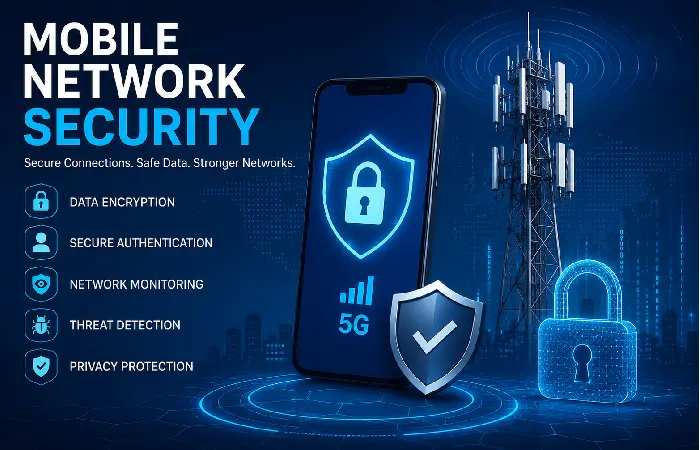
Mobile network security encompasses the various methods, policies and technologies that are implemented to secure the mobile networks, the devices connected to those networks, and the users of those devices from security threats, whether that threat is malicious or accidental.
With the growth of global mobile networks and the expansion of connected devices and users comes the need to keep these networks, and those using them, secure. Mobile network security is imperative from access to traditional calls to high speed 5 G data services in order to keep them confidential, stable and resistant to modern online ways.
Common Mobile Network Security Threats
- SIM Swapping Attacks
SIM swapping attackers trick the phone company into porting a victim‘s number to a new SIM.
- Rogue Base Stations
Cybercriminals may use fake cell towers and IMSI catcher, or ‘fake base station’.
- Mobile Malware
Malicious Apps can infect the Smartphone or steal important information.
- Data Interception
May be intercepted by an attacker as it travels across unsecured communications.
- Denial-of-Service (DoS) Attacks
Attackers overwhelm the network resources, causing service interruptions and contributing to the deterioration of performance.
- IoT Security Vulnerabilities
As mobile networks will have billions of connected devices, poorly protected IoT devices could be compromised and used as entry points for attacks.
Practical steps to protect yourself
- Set a PIN or passcode for your carrier account to guard against unauthorized SIM swaps.
- Utilize a VPN while on public/untrusted networks- This is essential when traveling internationally.
- Make sure your phone‘s software is current – many security updates patch weaknesses at the network level.
- Implement two-factor authentication through an authenticator application rather than SMS whenever feasible, as SMS-based 2FA can be more easily subverted through a SIM-swap.
- Beware of “no service” outages which come out of the blue; an unexplained loss of signal can (very rarely) be an attempt to perform a SIM-swap.
How to Improve Mobile Network Connectivity
Bad connectivity on your mobile phone network can cause calls to drop or become choppy, slow browsing rates, lagging text messages and generally frustration as a user. Luckily, any connectivity problems can often be attributed to common, easily-fixable issues. Thanks to best practices and troubleshooting techniques you can whether you have a 4G LTE or 5 G network improve your connectivity!
Move to an Area with Better Signal
The strength of your signal may depend on where you are. Moving nearer the window, venturing outside or stepping away from solid walls and obstacles can make a huge difference to the reception on your mobile network, and reduce call drops.
Enable Wi-Fi Calling
Wi-Fi Calling Enables you to make voice calls and send text messages via the Wi-Fi network when cellular coverage is limited. This can be helpful indoors or where the cellular signal is weak.
Keep Your Device Updated
Updating software and carrier settings on a regular basis will enhance network compatibility, resolve connection issues and improve device performance. Always keep your phone updated and we will not face any network upgrade issues.
Use a Signal Booster
Mobile signal boosters help boost poor cell phone signals in your home, office or even in the countryside. They can improve calls, ‘surf’ the internet faster and improve the overall reliability of your cell phone network.
Switch to a Newer Network Technology
Choosing a 4G LTE or 5G supported device and plan might result in faster speeds, lower latency and improved connectivity.
Future of Mobile Networks
- 6G is being researched but there is no sign of commercial implementation as of 2026. Currently (as of 2026), 6G is in standards and research phase, with worldwide organizations and vendors (Nokia, research labs such as those mentioned in The Mobile Network‘s 2026 coverage), experimenting with AI-native network management, integrated sensing etc. It is not until about 2029–2030 that commercial trials may begin.
- Network management became considerably more intelligent in 2026 through the deployment of AI employing machine learning to forecast congestion, reconfigure routes without human intervention, and identify security issues live (“agentic AI” as many people today would describe it, in network management).
- Satellite-to-phone connectivity is exploding. What initiated as emergency-only SOS texting will morph into full-blown data connectivity for regions without terrestrial coverage.
- Industry is also recognizing the potential of private 5G networks. Many factories, ports, hospitals and campuses are installing their own standalone mobile networks, for the greater reliability and security they can bring.
- Network slicing will become more advanced, enabling providers to market customized network “tiers,” such as a dedicated ultra-low-latency network for applications like cloud gaming or tele-medicine.
- Sustainability is becoming more significant, as operators purchase high efficiency radio equipment to be ready for the increased power consumption of 5 G/6 G roll out.
Frequently Asked Questions About Mobile Networks
How do a mobile network and Wi-Fi differ?
Mobile network is a public wireless network provided by a cellular network where your cell phone uses a licensed radio spectrum from a telco as a medium to reach over long distances via cell towers. Wi-Fi is a personal wireless network so rather than long range, it has a shorter (say within the office/home/pub) range and is generally provided through fixed broadband line.
What do a mobile network and a mobile carrier have in common?
The mobile network is the hardware and infrastructure cell towers, spectrum, core equipment. The carrier is the company that offers you a plan to connect to the network. Some owns their network (MNOs); some lease access from existing (MVNOs).
What mobile network generation do I need to worry about in 2026?
Between most people, 4G LTE & 5G are important 2G and 3G have remain discontinued by most of the largest carriers in the US and Europe. When picking up your new device, ensure it is 5G stand alone (SA) capable.
Is my mobile network signal losing connection in the house?
Signals in higher frequencies (particularly 5G mm Wave) are very weak at getting through concrete, metal and energy efficient glass. This can remain fixed with Wi-Fi calling or a signal booster.
Is 5G is definitively a faster network than 4G?
Yes, usual – in ideal conditions 5G alone offers 300 Mbps – over 1 Gbps against 15 – 50 Mbps on normal 4G LTE and will significantly lower latency, which matters for game and video calls even more than speed.
Conclusion
Mobile networks currently represent the backbone of digital communication, making possible the connectiveness among billions of different people, devices and services worldwide. From 2G networks meant only for voice communication to the 5G networks, whose ultra high data rate expectations will drive video streaming, social media, cloud based computing, smart cities and all kind of connected devices and vehicles.
Kashifa Jafar is a technology writer and contributor at FutureTechExpert with 4+ years of experience in technology writing and content creation.
Read Full Bio of Author →Sameena reviews selected health, wellness, technology, and digital content for clarity, factual presentation, and reader usefulness.
Read Full Bio of Reviewer →