


 Kashifa Jafar
Technology Writer & Contributor
Kashifa Jafar is a technology writer and contributor at FutureTechExpert with 4+ years of experience in technology writing and content creation.
Read Full Bio of Author →
Kashifa Jafar
Technology Writer & Contributor
Kashifa Jafar is a technology writer and contributor at FutureTechExpert with 4+ years of experience in technology writing and content creation.
Read Full Bio of Author →
 Sameena Begum
Health, Technology & Digital Content Reviewer
Sameena reviews selected health, wellness, technology, and digital content for clarity, factual presentation, and reader usefulness.
Read Full Bio of Reviewer →
Sameena Begum
Health, Technology & Digital Content Reviewer
Sameena reviews selected health, wellness, technology, and digital content for clarity, factual presentation, and reader usefulness.
Read Full Bio of Reviewer →
Slow internet can be aggravating no matter if you are watching videos, doing a little gaming, talking to a buddy on Skype or working from home. If you have been researching How to Improve Wi-Fi Signal at Home, you are just one of a large group.
In fact, by 2026 our homes will have more connected devices than they ever have before, and if your wireless can be improved then you will really notice the benefits. Luckily, improving your wireless coverage does not always mean you need a new router. In fact, there are some key considerations and hardware you can use to really increase the speed and coverage.
If you’re troubleshooting weak Wi Fi coverage, it helps to understand how your overall home internet setup affects signal strength, bandwidth distribution, and device performance across different rooms.
 This article is part of
Internet Resources
Table of Contents
Best Router Placement
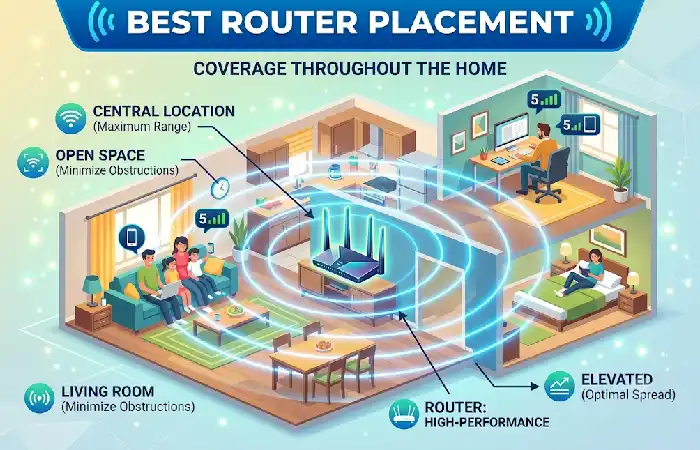
Placement is one of the most important factors affecting your Wi-Fi speed, coverage and dependability. Regardless of how fast your connection is, you can‘t get the best speeds possible if your router is stored in a cabinet or hidden away in a corner. Proper placement ensures there aren‘t any dead spots, your signal isn‘t interfered with and your connection is efficient throughout.
Best Practices for Router Placement
Use this expert advice to strengthen your Wi-Fi.
Place the Router in a Central Location
Position your router to sit at the centre of your house and not at the end. Since Wi-Fi transmit signals in all directions, placing your router to sit at the centre of the house will enable you to target for more of the strength to be directed at the edges and at the center of the house thus reducing the weak signals to the minimum.
For instance: if you put your living room in the heart of the house or in a room at the back of the house.
Avoid Cabinets and Enclosed Spaces
It is common to see people place their routers hidden away in TV cabinets or in closets, mainly for aesthetic reasons. This however, prevents radio signals from escaping but does also cause the router to become hot leading to possible degradation of performance.
Or you can have the loaner come to you, for instance to an open airy room where the antennaes could send signals.
The type of connection coming into your house can also influence network performance, so it’s worth comparing fiber, cable, and DSL internet options before assuming the router is the only problem.
Reduce Wi-Fi Interference
Despite having a high speed broadband plan and a state-of-the-art router, electric equipment around you, walls, and other nearby Wi-Fi networks all contribute to diluting your wireless transmission. Lowering interference can vastly improve the functioning of your Wi-Fi network without having to upgrade to new hardware.
While improving coverage, don’t forget that a stronger signal should also be a secure home Wi Fi network, with proper encryption, password management, and router security settings enabled.
Common Sources of Wi-Fi Interference
There are a number of items around the house that may hamper your Wi-Fi.
| Source of Interference | Impact on Wi-Fi | Recommended Solution |
| Microwave ovens | High | Keep the router at least 6 feet away |
| Bluetooth devices | Medium | Use the 5 GHz or 6 GHz band |
| Cordless phones | High | Replace with DECT 6.0 or keep them away from the router |
| Baby monitors | Medium | Position away from the router |
| Wireless security cameras | Medium | Connect to the 5 GHz band if supported |
| Smart TVs | Low to Medium | Leave space between the TV and router |
| Thick concrete or brick walls | High | Reposition the router or use a mesh system |
Wi-Fi Extenders vs Mesh Systems
Therefore, even though you‘ve moved away your Wi-Fi router and eliminated the source of interference, if you still have Wi-Fi dead zones around your house then more networking gear may be needed. Their functionality and applicability depend on your home‘s specifics.
Knowing the differences will allow you to select the right option depending on your home‘s dimensions, how much you are on the internet and your budget
What Is a Wi-Fi Extender?
A Wi-Fi extender (or Wi-Fi repeater or booster) is a device which receives the wireless signals from your router and transmits them to locations that require additional coverage.
This is a connecting link between your router and these devices at a distance.
Advantages of Wi-Fi Extenders
- Affordable compared to mesh systems.
- Easy to install and configure.
- Ideal for fixing one or two dead zones.
- Compatible with most existing routers.
- Doesn’t require replacing your current network.
Limitations of Wi-Fi Extenders
- Can reduce internet speed because they retransmit the same signal.
- Often creates a separate Wi-Fi network (SSID), requiring devices to switch networks manually.
- Less effective in very large or multi-story homes.
- Performance depends on where the extender is placed.
What Is a Mesh Wi-Fi System?
Consisting of one main router with a couple of satellite nodes around your house, Mesh Wi-Fi are more than just signal extenders. All of the nodes act together to create one coporate Wi-Fi network.
Has the built-in to jump between the other network .
Advantages of Mesh Wi-Fi Systems
- Whole-home Wi-Fi coverage.
- One network name (SSID) throughout the house.
- Seamless roaming between nodes.
- Better speeds over larger areas.
- Handles dozens of connected devices efficiently.
- Easy expansion by adding more nodes.
- Many systems include AI-powered optimization and automatic channel selection.
Limitations of Mesh Wi-Fi Systems
- Higher initial cost than extenders.
- Requires placing multiple nodes around the home.
- Best performance is achieved when nodes are positioned correctly.
- Advanced features may require a companion mobile app.
For larger homes with multiple dead zones, you may need more than a single router, and understanding mesh Wi Fi vs. Wi Fi extenders can help you choose the right solution for consistent coverage.
Router Updates
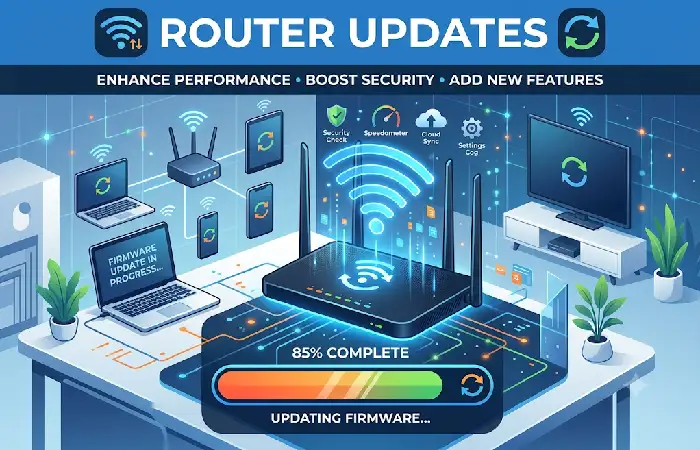
One of the easiest and most effective things you can do to speed up your Wi-Fi signal and keep it more secure is to keep your router up-to-date.
The companies who make your router often release new firmware version for their devices that might address bugs, enhance stability, fix security vulnerabilities and offer new features. So if you haven‘t updated your router in months – or even years!124, you might be missing out.
You probably don‘t think about updating the router firmware, since that task is not as common as updating software on your smartphone or computer. But updating the firmware is vital to keeping your home network running smoothly and securely.
Why Router Updates Are Important
Here are reasons why you should update your router firmware, other than that of Wi-Fi speed.
Improved Network Performance
Wireless traffic management update your firmware The firmware available for a router often improves the routing of wireless traffic, so reducing delays and signal snags and boosting efficiency. This is more significant if you are at home with a large number of connected devices.
Enhanced Security
Cyber threats are constantly changing. If your firmware isn‘t updated, you could lack critical security fixes. Your router relies on those updates to close security holes and defend your network from hackers, viruses, and other forms of cyber crime.
Better Device Compatibility
Modern devices such as; smart phones, laptops, gaming consoles, and smart home devices also may require their firmware to be updated. Newer router firmware will work much more efficiently with all of the newer devices and wireless standards.
One of the most effective ways to improve coverage is upgrading to a modern Wi Fi router designed for better range and performance, especially if your current hardware is several years old.
Troubleshooting Weak Signals
If still weak Wi-Fi, maintain following.
Step 1: Restart the Router
Use the power-cycleswitch on the back of the router by removing the power for 30 seconds.
Step 2: Run a Speed Test
Verify the Wi-Fi bandwidth for your plan.
Step 3: Move Closer
If speeds get better in the vicinity, coverage is the problem, not your ISP.
Step 4: Check Device Load
Pull the plug on any unnecessary gadgets to decrease load.
Step 5: Switch Wi-Fi Bands
Use:
- 2.4 GHz for longer range.
- 5 GHz for higher speeds.
- 6 GHz for compatible high-performance devices.
Step 6: Replace Old Hardware
Routers that are more than 5 years old are not likely to have the standards that will support modern Wi-Fi and they will most definitely be unsuitable for a connected home.
Weak wireless signals can cause high latency and packet loss during online matches, so gamers should also review these Wi Fi optimization tips for gaming and low lag performance.
Frequently Asked Questions
Is there anyway to improve Wi-Fi signal but not of having to go buy new hardware?
Work your way down: place your router in the middle of the house on an high shelf where it won‘t have to contend with the jamming effects of your microwave, wireless extension, and theassorted other tech gadgets.
Does the router have to be positioned in an optimal location?
Say you placed the router in the middle of your house and right in the middle away from cabinets, refrigerators walls, drawers metal objects and so on.
If I go with a Wi-Fi extender? Or a mesh system? What is a mesh system?
Should be Ok for a small flat, if you only have one small weak spot. For a larger house or multiple floors a mesh network system is preferable.
How often should I update the firmware in my router?
Update your router regularly for every few months and can do automatic when your router support the. Firmware upgrade will make more secure and stability connection and performance increased.
Conclusion
Therefore, it‘s possible to learn how to improve Wi-Fi at home without having to spend a great deal on expensive upgrades. Placing the router optimally, eliminating wireless interference, updating the firmware and opting for the best solution for the case, whether it‘s a Wi-Fi extender or a mesh system, for the coverage and stability can be improved dramatically. When homes in 2026 will have many more connected devices, applying these best practices will ensure rapid and stable connectivity.
Kashifa Jafar is a technology writer and contributor at FutureTechExpert with 4+ years of experience in technology writing and content creation.
Read Full Bio of Author →Sameena reviews selected health, wellness, technology, and digital content for clarity, factual presentation, and reader usefulness.
Read Full Bio of Reviewer →