
 Kashifa Jafar
Technology Writer & Contributor
Kashifa Jafar is a technology writer and contributor at FutureTechExpert with 4+ years of experience in technology writing and content creation.
Read Full Bio of Author →
Kashifa Jafar
Technology Writer & Contributor
Kashifa Jafar is a technology writer and contributor at FutureTechExpert with 4+ years of experience in technology writing and content creation.
Read Full Bio of Author →
 Sameena Begum
Health, Technology & Digital Content Reviewer
Sameena reviews selected health, wellness, technology, and digital content for clarity, factual presentation, and reader usefulness.
Read Full Bio of Reviewer →
Sameena Begum
Health, Technology & Digital Content Reviewer
Sameena reviews selected health, wellness, technology, and digital content for clarity, factual presentation, and reader usefulness.
Read Full Bio of Reviewer →
Whether you‘re into competitive FPS games, MMORPGs, racing simulators or cloud gaming services, finding the best internet for gaming will make a huge difference. Of course, download speed is important, but ping, jitter, packetloss and the robustness of your network are so much more critical.
Here‘s all you need to know about gaming internet, from what speeds you need and what features to look out for in a router, to how to optimize your network for gaming.
A smooth online gaming experience depends on choosing the right home internet connection for your household’s speed, latency, and device requirements.
 This article is part of
Internet Resources
Table of Contents
Ideal Gaming Speeds
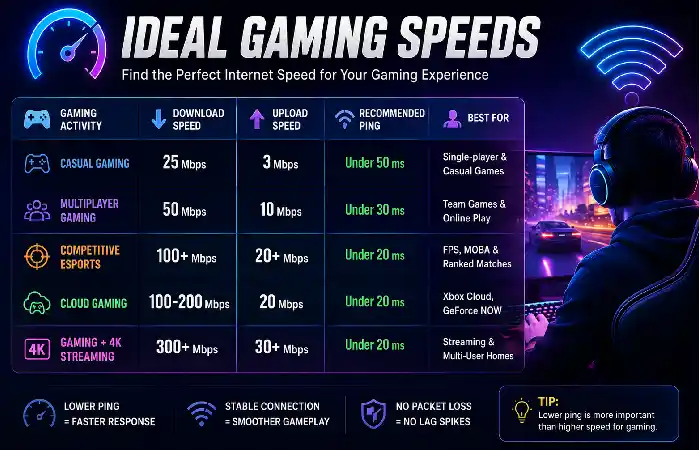
The first thing that comes to mind when you think of finding the best internet for gaming that there isn‘t enough bandwidth to handle online gaming with most people expecting the fastest internet package is not always necessary as online gaming does not require as much bandwidth as streaming 4K videos and no downloading huge files, so make sure you have a good connection that is stable.
The right connection speed also relates to how many devices are sharing your network, and if you‘re sharing game downloads, live streaming or just playing online. A faster speed plan is a good way to avoid experiencing internet slowdowns if you have many devices using your network at one time.
If you’re comparing internet technologies for competitive gaming, understanding the differences between fiber, cable, and DSL internet can help you choose the best option for low latency and stable performance.
Recommended Internet Speeds for Gaming (2026)
| Gaming Activity | Download Speed | Upload Speed | Recommended Ping | Best For | Resource |
| Casual Online Gaming | 25 Mbps | 3 Mbps | Under 50 ms | Single-player and casual multiplayer | https://www.fcc.gov |
| Multiplayer Gaming | 50 Mbps | 10 Mbps | Under 30 ms | Team-based online games | https://www.fcc.gov |
| Competitive Esports | 100 Mbps+ | 20 Mbps+ | Under 20 ms | FPS, MOBA, and ranked matches | https://www.fcc.gov |
| Cloud Gaming | 100–200 Mbps | 20 Mbps | Under 20 ms | Xbox Cloud Gaming, GeForce NOW | https://www.nvidia.com/en-us/geforce-now/ |
| Gaming + 4K Streaming | 300 Mbps+ | 30 Mbps+ | Under 20 ms | Multi-user households | https://www.fcc.gov |
Low Latency Explained
Latency or ping is the delay between a keystroke and the time it takes for the game to send the information to it‘s server. The lower the latency, the better. For latency measures how long it takes for your computer to send information to the server that is running the game.
Gaming Network Metrics
| Metric | Ideal Value | Why It Matters |
| Ping | Under 20 ms | Faster response time |
| Jitter | Under 10 ms | Consistent gameplay |
| Packet Loss | 0% | Prevents disconnects and lag spikes |
| Upload Speed | 20 Mbps+ | Smooth voice chat and streaming |
Tips to Reduce Latency
- Choose a fiber internet connection whenever available.
- Connect your gaming device using Ethernet.
- Close bandwidth-heavy downloads while gaming.
- Use Quality of Service (QoS) settings on your router.
- Select the nearest game server.
Lag spikes and random disconnects are often caused by poor wireless coverage, so it’s important to improve your WiFi signal strength before blaming your gaming service or ISP.
Wired vs Wireless Gaming
| Feature | Ethernet | Wi-Fi |
| Speed Stability | Excellent | Good |
| Latency | Lowest | Higher |
| Packet Loss | Rare | Possible |
| Interference | None | Common |
| Competitive Gaming | Best Choice | Acceptable with Wi-Fi 6/6E/7 |
Recommended: in order to compete, it is advantageous to be connected using an Ethernet cable. While the latest Wi-Fi standards (Wi-Fi 6E and Wi-fi 7) are excellent for casual games and multiplayer, the wired remains the best connection.
For households with multiple gamers, consoles, and streaming devices, investing in one of the best WiFi routers for gaming and streaming can reduce congestion and maintain consistent speeds.
Gaming Router Features
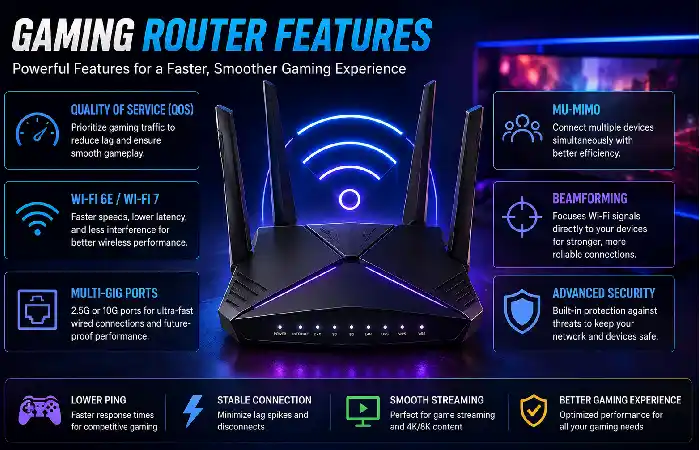
A gaming router can isolate gaming traffic and make the network more stable. This is important because in many cases home networks have to deal with many other online devices.
If your gaming setup is far from the main router, this comparison of mesh WiFi vs WiFi extenders explains which solution delivers better coverage and lower latency for online gaming.
Features to Look For
| Feature | Benefit | Resource |
| Quality of Service (QoS) | Prioritizes gaming traffic | https://www.wi-fi.org |
| Wi-Fi 6E / Wi-Fi 7 | Faster wireless performance | https://www.wi-fi.org |
| Multi-Gig Ethernet Ports | Supports high-speed fiber | https://www.ieee.org |
| MU-MIMO | Better performance for multiple devices | https://www.wi-fi.org |
| Beamforming | Improved signal strength | https://www.wi-fi.org |
Optimizing Network Performance
Even the most fundamental network misconfiguration can result in lag, high ping, packet loss and even disconnects (not as a result of poor internet if you have a good gamer internet). Here are some recent tips when configuring your home network.
Best Practices to Improve Gaming Performance
| Optimization Tip | Benefit | Resource |
| Use a Wired Ethernet Connection | Provides the lowest latency and most stable connection | https://www.fcc.gov |
| Enable Quality of Service (QoS) | Prioritizes gaming traffic over other devices | https://www.wi-fi.org |
| Place Your Router Centrally | Improves Wi-Fi coverage and reduces signal loss | https://www.wi-fi.org |
| Update Router Firmware | Enhances security, stability, and performance | https://www.cisa.gov |
| Upgrade to Wi-Fi 6E or Wi-Fi 7 | Delivers faster speeds and reduced interference | https://www.wi-fi.org |
Even with a fast internet connection, poor network configuration can cause lag. Follow these best practices to optimize your gaming experience:
- Use Ethernet whenever possible for the most stable connection.
- Place your router centrally and away from walls or metal objects.
- Enable QoS to prioritize gaming traffic.
- Update router firmware regularly to improve performance and security.
- Limit background downloads during gaming sessions.
- Upgrade to Wi-Fi 6E or Wi-Fi 7 if you rely on wireless connections.
- Restart your modem and router periodically to refresh the connection.
One of the easiest ways to improve your gaming without needing to buy a more expensive broadband package is to improve your network performance. A consistent connection, low ping delay and a well-optimised router settings can benefit your gaming far more than just having faster download speeds.
Online gamers should also protect their network from unauthorized access, which is why following a home network security guide
FAQ
Which is the best internet type for gaming?
If you want the total package, your best options will be fiber internet.
How fast should my internet be for online gaming?
Playing most online games would be ok with 50–100 Mbps but if you intend to play competitive games or have several users in your household you should have at least 100 Mbps.
Is Wi-Fi strong/good enough for gaming?
Yes Wi-Fi 6E or 7 mainly but Ethernet give more reliable connection with lower latency.
more rapid the internet, the less lag there will be?
Sometimes not. Sometimes, the prime factor is not high download speed but low latency, low jitter and consistent connectivity.
Is it better to purchase a gaming router?
Gaming router QoS and a new state of the art Wi-Fi would certainly make a vast improvement to a busy domestic network, but will not overcome a poor Internet connection.
Conclusion
Choosing the best internet for gaming is not just a matter of assuming the higher the speed the better. Well configured home network, a good fiber link, a low ping and negligible packet losses will always give you the best gaming experience.
Combining a dependable connection with modern equipment (wireless or wired router and network card, wired Ethernet when available), configured properly, creates a seamless experience for the local addict or weekend warrior. Concentrate on the actual quality of the connection rather than the resulting speed, and the improvement will be dramatic.
Kashifa Jafar is a technology writer and contributor at FutureTechExpert with 4+ years of experience in technology writing and content creation.
Read Full Bio of Author →Sameena reviews selected health, wellness, technology, and digital content for clarity, factual presentation, and reader usefulness.
Read Full Bio of Reviewer →