


 Kashifa Jafar
Technology Writer & Contributor
Kashifa Jafar is a technology writer and contributor at FutureTechExpert with 4+ years of experience in technology writing and content creation.
Read Full Bio of Author →
Kashifa Jafar
Technology Writer & Contributor
Kashifa Jafar is a technology writer and contributor at FutureTechExpert with 4+ years of experience in technology writing and content creation.
Read Full Bio of Author →
 Sameena Begum
Health, Technology & Digital Content Reviewer
Sameena reviews selected health, wellness, technology, and digital content for clarity, factual presentation, and reader usefulness.
Read Full Bio of Reviewer →
Sameena Begum
Health, Technology & Digital Content Reviewer
Sameena reviews selected health, wellness, technology, and digital content for clarity, factual presentation, and reader usefulness.
Read Full Bio of Reviewer →
The satellite internet speed has also significantly increased recently with the advent of LEO satellite systems such as Starlink. Whereas once satellite services were known for dreadful speeds and long latencies, modern systems are capable of providing nearly broadband speeds to home and business users in rural areas.
No matter if you are watching TV shows on Netflix, participating in video calls, playing video games on the internet, or working remotely with a team, knowing how fast your satellite internet connection is will allow you to select the best satellite internet provider and be responsible for proper use.
 This article is part of
Emerging Telecom Technology Resources
Table of Contents
What Is Satellite Internet Speed?
Satellite Internet Speed is the rate at which information is transferred from your computer to a satellite in space. the speed at which information is transferred to and from the internet via satellites orbiting the earth.
Unlike fibre, cable or DSL that has a wired infrastructure, satellite internet type translate your requests sends them to a satellite dish, then to a satellite and finally to a ground station connected to internet. It is the size of speed and latency when choosing satellite internet providers.
Two measurements matter most:
- Download Speed – How fast data is received
- Upload Speed – How fast data is sent
Speed is generally measured by Internet providers in Megabits per second.
| Activity | Recommended Speed |
| Email & Browsing | 5–10 Mbps |
| HD Streaming | 15–25 Mbps |
| 4K Streaming | 50 Mbps+ |
| Video Calls | 10–20 Mbps |
| Online Gaming | 25 Mbps+ |
| Remote Work | 25–50 Mbps |
In more detail, see Satellite Internet Providers and Satellite Internet Plans.
Satellite internet speed has improved dramatically in recent years, thanks to advancements in satellite technology and network infrastructure. If you’re new to this technology, our satellite internet guide explains everything you need to know about satellite broadband, its benefits, and how it compares to other internet options.
Download Speed vs Upload Speed
A large number of users only care about download speeds, but upload speeds are as important.
| Metric | Purpose |
| Download Speed | Streaming, browsing, downloading files |
| Upload Speed | Video calls, cloud backups, file sharing |
| Latency | Responsiveness of connection |
For example:
- Watching Netflix mainly uses download speed.
- Zoom meetings require both download and upload speeds.
- Gaming relies heavily on latency.
Several factors influence satellite internet speed, including network congestion, weather conditions, satellite type, and signal distance. Understanding how satellite internet works can help explain why latency and satellite orbit positions play a significant role in overall performance.
Average Satellite Internet Speeds in 2026
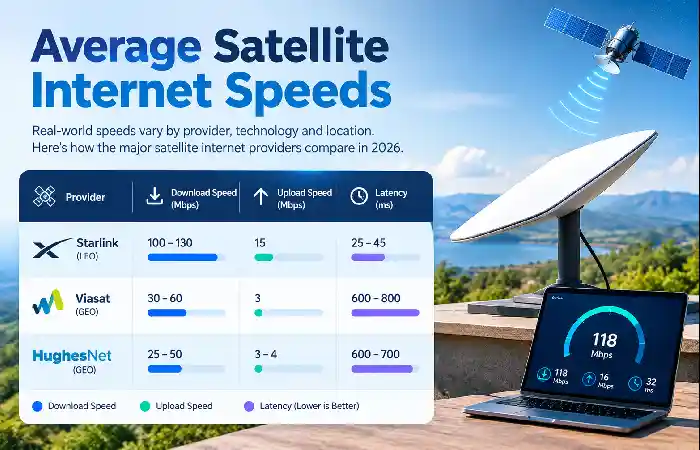
Actual speed tests in practice highlight the differences between providers.
Satellite Internet Speed Comparison (2026)
| Provider | Download Speed | Upload Speed | Latency | Orbit Type | Resource |
| Starlink | 100–130 Mbps Median | 15 Mbps | 25–45 ms | LEO | Starlink |
| Viasat | 30–60 Mbps | 3 Mbps | 600–800 ms | GEO | Viasat |
| HughesNet | 25–50 Mbps | 3–4 Mbps | 600–700 ms | GEO | HughesNet |
Major Observation: As compared to GEO satellite providers, the LEO satellite network (Starlink) provides much lower latency and significantly higher bandwidth.
2026 Performance Snapshot
| Metric | Typical Satellite Average |
| Download Speed | 65 Mbps |
| Upload Speed | 7 Mbps |
| Latency | 400+ ms |
| Best Performing Provider | Starlink |
Factors That Affect Satellite Internet Speed
There are many factors that influence real world performance.
- Satellite Orbit Type
LEO satellites are closer to the earth, thus reducing the delay and distance travelled.
| Orbit Type | Distance from Earth | Typical Latency |
| LEO | ~550 km | 25–60 ms |
| GEO | 35,786 km | 600–800 ms |
- Weather Conditions
Satellite signals are affected by changes such as Heavy rain, Snow and Storms.
- Network Congestion
Speeds frequently decrease during busy late evening levels when more people are logged on.
- Equipment Quality
Old routers and poorly aligned dishes can also degrade performance.
- Data Prioritization Policies
Several providers speed down at a certain point once a customer goes over the priority data limit.
The quality of your satellite internet equipment, including the satellite dish, modem, and Wi-Fi router, can also affect connection speeds and reliability. Upgrading outdated hardware may improve your internet experience.
Satellite Internet Latency
Latency is the time taken for data to travel to your computer or website from the internet.
Typical Latency Comparison
| Connection Type | Average Latency |
| Fiber | 5–15 ms |
| Cable | 15–40 ms |
| Starlink | 25–60 ms |
| HughesNet | 600–700 ms |
| Viasat | 600–800 ms |
High latency can cause:
- Lag during gaming
- Delays in video calls
- Slower website responsiveness
How to Test Satellite Internet Speed
Use trusted speed testing tools:
- Ookla Speedtest
- Fast.com
- Cloudflare Speed Test
Best Testing Practices
- Connect directly to your router.
- Pause downloads and streaming.
- Test multiple times throughout the day.
- Compare results during peak and off-peak hours.
Troubleshooting Slow Speeds
- Restart modem and router.
- Check dish alignment.
- Remove obstructions such as trees.
- Update router firmware.
- Verify provider outages.
Internet performance can vary depending on geographic location and network capacity. Areas with strong satellite internet coverage typically experience more consistent speeds and better service availability than regions with limited network resources.
How to Improve Satellite Internet Performance
Optimize Your Home Network
- Use Wi-Fi 6 routers.
- Place routers centrally.
- Use Ethernet for gaming and work.
- Limit background downloads.
Upgrade Equipment
If possible and feasible, you should download large files in the middle of the night.
Schedule Heavy Downloads
Download large files during off-peak hours.
Monitor Data Usage
Do not deprioritize by remaining in priority data limits.
Speed for Streaming
The speed at which you can stream is entirely a function of your download speed.
| Streaming Quality | Required Speed |
| SD | 3 Mbps |
| HD | 5–10 Mbps |
| Full HD | 10–20 Mbps |
| 4K UHD | 25–50 Mbps |
HD streaming is available on almost all current satellite plans, and several Starlink satellites can handle higher bandwidth for multiple 4K streams.
Not all services deliver the same performance. Leading satellite internet providers use different technologies, satellite constellations, and bandwidth management policies that directly influence download and upload speeds.
Speed for Gaming

Gaming has far more to do with latency than with speed.
| Provider | Gaming Suitability |
| Starlink | Good |
| Viasat | Poor |
| HughesNet | Poor |
While LEO satellite systems are suitable for when players are playing casually or competitively, it is common for lag on a GEO satellite to be painfully obvious.
Satellite Internet Speed for Remote Work
Remote workers need stable connections for:
- Video conferencing
- Cloud applications
- VPN access
- File sharing
Recommended Speeds
| Work Activity | Recommended Speed |
| Email & Browsing | 10 Mbps |
| Video Meetings | 20 Mbps |
| Cloud Collaboration | 25 Mbps |
| Large File Transfers | 50 Mbps+ |
Starlink‘s inherent low latency means it is particularly well fitted to remote working situations.
Your selected satellite internet plan can significantly impact the speeds you receive. Higher-tier plans often provide faster downloads, increased data allowances, and better performance during peak usage periods.
Frequently Asked Questions
How fast is a satellite internet?
Most homes find 50–100 Mbps is fast enough for streaming, browsing and working remotely.
What causes satellite internet to be slower at night?
During peak hours, network congestion may cause limited bandwidth.
Is Starlink quicker than the form of satellite internet that we currently have?
Yes. The Starlink network normally provides with higher speeds and much lower latency, than GEO providers.
Is 4K streaming powered by satellite internet?
Of course. (The vast majority of current plans with 50Mbps or higher are suitable for 4K streaming, reliability to be confirmed.)
Weather Impact on Satellite Internet Rates How Does it Matter?
Yes, as the extreme weather conditions can cause delays or slow the speed of the connection.
Conclusion
How fast was satellite internet in 2026? In 2026, satellite internet speed improved dramatically from the early days. While many campgrounds and isolated neighborhoods still use GEO satellite providers such as HughesNet and Viasat, new LEO networks like Starlink brought the industry up to broadband speeds with extremely low latency. With satellite internet, you can even stream movies in 4K, participate in a video meeting, work from home, or gamer online.
Along with download speed, be mindful of a good Satellite internet vendor will give you a high upload speed, low latency, it deals well with past foul weather, there is low congestion and has good pieces of gear.
Kashifa Jafar is a technology writer and contributor at FutureTechExpert with 4+ years of experience in technology writing and content creation.
Read Full Bio of Author →Sameena reviews selected health, wellness, technology, and digital content for clarity, factual presentation, and reader usefulness.
Read Full Bio of Reviewer →