
Last Updated: September 16, 2026
Mobile applications have revolutionized the way we interact, purchase, and learn. From communicating on the go to ordering lunch, paying bills, making business deals, and traveling across the world they are now more a part of our lives than ever.
In today’s world, billions of smartphone users access various services instantly by means of mobile applications from any location. Many companies record part of their revenue coming from these applications by trying to enhance customer engagement and efficiencies.
With the mobile technology advancement and the benefits brought by the integrative mobile technology developments like AI, 5G, cloud computing and improved security infrastructure, mobile apps are getting more powerful, smarter and tailored.
Table of Contents
What Are Mobile Applications?
Mobile applications, also referred to as mobile apps, are a type of applications program that are designed to run on mobile devices such as smartphones, tablets, smartwatches, and other handheld devices. Mobile apps enable a user to do tasks such as communicate, fund transfer, place order, buy movie tickets, order cabs, check mails, play music and games, read news, learning and many more.
Compared to the traditional desktop application, mobile applications are designed for touch-screen, mobile platform and portable device. Most of the mobile applications are installed and downloaded from the official application stores, such as, the Google Play Store for Android platforms, the Apple App Store for iOS platform. Some mobile applications are also running in browser as ‘Web Applications’ and ‘Progressive Web Applications’ (PWas).
Mobile apps now often call on features such as cloud services, artificial intelligence, GPS location services, cameras, microphones and others to create engaging and customized experiences. Whatever you‘re doing with a mobile application chatting, ordering dinner with a delivery app, banking, or taking part in a virtual meeting that‘s made possible 24/7.
Core Characteristics of Mobile Applications
- Designed for mobile devices
- Optimized for touch interfaces
- Available through app stores
- Can access device hardware
- Support notifications
- Often integrate cloud services
- Provide personalized experiences
Examples of Mobile Applications
| Category | Examples |
| Social Media | Instagram, Facebook, Threads |
| Messaging | WhatsApp, Telegram |
| Entertainment | Netflix, YouTube |
| Navigation | Google Maps |
| Finance | PayPal, Banking Apps |
| Shopping | Amazon, Flipkart |
| Productivity | Microsoft Outlook, Google Drive |
| AI Assistants | ChatGPT, Perplexity |
How Do Mobile Applications Work?
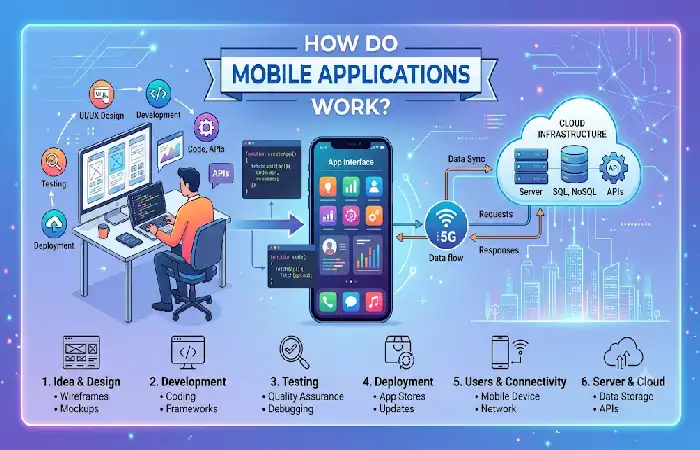
Mobile applications consist of an accessible user interface paired with robust back-end systems such as databases, Application Programmers’ Interfaces, cloud computing services which serve information and functions to the mobile device. The user‘s request is processed by the application which retrieves information from servers and displays the relevant results in real time.
Generally, a mobile app is divided into front end and back end. Front end is the part which appears to the end users, while back end processes the data, storage, set up authentication and business logic. These two parts work together to provide an integrated experience in messaging, online shopping, banking, navigation and streaming content.
Basic Mobile App Workflow
- User opens the app
- App loads interface
- User performs an action
- App sends request to server
- Server processes request
- Database retrieves information
- Response returns to app
- Results display to user
Mobile Application Architecture
| Component | Function |
| Frontend | User interface |
| Backend | Business logic |
| Database | Data storage |
| APIs | Communication bridge |
| Cloud Services | Scalability |
| Authentication | User security |
Types of Mobile Applications
Different Types of Mobile Applications There are various types of application in mobile branch based upon the way it is developed, deployed or delivered to the users. This information helps the business, developers and users to select the right mobile application based on the different types of applications.
The four main types of mobile apps are Native Mobile Applications, Web Applications, Hybrid Mobile Applications and Progressive Web Applications (PWAs). All serves the same goal but differs when it comes to architecture, development and functionality.
| Type | Performance | Offline Support | Development Cost |
| Native Apps | Excellent | Excellent | High |
| Web Apps | Moderate | Limited | Low |
| Hybrid Apps | Good | Good | Moderate |
| Progressive Web Apps | Good | Moderate | Low |
Native Mobile Applications
A native mobile application is an application built and optimized for a specific mobile platform/android or iOS. As the name suggests these applications are developed specifically for one platform and is built using the programming language/sdk etc of that platform. They make use of all the features the device has to offer.
Since they are tailored for a specific platform, native apps can typically provide the optimal performance, most security and the superior user experience. This explains why most of the most widely used applications in the world, from top social media to banking, maps and gaming are native.
Android Native Apps
Developed using:
- Kotlin
- Java
iOS Native Apps
Developed using:
- Swift
- Objective-C
Advantages
- Fast performance
- Better security
- Excellent user experience
- Full device access
Disadvantages
- Higher development costs
- Separate codebases
Popular Native Apps
| Android | iOS |
| Google Maps | Apple Maps |
| Gmail | Apple Mail |
| YouTube | FaceTime |
Web Applications
Web application are software application that are accessed through a web browser rather than being directly installed on the mobile device or computer. Users can access the web application through a web browser such as Chrome, Safari, Firefox and Edge using an internet connection.
As a result, a Web application is essentially a dynamic, data-driven web site that offers a user experience similar to a desktop application. Many companies consider web applications as a means to offer their services, get in touch with customers, enable collaborative work online, and supply computational resources without demanding software installation.
How Web Applications Work
Web applications use a number of different technologies. The interplay of these technologies takes place on both the client side (web browser) and the server side (web server). When a user visits a web application, the web browser to the web server to request and view content.
Basic Web Application Workflow
- The user opens a web browser.
- A URL is entered or selected.
- The browser sends a request to a web server.
- The server processes the request.
- Data is retrieved from a database if needed.
- The server returns the requested information.
- The browser displays the interactive application interface.
Characteristics
- Accessible through URLs
- Platform-independent
- Lower development costs
- Easier maintenance
Examples
- Online banking portals
- Learning management systems
- Web-based CRM platforms
Pros
- No installation required
- Faster deployment
- Universal accessibility
Cons
- Limited device access
- Internet dependency
Hybrid Mobile Applications
These applications are a hybrid of native and web applications. They are, built by usings HTML, CSS, Java Script, uploaded inside native cell phone container and then executed on Android or iOS platform
This is very different to native applications which every application is developed to work only on one operating system according to given specifications. Hybrid applications reduce the development workload because the code can be used cross-platform. Which has advantages like fast deployment, cost savings and affordable maintenance.
The hybrid application development has become one of the widely acclaimed approach for the development of mobile application in the recent years, as the emerging business demand for the faster and cost-effective mobile applications.
Technologies Used
- React Native
- Flutter
- Ionic
- Xamarin
Benefits
- Single codebase
- Faster development
- Lower costs
- Multi-platform deployment
Popular Hybrid Apps
| Application | Framework |
| React Native Components | |
| Alibaba | Hybrid Architecture |
| BMW App | Flutter |
Progressive Web Applications
PWAs rely on various newer web technologies such as Service Workers, Web App Manifests and Responsive Web Design to deliver features such as offline access, push notifications, quicker loading times and add-to-home-screen. This has led to several companies opting for PWA as a way to target users on multiple devices and cut costs on development and upkeep.
PWAs integrate the use of contemporary web technologies such as Service Workers, Web App Manifests and responsiveness to support offline access, push alerts, lightning load times and desktop installation. Due to its extensive support for multi device access with a single codebase, PWAs are becoming a common choice for many companies looking to cut costs and extend their reach to a variety of devices.
Key Features
PWAs provide a number of features that can be similar in functionality to native mobile applications.
App-Like User Experience
Conveniently, users can use a variety of PwA via a sleek and full of screen page that looks like a typical mobile app.
Offline Functionality
Cached Resouces: Many features are available offline with cached resouces.
Fast Loading Performance
PWAS has fast loading speed as common requests are locally kept in the device.
Home Screen Installation
Users are able to install PWAs directly from a browser without having to actually go to an app store.
Push Notifications
Businesses will be able to provide updates, reminders or send promotional messages to the users.
Advantages
- No app store approval
- Lower development costs
- Faster updates
Limitations
- Reduced device access
- Platform restrictions
Common Uses of Mobile Applications
Mobile applications are ubiquitous in our daily lives, providing access to information, services, and online content on the go. They are used for communication, entertainment, business processes, healthcare, and countless other applications across all sectors.
Due to the ubiquitous use of mobile phones and rapid proliferation of fast mobile data networks, they are among the best solution for improving productivity and providing quality and accurate experience to the customers and providing them customized services. So, both the individual and the corporate world can take benefits of mobile applications.
Personal Use
- Communication
- Entertainment
- Shopping
- Banking
- Navigation
- Fitness tracking
Business Use
- Customer engagement
- Employee productivity
- Inventory management
- Sales automation
- Customer support
Popular Categories of Mobile Apps
Mobile applications are useful to a varied set of objectives. As people possess and use mobile phones more and more in their daily lives and within the context of a business, application developers are developing specific applications to cater to the needs of all types of users, individual industries, and needs. Any use case you can think of, a mobile app is probably covering that.
Knowing what types of mobile apps are the most popular will help many companies in pinpointing the market opportunities while users will be able to discover applications that will suit them best. Although there are thousands of apps groups, some segments are dominant in downloads, users’ time spent using them and revenue generation.
Mobile App Categories Overview
| Category | Primary Purpose | Typical Users |
| Social Media | Communication and content sharing | General consumers |
| Entertainment | Video, music, and streaming | Media consumers |
| Gaming | Interactive entertainment | Gamers |
| Finance | Banking and payments | Individuals and businesses |
| Shopping | Online purchasing | Consumers |
| Education | Learning and training | Students and professionals |
| Healthcare | Wellness and medical services | Patients and healthcare providers |
| Productivity | Task and workflow management | Professionals and teams |
| Travel | Navigation and bookings | Travelers |
| Business | Enterprise operations | Organizations |
Mobile App Category Comparison
| Category | User Demand | Revenue Potential | Growth Rate |
| Social Media | Very High | High | High |
| Entertainment | Very High | High | Moderate |
| Gaming | Very High | Very High | High |
| Finance | High | High | High |
| Shopping | High | High | High |
| Education | Growing | Moderate | High |
| Healthcare | Growing | High | High |
| Productivity | High | Moderate | High |
| Travel | Moderate | High | Moderate |
| AI Applications | Rapidly Growing | Very High | Very High |
Key Features of Mobile Applications
Mobile applications are not what they used to be. They are complex and market-driven with the capability to provide rapid user experiences, instant connection, targeted personalization, and safe access to information and services. Whatever the usage communications, retail, e-banking, health, or business transactional applications all successful mobile applications have a number of features in common.
These functions are important not only to the functions provided to the application but they are also very important to the customer happiness, customer retention and the success of the application.
Modern mobile apps typically include:
User-Friendly Interface (UI)
Simple and user-friendly interface – this is one of the most important features of any mobile application. Application should be user friendly. It must be easy to use and nice looking.
Key UI Elements
- Clean layouts
- Easy navigation menus
- Responsive design
- Readable typography
- Consistent branding
Benefits
- Reduced learning curve
- Improved user satisfaction
- Higher engagement rates
Fast Performance and Responsiveness
The users want fast launch and immediate response to any action. If an application is slow it may be lost and lead to negative reviewsand a high ratio of trial to uninstalls.
Performance Optimization Techniques
- Efficient coding practices
- Data caching
- Image compression
- Content delivery networks (CDNs)
- Optimized API requests
Benefits
- Faster loading times
- Better user retention
- Improved app ratings
User Authentication and Account Management
Most the mobile applications need secure way of identification as well as management of users.
Common Authentication Methods
- Email and password login
- Social media login
- One-time passwords (OTP)
- Multi-factor authentication (MFA)
- Biometric authentication
Benefits
- Enhanced security
- Personalized experiences
- Secure account access
Push Notifications
Push notifications offer a way for an app to updates to your device when the app is not running.
Common Notification Types
- Promotions and offers
- Appointment reminders
- Order updates
- News alerts
- Security notifications
Benefits
- Increased engagement
- Better customer retention
- Real-time communication
Offline Functionality
A significant number of today‘s mobile applications run half or all of their features without an internet connection.
Offline Features
- Cached content
- Local data storage
- Offline document access
- Draft saving
Benefits
- Improved accessibility
- Better user experience in low-connectivity areas
- Increased reliability
Cloud Synchronization
Cloud integration enables you to access your data with other devices seamlessly.
Examples
- File synchronization
- Settings backup
- Cross-device access
- Real-time updates
Benefits
- Data availability anywhere
- Automatic backups
- Improved collaboration
Mobile Applications for Android and iOS
Android and iOS are the two most popular mobile operating systems used in billions of smartphones and tablets all over the world. Developers are using either of these platforms to develop applications in order to reach maximum mobile audiences. Although Android and iOS look alike, they are different in their development environment, device ecosystem and distribution, security model, and the user base.
Understanding the major distinctions of Android and iPhone iOS mobile apps offers entrepreneurs, developers and corporations a method of choosing suitable platform manner that is consistent with their intention, target market, investment and features.
Android
Android, the world population has popularly accepted mobile operating system used by different makers such as Samsung, Google, Xiaomi, OnePlus, Motorola etc.
Market Advantages
- Large global user base
- Open ecosystem
- Device diversity
Development Tools
- Android Studio
- Kotlin
- Java
iOS
The mobile operating system for iPhone, iPad. I will highlight some features for iOS to show what kind of role the OS play on iPhone, iPad. High level of security, High end user experience, Close integrated ecosystem.
Market Advantages
- High revenue generation
- Strong security
- Premium audience
Development Tools
- Xcode
- Swift
- Objective-C
Android vs iOS Comparison
| Feature | Android | iOS |
| Devices | Many Manufacturers | Apple Only |
| Development Language | Kotlin, Java | Swift |
| App Store | Google Play | Apple App Store |
| Customization | High | Moderate |
| Security | Strong | Very Strong |
How Mobile Applications Are Developed
Mobile application development (or software development of applications for small, wireless computing devices such as smart phones and other hand held devices) is the act or process by which application software is developed for these small, wireless computing devices.
Whether you want to build a native Android application, an iOS application, a hybrid application, or a developer of PWA(Progressive Web Application), developer can follow a certain way to build application that works.
Step 1: Requirement Analysis
Identify:
- Target audience
- Goals
- Features
Step 2: UI/UX Design
Create:
- Wireframes
- Prototypes
- User journeys
Step 3: Development
Frontend:
- Flutter
- React Native
- Swift
- Kotlin
Backend:
- Node.js
- Python
- Java
- .NET
Step 4: Testing
- Functional testing
- Security testing
- Performance testing
Step 5: Deployment
Publish to:
- Google Play Store
- Apple App Store
Step 6: Maintenance
- Updates
- Bug fixes
- Feature improvements
Benefits and Limitations of Mobile Applications
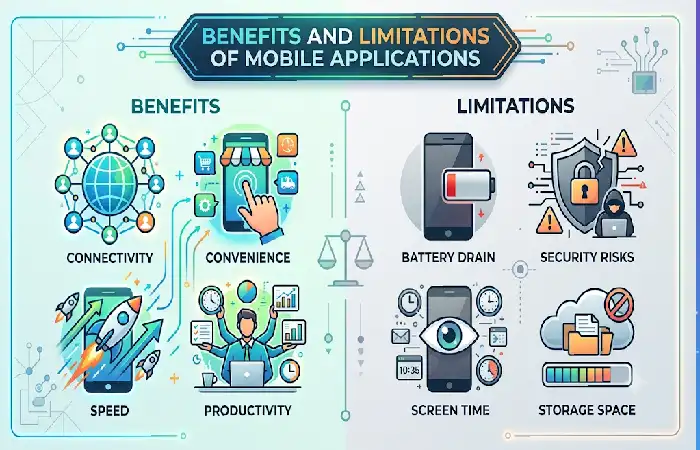
Mobile applications have now become an essential element of today’s digital lifestyle, providing people and companies a way to reach information, services, and communication channels whenever and wherever they want. Whether it is social networking, online shopping, internet banking, healthcare, or productivity tools, mobile applications now offer a level of accessibility and ease of use that old-style web pages and desktop software typically lacked.
The use of mobile applications has many benefits but there are also certain limitations concerning the development costs, maintenance, security issues and usability in different devices, which businesses should be aware of when choosing their mobile applications strategy.
Benefits of Mobile Applications
Mobile apps have many benefits for users, corporations and developers. They have revolutionized and became an integral part of digital transformation by allowing for contextualized, real-time and readily accessible experiences.
| Benefit | Impact |
| Accessibility | Anytime access |
| Convenience | Improved user experience |
| Engagement | Direct communication |
| Personalization | Better retention |
| Revenue Generation | Increased sales |
Limitations
Even though mobile applications include beneficial features, they are also linked with disadvantages that a business or a developer may face.
| Challenge | Description |
| Development Cost | High for native apps |
| Security Risks | Potential vulnerabilities |
| Device Fragmentation | Multiple screen sizes |
| Maintenance | Continuous updates required |
Mobile Application Trends in 2026
The industry of mobile applications is shaping rapidly as innovations and new technologies define our interaction with digital services. By 2026, mobile apps are anticipated to be more intelligent, quick, safeguarded and immersive. Advances in Artificial Intelligence (AI), 5G, cloud computing, augmented reality and cyber security are likely to influence the next generation of mobile experiences.
The current trend to a more mobile communication world is seeing companies investing huge sums on leading edge mobile application solutions. A good understanding of the current trends will enable organizations to develop the applications that will address future user needs.
AI-Powered Applications
Artificial Intelligence Artificial Intelligence has become one of the most impacting technologies in the world of mobile app development; today, mobile apps have started incorporating the advantage of learning a user‘s behavior with the help of this technology to continually automate routine tasks and offer a personalized experience.
Examples:
- AI chatbots
- Smart recommendations
- Voice assistants
- Predictive analytics
5G-Enabled Experiences
5G networks are bringing not only faster and more reliable mobile applications.
5G technology enables:
- Faster downloads
- Low-latency gaming
- Real-time video communication
- AR/VR experiences
Super Apps
Super apps integrate many services into one application so that people are not faced with installing a bunch of separate applications.
Single platforms offering multiple services:
- Payments
- Shopping
- Messaging
- Travel booking
Augmented Reality (AR)
Augmented Reality has a potential of reaching through many industries that combines information with the Real World.
Applications include:
- Virtual shopping
- Education
- Healthcare
- Gaming
Cloud-Native Mobile Apps
Contemporary applications favor cloud deployments to provide high scalability and availability.
Benefits:
- Better scalability
- Reduced storage requirements
- Faster deployment
Enhanced Security
Cyber security is still the major concern with the increasing information found in mobile applications.
Growing adoption of:
- Biometric authentication
- Zero-trust security
- End-to-end encryption
FAQ: Frequently Asked Questions About Mobile Applications
What is a mobile application?
A mobile application is a software application developed specifically for use on mobile devices such as smartphones and tablets.
What are the main types of mobile applications?
There are 4 most common types: native apps, web apps, hybrid apps, and progressive web apps.
Which is better: Android or iOS app development?
It really depends on your audience, budget and goals. Many businesses currently market on both platforms.
What programming languages are used for mobile apps?
Some of the languages commonly used are Kotlin, Java, Swift, Dart, JavaScript, C#.
Are mobile applications secure?
Encryption, authentication and security framework is used in many apps these days, it is the development process of the app too that determines security.
How much does mobile app development cost?
Cost varies widely according to complexity, features, platform needs, and approach used to develop it.
Conclusion
Mobile applications form the foundation of today‘s digital economy. They facilitate instant communication, entertainment, shopping, learning, providing healthcare and running a business. Whether it‘s native Android and iOS apps, the latest Progressive Web Apps (PWAs) or fully AI-powered mobile experiences, organizations have a choice of solutions to provide value to customers.
As these emerging technologies like artificial intelligence, 5 G, cloud computing, augmented reality and cybersecurity further develop and mature, mobile applications will become smarter, safer and customized. Companies that develop superior customer-centric mobile applications will be more capable to meet the customer demands and stay competitive in this ever-changing mobile first world.