
 Kashifa Jafar
Technology Writer & Contributor
Kashifa Jafar is a technology writer and contributor at FutureTechExpert with 4+ years of experience in technology writing and content creation.
Read Full Bio of Author →
Kashifa Jafar
Technology Writer & Contributor
Kashifa Jafar is a technology writer and contributor at FutureTechExpert with 4+ years of experience in technology writing and content creation.
Read Full Bio of Author →
 Sameena Begum
Health, Technology & Digital Content Reviewer
Sameena reviews selected health, wellness, technology, and digital content for clarity, factual presentation, and reader usefulness.
Read Full Bio of Reviewer →
Sameena Begum
Health, Technology & Digital Content Reviewer
Sameena reviews selected health, wellness, technology, and digital content for clarity, factual presentation, and reader usefulness.
Read Full Bio of Reviewer →
Mobile App Testing is a vital process to test the properly, performance, security and user experience of the applications on various devices and operating systems (Android, iOS) So that the application can smoothly run on various devices. As in 2026, countless mobile apps are fighting for the user attention, so mobile app testing is crucial in order to increase the quality of applications, cut down on unwanted crashes, and enhance the customer experience.
Regardless if you‘re an application developer, QA, business owner, product manager, learning about the world of mobile application testing will allow you to create trustworthy and usable applications.
 This article is part of
Mobile Apps Resources
Table of Contents
What Is Mobile App Testing?
Mobile app testing is the process of testing a mobile application to confirm that the application meets functional, usability, performance, security and compatibility requirements before the application is released.
The objective is to uncover bugs, crash, bottleneck in performance, problem related to user experience before they reach a real users.
Mobile testing typically involves:
- Manual testing
- Automated testing
- Functional verification
- Performance validation
- Security assessment
- Device compatibility checks
Mobile applications are not as simple as navigating web pages, because unlike web applications, they need to operate on many different screen sizes and hardware setups, multiple OS and network:
Key Testing Environments
| Environment | Purpose |
| Emulator | Early-stage testing |
| Simulator | OS-level behavior testing |
| Real Device | Real-world validation |
| Cloud Device Farm | Large-scale device coverage |
Mobile app testing plays a critical role in delivering reliable, secure, and high-performing applications. As explained in our Mobile Applications, testing is an essential stage that ensures apps meet user expectations before deployment.
Why Is Mobile App Testing Important?
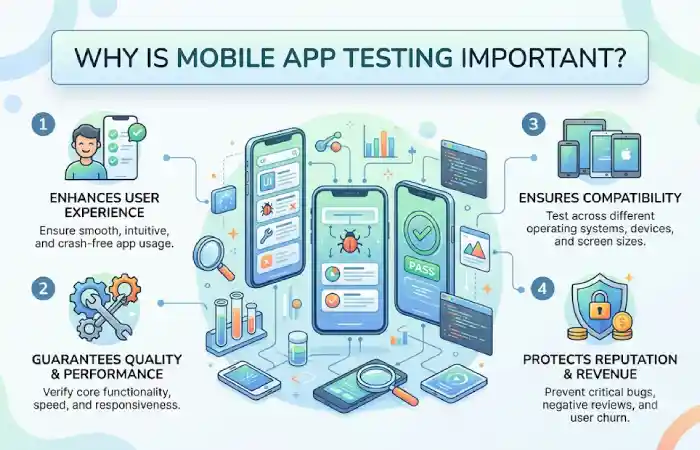
A poorly tested mobile app can result in:
- Application crashes
- Negative app store reviews
- Security vulnerabilities
- Customer churn
- Revenue loss
Benefits of Mobile App Testing
| Benefit | Impact |
| Better User Experience | Higher retention rates |
| Reduced Bugs | Improved reliability |
| Enhanced Security | Data protection |
| Faster Releases | Efficient development cycles |
| Lower Maintenance Costs | Fewer production issues |
From analysis of several testing reports in the online industry, it can be seen that the quality assurance is a very important part in the process of the app development, because a lot of users will uninstall the applications when they constantly crash and have some bad experience.
Testing requirements can differ significantly for Android applications because developers must support a wide variety of devices, screen sizes, and operating system versions.
Types of Mobile App Testing
The following describes various testing areas specific to mobile apps.
Common Testing Categories
| Testing Type | Purpose |
| Functional Testing | Validate features |
| Usability Testing | Evaluate user experience |
| Performance Testing | Measure speed and responsiveness |
| Compatibility Testing | Verify device support |
| Security Testing | Protect user data |
| Installation Testing | Check installation process |
| Localization Testing | Validate multiple languages |
| Accessibility Testing | Support all users |
Functional Testing
Functional testing is to verify the working of application features.
What Functional Testing Covers
- Login and registration
- User authentication
- Navigation flows
- Form submissions
- Payment processing
- Push notifications
- Search functionality
- Data synchronization
Example Test Cases
| Feature | Expected Result |
| Login | User successfully signs in |
| Search | Relevant results displayed |
| Checkout | Payment completed successfully |
| Profile Update | Changes saved correctly |
Usability Testing
Usability testing: It measures how easily users interact with the application.
Key Evaluation Areas
- Navigation simplicity
- Screen layout
- Readability
- Accessibility
- User journey effectiveness
- Touch responsiveness
Best Practices
- Test with real users
- Analyze user feedback
- Observe navigation patterns
- Identify friction points
High usability is reflected by the fact that the user keeps coming back and applies high scores in user rating.
Successful testing should be integrated throughout the mobile app development process rather than being treated as a final step before release.
Performance Testing
Ittests the overall performance of the application.
Performance Metrics
| Metric | Target |
| App Launch Time | Under 3 seconds |
| API Response Time | Under 2 seconds |
| CPU Usage | Optimized |
| Memory Usage | Stable |
| Battery Consumption | Minimal |
Performance Testing Areas
- Load testing
- Stress testing
- Scalability testing
- Battery testing
- Network testing
Widely used tools are Android Profiler, Xcode Instruments, Firebase Performance Monitoring.
Compatibility Testing
It confirms applications are functional on a variety of devices and operating systems.
Compatibility Checklist
| Area | Examples |
| Devices | Samsung, Google Pixel, iPhone |
| OS Versions | Android, iOS |
| Screen Sizes | Small to large displays |
| Network Types | 4G, 5G, Wi-Fi |
| Browsers | Mobile browser compatibility |
Given the fragmentation issue with Android devices is still prevalent, Compatibility testing is one of the key phases of mobile QA.
User experience testing evaluates whether an application follows established mobile app design principles that improve navigation, accessibility, and overall usability.
Security Testing

It is detecting weaknesses that could lead to users’ data being compromised.
Security Areas
- Authentication security
- Data encryption
- API security
- Session management
- Payment security
- Permission handling
Common Security Risks
| Threat | Risk |
| Data Leakage | User information exposure |
| Weak Authentication | Unauthorized access |
| API Exploits | System compromise |
| Malware Injection | Security breaches |
For applications related to finance, healthcare and e-commerce, security testing is also equally important.
Emerging mobile app trends, including AI-powered applications, augmented reality, and foldable device support, are creating new testing requirements for development teams.
Mobile App Testing Tools
By the year 2026, the mobile testing environment had developed into many different categories, including automation, testing of devices, performance monitoring, and cloud testing.
Popular Mobile App Testing Tools Comparison
| Tool | Platform | Best For | Resource |
| Appium | Android & iOS | Cross-platform automation | https://appium.io |
| Espresso | Android | Native Android testing | https://developer.android.com |
| XCUITest | iOS | Native iOS testing | https://developer.apple.com |
| Maestro | Android & iOS | Low-code automation | https://maestro.mobile.dev |
| BrowserStack | Cloud Devices | Real device testing | https://www.browserstack.com |
| Firebase Test Lab | Android & iOS | Cloud testing | https://firebase.google.com |
| AWS Device Farm | Android & iOS | Large-scale testing | https://aws.amazon.com/device-farm |
Tool Selection Guide
| Requirement | Recommended Tool |
| Cross-platform automation | Appium |
| Android-native testing | Espresso |
| iOS-native testing | XCUITest |
| Real device cloud | BrowserStack |
| CI/CD integration | Firebase Test Lab |
| Low-code automation | Maestro |
Appium is still one of the most popular cross-platform mobile automation framework in 2026.
Mobile App Testing Best Practices
Implement tested techniques for successful testing.
- Test on Real Devices
Real devices expose shortcomings within emulators.
- Automate Repetitive Tests
Automate:
- Regression testing
- Smoke testing
- Functional testing
- Prioritize High-Risk Features
Focus on:
- Login systems
- Payments
- User data handling
- Test Under Real Network Conditions
Simulate:
- Slow internet
- Network interruptions
- Poor signal strength
- Integrate Testing into CI/CD
Benefits include:
- Faster releases
- Continuous validation
- Reduced manual effort
Common Mobile App Testing Challenges
| Challenge | Solution |
| Device Fragmentation | Cloud device farms |
| OS Updates | Continuous compatibility testing |
| Network Variability | Network simulation |
| Performance Issues | Automated monitoring |
| Security Risks | Regular security audits |
Frequently Asked Questions
What is mobile app testing?
Testing a mobile app. Mobile app testing is defined as the process of testing and validating the mobile application‘s that it functions, usability, performance, security and compatibility before launching of the app.
Why is mobile app testing important?
As a result, it can help engineers and developers detect flaws in their products. Enable to improve user experience, lower security risk, and decrease bugs after launching.
Which tool is best for mobile app testing?
Appium is used for cross-platform testing, while Espresso and XCUITest are used for native Android and iOS testing, respectively.
Can mobile app testing be automated?
Yes. Most testing tasks such as regression, smoke, or functional testing can be automated using present day testing tools.
What is the difference between emulator and real-device testing?
An emulator mimics the device while testing on a real device confirms the application will behave within a user community.
Conclusion
Mobile App Testing is undoubtedly a critical element of today‘s software development processes. With mobile apps growing in sophistication and the demand for quality increasing among consumers, businesses need to ensure they have appropriate and integrated approaches in place that address all key aspects of the mobile application – resulting in a successfully launched, fully functional and user-friendly final product.
Kashifa Jafar is a technology writer and contributor at FutureTechExpert with 4+ years of experience in technology writing and content creation.
Read Full Bio of Author →Sameena reviews selected health, wellness, technology, and digital content for clarity, factual presentation, and reader usefulness.
Read Full Bio of Reviewer →