


 Kashifa Jafar
Technology Writer & Contributor
Kashifa Jafar is a technology writer and contributor at FutureTechExpert with 4+ years of experience in technology writing and content creation.
Read Full Bio of Author →
Kashifa Jafar
Technology Writer & Contributor
Kashifa Jafar is a technology writer and contributor at FutureTechExpert with 4+ years of experience in technology writing and content creation.
Read Full Bio of Author →
 Sameena Begum
Health, Technology & Digital Content Reviewer
Sameena reviews selected health, wellness, technology, and digital content for clarity, factual presentation, and reader usefulness.
Read Full Bio of Reviewer →
Sameena Begum
Health, Technology & Digital Content Reviewer
Sameena reviews selected health, wellness, technology, and digital content for clarity, factual presentation, and reader usefulness.
Read Full Bio of Reviewer →
Mobile App Design is essential in the success of any mobile application. Whether you‘re developing an eCommerce, social, productivity or business application, effective design will influence the user experience, user retention and user conversions. In 2026, your users will be demanding easy to use navigation, responsive interaction, more accessible interfaces and smooth experience on all devices.
As described by recent study on benchmark in UX, The well-established mobile apps are measured with hundreds of usability factors to enhance users’ experience and stimulate their engagement.
 This article is part of
Mobile Apps Resources
Table of Contents
What Is Mobile App Design?
Mobile App Design refers to the process of designing the visual look, behavior and user experience of the application. The mobile app design refers to a combination of the User Interface (UI) design and the User Experience (UX) design.
The main aim of designing a mobile application is to enable users to perform their tasks in a fast and fun way. Any mobile app should be based on the following skills: effective usability, accessibility, fast performance and uniform functioning in all mobile devices and operating systems.
The design process of the mobile app generally goes through step such as user research, wireframing, prototyping, visual design, usability testing, and constant optimization reflecting users’ feedback.
The designer studies the user needs and behaviors and implements design elements for mobile screens, finger-friendly touch gestures, simple navigation, font families and sizes, color schemes, and accessibility.
Mobile app design typically includes:
- User research
- Wireframing
- UI design
- UX optimization
- Navigation planning
- Accessibility implementation
- Prototyping and testing
Effective mobile app design considers the user, aesthetics and function of the design.
Mobile app design is a critical component of the broader mobile ecosystem, and understanding the fundamentals covered in our <a href=”https://www.futuretechexpert.com/mobile-applications-guide/”>complete guide to mobile applications</a> can help designers create more effective and user-focused experiences.Mobile app design is a critical component of the broader mobile ecosystem, and understanding the fundamentals covered in our complete guide to mobile applications can help designers create more effective and user-focused experiences.
Mobile App Design Components
| Component | Purpose |
| UX Design | Improves user satisfaction |
| UI Design | Creates visual appearance |
| Wireframes | Define layout structure |
| Prototypes | Test functionality |
| Design Systems | Maintain consistency |
| Accessibility | Improve usability for all users |
Resource Links
| Resource | Website |
| UX Research | Baymard Institute |
| Design Inspiration | DesignRush |
| UI Patterns | Mobile App Design |
Why User Experience Matters
User Experience (UX) what your app “feels” like to a user while interacting with it.
Poor UX often leads to:
- High uninstall rates
- Lower engagement
- Negative reviews
- Reduced revenue
Good UX focuses on:
- Simplicity
- Speed
- Clarity
- Accessibility
- User satisfaction
The following examples are research-based UX benchmarks, or performance standards, which have been applied to mobileapplications to raise awareness about the value of user-centered design.
Benefits of Strong UX
- Higher retention rates
- Increased user satisfaction
- Better conversion rates
- Improved app ratings
- Stronger brand loyalty
Successful app design works hand in hand with the mobile app development process, ensuring that visual elements, functionality, and performance align with project goals.
Mobile User Interface Design
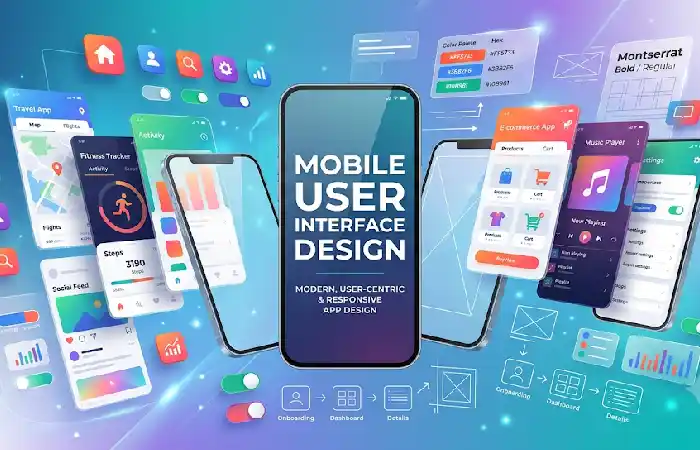
Mobile User Interface (UI) Design deals with the visual part of it.
These elements include:
- Buttons
- Icons
- Typography
- Colors
- Menus
- Forms
- Cards
Effective UI Design Principles
Simplicity
Watch wordiness and unnecessary adjuncts such as.
Visual Hierarchy
Most Frequently Used for Initial Guidance users will go to guide users into what is important and what to do next.
Consistency
Ensure consistent colors, text styles, and interactions for a cohesive experience across the application.
Feedback
Offer visual feedback in response to user tapping or completing action.
Mobile App Navigation
Navigation aids in enabling the user to get around the app.
Navigation issues lead to frustration and abandonment.
Popular Navigation Patterns
| Navigation Type | Best For |
| Bottom Navigation | Consumer apps |
| Hamburger Menu | Content-heavy apps |
| Tab Navigation | Multi-feature apps |
| Gesture Navigation | Modern mobile experiences |
Navigation Best Practices
- Keep menu options limited
- Use clear labels
- Maintain consistency
- Provide back-navigation options
- Highlight active sections
A number of popular apps have simple navigation schemes designed to minimize friction.
When designing for Android devices, it is important to understand the principles of Android application development to create responsive interfaces that perform well across different screen sizes and device types.
Designing for Different Screen Sizes
Modern mobile apps must work across:
- Smartphones
- Tablets
- Foldable devices
- Large-screen phones
Responsive Design Strategies
Flexible Layouts
Use scalable containers and grids.
Adaptive Components
Adjust the size of the resize buttons or the images that need resizing on the fly.
Scalable Typography
Always write so that it is easily displayed on all screens.
Device Testing
Test on Android and iOS devices.
Screen Size Comparison
| Device Type | Typical Screen Size |
| Smartphone | 5–7 inches |
| Large Phone | 6.5–7.5 inches |
| Tablet | 8–13 inches |
| Foldable | Variable |
Creating Consistent App Layouts
Known as ‘consistency’. Consistent designs make learning easier and help users complete tasks more quickly.
Users should immediately recognize:
- Buttons
- Navigation patterns
- Typography
- Color schemes
Design System Elements
- Color palette
- Typography guidelines
- UI components
- Icon libraries
- Layout standards
A design system cuts development time and gives a consistent experience.
Designers should also follow platform-specific guidelines and learn about iOS app development best practices to deliver a seamless experience for Apple users.
Accessibility in Mobile App Design
Accessibility guarantees that applications are accessible to all users including people with some form of disability.
Essential Accessibility Features
- Screen reader support
- High color contrast
- Adjustable text sizes
- Alternative text for images
- Voice navigation support
- Touch-friendly controls
Accessibility Checklist
| Feature | Importance |
| Color Contrast | High |
| Screen Readers | High |
| Keyboard Support | Medium |
| Text Scaling | High |
| Voice Commands | Medium |
Accessibility is rapidly becoming a standard feature of current mobile implementations.
Even the best designs should be validated through comprehensive mobile app testing strategies to identify usability issues and optimize the overall user experience.
Mobile App Design Best Practices
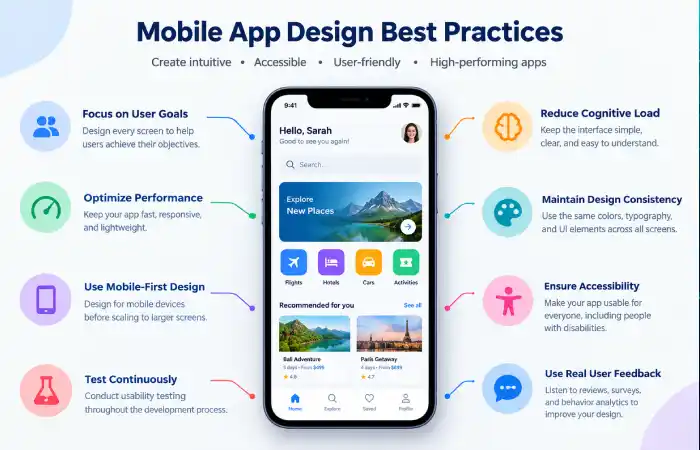
Focus on User Goals
Goal the design of each screen should always support the user in accomplishing one distinct goal.
Reduce Cognitive Load
Keep the amount of information to a minimum.
Optimize Performance
Speed of loading screens.
Prioritize Mobile-First Design
Design away for mobile devices first then scale up.
Test Continuously
Throughout the development process, you should conduct usability testing.
Use Real User Feedback
Review reviews, surveys, behavior analytics.
To stay competitive in a rapidly evolving industry, designers should keep up with the latest mobile app trends that are shaping user expectations and interface design standards.
Common Mobile App Design Mistakes
Avoid these common issues:
Overcomplicated Navigation
Excessive menu choices-There are so many options; users get lost.
Inconsistent Design
There are numerous confusing styles across screens.
Small Touch Targets
The buttons should be prominent.
Poor Accessibility
Accessibility is no limit to usability.
Excessive Animations
Management of too many animations.
Lack of User Testing
Common pitfalls of design assumptions and the problems they create are as follows.
Troubleshooting Mobile App Design Issues
| Problem | Solution |
| High Bounce Rate | Improve onboarding experience |
| Low Engagement | Simplify navigation |
| Negative Reviews | Conduct UX testing |
| Slow Performance | Optimize assets |
| User Confusion | Improve UI consistency |
| Accessibility Complaints | Follow accessibility guidelines |
Frequently Asked Questions
What is mobile application design?
Mobile application design involves the user interface and user experience design of a mobile application.
What is the distinction between UI and UX?
UI is concerned with visual design and usability, whereas UX deals with the total user experience.
What is the significance of designing mobile apps?
Design that is good. Design that enhances usability, increases engagement and retention, and improves customer satisfaction.
What applications are available?
Some of the most common tools are Figma, Adobe xd, Sketch, Framer, and ProtoPie.
Could you tell me how I can enhance my design of a mobile application?
All Resources Stay away from user research, usability testing, accessibility, responsive layouts, and consistency in design.
Conclusion
Mobile Apps Design involves more than just designing your application to be visually beautiful. Truly successful applications are those that have been designed with usability, simple navigation, great usability and experience, accessibility for all, flexible and flexible layout and a good design system implemented.
With the increase in mobile usage in 2026, companies that have a focus on user-centred design will have a more successful app, having more users, higher retention, and a stronger app experience. By following the best practices for making apps user-friendly and accessible, you will be able to build a great app in 2026.
Kashifa Jafar is a technology writer and contributor at FutureTechExpert with 4+ years of experience in technology writing and content creation.
Read Full Bio of Author →Sameena reviews selected health, wellness, technology, and digital content for clarity, factual presentation, and reader usefulness.
Read Full Bio of Reviewer →