
 Kashifa Jafar
Technology Writer & Contributor
Kashifa Jafar is a technology writer and contributor at FutureTechExpert with 4+ years of experience in technology writing and content creation.
Read Full Bio of Author →
Kashifa Jafar
Technology Writer & Contributor
Kashifa Jafar is a technology writer and contributor at FutureTechExpert with 4+ years of experience in technology writing and content creation.
Read Full Bio of Author →
 Sameena Begum
Health, Technology & Digital Content Reviewer
Sameena reviews selected health, wellness, technology, and digital content for clarity, factual presentation, and reader usefulness.
Read Full Bio of Reviewer →
Sameena Begum
Health, Technology & Digital Content Reviewer
Sameena reviews selected health, wellness, technology, and digital content for clarity, factual presentation, and reader usefulness.
Read Full Bio of Reviewer →
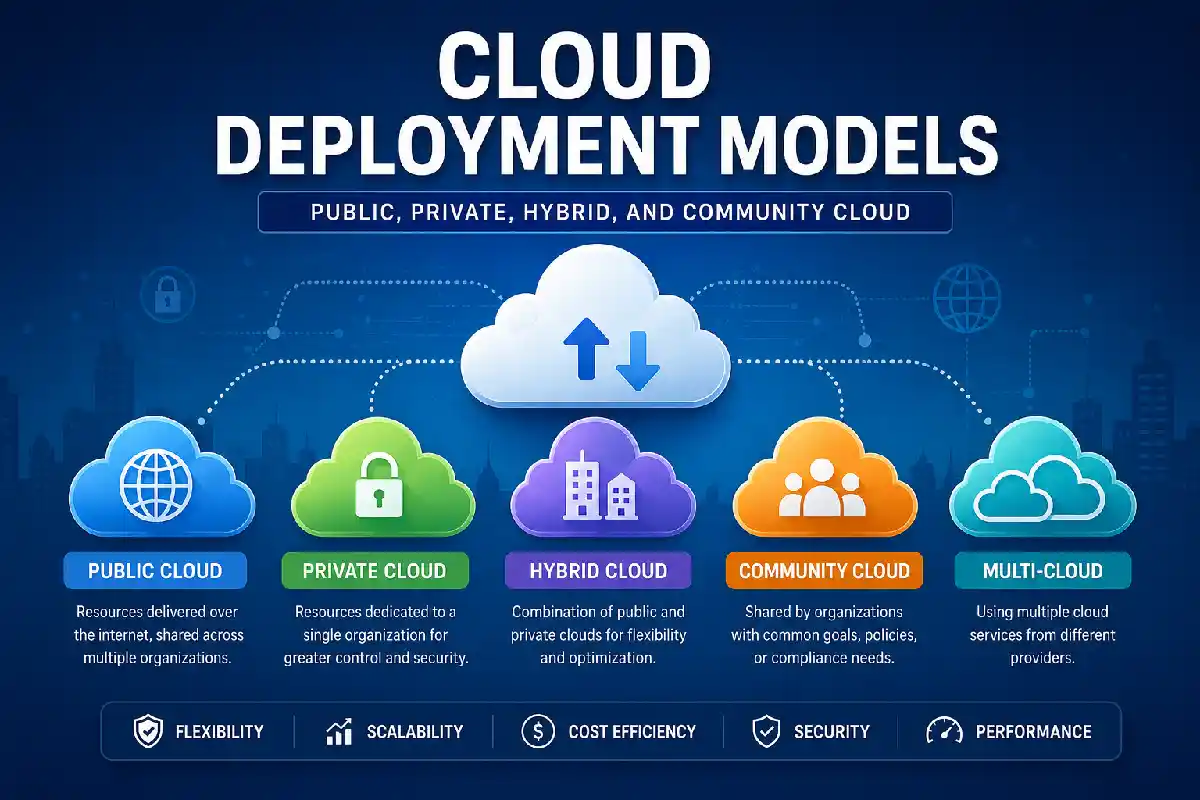
Cloud deployment models specify where the cloud infrastructure, applications, data and computing resources are hosted, managed and accessed from. The deployment model selected be it public, private, hybrid, community, or multi-cloud can have implications on your organization with respect to costs, security, scalability, compliance, performance and control.
Cloud computing is no longer merely about choosing between on-premises and public cloud. In 2026, enterprise workloads enabled by combinations of cloud deployments and platforms support AI, applications, data, work from anywhere, disaster recovery and regulated business processes.
The ideal production environment is application workload driven. A start-up company might choose to leverage the elasticity of a public cloud. A heavily regulated enterprise organization might elect to operate sensitive workloads in a private environment and execute Public Cloud infrastructure to deploy rapidly scaling applications.
This comprehensive report begins by explaining the key models of cloud deployment, how they relate to one another, the most common and effective application of each deployment model, the security and cost advantages where appropriate and how a business goes about selecting a suitable architecture.
 This article is part of
Deployment Models Resources
Table of Contents
What Are Cloud Deployment Models?
Cloud deployment model specifies: the location of cloud infrastructure, the owner or operator of the infrastructure, who can access the cloud, how the cloud infrastructure provides computing resources to users.
In simple terms, a deployment model answers this question:
Who owns your cloud environment, and where is it hosted?
The four traditional cloud deployment models are:
- Public cloud
- Private cloud
- Hybrid cloud
- Community cloud
Finally, the multi-cloud approach is often encountered. What need to be clarified here is the terminologies, NIST‘s original suggested deployment model describes for public, private, community and hybrid. Multi-cloud is a recent cloud deployment solution that other than these four definitions, referring to several cloud services form different providers.
Cloudwards even classifies these four NIST models separately from multi-cloud, whereas current AWS literature combines all five approaches when discussing current cloud planning.
Cloud Deployment Models vs. Cloud Service Models
Service models and deployment models are similar but different.
| Cloud concept | Main question | Examples |
| Deployment model | Where and for whom is the cloud infrastructure operated? | Public, private, hybrid, community |
| Service model | What type of service is provided? | IaaS, PaaS, SaaS |
| Deployment architecture | How is an application distributed? | Regional, multi-region, hybrid, multi-cloud |
As an example, a company can have a public cloud deployment and consume the services of IaaS, PaaS and SaaS.
For example, this distinction can help you avoid this beginner trap: Combining public cloud, SaaS and hybrid cloud efforts as if they were competing categories.
Why Cloud Deployment Models Matter
Choosing the right deployment model is an architectural decisionnot a purchasing decision.
The model you select can influence:
- Infrastructure costs
- Security controls
- Data ownership
- Compliance requirements
- Application performance
- Scalability
- Availability
- Disaster recovery
- IT staffing requirements
- Vendor dependency
- Network architecture
- Data residency
- Operational complexity
For instance, a public cloud service can deliver needed resources quickly through a pay-as-you-go model where no hardware purchase is necessary. Conversely, a private cloud building can offer more customization of infrastructure and governance, though at a higher cost and require greater operational experience.
Hybrid environments though may offer to combine the benefits of the various environments, however, they pose integration and management issues.
Google Cloud defines hybrid cloud as: ‘An environment where applications or their components are running partly on the public cloud and partly on the private cloud. (On-premises infrastructure is generally considered part of the private side of the architecture).’
Why the decision is becoming more important in 2026
More and more organizations are current volumes of work that are distinctly different.
A company may simultaneously have:
- Customer-facing web applications
- Databases containing sensitive information
- AI and machine-learning workloads
- Legacy applications
- SaaS platforms
- Backup systems
- Development environments
- Analytics platforms
- Edge workloads
- Disaster-recovery infrastructure
Having all the workloads within one environment isn‘t always the best way to go.
The smarter solution is to identify what environment each workload belongs in.
Types of Cloud Deployment Models
The major deployment models can be summarized as follows:
| Model | Infrastructure access | Control | Scalability | Typical cost profile | Common use |
| Public cloud | Shared provider infrastructure | Medium | Very high | Pay-as-you-go | Startups, web apps, analytics |
| Private cloud | Dedicated to one organization | High | High but capacity-dependent | Higher infrastructure/management cost | Regulated and sensitive workloads |
| Hybrid cloud | Connected private + public environments | High to medium | Very high | Variable | Enterprises and gradual migration |
| Community cloud | Shared by organizations with common needs | Shared | Medium to high | Shared costs | Government, healthcare, sector groups |
| Multi-cloud | Multiple cloud providers | Depends on architecture | Very high | Variable | Resilience, flexibility, provider diversification |
However these categories should not be considered as boxes. They can be combined according to the needs of the application.
Public Cloud
A public cloud is a cloud environment managed and offered by a cloud service provider for use by different customers.
Most users will utilize the items listed above (compute, storage, networking, database, security services, analytics, AI services, etc.) with a pay as you go, usage-based, or subscription service model.
Some of the biggest public cloud providers are: AWS, Microsoft Azure, Google Cloud.
The key message is public cloud doesn‘t mean “insecure” or “all comers.” Clients have separate resources and access controls; the infrastructure underneath is still used for multiple clients.
Organizations that want scalable infrastructure without managing physical servers can consider Public Cloud Deployment, where resources are provided through a third-party cloud provider.
How Public Cloud Works
A public cloud provider owns and is responsible for the following infrastructure from a high level:
Customers provision resources, and configure their applications and security controls, in the provider‘s environment.
A simplified structure looks like this:
Cloud provider infrastructure to virtualized resources to customer environment to applications and data
The provider is in charge of the basic physical infrastructure, and the customer must handle the components specified in the relevant shared-responsibility model.
Advantages of Public Cloud
- High scalability
The organizations can enhance or shrink resources in line with requirements.
This is useful especially for traffic with highly fluctuating traffic.
- Lower upfront infrastructure investment
A company is not necessarily required to buy and physically host huge servers before deployment.
- Fast deployment
The time to provision cloud resources can typically be an order of magnitude faster then prepping.
- Broad service availability
The time to provision cloud resources can typically be an order of magnitude faster then prepping.
- Global reach
According to the architecture and the available regions that the provider offers, organizations are able to deploy applications across geographic regions.
Disadvantages of Public Cloud
Choosing public cloud is not always the right choice.
Potential disadvantages include:
- Ongoing usage costs
- Vendor dependency
- Configuration complexity
- Compliance considerations
- Network dependency
- Unexpected spending from poorly managed resources
- Less physical infrastructure control
Public Cloud Use Cases
Public cloud is commonly suitable for:
- Websites
- Mobile applications
- SaaS applications
- Development and testing
- Data analytics
- AI experimentation
- Content delivery
- Backup
- Disaster recovery
- Variable workloads
- Rapidly growing businesses
Private Cloud
A private cloud- a cloud environment that is specific to an individual organization.
The infrastructure might be owned, managed and run by the organization or by a 3 rd party. It is could be based on the organization‘s site or in a datacenter.
And the main trait is that it is a private environment exclusively for a single organization instead of a community of users running their own public cloud service.
How Private Cloud Works
A private cloud can provide cloud-like capabilities such as:
- Virtual machines
- Automated provisioning
- Resource pools
- Self-service infrastructure
- Network virtualization
- Centralized management
- Automated scaling
On the other hand, the organization has, in most cases, more dominance over the infrastructure and policies.
Businesses with strict security, compliance, or infrastructure-control requirements may benefit from Private Cloud Deployment, which provides a dedicated cloud environment.
Advantages of Private Cloud
Greater control
Leveraging existing infrastructure offers the advantage of getting the network up and running with fine grained administrative control over infrastructure, networking, security policy enforcement and configuration.
Customization
The environment can be built to certain business requirements.
Regulatory alignment
Private infrastructure may be helpful where there are specific governance, security or data requirements within the organizations.
Private infrastructure may be helpful where there are specific governance, security or data requirements within the organizations.
Predictable infrastructure
Dedicated capacity for workload s that are predictable can be advantageous.
Disadvantages of Private Cloud
The main disadvantage is the performance responsibility.
Organizations may need to manage:
- Servers
- Storage
- Networking
- Virtualization
- Security
- Monitoring
- Backup
- Disaster recovery
- Hardware lifecycle
- Capacity planning
- Skilled IT personnel
This can potentially make private cloud more expensive and complex than public cloud for certain workloads.
Hybrid Cloud
An hybrid cloud is a combination of two or more different cloud deployment types, with a connection between them that allows applications, data or workloads to be shared across those environments.
The most popular set-up mixes public cloud with private cloud or local / on-premises…
Hybrid cloud is appropriate for situations where an organization either is unable or unwilling to migrate all of its workloads to the public cloud.
Example of Hybrid Cloud
Imagine a financial organization with:
- Sensitive customer data in a controlled private environment
- A customer-facing application running in public cloud infrastructure
- Analytics workloads using public cloud resources
- Backup infrastructure in another environment
These environments can be exploited as part of a larger hybrid architecture.
Why Businesses Choose Hybrid Cloud
Hybrid cloud can provide a balance between:
- Control
- Flexibility
- Scalability
- Compliance
- Existing infrastructure investment
Also, it can aid slowly migration.
An organization need not move a remittance entire IT estate. It can modernize workloads over time.
Companies that need to combine on-premises infrastructure with cloud resources can use Hybrid Cloud Deployment for greater flexibility and workload management.
Advantages of Hybrid Cloud
- Flexible workload placement
- Gradual cloud migration
- Public-cloud scalability
- Retention of existing infrastructure
- Potentially better control over sensitive workloads
- Support for disaster recovery
- Greater architectural flexibility
Challenges of Hybrid Cloud
One complication of hybrid cloud is that it is far more complex.
Organizations must manage:
- Connectivity
- Identity
- Network security
- Data movement
- Monitoring
- Integration
- Governance
- Configuration consistency
- Cost visibility
It is very easy to lose control over complicated hybrid architecture.
Google Cloud points out, rằngA hybrid-cloud architecture is not a one size fits all. Organisations can mix and match cloud and on-premises environments in many ways, according to their applications and data needs.
Community Cloud
The community cloud is applicable for a defined set of organizations that have similar needs.
The participating organizations may have similar:
- Regulatory requirements
- Security needs
- Business objectives
- Data-handling requirements
- Industry standards
The community cloud is a midway point between a public cloud and a private cloud.
Community Cloud Example
Suppose you have a handful of organizations in this same regulated industry that all require identical security and compliance controls.
Instead of running separate environments on their own infrastructure they could share a cloud infrastructure based on mutual requirements.
Community cloud can be particularly relevant to:
- Government organizations
- Healthcare organizations
- Financial-sector groups
- Research institutions
- Educational institutions
- Industry consortiums
Can take the form of… The precise architecture of the product and the proportion of ownership can differ.
Organizations with similar security, compliance, or operational requirements can share infrastructure through Community Cloud Deployment.
Advantages
- Shared infrastructure costs
- Common governance requirements
- Industry-specific controls
- Collaboration opportunities
- Dedicated participation rules
Disadvantages
- More limited provider choices
- Shared governance can be complicated
- Potential coordination issues
- Smaller economies of scale than major public clouds
- Responsibility for security and compliance still requires careful management
RISA‘s directions on cloud talks about community clouds being a cloud that provide services to a specific set of customers with common requirements and activities, as defined by the community cloud versus the public cloud and a broader set of consumers than private cloud.
Multi-Cloud Deployment
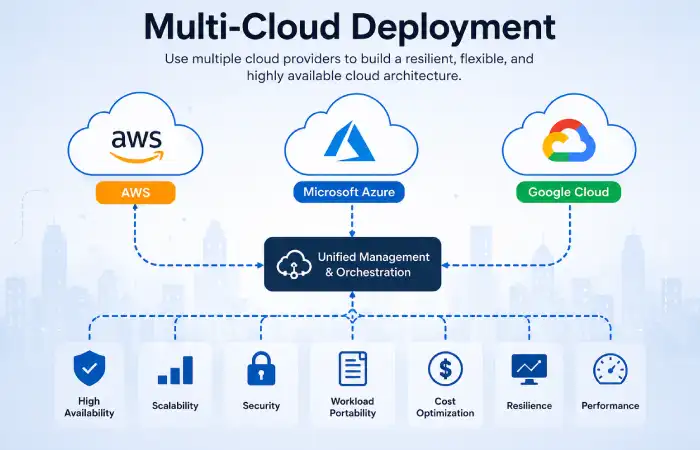
This refers to employing services hosted by at least two different cloud vendors.
For instance, perhaps an organization would want to use one provider for analytics, a second for enterprise applications, and a third for specialized infrastructure.
Multi-Cloud and Hybrid Cloud are two different concepts.
Businesses that want to distribute workloads across multiple cloud providers can adopt Multi-Cloud Deployment to improve flexibility and reduce dependence on a single provider.
Hybrid Cloud vs. Multi-Cloud
| Feature | Hybrid cloud | Multi-cloud |
| Main idea | Connect different environments | Use multiple cloud providers |
| Typical setup | Public + private/on-premises | Cloud provider A + provider B |
| Primary motivation | Flexibility and workload placement | Provider diversification and specialized services |
| Integration | Usually important | Can range from loose to deeply integrated |
| Complexity | High | High to very high |
A company can make use of both hybrid and multi-cloud.
Google‘s architecture guidance considers hybrid/multi-cloud as a separate deployment archetype and compares it against other architectures on factors such as availability, cost, performance and manageability.
Benefits of Multi-Cloud
- Reduced dependence on one provider
- Access to specialized services
- Geographic flexibility
- Potential resilience improvements
- Ability to select the best platform for different workloads
Multi-Cloud Challenges
Multi-cloud introduces additional complexity in:
- Identity management
- Networking
- Monitoring
- Security
- Billing
- Governance
- Skills
- Automation
- Data portability
Diversification is achieved by using multiple providers; however, having too many providers can, in many cases, result in unnecessary complexity.
Has the architecture been developed for a business reason?
Public vs. Private vs. Hybrid Cloud
The most popular cloud is between public, private and hybrid cloud.
| Factor | Public | Private | Hybrid |
| Ownership | Provider | Single organization/managed provider | Multiple environments |
| Control | Moderate | High | High |
| Scalability | Excellent | Capacity-dependent | Excellent |
| Upfront infrastructure | Low | Usually higher | Variable |
| Management burden | Lower | Higher | High |
| Customization | High | Very high | High |
| Migration flexibility | High | Lower | Very high |
| Complexity | Low to medium | Medium to high | High |
| Sensitive workloads | Possible with proper controls | Often preferred by some organizations | Strong option |
| Best for | Flexible workloads | Dedicated environments | Mixed requirements |
Which Is Cheapest?
It all comes down to your specific needs, calculated risks, and individual situation. The debate about the optimal deployment model has yet to be settled.
Public cloud may also help to mitigate up-front capital costs, (but ongoing consumption charges can also be high).
Private cloud may necessitate higher investment in infrastructure but might be cheaper to run for stable, predictable workloads.
Hybrid cloud has cost that can be not fixed as it is built by mixed environment.
The above comparison should be reattributed using TCO instead of the comparison of monthly cloud bills.
Cloud Deployment Models and Security
Determine security at the workload and architecture levels.
A common mistake is assuming:
Public cloud = unsecure
Private cloud= secure
This is far too simplistic.
Private environment that is not well rated can be insecure and the public cloud environment that has been designed in strong security controls.
Important Security Controls
Regardless of deployment model, organizations should consider:
- Identity and access management
- Multi-factor authentication
- Encryption
- Network segmentation
- Least-privilege access
- Logging
- Security monitoring
- Vulnerability management
- Backup
- Disaster recovery
- Configuration management
- Incident response
- Secrets management
Shared Responsibility
In a public cloud security, it would reflects a shared-responsibility.
The provider owns some of the underlying infrastructure responsibilities but the customer is responsible for the correct configuration and protection of their workloads.
It also depends on which service you are using.
For example, responsibilities can differ between:
- Virtual machines
- Managed databases
- Containers
- Serverless services
- SaaS applications
This is where security teams should analyze the actual service rather than call an environment “public cloud”.
Cloud Deployment Models and Scalability
Scalability indicates increasing or decreasing resources as needed.
Public cloud has generally good elasticity since the providers has large pools of resources.
The private cloud is also scalable, but considerations include physical infrastructure and capacity planning constraints.
The hybrid cloud offers an interesting compromise.
For example:
Normal demand → private infrastructure
Peak demand → additional public-cloud resources
One could avoid the infrastructure expense from overspending by adopting this strategy and choosing not to make a major infrastructure purchase for the peak load.
Butall of this will demand proper networking, application architecture, data synchronization, automation etc.
Cloud Deployment Models and Cost
When it comes to cloud cost, in addition to looking at the service prices, there‘s more involve.
Organizations should consider:
- Compute costs
Virtual machines, containers, serverless function, and specialized processors could also lead to spending.
- Storage costs
Costs can depend on:
- Storage capacity
- Storage class
- Performance
- Replication
- Backup
- Data retention
- Network costs
Data transfer can become significant in architectures that move large volumes of information between environments.
- Management costs
Private and hybrid environments may require additional personnel and tooling.
- Security costs
Security monitoring, compliance, backup, identity management, and security services can contribute to total spending.
- Downtime costs
The cheapest infrastructure is not necessarily the cheapest business solution.
If an application experiences costly downtime, spending more on availability may be financially justified.
Example Cost Comparison
| Cost category | Public | Private | Hybrid | Multi-cloud |
| Hardware investment | Low | High | Medium/high | Low to medium |
| Infrastructure management | Low/medium | High | High | High |
| Variable usage cost | High | Lower for fixed capacity | Medium/high | High |
| Scaling cost | Flexible | Capacity-dependent | Flexible | Flexible |
| Network complexity cost | Medium | Medium | High | High |
| Skills requirement | Medium | High | High | Very high |
These are directional comparisons, not universal prices. Actual TCO depends on workload size, utilization, licensing, region, contracts, staff, and architecture.
How Cloud Deployment Models Support Business Goals
Cloud architecture should support business objectives rather than exist simply because cloud technology is popular.
Goal: Rapid growth
Public or hybrid cloud can provide flexible capacity.
Goal: Regulatory control
Private, community, or carefully designed hybrid environments may be appropriate depending on regulatory requirements.
Goal: Lower upfront investment
Public cloud can reduce the need for large initial infrastructure purchases.
Goal: Modernization
Public and hybrid environments can provide access to managed databases, containers, serverless platforms, analytics, and AI services.
Goal: Disaster recovery
Cloud infrastructure can provide additional recovery environments and geographic redundancy.
Goal: Global expansion
Public cloud can provide access to infrastructure in multiple geographic regions.
Goal: Reduce vendor dependency
A multi-cloud strategy can provide provider diversification, although it also increases complexity.
Choosing the right model depends on factors such as budget, security, scalability, compliance, and the specific requirements of Cloud Deployment for Businesses.
How to Choose the Right Cloud Deployment Model
Choosing a deployment model should start with workloads, not providers.
Step 1: Identify the workloads
List:
- Applications
- Databases
- Files
- Analytics
- AI workloads
- Development systems
- Legacy systems
- Backup systems
Step 2: Classify the data
Determine whether the data is:
- Public
- Internal
- Confidential
- Highly sensitive
- Regulated
Step 3: Identify compliance requirements
Ask:
- Where must data be stored?
- Who can access it?
- How long must it be retained?
- What audit requirements apply?
- Are specific security controls mandatory?
Step 4: Measure performance requirements
Consider:
- Latency
- Throughput
- Availability
- Geographic distribution
- Processing requirements
Step 5: Calculate TCO
Include infrastructure, software, networking, personnel, security, backup, monitoring, migration, and downtime.
Step 6: Evaluate internal skills
A technically attractive architecture may be impractical if the organization cannot operate it reliably.
Step 7: Plan for growth
Consider expected workload growth over the next three to five years rather than only today’s requirements.
Step 8: Evaluate portability
Ask whether applications and data can be moved if business requirements change.
A Simple Decision Framework
| Requirement | Potentially suitable model |
| Fast deployment | Public |
| Highly dedicated infrastructure | Private |
| Mixed legacy and cloud systems | Hybrid |
| Shared industry requirements | Community |
| Multiple provider strategy | Multi-cloud |
| Unpredictable traffic | Public/hybrid |
| Strict workload isolation | Private/hybrid |
| Gradual migration | Hybrid |
| Specialized provider services | Multi-cloud |
These are starting points rather than universal rules.
Benefits and Challenges of Cloud Deployment Models
Major Benefits
Cloud deployment models can provide:
- Flexible infrastructure
- Faster application deployment
- Better resource utilization
- Scalability
- Global availability options
- Modern development capabilities
- Disaster-recovery options
- Access to managed services
- Reduced physical infrastructure requirements
Common Challenges
However, cloud adoption introduces its own problems.
Cost management
Cloud environments can become expensive when resources are not monitored.
Security misconfiguration
Incorrect identity, storage, network, or access settings can expose systems.
Complexity
Hybrid and multi-cloud architectures require more operational coordination.
Vendor lock-in
Applications designed around proprietary services may be difficult to migrate.
Skills shortages
Cloud environments require knowledge of networking, identity, security, automation, architecture, and cost management.
Migration difficulty
Legacy applications may not be suitable for immediate cloud migration.
Cloud Deployment Models for Small Businesses
Small businesses often prioritize:
- Low upfront costs
- Easy management
- Fast deployment
- Security
- Predictable spending
- Limited IT staffing
For many small businesses, public cloud and managed services can be attractive because they reduce the amount of infrastructure the company must operate itself.
A small business might use:
Public cloud → website and applications
SaaS → email and productivity
Cloud backup → business continuity
Managed security → protection and monitoring
A private cloud may make sense when a company has unusual security, regulatory, performance, or infrastructure requirements, but it should not be selected simply because it sounds more secure.
Cloud Deployment Models for Enterprise Organizations
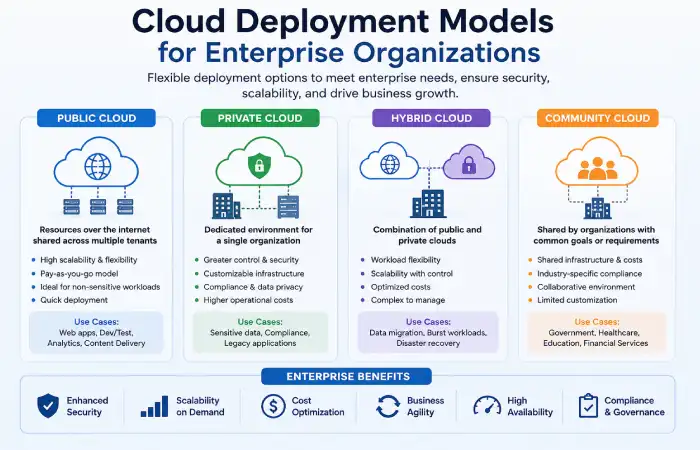
Large enterprises often have more complicated requirements.
They may have:
- Legacy applications
- Multiple data centers
- Regulatory requirements
- Global operations
- Large data platforms
- Multiple business units
- Existing private infrastructure
- Cloud-native applications
Because of this, hybrid and multi-cloud strategies can become attractive.
An enterprise might use:
Private environment → sensitive legacy workloads
Public cloud → customer applications
Public cloud provider B → specialized analytics
SaaS → productivity applications
Secondary region/provider → disaster recovery
The important point is that enterprise cloud architecture should be governed centrally while allowing individual workloads to use appropriate platforms.
Cloud Deployment Trends and Future Considerations
Cloud deployment is evolving as organizations adopt AI, automation, distributed systems, and increasingly complex data architectures.
AI Workloads
AI applications can require substantial compute, high-performance networking, large datasets, and specialized accelerators.
This makes infrastructure planning increasingly important.
Recent 2026 industry reporting shows that enterprises are increasing investment in AI infrastructure while also dealing with the complexity of integrating AI into existing systems.
Hybrid AI
Organizations may not want every AI workload running in one location.
Sensitive data may remain in controlled environments while computational workloads use public-cloud infrastructure.
This can create hybrid AI architectures.
Data Sovereignty
Data residency and sovereignty are becoming increasingly important for organizations operating across jurisdictions.
The choice of deployment model can affect where data is stored and processed.
Cloud-Native Applications
Containers, Kubernetes, serverless computing, microservices, and managed services are influencing how applications are designed.
Modern architectures increasingly separate application components so they can be deployed according to workload requirements.
Multi-Cloud Governance
As organizations adopt multiple providers, centralized governance becomes more important.
Future cloud strategies will increasingly require:
- Unified identity
- Policy automation
- Cost management
- Security monitoring
- Infrastructure automation
- Standardized observability
Automation
Infrastructure-as-code and automated policy enforcement can reduce configuration errors and make large environments easier to manage.
Edge and Distributed Computing
Applications increasingly need computing closer to users, devices, and data sources.
This creates architectures that may span:
Edge → private infrastructure → public cloud → multiple regions
The result is a broader concept of distributed cloud infrastructure rather than a simple “move everything to the cloud” strategy.
Frequently Asked Questions About Cloud Deployment Models
Can you tell me the four cloud deployment models?
The four patterns are the public cloud, the private cloud, the hybrid cloud, and the community cloud. These have been the four deployment models defined in the original NIST framework.
What the most common cloud deployment model?
Public cloud has been the most popular due to its ability of delivering on demand Infrastructure and managed services without owning the underlying physical platform.
Is multi-cloud a cloud deployment model?
Historically multi-cloud is known as a new deployment concept however, it is not part of the four main NIST cloud types. However, it is utilize the services from multiple cloud providers.
Which of the cloud deployment model would best suit small businesses?
Public cloud is often an easy entry point for small enterprise taking a cloud computing model as it will help to reduces infrastructure ownership and offer flexible resources too. The ultimate decision ultimately lies in, security, compliance, workload, budget and staffing.
What‘s the most suitable cloud deployment model for enterprises?
An enterprise model does not exist in general. In practice, very large organizations tend to prefer hybrid and multi-cloud models as they might have to mix among a number of solutions, such as legacy applications, private cloud, public cloud or vendors offering cloud services.
Final Takeaway
Every cloud deployment model is about the place (whose infrastructure runs where), authority (whisperers of commands and tasks management), accessibility (who uses it) and workload(s) management.
Cloud computing has different trade-offs. Public cloud is flexible and fast, private cloud is independent and controlled. Hybrid cloud is interconnecting clouds for combined needs. Community cloud is designed for the needs of similar groups of organizations, Multi-cloud combines services of several clouds.
Kashifa Jafar is a technology writer and contributor at FutureTechExpert with 4+ years of experience in technology writing and content creation.
Read Full Bio of Author →Sameena reviews selected health, wellness, technology, and digital content for clarity, factual presentation, and reader usefulness.
Read Full Bio of Reviewer →