
 Kashifa Jafar
Technology Writer & Contributor
Kashifa Jafar is a technology writer and contributor at FutureTechExpert with 4+ years of experience in technology writing and content creation.
Read Full Bio of Author →
Kashifa Jafar
Technology Writer & Contributor
Kashifa Jafar is a technology writer and contributor at FutureTechExpert with 4+ years of experience in technology writing and content creation.
Read Full Bio of Author →
 Sameena Begum
Health, Technology & Digital Content Reviewer
Sameena reviews selected health, wellness, technology, and digital content for clarity, factual presentation, and reader usefulness.
Read Full Bio of Reviewer →
Sameena Begum
Health, Technology & Digital Content Reviewer
Sameena reviews selected health, wellness, technology, and digital content for clarity, factual presentation, and reader usefulness.
Read Full Bio of Reviewer →
The Cloud service models form the foundation of the Cloud computing today. Whether you are creating a startup, establishing a large organization, designing a new application, or accessing a full AI-enabled service, knowing the cloud service models will aid you in selecting the appropriate technology stack and in optimizing cost and scalability.
In 2026, the Cloud computing becoming the delivery platform still developing at a fast rate. The organizations have been capable to movement their applications and business workloads from an existing traditional data center infrastructure to cloud. They also are capable to adopt the generally used service models of PaaS, SaaS, IaaS and new Service Models like FaaS, BaaS, DaaS and XaaS to consume cloud services.
Here he will walk you through what all models are and attributes, what its good and bad points are, looks at the security issues involved and then helps businesses identify which is best suited to their needs.
 This article is part of
Service Models Resources
Table of Contents
What Are Cloud Service Models?
Cloud service models are the categorized service offerings of cloud computing and are commercially used to represent the generalized way of how a cloud computing resources or services are provided to the customers over internet. It is a replacement of buying, manage and maintaining hardware and software on-premise site.
These models delineate who is accountable for operating certain layers of the technology stack including servers, storage, the operating system, the application, security and networking. The degree of accountability differ according to the cloud service model selected.
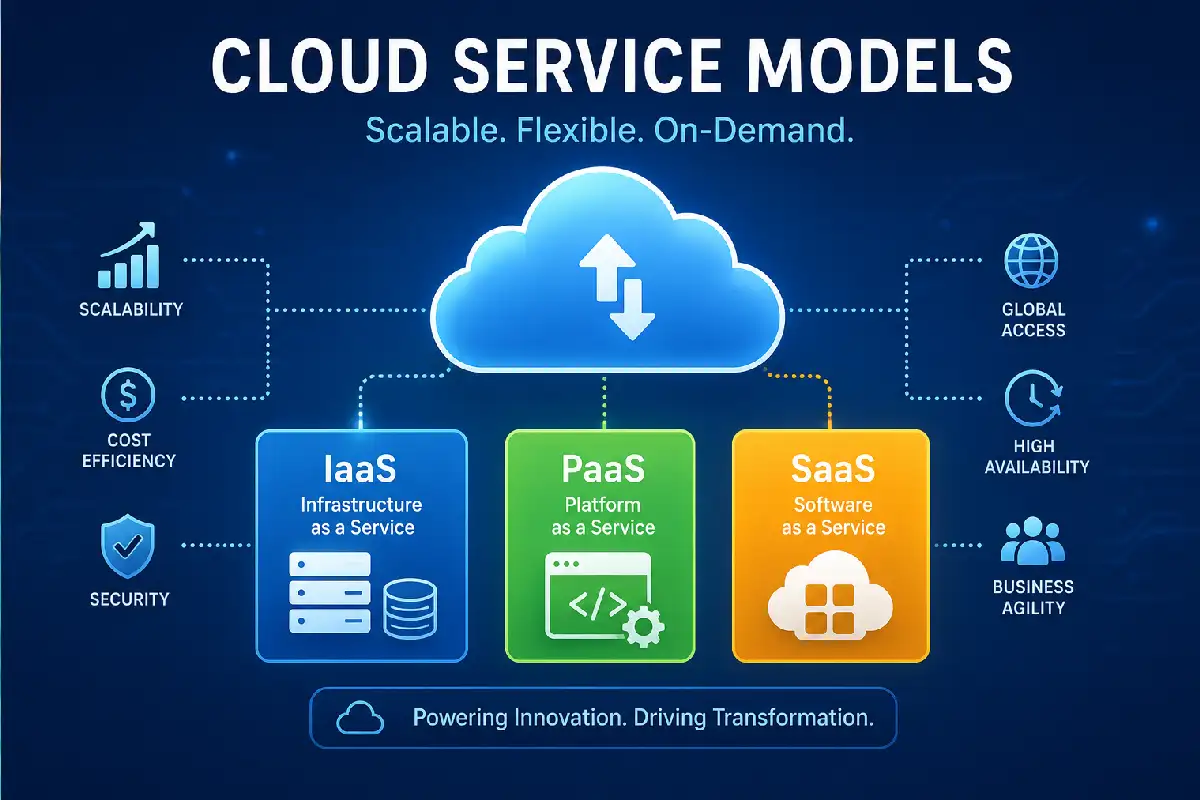
The three core cloud service models are:
| Service Model | Full Form | Managed By Provider | Managed By Customer |
| IaaS | Infrastructure as a Service | Hardware, networking, storage, virtualization | Operating systems, applications, data |
| PaaS | Platform as a Service | Infrastructure, operating systems, runtime environments | Applications and data |
| SaaS | Software as a Service | Entire application stack | Application usage and data input |
| FaaS | Function as a Service | Infrastructure and execution environment | Individual code functions |
| XaaS | Anything as a Service | Various cloud-delivered services | Depends on service type |
Among the different cloud deployment options, Infrastructure as a Service (IaaS) provides virtualized computing resources such as servers, storage, and networking on demand.
How Cloud Service Models Work?
Cloud service models involve the delivery of IT resources, such as infrastructure, platforms and software via the web rather than by maintaining them in-house. Cloud providers typically operate vast web-enabled data centers that support servers, storage, network, database and application resources for end users. These resources are available to customers on a utility basis and easily provisioned via a web portal, API or management console.
The fundamental idea that underpins all of the cloud service models is the shared responsibility model whereby different elements of the technology stack are handled either by the cloud provider or by the customer respectively. The partitioning of responsibility varies depending on the service model.
The Basic Workflow of Cloud Service Models
User Requests Resources
A business or developer chooses the specific cloud services they require; these may include virtual servers, databases, application development tools or software.
Cloud Provider Allocates Resources
The provider automatically supplies the requested resources from its worldwide infrastructure.
Services Are Delivered Over the Internet
Clients access the resources via web browsers, mobile applications, APIs or remotely.
Resources Scale Automatically
Cloud platforms offer a way to dynamically expand and contract computing power according to the workload.
Usage Is Monitored and Billed
Users generally only pay for the resources they use through subscription or pay-as-you-go offerings.
Organizations looking for flexible infrastructure should understand what is IaaS in cloud computing and how it supports scalability without major hardware investments.
Why Cloud Service Models Matter
The reasons why the different cloud service models are important in the business world are the following. They enable cost-effective, rapid access to flexible and scalable computing resources in today‘s digital marketplace. Instead of making large investments in software and hardware, organizations can receive computing power when it is required, as a service, and only that which is needed, leading to lower costs and faster innovation.
No matter what size company you have, whether it a small startup, expanding e-commerce presence or worldwide organization choosing the right cloud service offering will have a significant impact on performance, security, efficiency and long-term potential and growth.
Faster Time to Market
IT system purchase, installation, and configuration can take weeks or even months. Cloud service model provides instant access to computing resources.
Benefits:
- Quick deployment of applications
- Accelerated software development life cycles
- Lower time to establish infrastructure
- Faster to release products.
For instance, a developer can have a new application running on a Platform as a Service in a matter of minutes where it would otherwise take days in order to set up dedicated servers.
Lower IT Costs
The number one reason why companies use these types of cloud service models is to save money. These providers provide “pay as you go” services allowing a business to not need to acquire large sums of hardware and Datacentres.
| Traditional Infrastructure | Cloud Service Models |
| High capital expenses | Low upfront costs |
| Hardware maintenance costs | Provider-managed infrastructure |
| Fixed capacity | Flexible scaling |
| Costly upgrades | Automatic updates |
This is particularly beneficial for startups and small business with small budgets.
Improved Scalability
Cloud service models freely allow services to scale up or down depending on a business’s needs. When there are a number of service models (e.g. IaaS, PaaS, SaaS), organizations can plan for a rise in traffic, peak periods or growth over the long-term without the need to make extreme investments in hardware.
Examples:
- E-commerce stores during holiday sales
- Streaming platforms during major events
- SaaS companies onboarding new customers
- AI applications processing large datasets
Auto scaling maintains maximum efficiency, minimizing your expense.
Enhanced Business Agility
Traditional business models rapidly respond to changes in the market, customers’ needs and opportunities. Cloud service models offer the agility to innovate faster.
Organizations can:
- Establish new services quickly
- Experiment with new technologies
- Make updates available all the time.
- Quickly adapts to its environment.
In industries particularly dynamic or where technological innovations fuel the growth, such a competitive advantage is highly crucial.
Increased Accessibility and Collaboration
Most of the cloud based services are available anywhere anytime from the internet connectivity. So, it is easy to work remotely with the access to applications and other resources.
Benefits include:
- Work from any location
- Real-time collaboration
- Cross-device accessibility
- Improved productivity
The cloud service models, as offered by popular SaaS providers such as Microsoft 365, Google Workspace, Slack illustrate the way in which popular SaaS providers such as those, support the modern workplace.
Main Types of Cloud Service Models
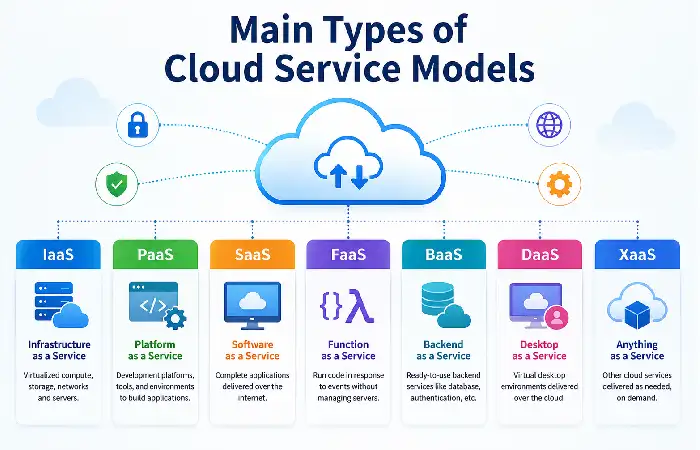
Cloud computing provides three main service models according to the business and technical needs. Each of these models provides a different degree of control, management and function for the service. Knowing about the three main types of cloud service models can help you decide and select the best service model according to your requirements, resources and budget.
The following provides a list of the most common models for which the terms are associated: IaaS, PaaS, SaaS, Faaz, BaaS, DaaS and XaaS.
Overview of Cloud Service Models
| Service Model | Full Form | Primary Purpose | Typical Users |
| IaaS | Infrastructure as a Service | Virtual infrastructure and computing resources | IT teams, system administrators |
| PaaS | Platform as a Service | Application development and deployment | Developers |
| SaaS | Software as a Service | Ready-to-use software applications | Businesses and end users |
| FaaS | Function as a Service | Event-driven serverless computing | Developers and DevOps teams |
| BaaS | Backend as a Service | Managed backend functionality | Mobile and web developers |
| DaaS | Desktop as a Service | Cloud-hosted virtual desktops | Remote workers and enterprises |
| XaaS | Anything as a Service | Broad range of cloud-delivered services | Organizations of all sizes |
Infrastructure as a Service (IaaS)
IaaS delivers virtualized computing resources through the internet including storage, servers, applications, virtualizations and networking. The customers are responsible for hosting applications, operating systems and data.
Popular Examples:
- Amazon EC2
- Microsoft Azure Virtual Machines
- Google Compute Engine
- Oracle Cloud Infrastructure
Best For:
- Custom IT environments
- Website hosting
- Disaster recovery
- Enterprise applications
Key Advantage: Maximum flexibility and control.
Platform as a Service (PaaS)
PaaS Is a complete platform for developing and deploying applications. Developers can create, test and deploy apps without having to worry about the underlying hardware or software.
Popular Examples:
- Google App Engine
- Azure App Service
- Heroku
- Red Hat OpenShift
Best For:
- Application development
- Web and mobile apps
- Agile software projects
Key Advantage: Faster development and deployment.
Developers can streamline application creation with Platform as a Service (PaaS), which provides development tools and environments in the cloud.
Software as a Service (SaaS)
SaaS -(software as a service) SaaS refers to on demand, centrally hosted software, sometimes referred to as application service providing (ASP). In most cases, SaaS is a web-based application that the user accesses through a web browser or a mobile application on the Internet or via an enterprise network. The data and the software is being managed by a vendor or a third party.
Popular Examples:
- Microsoft 365
- Google Workspace
- Salesforce
- Zoom
- Slack
Best For:
- Business productivity
- Collaboration
- Customer relationship management
- Communication tools
Key Advantage: No installation or maintenance required.
The most widely adopted cloud model is Software as a Service (SaaS), allowing users to access applications directly through a web browser.
Function as a Service (FaaS)
FaaS (Function as a Service) is a platform of serverless computing, which provides coding that is invoked by a variety of event. The administration of infrastructure is wholly abstracted from the programmer.
Popular Examples:
- AWS Lambda
- Azure Functions
- Google Cloud Functions
Best For:
- Event-driven applications
- Automation workflows
- API backends
- Real-time processing
Key Advantage: Pay only for execution time.
Serverless computing is powered by Function as a Service (FaaS), enabling developers to run code without managing servers.
Backend as a Service (BaaS)
Backend as a Service (BaaS) provides ready to use backend services such as Databases, Authentication, Storage and APIs so that the developer can focus on Front end while BaaS providers take care of backend.
Popular Examples:
- Firebase
- Supabase
- Backendless
- AWS Amplify
Best For:
- Mobile applications
- Web applications
- Startup MVPs
- Rapid development projects
Key Advantage: Reduced backend development effort.
Desktop as a Service (DaaS)
DaaS is a delivery model for virtualized desktop environments via the cloud. It allows users to get hold of full desktop access regardless of the device they‘re using and whether they are online.
Popular Examples:
- Azure Virtual Desktop
- Amazon WorkSpaces
- Citrix DaaS
- VMware Horizon Cloud
Best For:
- Remote workforces
- Hybrid work environments
- Secure remote access
- Centralized desktop management
Key Advantage: Access desktops from anywhere.
“Developers can accelerate mobile and web application development with Backend as a Service (BaaS) providers.”
Anything as a Service (XaaS)
XaaS is a generic term that encompasses just about all IT services delivered via the cloud. It takes the cloud service model outside the conventional SaaS, PaaS and IaaS delivery model.
Common XaaS Categories:
| Service Type | Description |
| AIaaS | Artificial Intelligence as a Service |
| DBaaS | Database as a Service |
| SECaaS | Security as a Service |
| STaaS | Storage as a Service |
| UCaaS | Unified Communications as a Service |
| DRaaS | Disaster Recovery as a Service |
Best For:
- Specialized business services
- Enterprise cloud strategies
- Digital transformation initiatives
Key Advantage: Access advanced capabilities without building them in-house.
IaaS vs. PaaS vs. SaaS
The decision whether to opt for IaaS, PaaS or SaaS is based on the control, flexibility and management that is desired by the organization. IaaS, PaaS and SaaS are the existing cloud service models and represent the base building blocks of cloud computing. They vary mainly in the level of control, flexibility and management the cloud provider takes over versus the cloud customer.
Quick Comparison Table
| Feature | IaaS | PaaS | SaaS |
| Full Form | Infrastructure as a Service | Platform as a Service | Software as a Service |
| Infrastructure Management | Provider | Provider | Provider |
| Operating System Management | Customer | Provider | Provider |
| Application Management | Customer | Customer | Provider |
| Deployment Speed | Medium | Fast | Instant |
| Customization | High | Medium | Low |
| Technical Expertise Required | High | Medium | Low |
| Maintenance Responsibility | Customer | Shared | Provider |
| Scalability | High | High | High |
| Best For | IT Teams & Enterprises | Developers | End Users & Businesses |
Businesses seeking faster software delivery often rely on a cloud application development platform that eliminates infrastructure management tasks
Cloud Service Models and Security
Security is a critical factor in the decision to use cloud computing. Cloud service providers. Invest significantly in safeguarding their infrastructure, but ultimately security is a shared responsibility.; knowing where security responsibilities lie in the different cloud service models will ensure that organizations safeguard their data, remain compliant and are less vulnerable to Cyber-attacks.
No matter what model you‘re on IaaS, PaaS, SaaS security best practices should be in place to enforce a secure cloud.
Essential Cloud Security Best Practices
Security considerations In whichever cloud service model it is used, the organizations should apply the following security best practices:
- Enable Multi-Factor Authentication (MFA)
An extra layer of protection MFA role offers is confirming the identity of a user by more than a single method.
Benefits:
- Effectively blocks access to unauthorized users
- Minimizes risks of account breaches
- Enhances compliance preparedness
- Implement Identity and Access Management (IAM)
IAM makes sure users are given only the resources they require.
Best Practices:
- Use of least-privilege principles
- Employ role-based access control (RBAC)
- Check permissions frequently
- Remove inactive accounts
- Encrypt Data Everywhere
Protect sensitive data. means keeping sensitive information secure from prying eyes.
| Encryption Type | Purpose |
| Encryption at Rest | Protects stored data |
| Encryption in Transit | Secures data during transfer |
| End-to-End Encryption | Protects communication channels |
- Continuously Monitor Cloud Environments
Security Monitoring Ensures potential threats are detected early.
Monitoring Tools Include:
- AWS CloudTrail
- Azure Monitor
- Google Cloud Operations Suite
- Splunk
- Datadog
Many organizations use cloud-based software applications to improve collaboration, accessibility, and operational efficiency.
Cloud Service Models and Scalability
The oldest advantage of using cloud computing is that it enables companies to scale IT resources up and down, based on different workload demands, and without impacting on the running of the company’s actual business.
This capability to adapt to resizing of business operations be it for a small blog site, a burgeoning online shopping outlet or a multinational enterprise through various cloud service models, has contributed to this facet of cloud computing‘s popularity.
Types of Cloud Scalability
There are two primary types of cloud scalability:
- Vertical Scalability (Scaling Up)
Vertical scaling scales the resources of a single server.
Examples include:
- Adding more CPU power
- Increasing RAM
- Expanding storage capacity
Advantages
- Simple implementation
- Minimal architectural changes
- Ideal for traditional applications
Limitations
- Hardware limits exist
- Can become expensive over time
- Horizontal Scalability (Scaling Out)
Horizontal scaling means increasing the number of servers or instances.
Examples include:
- Launching additional virtual machines
- Expanding Kubernetes clusters
- Increasing application instances
Advantages
- Nearly unlimited scalability
- High availability
- Improved fault tolerance
Limitations
- Requires distributed application architecture
- More complex management
Enterprises use cloud data delivery services to access real-time information and analytics across multiple business units.
Cloud Service Models and Cost Management
One of the reasons why cost management is an important factor of cloud computing is that utilization is an important part of cloud costing as most of the services used in cloud are paid on a usage basis.
Though that cloud service models can reduce the demands of infrastructure costs up front, it is not impossible to run up unreasonably high costs through inadequate planning and utilization.
No matter which concept IaaS, PaaS, SaaS, or FaaS you apply, always know the rules on how to calculate and control costs.
How Cloud Service Models Affect Costs
Each cloud service model has different pricing structures and management responsibilities.
| Service Model | Cost Structure | Customer Responsibility | Typical Cost Level |
| IaaS | Pay for infrastructure resources | High | Variable |
| PaaS | Pay for platform usage | Medium | Moderate |
| SaaS | Subscription-based pricing | Low | Predictable |
| FaaS | Pay per execution | Low | Highly efficient |
| BaaS | Pay for backend services consumed | Low | Usage-based |
| DaaS | Per-user subscription pricing | Medium | Predictable |
Benefits of Cloud Service Models
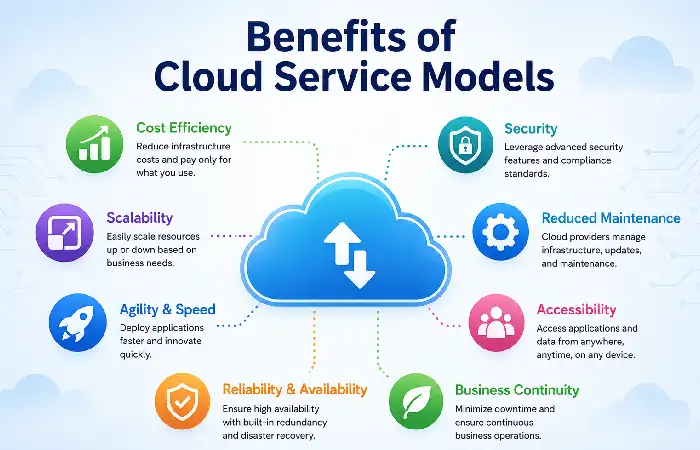
The various models of Cloud computing have revolutionized the way organizations and businesses consume technology; they have made it possible to consume computing resources, development platforms and applications on demand.
Cloud models either IAAS, PAAS, SAAS or newer consumption models such as FaaS, XaaS are beneficial to a great extent over traditional on-premise IT infrastructures.
Lower Infrastructure and Operational Costs
Cost savings is arguably the most attractive benefit of cloud service models. It is no longer necessary to make significant investments to provide servers, network equipment, storage devices, and data center locations.
Key Cost Benefits
- Reduced capital expenditures (CapEx)
- Pay-as-you-go pricing
- Lower maintenance costs
- Minimal hardware replacement expenses
- Reduced energy consumption
Scalability and Flexibility
Cloud service models enable organizations to grow or shrink, spin up or shut down, based on actual usage. This means your organization can accommodate growth, temporary surges due to the seasonality of your business, or sudden traffic peaks, by downscaling/upscaling if needed without having to buy more infrastructure.
Benefits of Scalability
- Automatic resource allocation
- Improved performance during peak demand
- Reduced waste during low usage periods
- Faster business expansion
Such as an E-Commerce site, during Christmas shopping, it can be scaled up and greatly increased, then scaled down again to cut down expenses afterwards.
Faster Deployment and Innovation
Providing infrastructure used to take weeks or months. With cloud, organisations can deploy apps, services, and environments instantly.
Advantages
- Rapid application development
- Faster testing and deployment
- Continuous integration and delivery (CI/CD)
- Reduced time-to-market
This rapid advancement enables business to facilitate rapid innovation and adaptability to market fluctuations.
Improved Business Agility
The models of service include three service models which can be used for any application. These cloud service models also provide the agility to adapt change of customer demands and business opportunities.
Organizations can:
- Launch new products quickly
- Enter new markets faster
- Experiment with emerging technologies
- Scale globally without major infrastructure investments
This characteristic makes it particularly useful in comparison to other industries where speed and adaptability are key factors to survival.
Enhanced Accessibility and Remote Work Support
Availability and Accessibility – Cloud services are available 24/7 anywhere the internet is available. This enables remote work, and allows for hybrid operations and connectivity from anywhere in the world.
Benefits
- Access applications from any device
- Real-time collaboration
- Improved workforce productivity
- Support for distributed teams
SaaS products in the likes of Microsoft 365, G Suite and Slack have become such a fundamental part of the modern day office.
Challenges of Cloud Service Models
Although the cloud service models possess many paradigm advantages, there are also some challenges to the adoption of cloud service, which should not be ignored. Awareness of these challenges may help organizations to have the informed decisions on where to choose the cloud and how to limit these challenges.
Either an enterprise decides to run an application on premises or purchase an off-the-shelf application, make use of IaaS, PaaS, SaaS or the more recent FaaS and XaaS offerings, all need significant planning for not to create security threats, result in unforeseen expenses or unexpected operational issues.
Common Challenges Across Cloud Service Models
| Challenge | Impact | Affected Models |
| Security Risks | Data breaches and unauthorized access | IaaS, PaaS, SaaS |
| Vendor Lock-In | Difficult migration between providers | All Models |
| Cost Overruns | Unexpected cloud expenses | IaaS, PaaS, FaaS |
| Compliance Issues | Regulatory and legal risks | All Models |
| Downtime and Outages | Service interruptions | All Models |
| Limited Control | Reduced infrastructure visibility | SaaS, PaaS |
| Performance Issues | Latency and network dependence | All Models |
| Skills Gap | Lack of cloud expertise | IaaS, PaaS |
How to Choose the Right Cloud Service Model
Choose IaaS If:
- You need infrastructure control.
- You have IT expertise.
- You require custom environments.
Select PaaS If:
- You build applications frequently.
- Development speed matters.
Choose SaaS If:
- You need ready-to-use software.
- IT resources are limited.
Choose FaaS If:
- You want serverless architecture.
- Workloads are event-driven.
Cloud Service Models for Small Businesses
Small businesses typically benefit from:
| Priority | Recommended Model |
| Email & Collaboration | SaaS |
| Website Hosting | PaaS |
| E-commerce | SaaS |
| Custom Applications | PaaS |
| Data Storage | XaaS |
Recommended Stack
- Microsoft 365
- Google Workspace
- Shopify
- HubSpot
- Dropbox
Modern businesses increasingly adopt a serverless computing model to reduce infrastructure costs and improve scalability.
Cloud Service Models for Enterprise Organizations
Enterprises often combine multiple models.
Typical Enterprise Architecture
- IaaS for core infrastructure
- PaaS for development
- SaaS for productivity
- FaaS for automation
- AIaaS for machine learning
Hybrid and Multi-Cloud Adoption
Large organizations increasingly deploy workloads across:
- AWS
- Microsoft Azure
- Google Cloud
to improve resilience and avoid vendor lock-in.
Frequently Asked Questions
What are the three mainly service models of a cloud?
These are as follows: IaaS PaaS SaaS
What would be the most user friendly cloud service model?
Since everything is taken care of by the SaaS provider, this is by far the simplest.
How do we distinguish the two terms and identify if they are synonymous?
Just about. FaaS is a small part of serverless computing.
Was versteht man unter XaaS?
Anything as a Service (XaaS) indicates all of the services delivered on the cloud.
What is the most effective model?
Most startups start with SaaS and PaaS because of a lower operational complexity.
Conclusion
Cloud Service Models have been focused on by the present digital transformation, Web3.0 technology revolution to help organisations providing with resources for using the computing, gaining the platforms for developing, employing the applications. They are operating for IaaS, PaaS, SaaS, FaaS.
Kashifa Jafar is a technology writer and contributor at FutureTechExpert with 4+ years of experience in technology writing and content creation.
Read Full Bio of Author →Sameena reviews selected health, wellness, technology, and digital content for clarity, factual presentation, and reader usefulness.
Read Full Bio of Reviewer →