
 Kashifa Jafar
Technology Writer & Contributor
Kashifa Jafar is a technology writer and contributor at FutureTechExpert with 4+ years of experience in technology writing and content creation.
Read Full Bio of Author →
Kashifa Jafar
Technology Writer & Contributor
Kashifa Jafar is a technology writer and contributor at FutureTechExpert with 4+ years of experience in technology writing and content creation.
Read Full Bio of Author →
 Sameena Begum
Health, Technology & Digital Content Reviewer
Sameena reviews selected health, wellness, technology, and digital content for clarity, factual presentation, and reader usefulness.
Read Full Bio of Reviewer →
Sameena Begum
Health, Technology & Digital Content Reviewer
Sameena reviews selected health, wellness, technology, and digital content for clarity, factual presentation, and reader usefulness.
Read Full Bio of Reviewer →
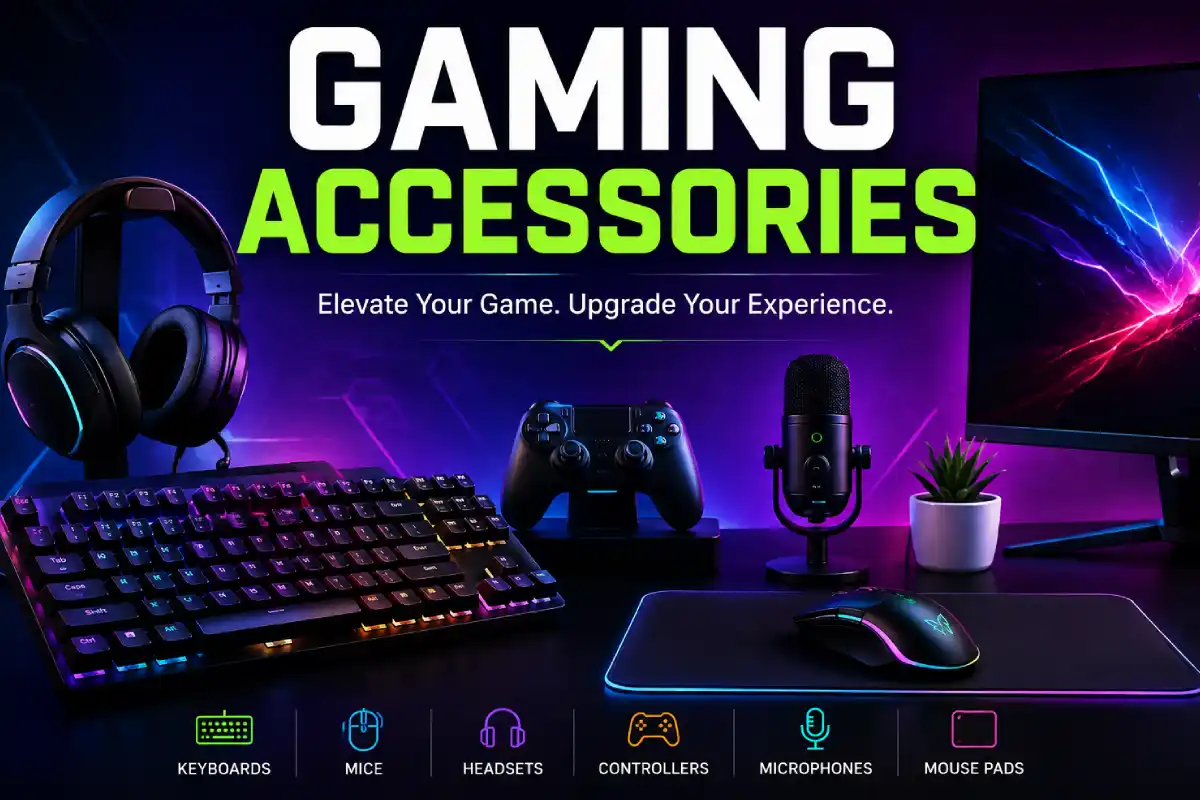
Gaming peripherals can significantly enhance your gaming experience no matter if you‘re a casual gamer, eine športoe speler, PC gamer or console user. Gaming keyboard, gaming mouse, gaming headset, gaming controllers, gaming monitor accessories and gaming desk equipment can increase comfort, control, communication and gaming quality. To find the right gaming gear among hundreds of different products at various price points can be a little frustrating.
While you don‘t always have to spend a ton of money on accessories to run an awesome gaming setup, the best options for your particular needs will vary depending on your platform, games, space, comfort, and price range.
For instance, playing FPS games might lean toward a lightweight gaming mouse and a responsive keyboard, whereas the thrill-seeker gaming race fan will want the best controller or racing wheel.
 This article is part of
Gaming Gadgets Resources
Table of Contents
What Are Gaming Accessories?
Gaming accessories is the term for hardware or equipment used to complement, enhance or provide during a gaming experience. Some Gaming accessories directly connect to a gaming PC or console while others don‘t alter the gaming experience but can effect high levels of comfort and organizational considerations, as well as entertainment options such as sound and communication; and aesthetic considerations.
A simple gaming setup can just consist of a computer or console, monitor, keyboard and a mouse/joystick or gamepad to play the games. There are many additional accessories that can complete a gaming setup and make it more comfortable and easy to use.
Common Gaming Accessories
| Gaming Accessory | Main Purpose | Best For |
| Gaming Keyboard | Game controls and typing | PC gamers |
| Gaming Mouse | Precise aiming and control | FPS and strategy gamers |
| Gaming Headset | Audio and communication | Multiplayer gaming |
| Gaming Controller | Console-style controls | Console and PC gamers |
| Mouse Pad | Smooth mouse movement | PC gamers |
| Gaming Monitor | Visual performance | PC and console gamers |
| Microphone | Voice communication | Streamers and creators |
| Gaming Chair | Comfort and support | Long gaming sessions |
| Monitor Arm | Desk organization | PC setups |
| USB Hub | Additional connectivity | PC gamers |
| Capture Card | Recording and streaming | Content creators |
Gaming adornments can often be categorized between indispensable accessories which have an influence on the game itself and unneeded tail ends that are intended to make you more comfortable, more practical or more fashionable.
Another way we might put this is that a gaming mouse (a device targeted directly at gaming) is more critical than RGB lighting (a flourish to make the mouse look cool). Equally, a pleasant chair is more worth than ten pounds than an ornate, expensive-looking addition to your desk.
Why Gaming Accessories Matter for Gamers
The proper gaming accessories will enhance many aspects of your gaming experience, make them feel much more natural, and help you to be more effective.
But accessories won‘t suddenly improve your gaming abilities. Your skills, game knowledge and practice, as well as your settings, are still the crucial element. Good gear just allows you to optimize these.
Better Control
A responsive keyboard/mouse makes easy your input performing while in game. This can be very handy in game where in some situations few pixels can make the difference.
Take a game like an FPS, as an example. A straight forward mouse which has a comfortable shape and is very precise may be preferable. A player of a strategy game may want a keyboard with simple yet easily accessible programmable keys.
Improved Comfort
In addition, the comfort level is of greater importance while gaming for extended periods.
If you have an ergonomic chair, set up the monitor correctly, use a comfortable mouse and suitable keyboard.
Instead of choosing an accessory only because it looks impressive, consider:
- Hand position
- Wrist comfort
- Seating position
- Monitor height
- Desk height
- Cable organization
- Available workspace
Better Communication
Communication by voice is an aspect of many multiplayer games.
A gaming headset with a decent microphone can help your team hear you clearly. A separate microphone offers another option for players who stream or make gaming videos.
More Immersive Audio
A good headset or speaker set can make a game much more immersive. Better quality sound can provide clearer dialogue, sound effects, and background noise.
More Convenient Gaming
Accessories can also make everyday gaming easier.
Examples include:
- Controller charging docks
- USB hubs
- Monitor arms
- Headset stands
- Cable-management accessories
- Wireless peripherals
- External storage
In addition, for battle some, we must also consider the quality of the sound system for competitive and game.
Types of Gaming Accessories
Other accessories simplify playing everyday.
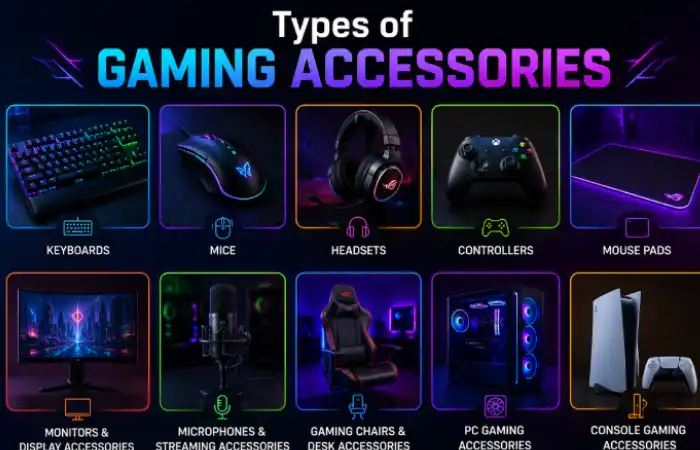
Here are the major categories you will encounter:
| Category | What It Does | Typical User |
| Gaming Keyboards | Provides responsive controls | PC gamers |
| Gaming Mice | Provides precise pointer control | PC/FPS gamers |
| Gaming Headsets | Provides game audio and chat | Multiplayer gamers |
| Controllers | Provides gamepad controls | Console/PC gamers |
| Mouse Pads | Improves mouse movement | PC gamers |
| Gaming Monitors | Displays the game | PC/console gamers |
| Microphones | Improves voice quality | Streamers |
| Streaming Accessories | Supports content creation | Creators |
| Gaming Chairs | Provides seating | Desk gamers |
| Desk Accessories | Improves organization | PC gamers |
| PC Accessories | Improves connectivity and functionality | PC users |
| Console Accessories | Expands console functionality | Console gamers |
These products will not necessarily enhance your game but will help to make your game area a cleaner and more manageable place to be.
Market for gaming accessories is very diverse. There are products dedicated to gameplay, as well as those aimed at comfort, streaming, organization, or customization.
Gaming Keyboards
Gaming keyboard is one of the most must-have accessories for PC gamers. It controls movement, skills, hotkeys, chatting and a lot more.
There are different design types of gaming keyboards, most popular being mechanic keyboard for PC gamers.
A responsive keyboard can improve movement, command input, and overall control during gameplay. Explore our guide to gaming keyboards to learn about switches, response time, layouts, customization, and other important features.
Mechanical Keyboards
The keys of most computer keyboards and other keyboards are moved using mechanical switches beneath the keys. Switches can have different actuation forces, sounds, and feedback.
They are popular because they can provide:
- Consistent key presses
- Distinct tactile feedback
- Fast response
- Customization options
- Replaceable keycaps on many models
Membrane Keyboards
The membrane keyboard has a different mechanism, being generally simpler and cheaper.
They may be useful for novice gamers who need a cheap gaming keyboard.
Optical and Hall Effect Keyboards
Modern versions of gaming keyboards can utilize magnetic or optical sensing methods.
Magnetic sensors, also known as Hall Effect key sensors, are used in Hall Effect keyboards to monitor key travel. They can vary by model and software capabilities in providing customizable actuation and additional functionalities.
Gaming Keyboard Comparison
| Keyboard Type | Advantages | Limitations | Best For |
| Membrane | Affordable, quiet | Less customization | Beginners |
| Mechanical | Responsive, customizable | Can be expensive | Most PC gamers |
| Optical | Fast actuation | Higher price | Competitive players |
| Hall Effect | Adjustable actuation | Usually premium-priced | Enthusiasts |
What to Look for in a Gaming Keyboard
Before buying one, consider:
Switch type: Would you like the switches to be tactile, linear, or clicky?
Keyboard Layout: All-in-one full size keyboards have a numbers pad, whereas smaller keyboard layouts are more economical of space.
Polling rate: The higher polling rates allow less time between keyboard updates but the real effect of that depends on the rest of your system.
Programmable keys: Those are interesting for gaming because it needs too many shortcuts.
Wired or wireless: Wireless versions are easier to keep clean, wired keyboards eliminate batteries.
Software: Verify if the keyboard software allows assigning keys for macro, profiles, lighting, and giving an update for firmware
Assuming your spend is for most beginners a comfortable & reliable mechanical keyboard is probably a better first than paying that little bit extra for the extra features that you will never use.
Gaming Mice
The gaming mouse are an essential gaming supporting device for PC gamers especially to first person shooters and battle royales, but generally for all the strategy and other competitive game types. A gaming mouse is concepted around a precise tracking behavior with high responsiveness, ergonomic handling and features for rapid and repetitive movements.
The right mouse will actually feel comfortable in your hand, not merely have the highest value in DPI or have the most buttons.
Precise tracking and comfortable handling are essential for competitive gaming. Our guide to gaming mice covers DPI, polling rate, sensors, weight, ergonomics, and other factors to consider when choosing a gaming mouse.
What Makes a Gaming Mouse Different?
Modern gaming mice can include several features designed specifically for gaming:
- High-resolution optical sensors
- Adjustable sensitivity
- High polling rates
- Programmable buttons
- Lightweight designs
- Wireless connectivity
- Customizable profiles
- RGB lighting
- Onboard memory
Not all features are desirable for all users. For example, an easygoing gamer may not need anything more than a comfy mouse with consistent tracking and an FPS player may be best off with something lightweight, that tracks flawlessly, and has an extremely high polling rate.
DPI and Sensitivity
DPI stands for dots per inch, and represents the distance the cursor moves when the mouse is physically moved.
More DPI does not make a better gaming mouse. Many high-level gamers set their in-game sensitivity quite low, and then control the mouse cursor by mouse movements.
It‘s more important that you have enough adjustment range to select a sensitivity that feels right when you play.
Polling Rate
Polling frequency refers to how often the mouse communicates its position to the computer.
Common values include:
- 125 Hz
- 500 Hz
- 1,000 Hz
- 2,000 Hz
- 4,000 Hz
- 8,000 Hz
More polling rate means lower input intervals, but also a more complicated workload. Most players would consider a solid 1000Hz mouse as a very good starting point.
Gaming Headsets
A gaming headset is a set of combined headphones and microphone. It is a very good choice for online gaming as it allows you to listen to sounds from the game and speak to your team mates without the need for extra equipment.
A suitable headset should offer the balance between microphone quality, comfort, bluetooth/dongle connectivity, durability and good sound quality.\
Clear game audio and reliable voice communication can improve both immersion and competitive awareness. Learn more about gaming headsets and compare important features such as microphone quality, comfort, connectivity, and sound performance.
Types of Gaming Headsets
Wired Gaming Headsets
Wired headsets include variety of connection types such as: 3.5 mm jack; USB.
Advantages:
- No battery charging
- Simple connection
- Often lower cost
- Consistent connection
Disadvantages:
- Cable management
- Less freedom of movement
Wireless Gaming Headsets
Most products are usually connected using either, a wireless specific technology (such as Wi-Fi) or Bluetooth.
Advantages:
- No cable across the desk
- Greater freedom of movement
- Cleaner gaming setup
Disadvantages:
- Requires charging
- Potentially higher cost
- Wireless compatibility varies
Open-Back vs. Closed-Back
Most headsets that have closed backs offer isolation from the outside world and prevent excessive sound leakage. They are commonly used in internet cafés for gaming purposes.
Open-back headphones lets more air pass through and have a more open sound Image, but less Isolation.
Gaming Controllers
The controllers are a significant integral part of any sort of console game and hand-held games. The controllers are also means for use in personal computer games like racing, sports, fighting, road, adventure and shooting games.
A controller usually includes:
- Analog sticks
- D-pad
- Face buttons
- Shoulder buttons
- Triggers
- Vibration or haptic feedback
- Wireless or wired connectivity
For racing games, sports titles, platformers, and console-style gameplay, gaming controllers can provide comfortable and responsive controls. Learn what to consider when choosing a controller for your gaming setup.
Standard vs. Premium Controllers
For the typical player a standard controller will do. High-end controllers can have features like adjustable trigger buttons, replaceable panels, extra buttons, improved grips, or profile customization.
These behaviors may be helpful to some individuals, but not everyone.
Gaming Controller Comparison
| Feature | Standard Controller | Premium Controller |
| Basic Controls | ✓ | ✓ |
| Wireless | Often | Often |
| Extra Buttons | Limited | More options |
| Custom Profiles | Limited | Common |
| Adjustable Controls | Limited | More extensive |
| Price | Lower | Higher |
| Best For | Most gamers | Enthusiasts/competitive players |
How to Choose a Gaming Controller
Before buying, check:
- Platform compatibility
- Wired or wireless connection
- Battery life
- Button layout
- Analog-stick feel
- Trigger design
- Additional buttons
- Software support
- Warranty
In terms of PC gaming, compatibility is of the most importance as some controllers integrate better with certain OS or games more so than others.
Gaming Mouse Pads
Gaming mouse pad – Gives you a level and consistent surface to move a mouse on. Even though it sounds like an insignificant piece of equipment, it can be felt when using a mouse.
Mouse pads generally fall into three categories:
Cloth Mouse Pads
Cloth pads offer a softer surface with more controlled movement. They tend to be favored by fps gamers with broad, sweeping arm movements.
Hard Mouse Pads
Hard pads usually have plastic or other hard surfaces. They can be fast and smooth to move. Easy to wipe clean.
Extended and XXL Mouse Pads
Plenty of surface area is the advantage of large mouse pads they occupy most of the desk and allow room to place your keyboard.
Mouse Pad Comparison
| Type | Speed | Control | Maintenance | Best For |
| Cloth | Medium | High | Moderate | FPS |
| Hard | High | Medium | Easy | Fast movement |
| Extended | Varies | Varies | Moderate | Large setups |
| XXL Desk Mat | Varies | Varies | Moderate | Full-desk setups |
What Size Mouse Pad Should You Choose?
Choose based on the space you have available at your desk, and the sensitivity settings you require.
A smaller mat might be perfect for hight sensitivity gaming. A large one can be used by “broad strokes” mouse movers.
Don‘t think the biggest mouse pad is the best. Go for whatever size mouse pad fits your desk and playing style.
A consistent surface can improve mouse movement, tracking, and control. Check out our guide to gaming mouse pads to learn about different sizes, surfaces, materials, and features.
Gaming Monitors and Display Accessories
Your monitor is more correctly called a display, but is such a fundamental part of gaming that it is a must-have in any discussion of gaming-addons.
Important monitor specifications include:
- Refresh rate
- Resolution
- Response time
- Panel technology
- Adaptive sync
- Screen size
- Connectivity
- HDR capabilities
Refresh Rate
This is measured in Hz (Hertz) and tells you how many times the display will update itself every second.
Common gaming monitor refresh rates include:
- 60 Hz
- 120 Hz
- 144 Hz
- 165 Hz
- 240 Hz
- 360 Hz
- 480 Hz and above on some newer displays
Higher refresh rates tend to present motion in a smoother fashion, when your computer or game console is capable of producing enough frames to benefit from them.
Resolution vs. Refresh Rate
The process of selecting a gaming monitor is one of compromises between image fidelity and motion performance.
| Priority | Consider |
| High visual detail | Higher resolution |
| Competitive FPS | High refresh rate |
| Console gaming | Resolution + supported refresh rate |
| Story games | Image quality + HDR |
| Esports | Refresh rate + response performance |
A 4K monitor is not necessarily the best option for every gamer. The same is true of an extremely high-refresh display if your machine is not capable of generating it.
Useful Display Accessories
You can also improve your setup with:
- Monitor arms
- Monitor stands
- Screen-cleaning kits
- Monitor light bars
- Webcam mounts
- Cable-management clips
- VESA mounts
For example, a monitor arm provides more desk space and makes it more convenient to change the height and view angle of the screen.
Your display plays a major role in how smooth and responsive games feel. Explore our guide to gaming monitors to learn about refresh rates, response times, resolution, adaptive sync, and other important specifications.
Gaming Microphones and Streaming Accessories
If streaming game-play, recording videos or engaging with viewers frequently, then the use of dedicated streaming accessories can greatly enhance production quality.
A basic streaming setup may include:
- USB microphone
- Webcam
- Headphones
- Lighting
- Capture card
- Microphone arm
- Stream controller
USB vs. XLR Microphones
USB microphones are more convenient in an installation than those which require external wiring.
Unlike XLR microphones, they may need an extra audio processing device, but in return, they give additional versatility for more complex audio configuration.
| Feature | USB Microphone | XLR Microphone |
| Setup | Easy | More complex |
| Extra Equipment | Usually unnecessary | Audio interface/mixer |
| Flexibility | Good | Excellent |
| Beginner Friendly | ✓ | Less so |
| Streaming | Excellent | Excellent |
| Upgrade Potential | Moderate | High |
A good quality USB microphone might be a better option for those starting off than constructing an elaborate XLR setup.
Gaming Chairs and Desk Accessories
A few more pieces of equipment that are often overlooked are your mouse, keyboard and monitor. However, your chair and desk play a part in how comfortable and clean your gaming desk feels. As you may be sitting at your desk for hours you might prefer functional furniture over decorative pieces.
There should be optimally comfort, adjustability, stability and an effective desk organization and not only may I buy a chair as it looks like a racing seat.
Gaming Chairs
Gaming chairs have many different variations, but when it boils down to it the two equally demanded features are support and adjustability.
Look for:
- Adjustable seat height
- Comfortable seat cushion
- Adjustable armrests
- Stable base
- Suitable back support
- Reclining function
- Appropriate seat width and depth
- Durable upholstery
A chair that is suitable for the contours of one‘s body, and that allows the user to sit comfortably, is likely to be more useful than an excessively encumbered chair with RBG lighting or ornaments.
Gaming Chair Types
| Chair Type | Main Advantage | Best For |
| Racing-style | Gaming-focused design | General gamers |
| Ergonomic office chair | Adjustability and support | Long desk sessions |
| Mesh chair | Breathability | Warm environments |
| Reclining gaming chair | Relaxed positioning | Casual gaming |
| Floor gaming chair | Low seating position | Console gaming |
Gaming Desks
Having a gaming desk with sufficient space to sit your monitor, keyboard, mouse and other accessories on comfortably, whilst not feeling cluttered.
Important features include:
- Adequate width and depth
- Stable construction
- Cable-management openings
- Monitor-mount compatibility
- Sufficient legroom
- Durable surface
- Adjustable height, if required
A big desk does not necessarily mean a better desk. Make sure you measure your room before you buy and allow space to move comfortably round it.
Useful Gaming Desk Accessories
Small accessories can have an unexpectedly large impact upon organization.
Popular options include:
- Headset stands
- Controller holders
- Cable clips
- Under-desk cable trays
- Monitor arms
- USB hubs
- Desk mats
- Cup holders
- Desk drawers
- Footrests
Gaming Desk Setup Priorities
| Accessory | Importance | Main Benefit |
| Monitor arm | High | Better positioning and desk space |
| Cable management | High | Cleaner and safer setup |
| Headset stand | Medium | Easy headset storage |
| USB hub | Medium | More connectivity |
| RGB lighting | Optional | Appearance |
| Desk ornaments | Optional | Personalization |
PC Gaming Accessories
PC gamers get a much larger toolkit of accessory options. Some enhance the game, others bring more connectivity, storage, cooling or edge.
The top PC gaming PC accessories will vary according to your PC specifications and your specific modifications.
Essential PC Gaming Accessories
A typical PC setup may include:
- Gaming keyboard
- Gaming mouse
- Mouse pad
- Gaming headset
- Monitor
- Speakers, if preferred
- Webcam, for streaming or video calls
Useful Additional PC Accessories
You may also consider:
- USB hub
- External SSD
- UPS
- Wi-Fi adapter
- Bluetooth adapter
- Monitor arm
- Webcam
- Microphone
- Cable-management accessories
- Laptop cooling pad
- Controller
USB Hubs
A USB port is convenient when you find there aren‘t the number of ports available for all your peripherals on your computer.
Before purchasing one, check:
- USB version
- Number of ports
- Power delivery
- Data-transfer requirements
- Compatibility with your computer
Powered USB hub can be good, if a device needs a bit more power than what a standard hub can supply.
External Storage
New games can take up a lot of storage space. You can get an external SSD if you require extra storage and would like to put games, recordings and other things on it.
It also depends on your computer, operating system, interface and drive, what are supported transfer speeds and so on.
UPS for Gaming PCs
A UPS (uninterruptible power supply) provides some ringbound power and condition equipment for some power-related issues.
For a desktop gaming PC you must decide on a UPS based on the power consumption of the whole system, rather than the maximum wattage displayed for the computer.
Console Gaming Accessories
Console gamers and PC gamers are interested in different things. While most of the hardware needed to play is already built into a console, there are a variety of other accessories that can improve your comfort, storage, sound, charging and multiplayer experience.
Common Console Gaming Accessories
- Extra controllers
- Gaming headset
- Controller charging station
- Console storage expansion
- Controller grips
- Protective cases
- HDMI cables
- Capture cards
- Steering wheels
- Racing pedals
- Gaming headsets
- Portable carrying cases
Extra Controllers
Another controller will be one of the most useful things someone can buy if two or more people in a household are playing multiplayer games in the same room.
Make sure it has the features you want and that it is officially licensed for your console before you buy a third-party controller.
Controller Charging Stations
Charging docks may be used to house and charge controllers.
These can also help cut down on the mega mess of the cables and also have controllers set up and ready for use in the next game session.
Storage Accessories
More storage space is not a bad thing, as modern games can easily take up huge amounts of disk space.
Always check the console manufacturer‘s requirements for the expansion drive compatibility before purchasing.
Wireless vs. Wired Gaming Accessories
Choosing wired or wireless is one of the most serious decisions made when buying for gaming accessories.
Both selections have their respective benefits, and there are now good wireless Gaming peripherals on the market. It really depends on your current setup and wallet, whether you want the batteries or not and what kind of games you play.
Wired Gaming Accessories
Wired accessories are attached to your PC or console.
Advantages
- No battery charging
- Usually simple to configure
- Consistent connection
- Often lower purchase price
- No wireless interference concerns
Disadvantages
- More cables
- Cable management is required
- Less freedom to move around
- Desk can look more cluttered
Wireless Gaming Accessories
Wireless accessories connect to the gaming device without any physical cable between the device and the peripheral.
Advantages
- Cleaner desk
- Greater freedom of movement
- Easier setup
- Fewer visible cables
Disadvantages
- Battery needs charging
- Usually costs more
- Wireless compatibility varies
- Some devices require proprietary receivers
How to Choose the Right Gaming Accessories
If you buy your gaming gear without second thought then just like any other luxury supplies to your home buying things you don‘t need can often become very expensive.
A very simple process is to rank accessories by gaming platform and type of game, budget, comfort, and upgrade considerations.
Step 1: Identify Your Gaming Platform
Start by deciding whether you primarily play on:
- Gaming PC
- Laptop
- PlayStation
- Xbox
- Nintendo console
- Multiple platforms
And always checked that it is compatible to be bought.
Step 2: Consider the Games You Play
Not all games use the same equipment.
A FPS player might place importance on the mouse and a quality headset, whereas a racing gamer might prefer a controller or racing wheel.
| Gaming Style | Accessories to Prioritize |
| FPS | Mouse, keyboard, headset |
| MMO | Keyboard, programmable mouse |
| MOBA | Mouse, keyboard |
| Racing | Controller/wheel |
| Fighting | Controller/fight stick |
| Sports | Controller |
| Streaming | Microphone, webcam, lighting |
| Casual | Comfortable basic peripherals |
Step 3: Set a Budget
Don‘t blow your budget on one posh-looking add-on and leave the rest of your system uncomfortable and all backwards.
Sometimes a balanced setup might be more practical.
For example, instead of purchasing an extremely expensive mouse, you could allocate some of that budget toward:
- A better headset
- A larger mouse pad
- Better desk organization
- Additional storage
- A more comfortable chair
Step 4: Prioritize Performance Over Appearance
While RGB lighting is nice to have in a gaming setup, more often than not it doesn‘t add much to the actual gaming experience.
Before paying extra for appearance, ask:
Does this feature solve a problem for me?
If the answer is a ‘no’, then think about spending the cash used on this idea in another area.
Step 5: Check Compatibility
Always verify:
- Operating system compatibility
- Console compatibility
- Connection type
- Required software
- Available ports
- Physical dimensions
- Power requirements
This is especially critical when purchasing controllers, wireless accessories, capture cards and USB peripherals.
Gaming Accessories for Competitive Gaming
Numbe of general aspects which are capable to compensate sound impacts of competitive gamers are following:
- That however does not mean that all competitive players need to have the most expensive equipment.
- A well balanced configuration may be more practical than purchasing high end components due to their higher specs.
Important Competitive Gaming Accessories
Gaming mouse: Comfortable shape, good sensor, appropriate weight, and stable tracking.
Keyboard: Quick response switches, stable key presses and helpful customization may be valuable.
Gaming headset: Gaming audio quality and communication needs to be clear for multiplayer games.
Mouse pad: Select one with a textured surface appropriate for your comfort and scope of movement.
Gaming monitor: high refresh display may give you a smoother motion if your system is capable to output enough frame.
Competitive Gaming Setup
| Accessory | Priority |
| Gaming Mouse | Very High |
| Gaming Keyboard | Very High |
| Gaming Monitor | Very High |
| Mouse Pad | High |
| Headset | High |
| Gaming Chair | Medium-High |
| RGB Lighting | Low |
| Decorative Accessories | Very Low |
The most important thing I will take away with me is that your equipment should play to your strengths and not be relied upon as a replacement for practice.
Gaming Accessories for Streamers
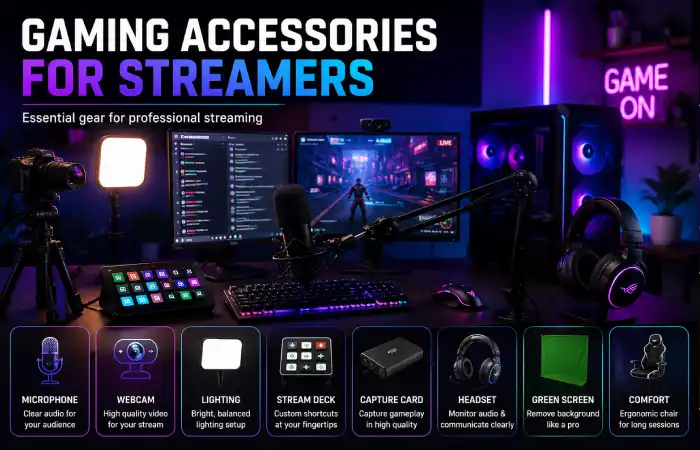
Streamers have varying needs because the audience must view and hear the streamer.
Great streaming equipment doesn‘t have to cost a fortune at the start. Audio, lighting and dependable video often make a bigger difference than decorative items.
Essential Streaming Accessories
- Microphone
- Webcam or camera
- Headphones
- Lighting
- Capture card for supported console setups
- Microphone arm
- Streaming controls
Beginner vs. Advanced Streaming Setup
| Equipment | Beginner | Advanced |
| Microphone | USB | XLR |
| Camera | Webcam | Dedicated camera |
| Lighting | Single light | Multiple lights |
| Controls | Keyboard shortcuts | Stream controller |
| Audio | Headset/USB mic | Audio interface + mixer |
| Video | Basic webcam | Capture system |
Microphone Placement Matters
The position of the microphone has a huge effect even if you have an excellent and expensive microphone.
Budget-Friendly Gaming Accessories
Gaming is not about having the most expensive setup.
The best way to go about it is to work out what accessories will make the biggest difference to the overall experience and buy those first.
Entry-Level Setup
A beginner PC gamer could start with:
- Reliable gaming mouse
- Basic mechanical or membrane keyboard
- Affordable headset
- Standard mouse pad
And improve individual components one by one.
Mid-Range Setup
Once your basic equipment is covered, you can consider:
- Better wireless peripherals
- Larger mouse pad
- Higher-refresh monitor
- Improved headset
- Dedicated microphone
- Monitor arm
- Better desk organization
Premium Setup
Premium setups can include:
- High-end wireless peripherals
- High-refresh gaming monitor
- Advanced mechanical or Hall Effect keyboard
- Premium headset
- Dedicated microphone
- Professional lighting
- High-end desk and chair
- Advanced streaming equipment
Gaming Accessories Maintenance and Care
Maintaining your gaming equipment will ensure that can stay in good condition for a long time and work as it should.
Gradually, dust, food spillages, moisture and mishandling of cables can take their toll on peripherals.
Keyboard Maintenance
Schedule for cleaning dust and dirt from in between the keys.
For deeper cleaning:
- Disconnect the keyboard.
- Remove removable keycaps if appropriate.
- Clean the surface carefully.
- Allow components to dry completely before reconnecting.
Do not ever pour anything directly on a keyboard; this should be avoided.
Gaming Mouse Maintenance
Use a bit of a blow to clean the outside of the sensor.
Pay attention to:
- Mouse feet
- Sensor opening
- Scroll wheel
- Side buttons
- Cable
Headset Maintenance
Wipe off the ear cushions after use from time to time and store them somewhere on the dry.
For wireless models, try not to let the battery get completely drained for too long.
Mouse Pad Maintenance
Dust and oils from skin can transfer to the cloth surface of mouse pads. Observe manufacturer‘s cleaning instructions, as different bases and coating materials require different cleaning procedure.
Frequently Asked Questions About Gaming Accessories
Which gaming accessory should I buy first?
Start with the accessory that creates the biggest limitation in your current setup. For example, if your mouse is uncomfortable, upgrade it before purchasing decorative RGB accessories.
Are wireless gaming accessories good for competitive gaming?
Yes. Modern wireless gaming peripherals can provide very responsive connections. However, compare connection technology, latency testing, battery life, and reliability before purchasing.
Do gaming keyboards improve gaming performance?
A gaming keyboard can provide useful features such as responsive switches, programmable keys, and customization. However, it will not automatically make someone a better gamer.
Is a gaming headset necessary?
No. A headset is useful for multiplayer communication and convenient audio, but speakers or separate headphones and microphones can also work.
Are gaming chairs worth buying?
A gaming chair can be useful, but the “gaming” label does not guarantee better ergonomics. Focus on adjustability, comfort, stability, and fit rather than appearance alone.
Final Thoughts
The best gaming accessories are not necessarily the most expensive products on the market. A good gaming setup is built around your platform, favorite games, comfort, available space, and budget. Start with the accessories that directly affect your gameplay, then upgrade gradually as you identify specific needs.
For PC gamers, a reliable mouse, keyboard, headset, mouse pad, and suitable monitor are strong starting points. Console gamers can focus on controllers, headsets, charging solutions, and storage. Streamers can prioritize microphones, cameras, lighting, and capture equipment.
Kashifa Jafar is a technology writer and contributor at FutureTechExpert with 4+ years of experience in technology writing and content creation.
Read Full Bio of Author →Sameena reviews selected health, wellness, technology, and digital content for clarity, factual presentation, and reader usefulness.
Read Full Bio of Reviewer →