


 Kashifa Jafar
Technology Writer & Contributor
Kashifa Jafar is a technology writer and contributor at FutureTechExpert with 4+ years of experience in technology writing and content creation.
Read Full Bio of Author →
Kashifa Jafar
Technology Writer & Contributor
Kashifa Jafar is a technology writer and contributor at FutureTechExpert with 4+ years of experience in technology writing and content creation.
Read Full Bio of Author →
 Sameena Begum
Health, Technology & Digital Content Reviewer
Sameena reviews selected health, wellness, technology, and digital content for clarity, factual presentation, and reader usefulness.
Read Full Bio of Reviewer →
Sameena Begum
Health, Technology & Digital Content Reviewer
Sameena reviews selected health, wellness, technology, and digital content for clarity, factual presentation, and reader usefulness.
Read Full Bio of Reviewer →
For a game mouse it is designed to provide the user with increased, control, precision tracking, fast response, as well as customizable controls. In comparison to a normal mouse, a game mouse can be designed to fit a particular game, grip style, hand size, and playing style.
The gaming-mouse field in 2026 offers lightweight FPS mice with high-precision sensors, ergonomic wireless models, MMO mice with dozens of programmable buttons, and a number of all-around performers that‘s great for both gaming and work. Expert testing today demonstrates that most existing wireless gaming mice currently have, lower latency than wired mice.
This guide will go through what be be considered when choosing a gaming mouse. More specifically: DPI, polling rate, weight, connectivity, ergonomics, sensors, buttons.
 This article is part of
Gaming Gadgets Resources
Table of Contents
What Are Gaming Mice?
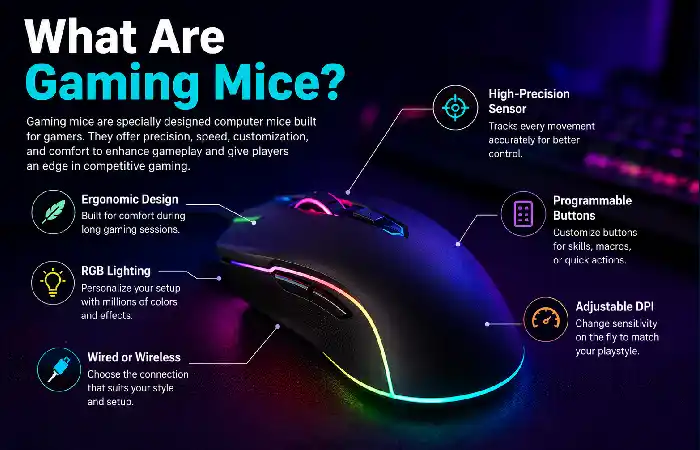
Gaming mice are computer mice intended for gaming. Gaming mice generally have features including: precision optical sensors, customizable buttons, adjustable sensitivity, higher polling rate, gaming software, and dedicated shape.
There is a designed-for-speed-or-lightweight-fatigue concept, as some are very light for speedy FPS movements, while some are really comfortable with many additional buttons for MMO and Strategy game.
The key takeaway here is that there is not one type of mouse that’s perfect for every user. According to Tom‘s Hardware, each game and grip utilizes varied mouse properties.
Common gaming mouse features
- Optical gaming sensor
- Adjustable DPI
- Programmable buttons
- High polling rate
- Wired or wireless connectivity
- Gaming configuration software
- Lightweight construction
- Ergonomic or ambidextrous designs
- Customizable RGB lighting
A gaming mouse is only one part of a complete setup. Choosing the right gaming accessories can improve comfort, control, and overall gameplay.
Gaming Mouse vs. Regular Mouse
A standard mouse is built to handle the same everyday usage as you may be doing with your mouse ( browsing, mostly documents and general PC use). Gaming mice are meant to be much faster and more accurate.
| Feature | Gaming Mouse | Regular Mouse |
| Tracking | Gaming-focused sensor | General-purpose sensor |
| DPI adjustment | Common | Less common |
| Programmable buttons | Often available | Usually limited |
| Polling rate | Often higher | Usually lower |
| Shape choices | Gaming-specific designs | General comfort |
| Weight choices | Lightweight to heavy | Usually moderate |
| Software | Often included | Limited or none |
| Gaming suitability | Excellent | Basic |
That doesn‘t mean you can‘t use a regular mouse. For playing the occasional game of solitaire it would probably suffice. A gaming mouse is more advantageous when you need precise movements, quick reactions, or customisable controls.
For competitive gaming, your mouse works best alongside responsive gaming keyboards that provide quick and reliable input.
DPI and Sensitivity Explained
DPI, which stands for dots per inch, is used to measure the distance the mouse cursor will travel when the mouse itself is physically moved.
For example, for a higher DPI, the cursor will move larger distance with the same keyboard movement. The lower DPI, the more keystroke it needs.
But higher DPI doesn‘t necessarily mean a better gaming mouse.
Having a particularly high maximum DPI on your mouse does not make it any more accurate, or better for gaming. Quality of the sensor, and your consistency, sensitivity and comfort while using it are much more significant factors.
DPI vs. in-game sensitivity
These are related but different settings:
- DPI: Set by the mouse.
- Game sensitivity: Set inside the game.
- Effective sensitivity: The combination of both settings.
This allows for two players to have different DPI settings but still arrive at a similar overall sensitivity.
Audio is another important part of an immersive setup, so consider pairing your mouse with comfortable gaming headsets for clear game audio and communication.
Wired vs. Wireless Gaming Mice
Perhaps the biggest decision when searching for gaming mice is whether to go with a wired mouse or a wireless solution.
Wired gaming mice
The wired models are directly plugged into the computer by a cable.
Advantages:
- No battery charging
- Simple connection
- Usually lower purchase price
- Consistent connection
- No wireless receiver required
Disadvantages:
- Cable can create resistance
- Less freedom of movement
- Desk setup can look less clean
Wireless gaming mice
Most of the wireless models utilize one or both of the following; a dedicated 2.4GHz receiver or Bluetooth.
Advantages:
- No cable dragging across the desk
- Cleaner setup
- Greater freedom of movement
- Modern low-latency models can perform extremely well
Disadvantages:
- Requires charging or battery replacement
- Usually costs more
- Wireless receiver needs to be managed
According to today‘s RTINGS tests, some of the wireless gaming mice are lagging at or below the latency levels of some wired mice, so you shouldn‘t just assume wireless is always slower.
In a competitive context, measure latency and reliability of connection instead of defaulting to a ‘wired is faster’ assumption.
While a mouse is ideal for many PC games, gaming controllers can be a better choice for racing, sports, platform, and controller-friendly titles.
Lightweight Gaming Mice
Gamers who play FPS games usually use lightweight mice as they tend to make big fast movements easier.
Whether a lighter mouse is an advantage depends on how you use the mouse. It might be handy when you have a large surface to slide the mouse over all day. But lighter isn‘t necessarily better.
A ultralight mouse might be felt as too insubstantial for some players. For some players the simplicity and stability of a heavier mouse may be preferred.
When comparing lightweight gaming mice, consider:
| Feature | Why It Matters |
| Weight | Changes movement feel |
| Shape | Affects grip and control |
| Balance | Influences handling |
| Sensor | Determines tracking performance |
| Mouse feet | Affect glide |
| Buttons | Affect functionality |
| Battery | Important for wireless models |
Some models from the 50–60g range are already available, along with many much heavier gaming mice, indicating a fairly broad range of potential designs. For instance, Tom‘s Hardware presently reviews gaming mice in all of the following disciplines.
Your mouse also needs a suitable surface, and gaming mouse pads can provide smoother tracking and more consistent movement.
Ergonomic Gaming Mouse Designs
A comfortable ergonomic gaming mouse is designed with the mouse being formed in such a way that a comfortable hand position is achieved, often with a raised palm area and a thumb resting space.
These mice could be suitable for users who like ‘palm’ grip or relaxed ‘claw’ grip.
Ambidextrous mouse An ambidextrous mouse usually consist of symmetrical shape, which may match users who want symmetrical shape.
Which shape is best?
No gaming mouse shape is best; however, there is a ‘best’ shape.
Consider:
- Your hand size
- Your grip style
- How long you play
- Whether you prefer a high or low hump
- Whether you want a thumb rest
- Whether you need left-handed compatibility
Comfort is a very important factor and hence, one of the early parameters you should be looking out for. As suggested by RTINGS, you should look to check the hand size and comfort when choosing a gaming mouse.
A responsive mouse is even more useful when paired with a high-refresh-rate gaming monitor that can display fast movements smoothly.
Gaming Mice for FPS Games
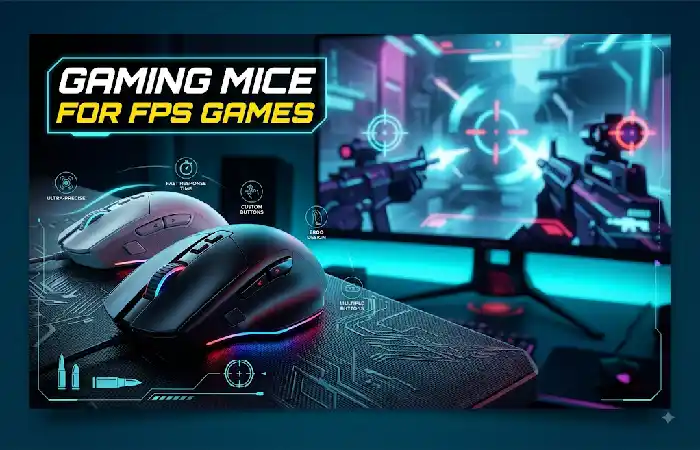
The FPS games that involve a “kill match”, where it‘s a one-on-one firefight, or competitive shooters, will want a mouse capable of rapid but precise movements.
Look for:
- Lightweight construction
- Accurate sensor
- Comfortable shape
- Low click latency
- Reliable tracking
- Smooth mouse feet
- Reliable wired or wireless connection
Not every FPS game needs more buttons. For a game where you can do so much from the keyboard just a two side button mouse is useful, and with is two more buttons then a standard mouse.
For competitive FPS players, shape and weight may be more significant than just buying a mouse with the highest spec numbers.
Gaming Mice for MMO and Strategy Games
More programmable buttons are recommended for MMO and strategy games.
Rather than going to the keyboard all the time to access some common commands, some actions can also be bound to the mouse.
| Game Type | Features to Prioritize |
| FPS | Low weight, sensor, latency |
| MMO | Programmable buttons |
| MOBA | Side buttons, comfort |
| RTS | Accuracy, control |
| RPG | Comfort, customization |
| Casual gaming | Value and comfort |
Contemporary MMO mice often feature large numbers of buttons. For example, the Razer Naga V3 Pro which was released in 2023 has removable side panels to customize the number and placement of buttons, giving this type of mouse great versatility for MMO and high input games.
How to Choose a Gaming Mouse
It is fairly simple to make a decision on which gaming mice to buy, do the following.
- Check your grip
The three common grip styles are:
- Palm grip
- Claw grip
- Fingertip grip
Based on which mouse shape is comfortable to you is swayed by your grip.
- Measure your hand
Compare the size of your hand if you take note of your hand length and width and compare it to the mouse dimensions provided by the manufacturer.
If a mouse is too large, it can actually be felt unwieldy; if it is too small it can feel constricted.
- Consider your favorite games
An MMO player and an FPS player may require totally different mice.
Don‘t buy a supermouse if you don‘t play super. Be reasonable and select the mouse you actually play.
- Choose wired or wireless
If you don‘t want to actually charge a device, wired is useful.
If you are seeking freedom from a cable then it is a very good contemporary low-latency wireless mouse.
- Set a budget
The priciest mouse will not always be the easiest to use.
Today’s selection has budget, mid-range and premium choices and writer’s buying advice group these into the same three categories.
Gaming Mouse Features That Matter
Some specs count for far more when comparing gaming mice.
| Feature | Importance | Why |
| Shape | Very High | Determines comfort and control |
| Weight | High | Affects movement |
| Sensor | High | Controls tracking |
| Click latency | High | Influences response |
| Polling rate | Medium-High | Determines input reporting frequency |
| Buttons | Depends | Useful for MMO/MOBA |
| Wireless performance | High | Important for wireless models |
| Battery life | Medium-High | Important for wireless |
| RGB | Low | Mainly aesthetic |
| Maximum DPI | Medium | More isn’t necessarily better |
RTINGS uses uniform testing for factors such as click and sensor latency, going beyond the specifications provided by the manufacturer.
Polling rate
The polling rate determines how often the mouse reports its position to the computer.
Common values include:
- 125Hz
- 500Hz
- 1,000Hz
- 2,000Hz
- 4,000Hz
- 8,000Hz
More polling rates can reduce the delay between reports, but can increase the load on the system, and in wireless mice can potentially harm battery life.
Almost all users should find it rather pointless to purchase a mouse solely because of its undoubtedly tremendous polling rate.
FAQ About Gaming Mice
Are gaming mice worth the hype?
A gaming mouse can offer a casual gamer more control, customization, and comfort than just a basic mouse. A casual gamer may not need the extra features of a gaming mouse.
Better is higher DPI?
No. Since a higher max DPI does not necessarily mean the mouse will work better with a higher dpi setting. Your ability to control your sensitivity is the main factor.
Are wireless gaming mice any good?
Yes. There are current wireless gaming mice in use that can offer very low latency. Wireless gaming mice have been independently tested by 2026 with results showing they can perform as well as or better than some wired gaming mice.
What is the ideal weight for a gaming mouse?
Not all weights are the same. Sometimes using a lighter mouse can be preferred over a heavier one. In general FPS gamers prefer a lightweight mouse without fear of losing control, but there are plenty of gamers who like their weight in a mouse.
How many buttons should a gaming mouse have?
I guess it always is about your games. FPS players should be happy with two side buttons, MMO fan of course will want a lot more programmable controls.
Does RGB improve gaming performance?
No. RGB is for aesthetic and customization purposes. It will not effectively enhance the sensor‘s accuracy or response speed.
Final Thoughts
Not all gaming mice are created equal, and the best ones are not always the ones with the most buttons, the highest DPI or the brightest RGB light. The right mouse should feel natural in your hand and be built to work with the way you play.
In FPS games, weight, shape, tracking and latency are what counts. For MMO and strategy games, programmable buttons should provide advantage. For the general use, comfortable and versatility should be considered first.
Kashifa Jafar is a technology writer and contributor at FutureTechExpert with 4+ years of experience in technology writing and content creation.
Read Full Bio of Author →Sameena reviews selected health, wellness, technology, and digital content for clarity, factual presentation, and reader usefulness.
Read Full Bio of Reviewer →