
 Kashifa Jafar
Technology Writer & Contributor
Kashifa Jafar is a technology writer and contributor at FutureTechExpert with 4+ years of experience in technology writing and content creation.
Read Full Bio of Author →
Kashifa Jafar
Technology Writer & Contributor
Kashifa Jafar is a technology writer and contributor at FutureTechExpert with 4+ years of experience in technology writing and content creation.
Read Full Bio of Author →
 Sameena Begum
Health, Technology & Digital Content Reviewer
Sameena reviews selected health, wellness, technology, and digital content for clarity, factual presentation, and reader usefulness.
Read Full Bio of Reviewer →
Sameena Begum
Health, Technology & Digital Content Reviewer
Sameena reviews selected health, wellness, technology, and digital content for clarity, factual presentation, and reader usefulness.
Read Full Bio of Reviewer →
Gaming Controllers allow some games to be more comfortable, accurate and fun, such as racing, sports, fighting, platforming, third-person. Compared to a mouse and keyboard, the analog sticks, triggers, buttons and vibration controls are single, handheld device.
By 2026, there will be even more hardware options for buyers. They will be able to choose between wired or wireless controllers, Hall Effect or TMR sticks, programmable back buttons, adjustable sticks and triggers, and multi-platform support. This time guide illustrates the types of gaming controllers available and helps buyers decide.
 This article is part of
Gaming Gadgets Resources
Table of Contents
What Are Gaming Controllers?
A gaming controller is an input device used to control a video game using buttons, analog sticks, triggers and directional controls. It connects via USB, Bluetooth, its own wireless standard, or (on certain mobile devices) directly to the USB-C port.
Modern gaming controllers can include features such as:
- Dual analog thumbsticks
- D-pad and face buttons
- Analog triggers
- Vibration or haptic feedback
- Motion controls
- Programmable buttons
- Back paddles
- Adjustable trigger stops
- Hall Effect or TMR sensors
Hall Effect sticks have been especially critical as there is less wear from the non-contact magnetic sensing type of potentiometers. Recently TMR has also been introduced as a new magnetic sensing method.
“A good controller is only one part of a complete setup. Explore our guide to gaming accessories to build a more comfortable and responsive gaming station.”
Gaming Controllers vs. Keyboard and Mouse
Both control methods are not better than each other; the advantage of using one over the other depends on the game.
| Gaming type | Controller | Keyboard & Mouse |
| Racing | Excellent | Good |
| Sports games | Excellent | Fair |
| Fighting games | Excellent | Fair |
| Platformers | Excellent | Good |
| Third-person action | Excellent | Excellent |
| FPS games | Good | Excellent |
| RTS games | Poor | Excellent |
| MMO games | Fair | Excellent |
The analog sticks on a controller can be moved incrementally, and its triggers are used for variable input, thus proving particularly useful for racing/ driving titles. A mouse normally offers more accuracy while aiming, whilst a keyboard provides numerous readily available commands.
For PC gamers, often the best option is to have both.
“If you prefer keyboard-and-mouse controls for PC games, choosing the right gaming keyboards can make a noticeable difference in responsiveness and comfort.”
Wired vs. Wireless Controllers
Wired Controllers
It don’t connect via a wireless network they connect directly by way of a USB. They don’t need to be charged, are generally easier to install, and are often used by pro gamers.
Advantages:
- No battery charging
- Simple setup
- Usually lower cost
- No wireless interference
- Suitable for long gaming sessions
Disadvantages:
- Cable management
- Limited distance from the device
- Cable can become damaged
Wireless Controllers
Wireless models are generally equipped with a Bluetooth or a dedicated 2.4GHz/proprietary wireless link.
Advantages:
- Cleaner gaming setup
- Greater freedom of movement
- Convenient for couch gaming
- Easy to switch between compatible devices
Disadvantages:
- Requires charging or batteries
- Wireless performance varies by connection type
- Bluetooth compatibility can differ between platforms
Many such as the Microsoft’s Xbox Wireless Controller are versatile and compatible with multiple systems such as the Xbox consoles, Windows, Android and iOS, while Microsoft states on the Xbox controller that the battery will last up to 40hours depending on batteries and use.
“For games that benefit from precise aiming and fast cursor movement, pairing your setup with the right gaming mice can give PC players more control.”
PC Gaming Controllers
PC gamers have an abnormally large range of options. Xbox controllers are the easiest to get working on Windows because of the native ecosystem, but PlayStation and third-party ones also tend to work well in many titles depending on the method of connection. PCWorld specifically recommends Xbox controllers for the ease of use on Windows out of the box.
Before purchasing a PC controller, check:
- Windows compatibility
- Steam compatibility
- USB/Bluetooth support
- Game-specific support
- Button mapping software
- Wireless receiver requirements
Third-party controllers have also become less expensive than before. The current 2026 stand11.00 recommends the following controllers: GameSir, 8BitDo, Flydigi, GuliKit, Razer, and Victrix.
PlayStation and Xbox Controllers
The two popular designs for console controllers have different configurations.
| Feature | Xbox-style | PlayStation-style |
| Thumbstick layout | Offset | Symmetrical |
| Main face buttons | ABXY | Cross, Circle, Square, Triangle |
| PC compatibility | Usually excellent | Good, game-dependent |
| Ergonomic preference | Depends on player | Depends on player |
| Best ecosystem match | Xbox/Windows | PlayStation/PS5 |
Sony continues to stands out from the competition due to its haptic feedback and the adaptive triggers. For example, according to Sony official specifications, the Dualsense has an integrated microphone, a headset connection, a mute button and a Create button.
“Clear game audio and reliable voice communication are also important, so consider a quality pair of gaming headsets for a more immersive experience.”
Custom and Pro Gaming Controllers
The current standard DualSense is priced at in India through Sony Center for the Midnight Black and White variants (retail prices may change).
Common premium features include:
- Rear paddles
- Remappable buttons
- Trigger stops
- Adjustable thumbstick tension
- Interchangeable sticks
- Custom profiles
- Improved grips
- Hall Effect or TMR sensors
For instance, premium PC controllers already available include the Razer Wolverine V3 Pro 8K and modular Victrix Pro BFG.
“If you switch between controller and mouse-based gaming, a quality gaming mouse pad can provide a smoother and more consistent surface for precise movements.”
Controller Features and Button Layouts
Don‘t just compare controllers based on how many buttons there are.
Thumbsticks
Look for smooth movement, centered, and resistance. Hall Effect and TMR designs are becoming more attractive for stick wear concerned buyers.
Triggers
Analog triggers are especially advantageous for racing and driving titles as they enable players to accelerate and brake at varying intensities.
D-Pad
D-pad precision is needed for fighting games, platformers, retro games and menu navigation.
Back Buttons
Back buttons will let you do things without taking your thumbs off the sticks. These are particularly useful in competitive games.
Haptic Feedback
Haptic Feedback delivers more specific physical feedback than traditional vibrate, depending on the game support.
“Your controller is only as effective as the display it is connected to, so choosing suitable gaming monitors can help you get the most from fast-paced games.”
Controllers for Racing and Sports Games
There are several other game genres that are popularly played using controllers and racing and sports games seem particularly suited to the controller form.
Analog triggers are thought to offer finer control of throttle and braking on racing games, while analog sticks make steering far easier than using digital inputs from the keyboard.
We believe the controllers work best with sports games due to the analog movement, triggers, bumpers, and face buttons.
If you mainly play racing simulators, though, a proper steering wheel and pedal combination can offer a very different experience.
How to Choose a Gaming Controller
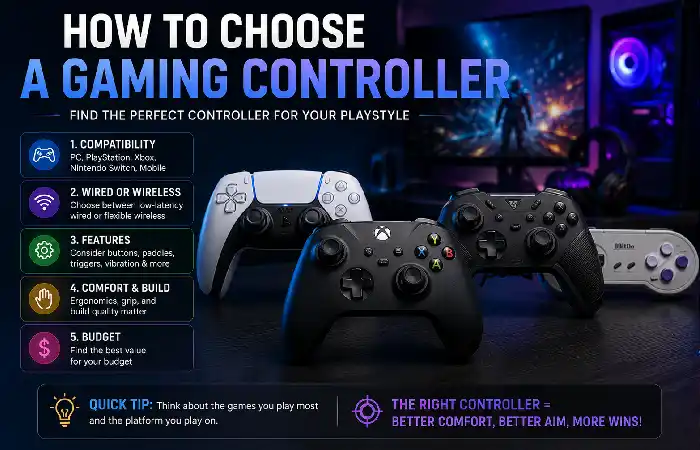
Use this checklist before buying:
| What to check | Why it matters | Resource |
| Platform compatibility | Prevents connection problems | PCWorld controller buying guide |
| Wired/wireless | Determines convenience and setup | Lenovo PC controller guide |
| Hall Effect/TMR | Important for durability and precision | TechRadar Hall Effect vs. TMR guide |
| Button mapping | Useful for competitive gaming | Tom’s Guide PC controllers |
| Ergonomics | Important during long sessions | TechRadar controller comfort guide |
| Price | Helps match controller to your budget | Microsoft Xbox Controller |
Quick recommendation:
- PC + Xbox: Consider an Xbox-compatible controller.
- PS5: DualSense is the natural first choice.
- Competitive PC gaming: Consider a pro controller with back buttons and advanced sensors.
- Budget gaming: Look at feature-rich third-party controllers.
- Racing: Prioritize accurate analog sticks and triggers.
- Long-term durability: Consider Hall Effect or TMR components.
One present budget sample is the 8BitDo Ultimate 2C, price listed by manufacturer at $29.99 for its Bluetooth Switch version.
Gaming Controller Maintenance Tips
Proper maintenance can extend controller life.
- Clean the exterior regularly with a dry or lightly damp microfiber cloth.
- Keep food and liquids away from the controller.
- Avoid pulling a wired controller by its cable.
- Store wireless controllers in a dry location.
- Do not leave rechargeable batteries exposed to excessive heat.
- Check thumbsticks for unusual movement or drift.
- Keep controller firmware updated when the manufacturer provides updates.
Never spray over the buttons, ports, or thumbstick assemblies.
FAQs About Gaming Controllers
Are the controllers more effective than the keyboard and mouse?
Not all the time. In general, controllers work way better than keyboard and mouse on racing, sports, fighting, platformers, and most third person games, while the later are better for FPS, strategy, or MMO games.
Are wired controllers better than wireless?
Wired controllers are ideal for short, simple sessions with uninterrupted playing while wireless controllers offer more roaming freedom. Which you choose will be situationally dependent.
Are Hall Effect Controllers Worth it?
They can be worth it if durability and stick accuracy are more important; Hall Effect employs a magnetic sensor instead of the usual contact in a potentiometer stick.
Can I use an Xbox controller on the PC?
Yes. Xbox Wireless Controllers are compatible with Windows PC‘s with various methods of connection, which also depend on your particular game.
Is it possible to use a PS5 DualSense on PC?
Yes. It is supported for compatible PC games, but features like adaptive triggers and advanced haptic feedback might require compatible games and applications.
Final Verdict
The ideal gaming controller depends on which platform, which games you prefer to play, how it feels in your hand and your budget. Casual PC gamer may be satisfied with a regular Xbox-type controller, while a more serious gamer can take advantage of customizable buttons, adjustable triggers, Hall Effect or TMR sticks, and high quality customization.
The greatest shift for the 2026 controller market is the rising number of high-end third-party hardware options. Consumers no longer have to decide between low-end first-party controllers or the vastly overpriced professional controllers. Budget and mid-tier controllers are starting to come equipped with features once provided exclusively by high-end gamepads.
Kashifa Jafar is a technology writer and contributor at FutureTechExpert with 4+ years of experience in technology writing and content creation.
Read Full Bio of Author →Sameena reviews selected health, wellness, technology, and digital content for clarity, factual presentation, and reader usefulness.
Read Full Bio of Reviewer →