
 Kashifa Jafar
Technology Writer & Contributor
Kashifa Jafar is a technology writer and contributor at FutureTechExpert with 4+ years of experience in technology writing and content creation.
Read Full Bio of Author →
Kashifa Jafar
Technology Writer & Contributor
Kashifa Jafar is a technology writer and contributor at FutureTechExpert with 4+ years of experience in technology writing and content creation.
Read Full Bio of Author →
 Sameena Begum
Health, Technology & Digital Content Reviewer
Sameena reviews selected health, wellness, technology, and digital content for clarity, factual presentation, and reader usefulness.
Read Full Bio of Reviewer →
Sameena Begum
Health, Technology & Digital Content Reviewer
Sameena reviews selected health, wellness, technology, and digital content for clarity, factual presentation, and reader usefulness.
Read Full Bio of Reviewer →
Selecting the best gaming keyboard can improve the layout of your gaming station to make it more comfortable, more responsive and more fun. No longer are modern keyboards just mechanical switch types and brightly lit RGB backlit keys. With the selection of mechanical, membrane, optical and hall Effect circuits for the keys as well as full size, tenkeyless, 75%, 65% and compact layouts, there is a myriad of choices for the 2026 gamer.
The best fit depends on what games you will be playing and to what extent you are willing to invest in your gaming PC.
 This article is part of
Gaming Gadgets Resources
Table of Contents
What Are Gaming Keyboards?
Gaming keyboards are designed especially for PC gaming. Of course, for most of these features are common. For example, compared to office keyboards, gaming keyboards usually have faster response, anti-ghosting, N-key rollover, keys programming, RGB color lighting, gaming mode, changeable switches and customizable software.
Premium switches are trending toward Hall Effect or magnetic switches, customizable actuation, and Rapid Trigger. The Steel Series Apex Pro Gen 3 has 40 levels of customizable actuation from 0.1 mm to 4.0 mm.
For players who are not so serious though, it is not imperative to own the most expensive keyboard. A quality mechanical keyboard with decent switches and a low latency can suffice.
A complete gaming setup starts with the right gaming accessories, from input devices and audio gear to displays and other essential peripherals.
Gaming Keyboards vs. Regular Keyboards
| Feature | Gaming Keyboard | Regular Keyboard |
| Response | Usually optimized for gaming | General-purpose |
| Switches | Mechanical, optical or magnetic | Often membrane |
| Anti-ghosting | Common | Less consistent |
| N-key rollover | Common on gaming models | Model-dependent |
| RGB | Common | Less common |
| Programmable keys | Often available | Limited |
| Gaming software | Frequently supported | Usually unavailable |
| Price | Budget to premium | Usually lower |
The biggest difference is not just RGB lighting. Input consistency, latency, rollover, switch behavior, customization can be much more important in gaming.
For accurate aiming and responsive controls, choosing the right gaming mice based on grip, sensor, weight, and polling rate can make a noticeable difference.
Mechanical vs. Membrane Gaming Keyboards
Mechanical keyboards have individual switches underneath each key and membrane keyboards usually have rubber-dome switches.
It tend to have a more audible keypress, increased switch options, and enhance customizability. Traditionally, membrane switches are quieter and more affordable.
RTINGS even states “The membrane switches really can be good enough for most gamers. Only professional gamers prefer the precision and feel of a mechanical switch.”
| Type | Best for | Main advantage | Limitation |
| Mechanical | Most gamers | Feel and customization | Can be expensive/noisy |
| Membrane | Casual gaming | Affordable and quiet | Less precise feel |
| Optical | Competitive gaming | Fast actuation | Fewer switch choices |
| Hall Effect | Competitive FPS | Adjustable actuation/Rapid Trigger | Usually costs more |
Best Keyboard Switch Types for Gaming
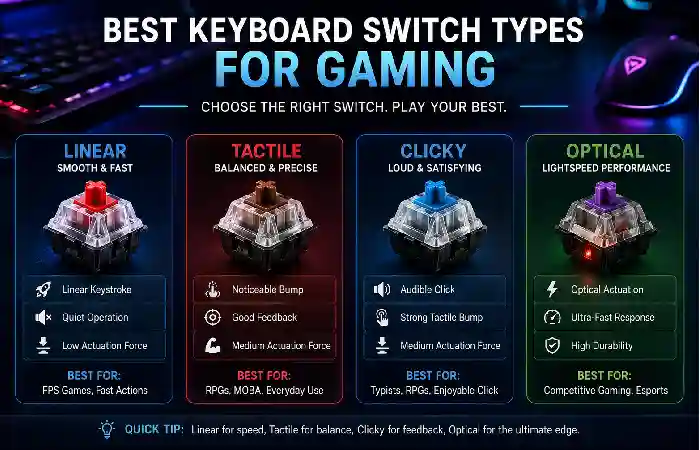
Switch choice affects how a keyboard feels every time you press a key.
- Linear switches: Smooth presses without a tactile bump. Excellent for fast repeated inputs.
- Tactile switches: Provide a noticeable bump during the keypress and are useful for both gaming and typing.
- Clicky switches: Add an audible click and tactile feedback but may be distracting in shared spaces.
- Optical switches: Use light-based actuation and can provide fast response.
- Hall Effect switches: Use magnetic sensing and can support adjustable actuation and Rapid Trigger.
Today many high end competitive keyboards now utilize Hall Effect technology. SteelSeries’ OmniPoint 3.0 switches allow for a customizable actuation of 0.1 to 4.0 mm as well as a Rapid Trigger feature.
Clear game audio and reliable voice communication are easier to achieve with the right gaming headsets, especially for competitive multiplayer games.
RGB Gaming Keyboards
RGB lighting is definitely among the most prominent gaming keyboard features. With per-key RGB, each key has the potential for its own color and effect; zone-based RGB has larger areas of the keyboard affected.
RGB doesn‘t aim to improve your gaming performances. The only thing you gain are some customization, better visibility and aesthetics.
Seek software that will allow you to develop your own lighting profiles, match lighting effects with other devices, and load different profiles for different games.
Players who prefer console-style controls can improve comfort and precision by choosing suitable gaming controllers for their preferred games.
Wired vs. Wireless Gaming Keyboards
Wired keyboards can remain an ideal option for competitive gamers, as they do not suffer the issues of batteries and always deliver a stable connection.
Wireless technology has also improved greatly. Many gaming keyboards are now available with 2.4GHz wireless channels. Which were designed specifically for low latency gaming.
| Connection | Best for | Advantages | Considerations |
| Wired USB | Competitive gaming | Reliable, no charging | Cable |
| 2.4GHz wireless | Gaming + clean setups | Low-latency freedom | Battery management |
| Bluetooth | Multiple devices | Convenient | Generally less gaming-focused |
Wired is still the best option for serious competitive gaming, but for casual games many gamers find wireless to be more convenient.
A quality surface also matters because gaming mouse pads can provide smoother tracking and more consistent mouse movement.
Compact and Full-Size Gaming Keyboards
A large keyboard requires more space for the desk, and it is also less comfortable to type on.
| Layout | Approx. keys | Best for |
| Full-size | ~104 | Gaming + productivity |
| 96% | ~100 | Number pad with less wasted space |
| TKL | ~87 | Competitive gaming |
| 75% | ~80 | Compact all-round use |
| 65% | ~66–68 | Minimalist gaming |
| 60% | ~61 | Maximum mouse space |
FPS players really like the ability to have the TKL keyboard because the removal of the number pad opens up a lot of space for large sweeping mouse movements.
Full-sized keyboards are your best option if you are a frequent number pad, macro, or power application user.
Your display is another important part of the setup, and gaming monitors with suitable refresh rates, response times, and resolutions can improve the overall gaming experience.
Gaming Keyboards for Competitive Players
For competitive FPS gaming, players also need to pay close attention to latency, actuation, Rapid Trigger, polling rate, switch consistency and layout.
The Hall Effect keyboards are especially intriguing in 2026 since customizable actuation allows players to select the distance a key must move in order to actually activate. Rapid Trigger also resets based on movement and not based on a fixed reset position.
For instance, the Huntsman V3 Pro made by Razer allows adjustment between 0.1 to 4.0mm of actuation, along with the addition of Rapid Trigger.
But none of these features are magic. Not even a high end keyboard can help you with bad aim, movement or game sense. Think of it more like a tool than a solution.
How to Choose a Gaming Keyboard
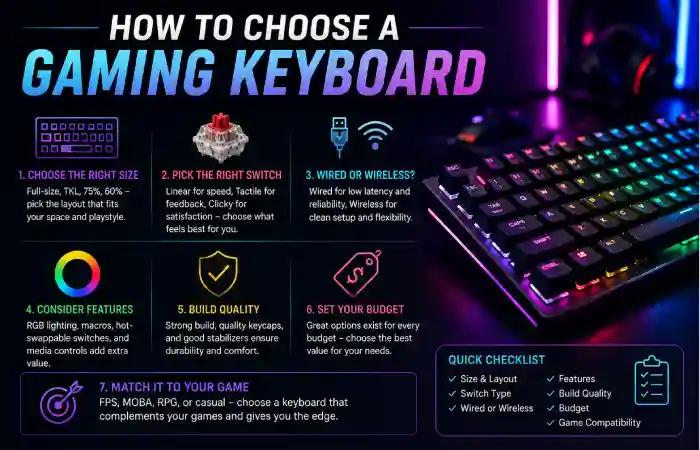
Begin with the type of games you play; don‘t pick up a keyboard just because it has the highest specifications.
- Choose your layout
Select full size for a number pad. Select TKL,75%, 65% or 60% if you require extra room for your mouse.
- Choose your switch
Linear switches work well for fast, smooth inputs. Tactile switches provide a stronger sense of feedback if needed. if adjustable actuation and Rapid Trigger are at all relevant then Hall Effect should be considered.
- Decide wired or wireless
Pick wired for simplicity and dependable pricing. Pick 2.4GHz wireless if you want a less cluttered desk.
- Check latency and rollover
Are you judging the gaming performance of the RGB or switch branding? Find independent latency testing, anti-ghosting and N-key rollover.
- Consider software
Adding to ‘other than that’ mentioned earlier, well designed software should be easy to modify RGBs, macros, profiles, actuation and many other options.
- Match the keyboard to your budget
You don‘t have to buy a premium keyboard just for gaming. Spend more on a keyboard when you want a feature for it:Hassle-free gaming, Hall Effect switches, Advanced customization, Wireless connectivity, Solid build.
Gaming Keyboard Features to Look For
| Feature | Why it matters | Priority |
| Low latency | Faster input registration | High |
| Mechanical switches | Better feel/customization | High |
| Hall Effect | Adjustable actuation | Competitive |
| Rapid Trigger | Faster repeated inputs | Competitive |
| Anti-ghosting | Helps simultaneous inputs register | High |
| N-key rollover | Supports multiple simultaneous keys | High |
| RGB | Appearance/customization | Medium |
| Macro keys | Extra commands | Depends on game |
| Wireless | Cleaner setup | Convenience |
| Hot-swappable switches | Easy customization | Enthusiasts |
For example, the Razer Huntsman V3 Pro features customizable actuation, Rapid Trigger, Snap Tap, built-in profiles, PBT keycaps and N-key rollover.
2026 Gaming Keyboard Technology Snapshot
| Technology | 2026 relevance | Example/resource |
| Mechanical switches | Mainstream choice | RTINGS Gaming Keyboard Guide |
| Hall Effect | Rapidly growing in competitive keyboards | SteelSeries Apex Pro Gen 3 |
| Adjustable actuation | Premium/competitive feature | Razer Huntsman V3 Pro |
| Rapid Trigger | Important for competitive FPS | Razer Rapid Trigger Support |
| Wireless 2.4GHz | Mature gaming option | Tom’s Hardware Gaming Keyboard Guide |
| Compact layouts | Popular for competitive setups | Tom’s Guide Gaming Keyboards |
FAQs About Gaming Keyboards
Are gaming keyboards a worthwhile investment?
Yes, especially if you game on a regular basis. Mechanical switches,better rollover, lower latency and customizability can all enhance the experience.
Are they better for gaming?
In general, mechanical keyboards are favored by most people as they provide a uniform key feel with a much larger variety of switches. Nevertheless, an excellent membrane gaming keyboard will also serve well for the occasional gamer.
What about 60% keyboard gaming?
Yes. A 60% keyboard has more room for the mouse but will lack dedicated arrow keys, function keys, and number pad.
Wireless gaming keyboards are okay for competitive gaming?
Today, 2.4GHz wireless keyboards can be very capable for gaming. Still, all serious competitors should verify that there is been independent testing done on latency levels and connection and power reliability.
What is the most suitable switch for gaming?
No switch is directly the best: linear switch is loved for its smooth travel, but Hall Effect switch is appealing to competitive players because offering customizable actuation and rapid trigger.
Conclusion
The top gaming keyboard is whichever one suits your games, desk space and the typing modes you like best. Mechanical keyboards still remain the safest all-round bets, while Hall Effect ones are becoming more attractive for fighters who love switchable actuation and Rapid Trigger. Full size keyboards offer the most lines of functionality, while TKL and compact keyboards give gamers more space to move the mouse.
Forget about shiny specifications like ultra hot keys in 2026, concentrate on latency, switch quality, layout, connectivity, build quality and software support. That will lead you to a keyboard that enhances your gaming setup rather than makes you overpay for useless functionalities.
Kashifa Jafar is a technology writer and contributor at FutureTechExpert with 4+ years of experience in technology writing and content creation.
Read Full Bio of Author →Sameena reviews selected health, wellness, technology, and digital content for clarity, factual presentation, and reader usefulness.
Read Full Bio of Reviewer →