
 Kashifa Jafar
Technology Writer & Contributor
Kashifa Jafar is a technology writer and contributor at FutureTechExpert with 4+ years of experience in technology writing and content creation.
Read Full Bio of Author →
Kashifa Jafar
Technology Writer & Contributor
Kashifa Jafar is a technology writer and contributor at FutureTechExpert with 4+ years of experience in technology writing and content creation.
Read Full Bio of Author →
 Sameena Begum
Health, Technology & Digital Content Reviewer
Sameena reviews selected health, wellness, technology, and digital content for clarity, factual presentation, and reader usefulness.
Read Full Bio of Reviewer →
Sameena Begum
Health, Technology & Digital Content Reviewer
Sameena reviews selected health, wellness, technology, and digital content for clarity, factual presentation, and reader usefulness.
Read Full Bio of Reviewer →
A smart home is no longer just the domain of luxury or status. Implementation of a smart home may be cost effective, and an excellent investment for the householder seeking to optimise comfort, security and efficiency. By 2026, connected homes will enable you to remotely control everything from lighting and heating to security systems, entertainment equipment and high-use appliances, all operated from an easy to use control panel.
Whatever if you‘re building a new house, laying out money over a refurbishment project or simply hoping for one or two smart appliances, knowing about smart-home setups is certain to enable you to make sound decisions.
 This article is part of
Smart Home Gadgets Resources
Table of Contents
What Is Smart Home Installation?
Smart home installation is the process of the planning, installing, commissioning and setting-up of internet connected devices to automate, control and manage different parts of a house remotely. The devices are interconnected through Wi-Fi, Ethernet, Zigbee, Z-Wave, Matter, Thread, Bluetooth or other network protocols creating a connected life environment.
Smart home installation makes the house smart, adapting automatically to individual‘s behaviors and environment. “Examples of smart house technologies include smart lighting, smart thermostats, security cameras, smart locks, voice assistants and entire-home automation systems.”
A smart home typically includes:
- Smart lighting
- Smart thermostats
- Security cameras
- Video doorbells
- Smart locks
- Voice assistants
- Smart speakers
- Entertainment systems
- Motion sensors
- Energy monitoring devices
- Automated blinds and curtains
The goal is to create a connected ecosystem where devices work together seamlessly.
Example
Instead of manually adjusting lights, locking doors, and setting the thermostat every night, a single automation routine can:
- Turn off lights
- Lock all doors
- Activate security cameras
- Lower the thermostat
- Close motorized blinds
The idea is to develop an interconnected ecosystem.
A secure connected home starts with proper protection. Learn more about smart home security installation to safeguard your devices, network, and family.
How Smart Home Installation Works
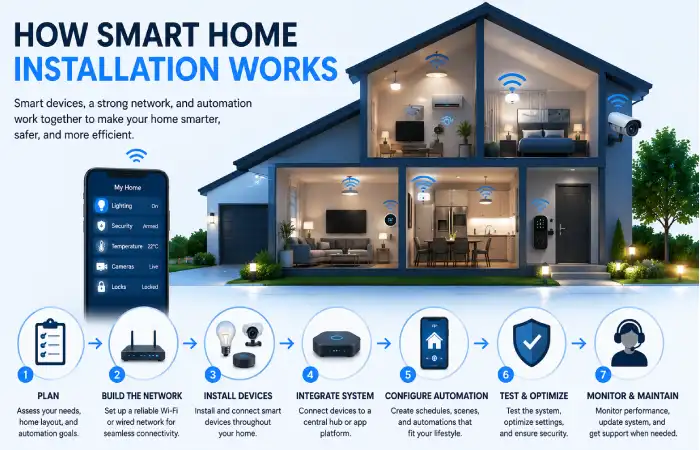
Prior to the investment in connected devices, automation and installation, there is a need to understand how a smart home work. Installing a smart home is fairly simple and is a mix of many processes such as network technology, configuration and installation of devices, automation creation etc.
It doesn‘t matter whether you‘re installing a few or all smart devices in a flat or developing a luxurious smart house It is always a smart home when everything is a part of a safe network and is connected together by a universal controlling system.
Every smart home follows a similar architecture:
| Component | Purpose |
| Smart Devices | Perform actions and collect data |
| Hub/Controller | Central communication point |
| Network | Connects devices |
| Mobile App | User control interface |
| Automation Engine | Creates routines and schedules |
| Voice Assistant | Voice-based control |
Typical Workflow
- Device collects information.
- Data is sent to the hub or cloud.
- Rules determine actions.
- Commands are issued automatically.
- User receives notifications when necessary.
Example Automation
Motion detected after 11 PM:
Hallway light turns on
Security camera records
Mobile notification sent
Light turns off after 5 minutes
Benefits of Professional Smart Home Installation
Many smart home products are marketed as self-installable DIY items but in reality, creating a robust, secure, and scalable smart home will take much more than just installing a few devices. As ecosystem complexity increases, more homeowners will turn to professional installers in order to have a properly functioning smart home in 2026.
Professional smart home installation is defined as installation not only of the devices but also of the system. Examples of other tasks involved in professional installation are system architecture, system optimization, device integration, automation programming, security setup, testing, troubleshooting and ongoing support.
From installing a few security gadgets to Smartening the entire house, professional expertise will help you avoid the pitfalls along the way.
Better System Design
Professionals evaluate:
- Home layout
- Wi-Fi coverage
- Device compatibility
- Future expansion needs
Reliable Performance
Smart home failure is mainly caused by poor network planning.
Professional installers ensure:
- Strong Wi-Fi coverage
- Proper device placement
- Network segmentation
- Stable automation routines
Security Improvements
Professionally installed systems typically include:
- Secure password management
- Encrypted communication
- Separate IoT networks
- Firewall configuration
Time Savings
What need a professional‘s skill can be home done in various ways.
Types of Smart Home Systems
Houses are not all created equal. Some are equipped with a handful of connection points that is used simply for convenience, while others opt for an integrated automation system to control lighting, security, climate, media and energy consumption for the entire house. Knowledge of the various systems is important in selecting a smart home system to meet your needs for one reason or another.
In 2026, smart home systems won’t necessarily be high-tech solutions. In fact, they will vary from very basic Do-It-Yourself kits to enterprise level home automation systems. There are so many options in this area that it will be very hard to decide on what works for you. It will all depend on your financial constraints, level of technical competence, property size and what you want to automate.
- Lighting Automation
Controls:
- Bulbs
- Switches
- Dimmers
- Scenes
Popular uses:
- Movie mode
- Vacation mode
- Sunrise routines
- Security Automation
Includes:
- Cameras
- Sensors
- Smart locks
- Alarms
- Climate Automation
Controls:
- Air conditioning
- Heating
- Fans
- Humidity
- Entertainment Automation
Manages:
- TVs
- Speakers
- Projectors
- Streaming devices
- Whole-Home Automation
Brings all cats into a single ecosystem.
Smart Home Security Systems
Security is undoubtedly one of the major reasons for building a smart home. The security systems nowadays are not that different from normal alarm systems, with connectivity of cameras, smart locks, motion detectors, sensors for windows and doors, video door bells, AI technology and monitoring on mobiles.
Components
| Device | Function |
| Cameras | Surveillance |
| Motion Sensors | Detect movement |
| Door Sensors | Monitor entry points |
| Smart Locks | Remote access |
| Video Doorbells | Visitor monitoring |
| Alarms | Threat alerts |
Security Features
- Live monitoring
- Remote viewing
- AI person detection
- Package detection
- Emergency alerts
Smart Lighting Installation
Most common are used to introduced in majority of people‘s, who are just beginning to build a connected home. It is relatively inexpensive, is easy to install, is highly visible in everyday operation and can be quickly experienced the improvements in convenience, security, security, ambience and efficiency. Your own home lights smart installation can be very single room, or across the whole house.
Options
Smart Bulbs
Advantages:
- Easy installation
- Color changing
- App control
Disadvantages:
- Higher cost per bulb
Smart Switches
Advantages:
- Controls multiple fixtures
- More reliable
Disadvantages:
- May require rewiring
Common Lighting Automations
- Motion-based lighting
- Occupancy sensing
- Scheduled routines
- Sunset/sunrise activation
Modern homeowners can improve convenience and energy efficiency with smart lighting installation solutions that automate schedules and brightness levels.
Smart Thermostat Installation
A smart thermostat is one of the best investments for a smart home in terms of comfort and savings. Rather than having to manually set up a schedule in the thermostat a smart thermostat will learn the owners routines and adjust cooling and heating cycles accordingly.
Key Features
- Learning schedules
- Remote temperature control
- Energy monitoring
- Voice assistant integration
Benefits
| Benefit | Impact |
| Energy Savings | Lower utility bills |
| Comfort | Better temperature control |
| Automation | Reduced manual adjustments |
| Monitoring | Usage tracking |
Reducing energy costs is easier with smart thermostat installation, allowing remote temperature control and intelligent climate management.
Smart Doorbells and Smart Locks
One of the most common smart home upgrades is smart doorbells and smart locks. These devices are desirable because they improve safety and convenience. Once connected to a home‘s wifi, the devices can show who is at the front door, unlock doors from a central control, alert homeowner to visitors and control access from any location through a mobile app or a voice activated device.
Smart Doorbells
Features include:
- HD video
- Motion alerts
- Two-way communication
- Cloud recording
Smart Locks
Allow:
- Keyless entry
- Temporary access codes
- Remote locking
- Activity logs
Best Uses
- Rental properties
- Family homes
- Deliveries
- Remote access management
Smart Home Entertainment Systems
Consumers want more than a TV and a few speakers. A smart home entertainment system controls all your home‘s media, lighting, heating, security and more, providing a hassle-free whole home media experience and transforming entertainment into the entire home.
Whether it is a serious home cinema, an ideal theater room, multi-room music streaming or whole home automation, the smart home entertainment system is transforming our experience of media.
Components
- Smart TVs
- Streaming devices
- Multi-room audio
- Home theaters
- Universal remotes
Benefits
- One-touch control
- Better user experience
- Whole-home audio
- Simplified management
Smart Speakers and Voice Assistants
Smart speakers and voice assistants are now the central command system of the current smart home. From humble beginnings as voice operated music players, they have grown into very powerful artificial intelligence driven products that can control lights, security, thermostats, music equipment, domestic appliances and various automation processes within the home.
Popular platforms include:
- Amazon Alexa
- Google Assistant
- Apple HomeKit/Siri
Common Commands
- Turn on lights
- Adjust thermostat
- Lock doors
- Play music
- Run automation scenes
Smart Home Automation and Control
Smart home appliances are most valuable when they act according to their neighbors automatically. Being able to manage volume levels, thermostats or cameras with a mobile device is nice, but the real benefit of a connected home lies within smart home automation and control.
Automation This allows devices to intelligently adjust to schedules, the environment, sensors, and the behavior of end users without user input.
Automation Examples
Morning Routine
- Lights gradually brighten
- Coffee machine starts
- Weather briefing plays
- Thermostat adjusts
Away Mode
- Lights turn off
- Doors lock
- Cameras activate
- Notifications enabled
Night Mode
- Security armed
- Exterior lights on
- Temperature lowered
To create a seamless smart living experience, explore smart home automation systems that connect and manage multiple devices from a single platform.
Smart Cameras and Home Monitoring
Smart cameras and home security systems are now a popular part of any smart home. With features such as AI, cloud connected cameras, motion detection, and instant notifications, modern smart security cameras allow homeowners to keep an eye on their home wherever they may be.
From safeguarding your loved ones, to tracking of package deliveries, to keeping an eye onyour furry friends, to securing your home, smart cameras and home monitoring systems allow you to rest assured by giving you round-the-clock visibility and smart automation.
Features
- AI object detection
- Facial recognition
- Cloud storage
- Local storage
- Night vision
Camera Placement Guide
| Location | Purpose |
| Front Door | Visitor monitoring |
| Backyard | Perimeter security |
| Garage | Vehicle protection |
| Hallways | Indoor monitoring |
For enhanced surveillance and remote access, consider smart camera installation as part of your home monitoring strategy.
Smart Home Networking and Wi-Fi
No matter how fantastic your smart devices may be, a strong network is a key component to a successful smart home. A weak network causes automations to run behind, devices to disconnect, security cameras to buffer, and simple user experiences to become frustrating. That‘s why smart home networking and Wi-Fi should be one of the first things to address when planning your smart home.
During 2026, the average smart home may have dozens or even hundreds of connected devices; such as smart lights and thermostats, cameras, door bells speakers, sensors, appliances and entertainment systems. To do so, a robust network infrastructure should be built.
Recommended Network Setup
Small Home
- Quality router
- 20–40 devices
Medium Home
- Mesh Wi-Fi
- Multiple access points
Large Home
- Enterprise-grade network
- Structured wiring
Network Best Practices
- Separate IoT network
- Strong passwords
- WPA3 security
- Regular firmware updates
Every connected home depends on a reliable network. A proper smart home Wi-Fi setup ensures stable connectivity for all smart devices.
Wired vs. Wireless Smart Home Installation
Perhaps the most critical choice to make when designing a smart home is whether to have a wired or wireless smart home. While either can provide home automation, security, energy management, and convenience, each comes with its own strengths and drawbacks in the areas of cost, dependability, expandability, ease of installation and maintenance.
Comparison Table
| Feature | Wireless | Wired |
| Installation Cost | Lower | Higher |
| Reliability | Good | Excellent |
| Expansion | Easy | Planned |
| New Construction | Good | Best |
| Existing Homes | Best | Difficult |
| Latency | Moderate | Very Low |
| Maintenance | Higher | Lower |
Wireless Advantages
- Faster deployment
- Lower costs
- Easier upgrades
Wired Advantages
- Superior reliability
- Better scalability
- Long-term stability
DIY vs. Professional Smart Home Installation
A common question among homeowners eager to establish a connected home is this: Do I Get-it-Yourself (DIY) or install it ourselves, or do we bring in the pros for a professional installation?
Today‘s smart home technology has become more user friendly so that anyone can set up their house themselves and so that first time users are encouraged to opt for a DIY system. However, larger installations are more suited to professional installation than DIY weathers.
DIY Installation
Best for:
- Smart speakers
- Smart bulbs
- Plug-in devices
- Video doorbells
Pros
- Lower cost
- Flexible setup
- Learning experience
Cons
- Troubleshooting challenges
- Compatibility issues
- Network limitations
Professional Installation
Best for:
- Whole-home automation
- Security systems
- Structured networking
- Wired installations
Pros
- Expert design
- Reliable deployment
- Better security
Cons
- Higher upfront investment
Smart Home Installation for New Homes
A new build truly provides the opportunity for a new generation smart home to be designed and built from the ground up. Essentially, smart home installation on a new build eliminates or significantly reduces many of the restrictions and limitations experienced when installing into retrofit situations.
Recommended Planning Stage
Before:
- Electrical rough-ins
- Drywall installation
- Network cabling
Consider Pre-Wiring For
- Cameras
- Access points
- Speakers
- Touch panels
- Smart switches
Implementing a new Smart home brings the highest level of options, dependability, value to the owner. With opportunity to build the automation up front, a complete living environment can be created that supplies the owner with security, convenience, entertainment, affordability and upgradeability.
Smart Home Installation for Existing Homes
A common misconception among home owners is that the only way to implement smart home technology is in a newly constructed home. Today‘s devices and wireless communications have made the implementation of a smart home in an existing home simpler and inexpensive than ever before.
No matter if you own an historic house, a newly renovated one, or a condominium, you can add the advantages of automation, security, energy management, and entertainment without modifications to your home.
Recommended Technologies
- Wi-Fi devices
- Zigbee devices
- Matter-compatible products
- Thread devices
Common Upgrades
- Smart switches
- Video doorbells
- Smart locks
- Cameras
- Voice assistants
Smart Home Installation Costs
Cost is likely to be the initial concern of homeowners who put a smart home project in motion. How much should it cost? Ultimately, this depends on many parameters, such as the dimensions of the house, the quantity and type of appliances, the level of automation, the networking needs, as well as the installation method (DIY or professional).
Expanding our integrator knowledge further it is smart home technology, how much it costs the homeowner. Well, 2026, we are more-than-a-lot awash in the stuff, whether it‘s inexpensive starter sets or palatial everything-on automation.
Estimated 2026 Budget Ranges
| Installation Level | Estimated Cost |
| Basic Starter Setup | $300–$1,000 |
| Smart Apartment | $1,000–$3,000 |
| Smart Family Home | $3,000–$10,000 |
| Advanced Whole Home | $10,000–$50,000+ |
Cost Factors
- Number of devices
- Wiring requirements
- Home size
- Platform selection
- Professional labor
- Network upgrades
The cost of installing a smart home can vary from hundreds of dollars for a basic buy-it-yourself system to hundreds of thousands for a fully integrated professionally installed entire home-automated system. The cost ultimately depends upon your aims and the size of your home, the types of devices you are integrating, networking needs and degree of automation desired.
How to Choose a Smart Home Installer
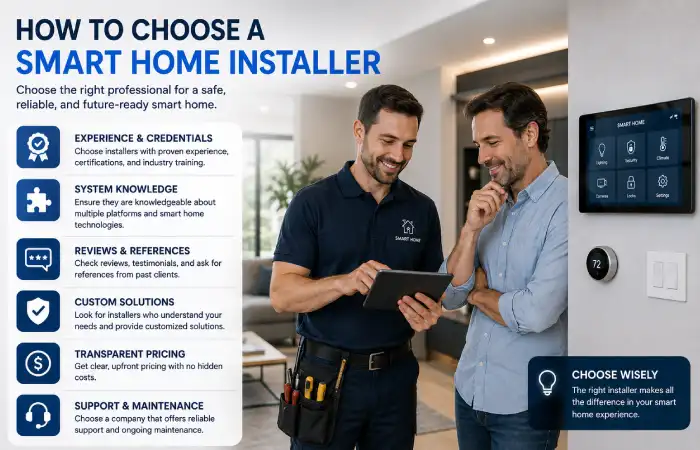
Selecting the appropriate smart home installer is among the best decisions you‘ll make building a connected home. Though some smart devices are easy to install by yourself, a full home automation, security, networking, entertainment, and whole home integration project is best suited to a professional installer to assemble a reliable, scalable and secure installation to meet your needs.
Questions to Ask
Experience
- How many installations completed?
- Which platforms do they support?
Certifications
Look for expertise with:
- Control4
- KNX
- Crestron
- Lutron
- HomeKit
- Matter
Support
Ask about:
- Maintenance plans
- Remote support
- Warranty coverage
A good smart home installer will make your home automation installation a good investment, rather than a $20,000 headache. Do not hesitate to find out about their experience, certification and qualification, wireless-networking experience, security and back-up policy, references.
Smart Home Installation Best Practices
A successful smart home installation is about more than just hooking up the gear. The smartest homes are ones that are dependable, safe, expandable, and straightforward to monitor and maintain. Applying established best practices in installation will make sure your smart home works efficiently now and can be upgraded as your needs change.
Start with a Strong Network Foundation
The backbone of everyone‘s connected home ecosystem is your Wi-Fi and network. Nothing even the most wondrous smart device can do will matter if the network is flaky and causes delays, malfunctioning or drop off automation commands.
Why It Matters
A steady network alleviates device latency, enhances automation accuracy and encourages the increasing volume of available devices.
Choose Compatible Devices and Ecosystems
Not every smart device is compatible between each other. Make sure devices are compatible with your chosen smart home platform.
Popular Ecosystems
| Platform | Best For |
| Google Home | Flexible device compatibility |
| Amazon Alexa | Voice automation and smart speakers |
| Apple HomeKit | Privacy-focused users |
| Samsung SmartThings | Broad device support |
| Matter-Compatible Devices | Cross-platform interoperability |
Best Practices
- Prioritize Matter-certified products when available.
- Research compatibility before buying.
- Avoid mixing too many proprietary ecosystems.
- Choose devices that support future integrations.
Plan for Future Expansion
Starting with a few smart home devices other owners are slowly growing into full-fledged smart homes.
Best Practices
- Select scalable platforms.
- Leave room in electrical panels for future upgrades.
- Install extra Ethernet cabling during renovations.
- Choose hubs and controllers that support additional devices.
Examples of Future Additions
- Smart irrigation systems
- Motorized blinds
- Energy monitoring systems
- EV charging automation
- Whole-home audio systems
Pre-planning allows you to avoid future installation costs and interruptions.
Prioritize Smart Home Security
Unprotected system of interconnected devices can be a gateway for cyber threats.
Security Best Practices
- Create strong, unique passwords for all devices.
- Enable multi-factor authentication (MFA).
- Update firmware regularly.
- Disable unused features and services.
- Remove devices no longer in use.
Network Security Recommendations
| Security Measure | Benefit |
| Separate IoT Network | Isolates smart devices |
| WPA3 Encryption | Stronger wireless protection |
| MFA Enabled | Prevents unauthorized access |
| Regular Updates | Fixes security vulnerabilities |
Use Device Naming Conventions
More devices, more difficulties: the larger number of devices, the harder it is to manage them in the absence of a proper naming convention.
Example Naming Structure
- Living Room Main Light
- Master Bedroom Thermostat
- Front Door Camera
- Kitchen Motion Sensor
Benefits
- Easier voice control
- Faster troubleshooting
- Better automation management
- Simplified device organization
By using consistent names, you can avoid confusion when creating automations.
Frequently Asked Questions About Smart Home Installation
What is the cost of smart home installation?
Simple systems can begin at less than $1,000 and a high end fully integrated luxury home over $50,000 depending on the project.
Is professional installation needed?
When it comes to whole-home automation, networking, security, and wired systems, Professional installation often results in more reliable performance and a better investment.
Can I implement a smart home in my existing residence?
Yes. The majority of contemporary wireless technology is aimed at retrofit projects.
Are all smart homes functional without an internet connection?
Most devices remain functioning on the local device but the cloud functions are not accessible.
The best platform for the smart homes is?
The best platform to use is a matter of need. The most embeddable of the Matter compatible ecosystems are as flexible as possible.
How safe are Smarthome systems?
Smart homes can be made very secure if set up properly with strong passwords, encrypted networks, updated firmware and other security measures.
Conclusion
Smart home installation isn‘t just about gadgets anymore it‘s about a connected, efficient, secure, easy-to-use living space. Whether you start small with intelligent lighting and voice control or go the full-on whole house automation, the secret is to plan thoroughly for compatibility and future expansion.
Begin with a robust network, use trustworthy equipment, focus on security, and create a scalable system for the future. If you plan your installation properly, you will reap the benefits of a smart home for many years.
Kashifa Jafar is a technology writer and contributor at FutureTechExpert with 4+ years of experience in technology writing and content creation.
Read Full Bio of Author →Sameena reviews selected health, wellness, technology, and digital content for clarity, factual presentation, and reader usefulness.
Read Full Bio of Reviewer →