
 Kashifa Jafar
Technology Writer & Contributor
Kashifa Jafar is a technology writer and contributor at FutureTechExpert with 4+ years of experience in technology writing and content creation.
Read Full Bio of Author →
Kashifa Jafar
Technology Writer & Contributor
Kashifa Jafar is a technology writer and contributor at FutureTechExpert with 4+ years of experience in technology writing and content creation.
Read Full Bio of Author →
 Sameena Begum
Health, Technology & Digital Content Reviewer
Sameena reviews selected health, wellness, technology, and digital content for clarity, factual presentation, and reader usefulness.
Read Full Bio of Reviewer →
Sameena Begum
Health, Technology & Digital Content Reviewer
Sameena reviews selected health, wellness, technology, and digital content for clarity, factual presentation, and reader usefulness.
Read Full Bio of Reviewer →
Installing a smart thermostat is arguably the simplest smart home upgrade you can make in 2026. The benefits are immense whether you‘re replacing an old-school timer or putting together a fully connected home.
Existing smart thermostats (Nest, Ecobee, Honeywell, Emerson, etc.) sense your home‘s current temperature and humidity while also detecting when you‘re gone and adapting their behavior in response to your personal pattern, local weather, and more enabling “all-day comfort without all-day energy use.” Choosing a smart thermostat certified to the ENERGY STAR standard will verify your home savings.
 This article is part of
Smart Home Gadgets Resources
Table of Contents
What Is Smart Thermostat Installation?
The process of installing a smart thermostat involves inserting a Wi-Fi-enabled device and replacing it with your regular thermostat that controls your HVAC system, communicates with applications on your smart phone and other smart devices.
Unlike traditional thermostats, smart thermostats can:
- Learn usage patterns
- Create automated schedules
- Enable remote temperature control
- Provide energy reports
- Integrate with voice assistants
All of most installations are 30 minutes to an hour for compatible HVAC systems. Ecobee states that a few installations can be done within 45 minutes.
A smart thermostat becomes even more effective when integrated into a complete smart home installation guide that connects all devices within your home ecosystem.
Benefits of Smart Thermostats
- Lower Energy Bills
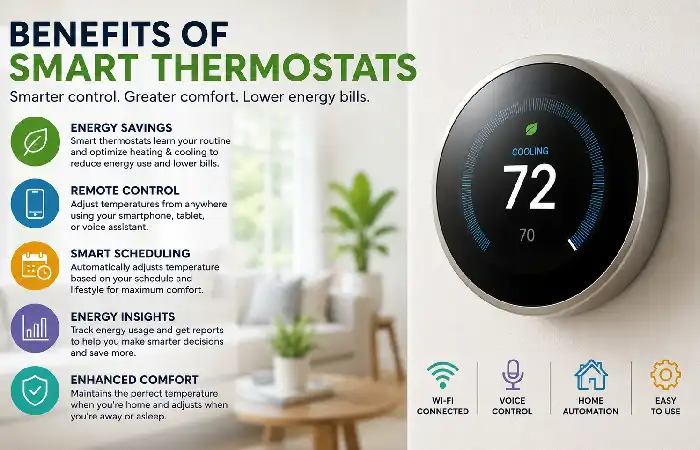
Smart thermostats that are ENERGY STAR rated utilize automation and scheduling, and can therefore lower their runtime while still providing comfort. As proven by independent field data, though, there are measurable savings in energy.
- Remote Control
Adjust temperatures from anywhere using:
- Mobile apps
- Tablets
- Smart watches
- Voice assistants
- Automatic Scheduling
Smart thermostats can:
- Detect occupancy
- Learn routines
- Create schedules automatically
- Better Home Comfort
More sophisticated models have sensors to control temperatures in a number of rooms.
- Smart Home Integration
Works with:
- Google Home
- Amazon Alexa
- Apple HomeKit
- Matter-enabled devices
Because thermostats are connected devices, following smart home best practices outlined in smart home security systems can help protect your network and personal data.
How Smart Thermostats Work
A smart thermostat is an automated heating and cooling controls that integrates sensors, software and the Internet to take control over your home heating and cooling system.
Typical Process
- Monitor room temperature
- Analyze schedules and preferences
- Connect to cloud services
- Control HVAC equipment
- Optimize heating and cooling cycles
Many systems also provide:
- Weather-based adjustments
- Energy reports
- Occupancy detection
- Geofencing capabilities
Smart Thermostat Compatibility
Most modern day HVAC Systems are compatible with smart thermostats, although may require additional equipment, re-wiring or a professional install.
Compatibility Checklist
| HVAC System | Compatible |
| Central Air Conditioning | Yes |
| Forced-Air Heating | Yes |
| Heat Pumps | Usually |
| Multi-Stage Systems | Model Dependent |
| Radiant Heating | Some Models |
| High Voltage Systems | Often No |
Most make them available online to check prior to the installation.
C-Wire Requirements
This is the C-wire (Common Wire). Continuous power is supplied by.
Many smart thermostats require:
- Existing C-wire
- C-wire adapter
- Power extender kit
Not having a C-wire isn‘t an obstacle to installation; it could have an impact on choosing a particular model.
Many homeowners combine thermostats with smart home lighting solutions to create automated schedules that improve comfort and energy efficiency.
Wi-Fi and Connectivity Requirements
Reliable internet access is essential.
Recommended Requirements
| Requirement | Recommendation |
| Wi-Fi Band | 2.4 GHz |
| Internet Speed | 10 Mbps+ |
| Router Distance | Under 50 ft |
| Mobile App | iOS or Android |
Strong Wi-Fi coverage ensures:
- Faster response times
- Reliable automation
- Consistent remote access
Smart Temperature Scheduling
One of the smartest (pun intended) features of a smart thermostat is smart temperature scheduling. Instead of going through the effort of programming your thermostat each day, a smart thermostat will do it for you. Temperature is adjusted automatically throughout the day according to your family‘s schedule, presence, and preferences.
When temperature changes are automated, residents get more efficient operation of the heatair units, save money, and enjoy having a more comfortable home.
Example Schedule
| Time | Temperature |
| 6:00 AM | 72°F |
| 9:00 AM | 68°F |
| 5:00 PM | 72°F |
| 10:00 PM | 66°F |
This schedule minimizes the time that the systems run while still applying the zones during desired comfort.
Smart thermostats are a core part of modern smart home automation systems, enabling intelligent temperature control based on routines and occupancy.
Energy Savings with Smart Thermostats
To qualify as ENERGY STAR, the smart thermostat should provide feedback on actual usage indicating a tangible reduction in the duration of heating and cooling.
Estimated Annual Savings
| Feature | Potential Savings |
| Scheduling | High |
| Geofencing | Moderate |
| Occupancy Detection | Moderate |
| Remote Adjustments | Moderate |
| Energy Reports | Moderate |
Why Savings Occur
- Reduced HVAC runtime
- Smarter temperature setbacks
- Better occupancy management
- Automated optimization
A stable smart home Wi-Fi setup is essential for ensuring reliable thermostat performance, remote access, and real-time monitoring.
Professional vs. DIY Installation
Comparison Table
| Factor | DIY | Professional |
| Cost | Lower | Higher |
| Installation Time | 30-60 Minutes | 30-90 Minutes |
| Wiring Expertise Needed | Yes | No |
| Troubleshooting | Self-Service | Included |
| Warranty Protection | Limited | Often Better |
Choose DIY If:
- You have low-voltage wiring
- HVAC labels are clear
- A C-wire is available
Choose Professional Installation If:
- Wiring is complex
- You have a heat pump
- Multiple HVAC zones exist
- No C-wire is present
If you don‘t want to risk your cabling or if it doesn‘t work, go professional.
Best Smart Thermostats Comparison (2026)
| Feature | Nest Learning | Ecobee Premium | Honeywell T10 |
| Learning Capability | Yes | Yes | Limited |
| Room Sensors | Optional | Included | Included |
| Alexa Support | Yes | Built-In | Yes |
| App Control | Yes | Yes | Yes |
| Multi-Room Comfort | Good | Excellent | Excellent |
| Best For | Automation | Comfort | Zoned Homes |
Sources:
- Google Nest
- ecobee
- Honeywell Home
Information taken from manufacturer‘s specifications and 2026 HVAC comparison reports.
How to Choose a Smart Thermostat
Consider these factors:
HVAC Compatibility
Always verify system support first.
Smart Home Ecosystem
Choose based on:
- Google Home
- Alexa
- Apple HomeKit
- Matter
Energy Features
Look for:
- Geofencing
- Learning schedules
- Occupancy sensing
- ENERGY STAR certification
Room Sensors
It could be beneficial for homes that have different temperatures from room to room.
Integrating a thermostat with a smart home camera installation can help create occupancy-based automations that improve security and efficiency.
Smart Thermostat Installation Tips
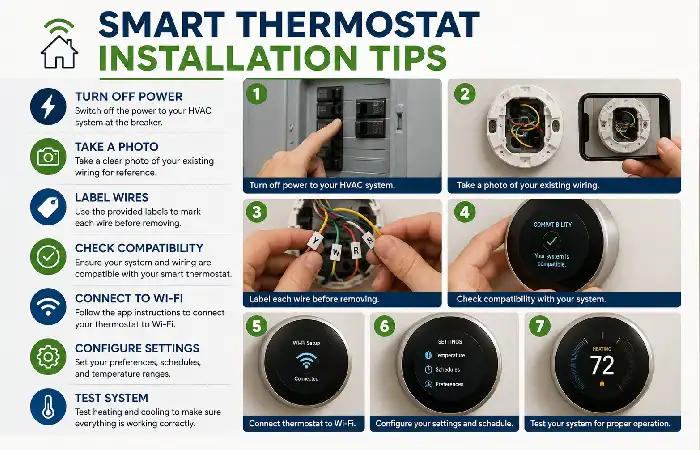
Before Installation
- Turn off HVAC power
- Photograph existing wiring
- Label all wires
- Verify compatibility
During Installation
- Follow manufacturer instructions
- Use terminal labels instead of wire colors
- Secure wiring connections
After Installation
- Connect Wi-Fi
- Configure schedules
- Test heating and cooling modes
The following steps are always advocated by popular thermostat manufacturers
Frequently Asked Questions
What is the installation time for a smart thermostat?
Most installs will take 30-60 minutes, depends on how wiring is.
Do you need a C-wire?
Most smart thermostats need to have a c wire in order to power them However there are adapters and power kits.
Can I install a smart thermostat by myself?
Most end-users, if their HVAC is wired with common low-voltage wiring, would be capable of installing it.
Is a smart thermostat worth purchasing?
Most owners would be willing to pay for a discounted savings from energy, hands free operation, automation, and remote control.
Which smart thermostat is best in 2026?
These devices Ecobee Premium, Nest Learning Thermostat, and Honeywell T10 are still ranked as some of the best by different magazines based on the HVAC compatibility and smart-home needs.
Conclusion
Smart Thermostat is considered one of the best value add technology to homes. Combining the provision of convenience (smart scheduling and remote access) with energy use monitoring and a sort of central control over home systems, smart thermostat not only can increase home comfort but also extend whole house control for cost savings.
Kashifa Jafar is a technology writer and contributor at FutureTechExpert with 4+ years of experience in technology writing and content creation.
Read Full Bio of Author →Sameena reviews selected health, wellness, technology, and digital content for clarity, factual presentation, and reader usefulness.
Read Full Bio of Reviewer →