
Last Updated: August 19, 2026
Selecting Gaming Monitors is no longer just a matter of selecting the largest display you can get. The capabilities of contemporary screens vary in terms of refresh rate, response time, resolution, panel technology, HDR specifications, adaptive sync and Ports. The best product for you will depend on the games you play, your graphics card, your budget and whether you value speed over immersion.
In 2026 gaming monitors offer a huge range from cheap 1080p, high refresh rate monitors right up to high end 4K OLED panels running at 240Hz+ 10 different types of spec testing show that in terms of monitors no one does it all better.Types of spec testing carried out by experts today also indicates that no one monitor best fits every gamer.
Table of Contents
What Are Gaming Monitors?
Gaming monitor A good gaming monitor is a monitor designed to provide better motion, much faster pixel response, and gaming specific features which are not so much cared by the office monitors.
Common gaming features include:
- High refresh rates such as 144Hz, 165Hz, 240Hz and higher
- Low pixel response times
- AMD FreeSync or NVIDIA G-SYNC compatibility
- HDR support
- Gaming-focused picture modes
- HDMI and DisplayPort connectivity
- Higher resolutions such as 1440p and 4K
Samsung characterizes gaming monitors as “Displays designed with extreme refresh rates, low response time, and adaptive-sync technologies to help eliminate tearing and optimize responsiveness”.
Why Gaming Monitors Matter
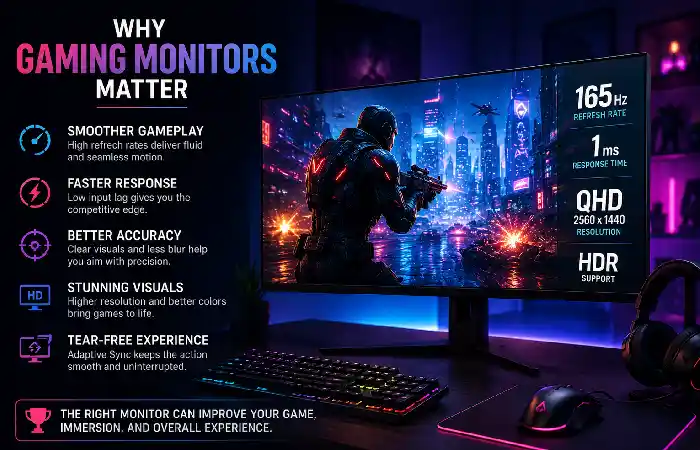
A gaming monitor can also significantly impact how smooth, crisp, and responsive your gameplay appears. They‘re designed with the specific needs of gamers in mind, and so are optimized for features like: higher refresh rates, quicker response times, low input lag, adaptive sync, and gaming-centric image quality.
For instance, a 60Hz display updates the whole image at most 60 times per second, and a 144Hz monitor at most 144 times per second. If your PC is capable of outputting enough frames, a higher refresh rate can be clearly more comfortable, making camera movement and tracking, aiming, as well as fast-action gameplay seem much more fluid.
Gaming monitors matter most in these areas:
- Smoother in-game experience: An increased frame rate diminishes the time distance between frames.
- Razor-sharp responsiveness: a snappy feeling to mouse/keyboard/controller inputs.
- Reduction of motion blur: The fast pixel response allows the objects while the rapid movement.
- Less screen tearing: Technologies like AMD FreeSync and NVIDIA G-SYNC allow the display to sync its refresh rate to the GPU.
- More immersive: Ultrawide, OLED, HDR and larger screens will make games more cinematic.
But, more costly specs aren‘t always the best. A 240Hz 4K monitor might simply not be required if your GPU is capped at 70 100 FPS at 4K. For most gamers then this can be a case of having a more balanced 1440p monitor with a slight bump in refresh rate of 144Hz 180Hz to improve FPS image quality value tradeoffs.
Refresh Rate Explained
Refresh rate-The refresh rate on a monitor, which determines how many times the monitor will update itself each second.
| Refresh rate | Best suited for | General benefit |
| 60–75Hz | Basic gaming | Entry-level experience |
| 120–144Hz | Mainstream gaming | Noticeably smoother motion |
| 165–180Hz | PC gaming | Excellent balance |
| 240Hz | Competitive gaming | Very smooth fast motion |
| 360–480Hz+ | Esports | Maximum competitive responsiveness |
IF your PC is capable of delivering high frame rates, higher refresh rates can be beneficial. The current 2026 monitors offer very high refresh rates such as 480 Hz OLED.
Response Time and Input Lag
Response time indicates the speed at which pixels change from one color to another, frequently in milliseconds.
Lower response times can make the ghosting less visible, less Motion Blur. But the advertised response-time values shouldn‘t be considered alone, because the real performance (ghosting, response times) depends on the panel, the overdrive setting, the test method.
Input lag is a different concept. It is the lag between a command from your gamepad, mouse or keyboard and the image showing up on the screen.
In the case of competitive gaming, find a screen that has fast pixel response and low input lag.
Resolution for Gaming
Resolution determines the number of pixels displayed on the screen.
| Resolution | Typical gaming use | Advantages | Considerations |
| 1920×1080 | Competitive/budget | Easier for GPUs to drive | Less detail |
| 2560×1440 | Mainstream PC gaming | Excellent balance | Requires more GPU power |
| 3840×2160 | High-end gaming | Very sharp image | Demands powerful hardware |
RTINGS argues that 1440p may be the compromise point between the regular 1080p and 4K, as it is a good evolution in picture quality without requiring as much GPU performance that 4K does.
IPS vs. VA vs. OLED Gaming Monitors
The panel technology is one of the most critical factors for the image quality and motion performance.
| Panel | Strengths | Weaknesses | Best for |
| IPS | Good colors, wide viewing angles, strong response | Lower contrast than VA/OLED | All-around gaming |
| VA | High contrast, deeper blacks | Some models can show dark-transition smearing | RPGs, movies, immersive gaming |
| OLED | Excellent blacks, contrast and extremely fast response | Higher price; burn-in considerations | Premium gaming |
| TN | Very fast and traditionally affordable | Weaker viewing angles/colors | Competitive esports |
In general, the advantages of OLED have shown good potential especially in the high end gaming application. Since the pixels of OLED are individually switched on and off they are capable of producing absolute black and high contrast range. In addition, OLED pixels are self-emitting. This parameter could result in lower cost and less power consumption.
Ultrawide Gaming Monitors
Ultrawide monitors use wider aspect ratios to provide expanded horizontal workspace.
They can be particularly immersive for:
- Racing games
- Flight simulators
- Open-world games
- Strategy games
- Simulation titles
Existing 2026 purchasing guides feature ultrawide categories, including OLED ultrawide displays.
Make sure that your favorite games support the ultrawide aspect ratio before purchasing!
Gaming Monitors for Competitive Players
In general, competitive gamers tend to value speed over maximum resolution.
A suitable esports monitor may emphasize:
- 240Hz, 360Hz or higher refresh rate
- Very low input lag
- Fast pixel response
- Adaptive sync
- A size that keeps the entire action within your field of view
- A powerful enough GPU to maintain high frame rates
PC Gamer’s 2026 recommendations, for example, include very high-refresh displays specifically aimed at competitive players.
How to Choose a Gaming Monitor
Use this simple checklist before buying:
| What to check | Recommended approach |
| Gaming type | Competitive, casual, RPG, racing or mixed |
| Resolution | 1080p budget, 1440p balanced, 4K premium |
| Refresh rate | 144–180Hz for general gaming; 240Hz+ for competitive |
| Panel | IPS for balance, VA for contrast, OLED for premium image quality |
| GPU | Match monitor resolution and refresh rate to GPU capability |
| Adaptive sync | Look for FreeSync/G-SYNC support |
| Size | 24–27 inches for many setups; 32 inches+ for immersive gaming |
| Ports | Check HDMI/DisplayPort versions and required bandwidth |
| HDR | Look beyond the basic “HDR” label and check real performance |
| Budget | Spend according to the rest of your gaming system |
Gaming Monitor Setup Tips
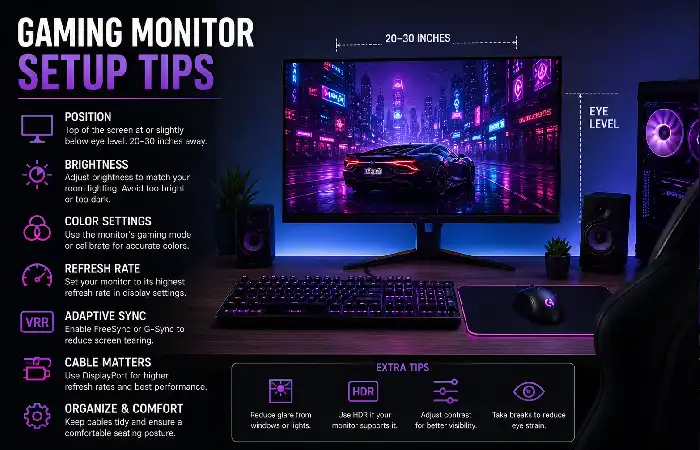
The purchase of the monitor is a first step.
For the best experience:
- Connect the monitor using the appropriate DisplayPort or HDMI connection.
- Set Windows or your operating system to the monitor‘s maximum supported refresh rate.
- Enable Free Sync, G-SYNC or another compatible adaptive-sync feature.
- Select the correct resolution.
- The game mode of the monitor should be appreciated with caution; the preset of the highest aggressiveness should not be selected, instead; the default parameters should be fine.
- Adjust brightness according to your room lighting.
- Position the screen so your eyes are roughly level with the upper portion of the display.
- Check your game‘s frame-rate performance and adjust graphics settings accordingly.
Gaming Monitor FAQs
How good is 144Hz for gaming?
Yes. For major box-PC games, the 144Hz screens are still a fantastic product and delivers at least perceptibly more fluid motion than a 60Hz, if the PC is capable of generating these frame rates.
Is 240Hz superior to 144Hz?
Yes, sort of. The benefits don‘t really become visible until you are a good player playing a high frame rate configuration. For the casual gamer it is better to spend your money in resolution, HDR or panel quality.
Is OLED the superior choice to IPS for gaming?
In theory, OLED is able to provide higher contrast, black level and a much faster response but for most users IPS is still fantastic all-round monitor and could be a more reasonable purchase for budget conscious or Burn-in worried customers,
Is 4K buying worth it for gaming?
You only really want 4K if you have gear to push it and for sharp, detailed image quality. If you want high frame rates then 1440p is more of a compromise.
What is the ideal size for a monitor for use with a game?
27 inches is a comfortable size for most gamers playing at a desk distance. Bigger 32-inch or ultrawide monitors offer a bit more support but they also need more room to sit on.
Final Takeaway
The most Gaming Monitors are not always the highest numbers on the spec sheet. The perfect display is a combination of resolution, refresh rate, response time, panel type, GPU power, screen size and budget.
When most PC gamers are entering 2026, 1440p at about 144–180Hz will be a good place to begin. Those who play a lot of competitive will want to shoot for 240Hz or better, and those with high-end systems may even want to look at 4K OLED and other high-end high-refresh monitors.