
 Kashifa Jafar
Technology Writer & Contributor
Kashifa Jafar is a technology writer and contributor at FutureTechExpert with 4+ years of experience in technology writing and content creation.
Read Full Bio of Author →
Kashifa Jafar
Technology Writer & Contributor
Kashifa Jafar is a technology writer and contributor at FutureTechExpert with 4+ years of experience in technology writing and content creation.
Read Full Bio of Author →
 Sameena Begum
Health, Technology & Digital Content Reviewer
Sameena reviews selected health, wellness, technology, and digital content for clarity, factual presentation, and reader usefulness.
Read Full Bio of Reviewer →
Sameena Begum
Health, Technology & Digital Content Reviewer
Sameena reviews selected health, wellness, technology, and digital content for clarity, factual presentation, and reader usefulness.
Read Full Bio of Reviewer →
Platform as a Service (PaaS) is one of the significant cloud computing models for developing software applications. Enterprises utilize PaaS to develop, test, deploy and maintain applications by not managing servers, networks, operating systems or storage. The teams need not spend their time on configuring hardware and environments, instead they can spend more time and effort to write the code and deliver software products faster.
A rising adoption of cloud in 2026 is moving to PaaS as the favorite platform for startups, enterprise, saas vendors and development teams that want to speed up innovation time and minimize their complexity.
 This article is part of
Service Models Resources
Table of Contents
What Is Platform as a Service?
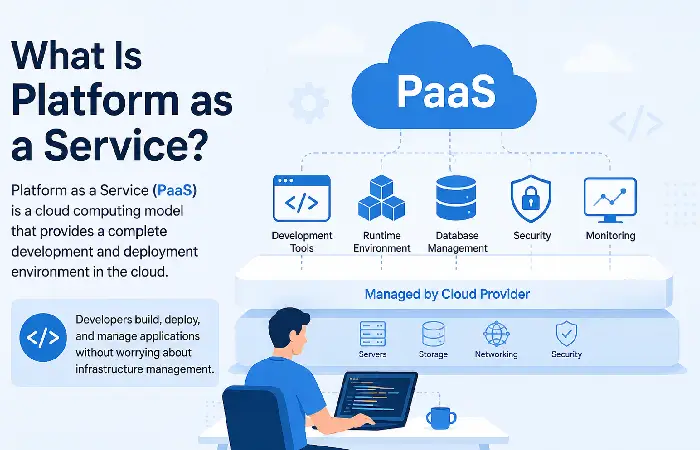
As per NIST, Platform as a service: Enables deployment of applications on cloud infrastructure using supported programming languages, libraries, frameworks, and tools by the provider operating systems, servers, storage, and networking are managed by the provider.
A PaaS platform typically includes:
- Infrastructure
- Operating systems
- Runtime environments
- Middleware
- Databases
- Development tools
- Monitoring capabilities
In the developer managed model developers are responsible for their applications and data, the rest is cloud managed.
Platform as a Service (PaaS) is one of the primary categories of cloud service models, providing developers with a complete environment for building, testing, and deploying applications.
How PaaS Works
Platform as a Service (PaaS) approaches situations by offering a full cloud environment that is ready for use and where developers can run, build, test and deploy their applications without worrying to deal with either product‘s infrastructure.
Generally, the process starts with developer uploading application code in PaaS system. The PaaS will automatically provision the necessary resources like CPU, storage, runtime, middleware and databases. After deployment, the PaaS vendor takes care of other work such as load balancing, security updating, system, monitoring, back-up and scaling.
Typical Workflow
Developer Writes Code
↓
Upload to PaaS Platform
↓
Platform Builds Application
↓
Automatic Deployment
↓
Scaling & Monitoring
↓
Production Environment
The provider automatically provides servers, network, storage, runtime, database and scaling etc. Developers just pushes the code and deploy the application.
Unlike Infrastructure as a Service (IaaS), PaaS abstracts the underlying infrastructure, allowing development teams to focus on coding rather than managing servers, storage, and networking resources.
Key Components of PaaS
| Component | Purpose |
| Application Runtime | Executes application code |
| Middleware | Connects services and applications |
| Database Services | Managed SQL and NoSQL databases |
| Development Tools | IDEs, APIs, SDKs |
| CI/CD Pipelines | Automated testing and deployment |
| Monitoring Tools | Performance tracking |
| Security Services | Identity management and access control |
| Auto Scaling | Handles changing workloads |
Benefits of PaaS
Faster Development
Teams can begin building right away without setting up a server. Google Cloud points out that on PaaS platforms, “setup time is drastically reduced and deployment cycles become shorter.”
Reduced Infrastructure Management
The provider manages the updates, maintenance, patches and operating system.
Scalability
Applications, can transparently scale to meet traffic spikes.
Cost Efficiency
Organizations pay only for the resources they use rather than making significant investments in hardware.
Global Collaboration
Development teams can be anywhere and working in the same environment.
Challenges of PaaS
| Challenge | Impact |
| Vendor Lock-In | Difficult migrations |
| Limited Customization | Less infrastructure control |
| Compliance Requirements | Industry regulations may apply |
| Downtime Dependency | Reliance on provider availability |
| Cost Growth | Large workloads can become expensive |
Troubleshooting Common Issues
| Problem | Solution |
| Slow Application Performance | Optimize database queries |
| Deployment Failures | Check logs and CI/CD pipelines |
| Scaling Delays | Review auto-scaling rules |
| Authentication Errors | Verify IAM permissions |
| Resource Limits | Upgrade service tiers |
PaaS Development and Deployment
Modern PaaS architecture also make the software development lifecycle (SDLC) more effective.
Development Features
- Source code repositories
- Continuous integration
- Automated testing
- Container support
- Serverless functions
- API management
Deployment Benefits
- One-click deployment
- Blue-green deployment
- Canary releases
- Rollback capabilities
- Version management
This reduces the operational overhead, thus increasing the speed of releases.
While developers use PaaS to create applications, end users typically access those applications through Software as a Service (SaaS) solutions delivered over the internet.
PaaS Security Considerations
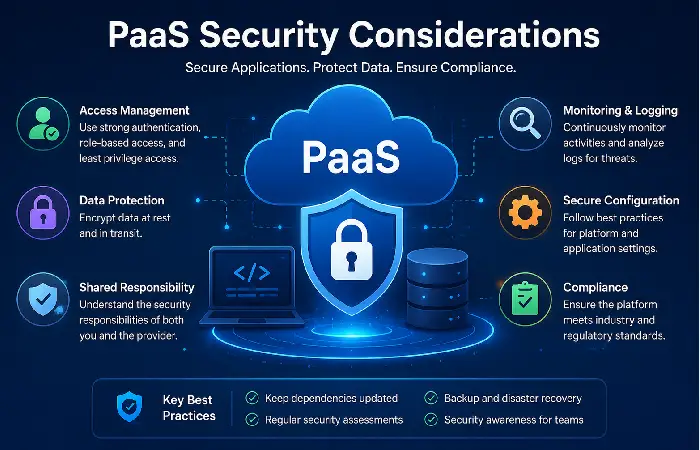
Security remains a shared responsibility.
Provider Responsibilities
- Physical security
- Infrastructure security
- Network protection
- System patching
Customer Responsibilities
- Application security
- Access management
- Data protection
- Compliance controls
Best Practices
- Enable multi-factor authentication
- Encrypt data at rest and in transit
- Use least-privilege access
- Conduct regular audits
- Monitor security logs
Many organizations extend their PaaS environments with Function as a Service (FaaS) platforms, enabling event-driven and serverless application execution.
Common PaaS Use Cases
Web Application Development
Build web apps that can scale fast.
Mobile Application Backends
Provide APIs, databases, and authentication.
SaaS Platforms
Ad hoc launches of subscription based software products.
DevOps Automation
Use automation for testing and deployments.
AI and Machine Learning
Use models directly in the application.
Microservices Architectures
Support distributed applications.
Applications developed on PaaS platforms can be integrated with Desktop as a Service (DaaS) solutions to provide secure remote access and centralized management.
PaaS vs. IaaS
| Feature | PaaS | IaaS |
| Infrastructure Management | Provider | Customer |
| Operating Systems | Provider | Customer |
| Runtime Environment | Provider | Customer |
| Development Speed | Faster | Slower |
| Customization | Moderate | High |
| Maintenance Effort | Low | High |
| Ideal For | Developers | IT Administrators |
PaaS is oriented towards application development, whereas IaaS gives more control over the infrastructure.
Leading PaaS Platforms in 2026
| Platform | Best For | Official Resource |
| Google Cloud Run | Containerized applications | Google Cloud Run |
| Azure App Service | Microsoft ecosystems | Azure App Service |
| AWS Elastic Beanstalk | AWS-native deployments | AWS Elastic Beanstalk |
| Red Hat OpenShift | Enterprise Kubernetes | Red Hat OpenShift |
| Salesforce Platform | Low-code development | Salesforce Platform |
The listed industry reports point to the continued cloud PaaS premium of Salesforce Platform, Azure App Service, Red Hat OpenShift, AWS services, as well as Google Cloud offerings.
How to Choose a PaaS Platform
Consider these factors:
- Programming Language Support
Ensure compatible with Java, Python, .NET, Node.js, Go, PHP.
- Scalability
Check whether automatic scaling does exist.
- Security Features
Check for compliance certifications and IAM controls.
- Pricing Structure
Know who will fund pay-as-you-go costs.
- Integration Ecosystem
Check the compatibility with database, API and the tool DevOps.
- Support and Documentation
Good documentation cuts down the implementation time.
Mobile app developers often compare PaaS with Backend as a Service (BaaS) when selecting a development platform.
FAQ
Is PaaS the same as cloud hosting?
No. PaaS can be said to include development tools, middleware, deployment pipelines and runtime environments. These are not provided by just cloud hosting.
Name some PaaS?
Google Cloud Run, Azure App Service, AWS Elastic Beanstalk, OpenShift, Salesforce Platform, and others.
Can PaaS be so convenient for start-ups?
YES. Because PaaS shave down infrastructure cost, and help speed up product development process.
What is the greatest advantage of PaaS?
The ability to rapidly develop and deploy applications without infrastructure responsibility.
Can PaaS be used to enhance AI applications?
Yes. Numerous services exist that offer managed AI, ML, and analytics to get customers up and running quickly.
Conclusion
Platform as a Service (PaaS) is a widely used component of cloud computing. A PaaS takes away a large part of the infrastructure resources required for running applications and instead provides a development environment, auto deployment capabilities, integrated security mechanisms and scalable infrastructure. A development team can therefore concentrate on developing a good application instead of having to worry about servers.
Looking ahead to 2026, all commercial organizations will definitely find Platform-as-a-Service an attractive combination ofease of useandflexibility. PaaS will accelerate application deployment, underpin DevOps approaches, compress operational costs, and support fast scaling of workloads as they grow. Consideration should be given to issues of vendor lock-in and compliance burdens, but the advantages will often outweigh restrictions for most organizations.
Kashifa Jafar is a technology writer and contributor at FutureTechExpert with 4+ years of experience in technology writing and content creation.
Read Full Bio of Author →Sameena reviews selected health, wellness, technology, and digital content for clarity, factual presentation, and reader usefulness.
Read Full Bio of Reviewer →