

Last Updated: June 30, 2026
In today ‘s digital world, cloud storage has become a necessity for storing and safeguarding important files, documents, contacts and most importantly pictures. While selecting between Samsung Cloud vs Google Drive for your personal storage space, knowing the functionality of each service will be of help to you in making a wise decision.
A direct comparison of Samsung Cloud and Google Drive based on the most recent data as of 2026 including storage, backup, prices, security, integration with Android and its actual usability
Samsung Cloud vs Google Drive at a Glance
| Feature | Samsung Cloud | Google Drive |
| Best For | Samsung device backup | Cross-platform cloud storage |
| Free Storage | No general free cloud storage for files | 15 GB shared free storage |
| File Storage | Limited | Yes |
| Device Backup | Excellent for Samsung Galaxy | Android backup only |
| Windows Support | Limited | Excellent |
| iPhone Support | No | Yes |
| Collaboration | No | Excellent |
| File Sharing | Limited | Advanced |
| AI Features | Minimal | Google Gemini integration |
| Official Resource | https://www.samsung.com | https://drive.google.com |
Table of Contents
Storage Capacity Comparison
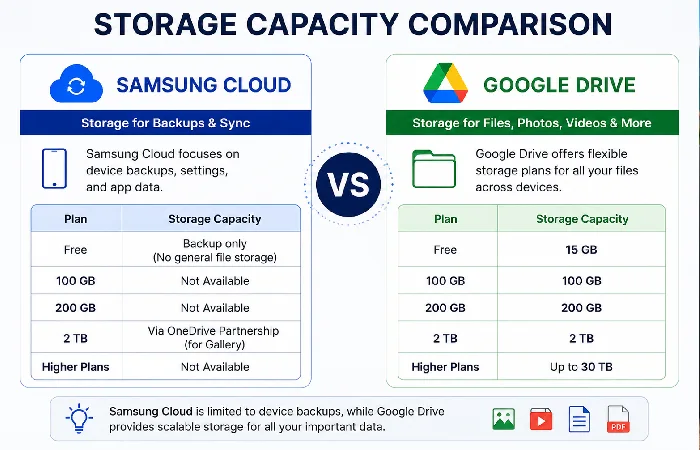
The storage is something which users compare first.
Samsung Cloud is not a true cloud storage any more. It‘s primarily used for Samsung Galaxy device settings backup and supported app data sync.
Google Drive is a complete cloud storage solution on the market for file formats such as but not limited to documents, photos, videos, PDFs, ZIP files etc.
Storage Plans (2026)
| Plan | Samsung Cloud | Google Drive |
| Free | Device backup only | 15 GB |
| 100 GB | Not Available | Available |
| 200 GB | Not Available | Available |
| 2 TB | Via Samsung Gallery + Microsoft OneDrive partnership | Google One |
| Higher Plans | No | Up to 30 TB |
Winner: Google Drive
The facilities for storage of personal and business files are much better in Google Drive.
Backup Features Comparison
Samsung Cloud is exceptional at archiving data unique to Samsung.
Samsung Cloud backs up
- Device settings
- Home screen layout
- Call history
- Contacts
- Messages
- Samsung Notes
- Calendar
- Wi-Fi settings
- Clock
- Samsung apps
Google Drive backs up Android and also stores files that are being worked on.
Google Drive backs up
- Android device backup
- Photos
- Videos
- Documents
- Contacts
- Calendar
- App data (supported apps)
Backup Comparison Table
| Feature | Samsung Cloud | Google Drive |
| Samsung Settings Backup | Yes | No |
| Photos Backup | Via OneDrive | Google Photos |
| File Backup | Limited | Excellent |
| Automatic Backup | Yes | Yes |
| Device Restore | Excellent | Good |
| Multi-device Backup | Limited | Excellent |
Winner: Tie
- Due to the number and availability of the Samsung devices it is more effective to use Samsung Cloud for Samsung device restore.
- Google Drive is more suitable for normal backup to the cloud.
Security and Privacy
Behind the security and privacy are other important factors like. When we compare Samsung Cloud vs Google Drive security and privacy are crucial considerations. When looking at both these services, the encryption used and the various layers of security offered are in parity. But the security features and the ecosystems themselves are slightly different.
Samsung Cloud
- Samsung Knox protection
- Two-factor authentication
- Secure encrypted backup
- Samsung Account security
- Device verification
Google Drive
- AES encryption
- TLS encryption during transfer
- Two-Step Verification
- Passkeys support
- Security Checkup dashboard
- Advanced malware scanning
Security Comparison
| Security Feature | Samsung Cloud | Google Drive |
| Encryption | Yes | Yes |
| Two-Factor Authentication | Yes | Yes |
| Malware Detection | Limited | Advanced |
| Ransomware Protection | Basic | Better |
| Zero Trust Infrastructure | Limited | Extensive |
Winner: Google Drive
Google advantages include larger cloud infrastructure, and more sophisticated security: enterprise-grade.
Pricing Differences
Samsung Cloud itself is still selling standard storage plans in some markets, while in others they have discontinued.For example via a deal with Microsoft OneDrive.
All storage upgrades to Google Drive are available through Google One.
Pricing Comparison (2026)
| Plan | Google Drive (Google One) | Samsung Cloud |
| Free | 15 GB | Backup only |
| 100 GB | Available | No |
| 200 GB | Available | No |
| 2 TB | Available | OneDrive partnership |
| Family Sharing | Yes | Via OneDrive |
| VPN Benefits | Selected plans | No |
Winner: Google Drive
The bigger number of storage options gives Google Drive the fit for individuals and companies.
Android Integration
Another major difference between Samsung Cloud and Google Drive is how each service works on Android devices. Samsung Cloud works well on Samsung Galaxy devices, but Google Drive is meant to operate perfectly on all Android devices plus many other platforms.
Samsung Cloud Integration
It integrates deeply with:
- Samsung Settings
- Samsung Gallery
- Samsung Notes
- Samsung Contacts
- Samsung Calendar
- Samsung Pass
But it all goes nearly automatically after factory reset.
Google Drive Integration
Google Drive works with:
- Android
- ChromeOS
- Windows
- macOS
- iPhone
- Gmail
- Google Docs
- Google Sheets
- Google Photos
It provides an expanded ecosystem.
Integration Comparison
| Platform | Samsung Cloud | Google Drive |
| Samsung Galaxy | Excellent | Excellent |
| Other Android Phones | Limited | Excellent |
| Windows PC | Basic | Excellent |
| Mac | Limited | Excellent |
| iPhone | No | Excellent |
Winner: Google Drive
Which Option Is Better?
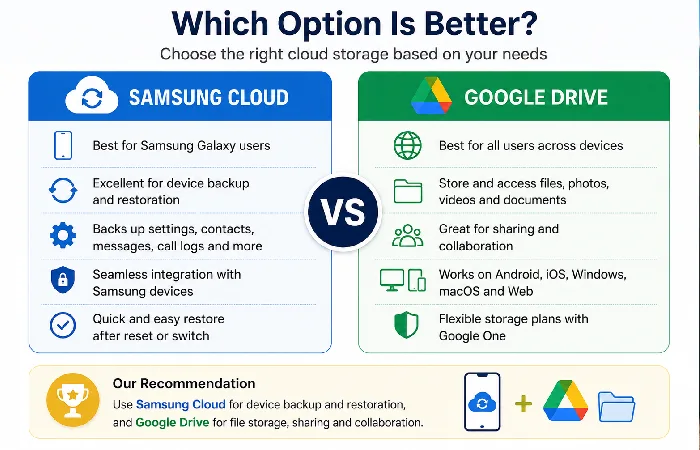
There‘s not just one winner-it all depends on what you value most. If you‘re a Samsung Galaxy owner wanting simple backups and easy settings restore after reset or new phone, than Samsung Cloud is the winner.
Google Drive, meanwhile, is the superior all-round cloud storage service. It has large storage capacity, is cross-platform, lets you share and collaborate your files.
| User Type | Best Choice |
| Samsung Galaxy Users | Samsung Cloud |
| Students | Google Drive |
| Business Users | Google Drive |
| File Sharing | Google Drive |
| Device Backup | Samsung Cloud |
| Collaboration | Google Drive |
| Cross-platform Users | Google Drive |
Choose Samsung Cloud if:
- You only own Samsung devices.
- You frequently factory reset your phone.
- You want effortless restoration of Samsung settings.
Choose Google Drive if:
- You store many files.
- You collaborate with others.
- You use multiple devices.
- You need large cloud storage plans.
Frequently Asked Questions
Is the ban on Samsung Cloud?
Samsung Cloud is still available for device backup and sync, but file storage has been largely moved to Microsoft OneDrive in many markets.
Can I combine my Samsung Cloud and Google Drive?
Yes. Many people using Samsung phones use for Samsung Cloud for settings and Google Drive for docs, pics and files.
Which is safer?
Both two services are very secure. Google Drive has the more sophisticated security features and enterprise grade infrastructure, while Samsung Cloud delivers solid security through Samsung Knox.
Does Samsung Cloud provide free storage?
Free file storage for Samsung Cloud has stopped in most regions. It isn‘t free any longer, and only manages backups for Samsung devices.
Which service is better for uploading photos?
Thanks to integration with Google Drive and Google One, Google Photos provides better organization, AI search, and access across devices. Samsung Gallery sync is usually Bing Microsoft OneDrive.
Conclusion
Which One Is Better? For many, the choice of Samsung Cloud or Google Drive is a personal decision based on usage habits and what they want from a cloud storage provider. Unless you are a Galaxy user who wants to upload and restore device settings and is using Samsung apps, or just want a handy device back-up tool, then Samsung Cloud hasn‘t a rival. If you want to have access to your files for sharing and collaboration across your Android, Windows, Mac OS and iPhone then Google Drive is the flagship choice.