
 Kashifa Jafar
Technology Writer & Contributor
Kashifa Jafar is a technology writer and contributor at FutureTechExpert with 4+ years of experience in technology writing and content creation.
Read Full Bio of Author →
Kashifa Jafar
Technology Writer & Contributor
Kashifa Jafar is a technology writer and contributor at FutureTechExpert with 4+ years of experience in technology writing and content creation.
Read Full Bio of Author →
 Sameena Begum
Health, Technology & Digital Content Reviewer
Sameena reviews selected health, wellness, technology, and digital content for clarity, factual presentation, and reader usefulness.
Read Full Bio of Reviewer →
Sameena Begum
Health, Technology & Digital Content Reviewer
Sameena reviews selected health, wellness, technology, and digital content for clarity, factual presentation, and reader usefulness.
Read Full Bio of Reviewer →
Cloud Storage & Collaboration is now an essential component of business practice in 2026. Regardless of whether a business is a freelance, a start-up, an enterprise team or a remote working team, cloud platforms allow for an easy means of backing up files, instant file sharing, and collaborative working anytime from anywhere on the globe.
Lately, industry benchmarks reveal, more and more companies are selecting cloud storage options based on collaboration features, security, compliance, AI-powered search, and multitasking accesibility. Google Drive, Microsoft‘s Onedrive, Dropbox and Box still lead markets because of their collaboration ecosystems along with their integration options.
This guide is packed with information about what you need to understand about cloud storage and collaboration. It discusses benefits, top services, team collaboration tools, file sharing, backup and more.
Organizations exploring sector-specific applications often begin with the broader benefits of cloud computing to understand how cloud technology drives business growth.
 This article is part of
Benefits of Cloud Computing
Table of Contents
What is Cloud Storage & Collaboration?
Cloud storage is the act of saving files in a place that is not directly on a computer but uploaded so those files can be utilized. This is done through the use of the internet.
The cloud collaboration allows users to work on the same files, projects or documents with other users or teams from anywhere.
A strong understanding of cloud computing basics helps businesses implement industry-focused solutions more effectively.
Common examples include:
- Real-time document editing
- Shared team folders
- Version control
- Cloud backups
- Secure file sharing
- Remote team collaboration
Organizations utilize cloud applications to be more productive, cut down infrastructure costs and facilitate hybrid workforce.
Many organizations achieve measurable results by leveraging the business benefits of cloud computing across different sectors.
Benefits of Cloud Storage
Cloud storage is a lot more than hosting your files.
- Anywhere Access
Employees can access files from:
- Laptops
- Smartphones
- Tablets
- Remote offices
Definitely support the flexible remote work and hybrid work.
- Improved Collaboration
Authoring supports multiple users editing a single document.
- Enhanced Security
Modern cloud providers offer:
- Encryption
- Multi-factor authentication
- Access controls
- Compliance certifications
- Automatic Backup
Files are frequently synchronizing and resilient to accidental deletion and device failure.
- Cost Savings
The cloud enables an organisation to stop purchasing enormous on-premise storage infrastructure and simply pay for the storage they need.
- Scalability
A storage capacity is similar to a hardware upgrade that can be added immediately.
Industry-specific deployments often require robust cloud security and data protection strategies to ensure compliance and reliability.
Best Cloud Storage Services Compared
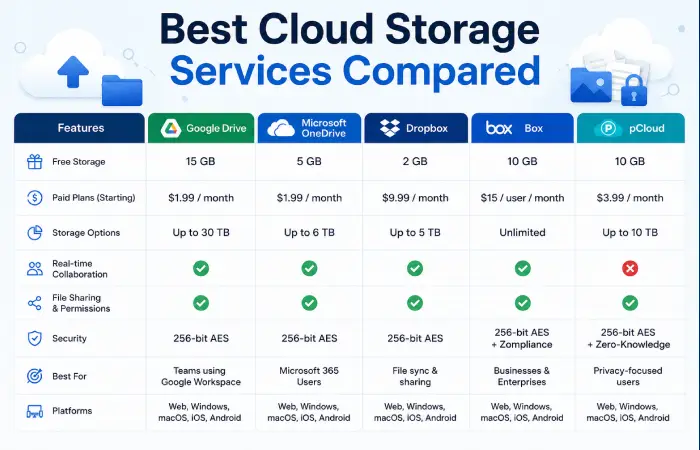
This comparison will give a brief overview of the most well known cloud storage services in 2026.
| Service | Best For | Free Storage | Key Collaboration Features | Security |
| Google Drive | Teams using Google Workspace | 15 GB | Real-time Docs, Sheets, Slides editing | Strong |
| Microsoft OneDrive | Microsoft 365 users | 5 GB | Office integration, co-authoring | Strong |
| Dropbox | Fast file synchronization | 2 GB | Team folders, file requests | Strong |
| Box | Enterprise compliance | 10 GB | Workflow automation, governance | Enterprise-grade |
| Sync.com | Privacy-focused organizations | 5 GB | Secure sharing | Zero-knowledge encryption |
Cloud Storage Service Comparison (2026)
| Feature | Google Drive | OneDrive | Dropbox | Box |
| Real-Time Editing | Excellent | Excellent | Good | Good |
| Microsoft Integration | Moderate | Excellent | Moderate | Good |
| Google Workspace Integration | Excellent | Moderate | Moderate | Moderate |
| Enterprise Compliance | Good | Excellent | Good | Excellent |
| Ease of Use | Excellent | Excellent | Excellent | Good |
Industry testing consistently puts Google Drive and OneDrive as collaboration leaders on the basis of productivity suite integrations while Dropbox remains a leader in sync speed.
Successful implementations frequently depend on selecting the right cloud computing platforms for organizational needs.
Cloud Collaboration Tools for Teams
Good collaboration is beyond storage.
Essential Collaboration Features
Real-Time Editing
Several people can edit the documents.
Examples:
- Google Docs
- Microsoft Word Online
- Collaborative spreadsheets
Team Workspaces
Shared environment also enables project members to have access to shared resources.
Version History
Users are able to retrieve earlier versions of documents if users make errors.
Task Integration
Many cloud platforms integrate with:
- Project management software
- Communication tools
- CRM systems
AI-Powered Search
In addition to these concrete examples, modern cloud platforms use ‘artificial intelligence’ to help find files andsummarise content.
Professionals specializing in cloud solutions can build rewarding careers through cloud computing career opportunities in growing industries.
Best Team Collaboration Platforms
| Platform | Best For | Key Features | Free Plan | Official Resource |
| Google Workspace | Remote and hybrid teams | Real-time document collaboration, Google Meet, shared drives, & AI-powered assistance | Limited free tools | Google Workspace |
| Microsoft 365 | Enterprises and Microsoft-centric organizations | Teams, OneDrive, SharePoint, Office co-authoring, & Copilot AI | Limited free tools | Microsoft 365 |
| Notion | Knowledge management and documentation | Wikis, databases, project tracking, & AI writing tools | Yes | Notion |
| Asana | Project and task management | Task assignments, timelines, & reporting dashboards | Yes | Asana |
| Trello | Small teams and simple workflows | Kanban boards, automation, & checklists | Yes | Trello |
| Box | Enterprise content management | Secure file sharing, governance, & workflow automation | Trial available | Box |
File Sharing Through Cloud Computing
File sharingis one of the most valuable capabilities provided by a cloud. Advanced applications increasingly combine cloud infrastructure with artificial intelligence in cloud computing to improve efficiency and automation.
Common Sharing Methods
Link-Based Sharing
Create links that you can share to the outside world.
Permission-Based Access
Control who can:
- View
- Comment
- Edit
- Download
Expiring Links
Temporary access enhances security.
Password-Protected Files
Sensitive files may have safeguards applied in a form of extra authentication.
Advantages of Cloud File Sharing
- Faster collaboration
- Reduced email attachments
- Better security controls
- Improved document tracking
- Centralized file management
Cloud sharing is becoming more popular as it provides better transparency and version management then up file exchange between co-workers.
Many industry deployments rely on scalable cloud storage solutions for secure data management and accessibility.
Cloud Backup Solutions Explained
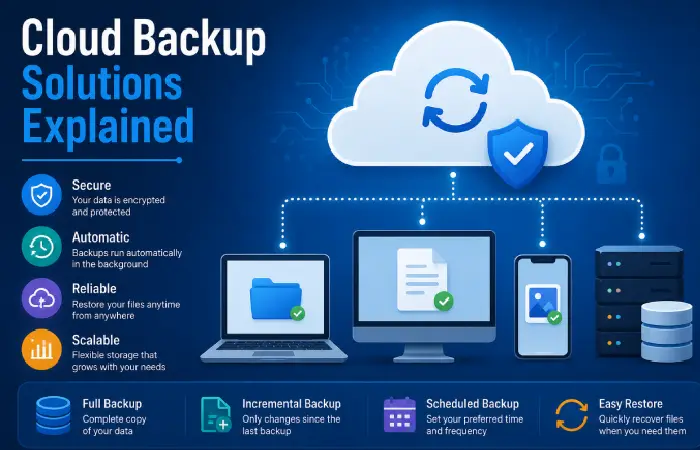
The Cloud backup and cloud storage are mixed up.
Cloud Storage
Designed primarily for:
- File access
- Synchronization
- Collaboration
Cloud Backup
Designed primarily for:
- Disaster recovery
- Long-term retention
- Data restoration
Types of Cloud Backup
| Backup Type | Purpose |
| Full Backup | Complete copy of data |
| Incremental Backup | Stores only changes |
| Differential Backup | Stores changes since last full backup |
| Continuous Backup | Real-time protection |
Popular Cloud Backup Providers
- IDrive
- Backblaze
- Acronis
- Carbonite
IDrive and Backblaze continually rank as some of the top dedicated cloud backup services in industry reviews. This is largely due to the fact they offer a very high level of automation, versioning and recovery.
Organizations that monitor future cloud computing trends are often better prepared for technological change.
Frequently Asked Questions
Is cloud storage secure?
Yes. Top administrators deploy encryption, access management, monitoring systems, and adherence to compliance frameworks to secure information. Additionally, companies should apply strict passwords and multi-factor authentication.
What is the difference between cloud storage and cloud backup?
Cloud storage is based on access and collaboration, whereas cloud backup is based on recovery and disaster recovery.
Which cloud storage service is best for collaboration?
Though there are many tools that can be used for real time co–authoring, Google Drive and Microsoft OneDrive are the best options due to their built–in productivity packages.
Can cloud storage replace local storage?
Yes, for a lot of them. However, keeping local back-ups is still advised.
How much cloud storage does a small business need?
Most small business will begin with 1–2 TB of storage and grow as data requirements necessitate.
Conclusion
Cloud Storage & Collaboration platforms in 2026 are now ecosystems built on a foundation of a complex set of features. In 2026, organizations are looking at solutions that provide secure storage, working collaboratively, AI enabled productivity and secured backup.
If to take each one of google drive, onedrive, Drop box, box or any other flash drive focusing on luxuries the appropriate choice will be based on collaboration, security issues and present software landscape. Governance, back up processes and collaborating applications are instrumental for developing organizations without losing control.
Decision-makers frequently consult cloud comparisons and tutorials when evaluating industry-specific cloud services.
Kashifa Jafar is a technology writer and contributor at FutureTechExpert with 4+ years of experience in technology writing and content creation.
Read Full Bio of Author →Sameena reviews selected health, wellness, technology, and digital content for clarity, factual presentation, and reader usefulness.
Read Full Bio of Reviewer →