
 Kashifa Jafar
Technology Writer & Contributor
Kashifa Jafar is a technology writer and contributor at FutureTechExpert with 4+ years of experience in technology writing and content creation.
Read Full Bio of Author →
Kashifa Jafar
Technology Writer & Contributor
Kashifa Jafar is a technology writer and contributor at FutureTechExpert with 4+ years of experience in technology writing and content creation.
Read Full Bio of Author →
 Sameena Begum
Health, Technology & Digital Content Reviewer
Sameena reviews selected health, wellness, technology, and digital content for clarity, factual presentation, and reader usefulness.
Read Full Bio of Reviewer →
Sameena Begum
Health, Technology & Digital Content Reviewer
Sameena reviews selected health, wellness, technology, and digital content for clarity, factual presentation, and reader usefulness.
Read Full Bio of Reviewer →
Cloud computing has revolutionised business and individual data storage, application execution and scaling of tech infrastructure. Now, the advantages of cloud computing extend way beyond storage. Organisations leverage cloud offerings for AI, security, collaboration, analytics, work-from-home and operating across globe.
According to the latest industry reports worldwide adoption of cloud accelerated at a rapid pace in 2025– 2026 while shift of existing cloud customers to cloud for optimization of lower Opex, improved scalability and rapid digital time-to-market remained the main focus of the operational cloud users worldwide. Major cloud giants AMzW(Amazon Web Services), MsA(Microsoft Azure), GooGlC(Google Cloud) is till date ramping up their AI-enabled cloud capabilities across the globe.
If you’re new to cloud technology, understanding the basics of cloud computing can help you learn how cloud services work and why they have become essential for modern organizations.
A simple guide for all beginners. In this guide I have explained all about cloud computing in a simple and easy-to-understand way. Including different types of cloud computing, cloud computing benefits, security advantages of cloud, cost of cloud computing, upcoming trends and why companies are leaving servers.
 This article is part of
Benefits of Cloud Computing
Table of Contents
What Is Cloud Computing?
Cloud computing is an innovative IT model that allows the user to avail the utility of power of the internet rather than a computer and hardware. The services provided through this model can be storage, servers, database, networking, software applications, analytics and artificial intelligence tools.
Plain English, cloud computing is when you make use of the services provided by off-site data-center rather than investing in and maintaining expensive hardware.
Businesses adopting modern infrastructure solutions often prioritize cloud security and data protection to safeguard sensitive information and digital assets.
Simple Explanation of Cloud Computing
Imagine cloud computing as similar to electricity.
In the old days, people relied on their own generators to produce electricity. Nowadays, enterprise select into the power grid and pay for their consumption. Cloud computing works in a similar way:
- Businesses no longer need to own massive server rooms
- They access computing resources online
- They scale usage up or down anytime
- They pay based on usage
This model removes the burden of managing expensive infrastructure internally.
Organizations across different sectors are adopting cloud industry solutions to improve efficiency and scalability.
Types of Cloud Computing
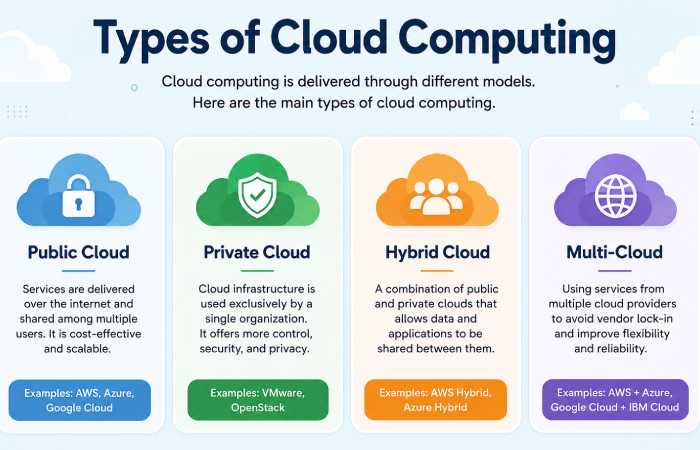
Cloud computing is not just a 1 technology system. There are several cloud deployment models and service types to effectively meet various workloads, business requirements and security needs. The knowledge of different types of cloud computing is very useful for business and individual users to decide on the cloud environment for best performance, cost and scalability.
As we reach 2026, organisations are adopting hybrid Cloud models to serve remote working, AI, cyber security, big data analytics and global digital operations.
Cloud computing types are generally divided into two categories:
- Deployment Models — where the cloud infrastructure is hosted
- Service Models — what kind of cloud service is provided
Cloud Deployment Models
Deployment models define how cloud infrastructure is organized and who controls it.
The four major deployment models are:
- Public Cloud
- Private Cloud
- Hybrid Cloud
- Multi-Cloud
1. Public Cloud
The most widely used form of cloud computing is the public cloud. This is a cloud model in which the infrastructure (clouds resources, along with its services and application’) is accessible to everyone.
Purchase businesses are leasing resources what would have been “owning” physical infrastructure.
How Public Cloud Works
Big public cloud providers have huge data centers all over the world. Many customers can run on the same infrastructure securely by virtualization.
Each customer only accesses their own data and applications even though the hardware may be shared.
Examples of Public Cloud Providers
| Provider | Popular Services |
| Amazon Web Services (AWS) | EC2, S3, Lambda |
| Microsoft Azure | Virtual Machines, Azure AI |
| Google Cloud Platform | BigQuery, Vertex AI |
| Oracle Cloud | Enterprise databases |
| IBM Cloud | Hybrid enterprise solutions |
Benefits of Public Cloud
Lower Costs
Don‘t have to buy an expensive servers and hardware to run.
Fast Deployment
Companies will have launched services in a matter of minutes.
Scalability
Resources can bloost up instantaneosly at traffic peaks.
Global Accessibility
Internet connection required in order to log into system. Users can connect to system from any internet access point.
Automatic Updates
Cloud providers are responsible for software patching and infrastructure upkeep.
Disadvantages of Public Cloud
- Less Customization
- Business may have little control over infrastructure.
- Shared Environment
- Some organizations are also opting for isolated infrastructure, again for reasons of compliance.
- Internet Dependency
- Internet connection must be stable.
Best Use Cases for Public Cloud
Public cloud works best for:
- Startups
- Websites
- Mobile apps
- SaaS platforms
- Online stores
- Development testing environments
2. Private Cloud
Private cloud refers to cloud infrastructure dedicated entirely to one organization. Unlike public cloud, resources are not shared with other customers.
Private clouds can be:
- Hosted internally
- Managed by third-party providers
- Located on-premises or externally
How Private Cloud Works
The organization controls:
- Servers
- Storage
- Security configurations
- Networking infrastructure
This provides greater customization and stronger control over sensitive data.
Benefits of Private Cloud
Enhanced Security
Committed infrastructure improves data protection.
Greater Control
Organizations personalized design infrastructure according to business needs.
Better Compliance
Useful for industries with strict directing requirements.
Predictable Performance
Resources are not Mutual with external users.
Disadvantages of Private Cloud
Higher Costs
Infrastructure and service expenses are significant.
Complex Management
Requires experienced IT teams.
Limited Scalability
Scaling may need additional hardware investment.
Industries Using Private Cloud
| Industry | Why Private Cloud Is Preferred |
| Healthcare | Patient data security |
| Banking | Financial compliance |
| Government | Sensitive national data |
| Defense | Classified information |
| Large Enterprises | Custom infrastructure |
3. Hybrid Cloud
By hybrid cloud we mean the combine of a public cloud with a private one.
This model allows organizations to move duties between environments depending on:
- Security needs
- Traffic demands
- Compliance requirements
- Performance optimization
How Hybrid Cloud Works
A business may:
- Store vulnerable customer data in a private cloud
- Run public-facing applications in a public cloud
- Use AI processing in scalable cloud environments
Benefits of Hybrid Cloud
Flexibility
Businesses can select the top environment for each workload.
Cost Optimization
Public cloud resources decrease private infrastructure costs.
Improved Security
Critical systems remain protected in private environments.
Better Disaster Recovery
Data backups can exist across multiple environments.
Scalability
Public cloud handles sudden traffic spikes.
Disadvantages of Hybrid Cloud
Complex Integration
Handling multiple environments can be technically complex.
Higher Management Requirements
Cloud experts are required in the market.
Security Coordination
Have a consistent Security policy.
Hybrid Cloud Use Cases
Hybrid cloud is ideal for:
- Large enterprises
- E-commerce platforms
- AI applications
- Financial services
- Healthcare organizations
- Media streaming services
4. Multi-Cloud
Multi-cloud is defined as using different cloud solutions at the same time.
For example:
- AWS for storage
- Azure for enterprise applications
- Google Cloud for AI analytics
Consequently, a multitude of organizations has employed multi-cloud approaches to free themselves from other providers.
Benefits of Multi-Cloud
Reduced Vendor Lock-In
Businesses are not dependent on one provider.
Better Reliability
If any one of the providers is down, the worker is shifted onto other providers.
Best-of-Breed Services
Companies select the best of each platform.
Global Optimization
Some providers are better at certain locations.
Challenges of Multi-Cloud
Increased Complexity
Managing several platforms requires expertise.
Higher Monitoring Needs
Security and billing become more difficult to track.
Integration Challenges
Applications must work across multiple environments.
Reliable cloud storage solutions help businesses securely manage and access critical data.
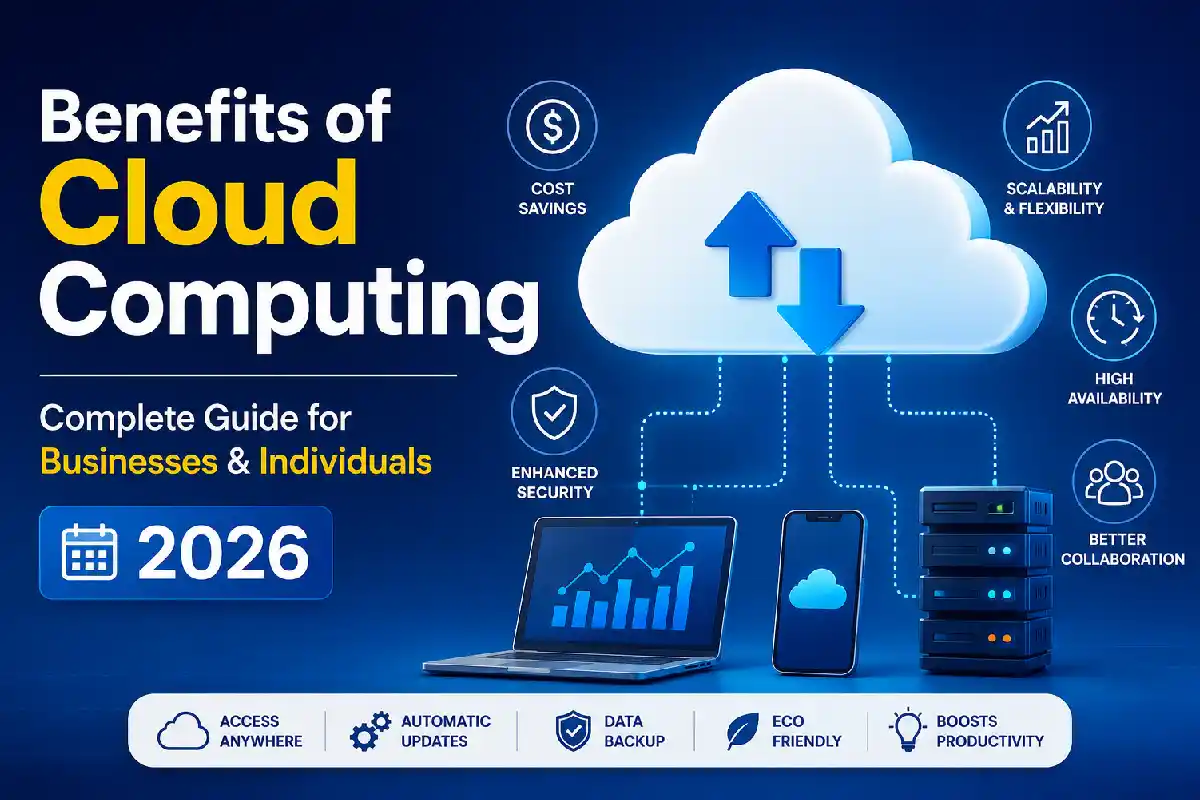
Top Benefits of Cloud Computing
Cloud computing holds one of the top positions to propel the digital transformation of 2026. Companies, start-ups, governments, schools, and even private users use the cloud platform for storage, software, communication, AI, Cybersecurity, big data management.
The largest factor driving this growth is the vast advantages provided by cloud computing. In comparison to the traditional IT architecture, Cloud technology has led to increased flexibility, reduced operational costs, enhanced scalability, increased collaboration, faster innovation.
It is no longer necessary for organizations to spend a fortune on hardware servers and exorbitant maintenance teams. Instead, they can make use of impressive computing resources over the web whenever required.
Here are the key benefits of cloud computing simplified for beginners with simple real life enterprise scenarios and SaaS app examples.
1. Cost Savings
The cost of technology is said to be one of the biggest reasons for organizations to move to cloud and the reduction of this cost would be a major benefit.
Traditional infrastructure often requires:
- Expensive servers
- Data center space
- Cooling systems
- Hardware upgrades
- IT maintenance teams
- Backup systems
Cloud computing removes most of this capex.
How Cloud Computing Saves Money
Cloud providers use a pay-as-you-go pricing model. Businesses only pay for:
- Storage used
- Computing power consumed
- Active users
- Network bandwidth
Reducing the cost of cloud services, makes it significantly cheaper for start ups, and all other small and medium businesses to make use of.
Traditional Infrastructure vs Cloud Costs
| Expense Type | Traditional Servers | Cloud Computing |
| Hardware Purchase | Very Expensive | Not Required |
| Maintenance | High | Included |
| Upgrades | Manual & Costly | Automatic |
| Downtime Recovery | Expensive | Faster Recovery |
| Scaling Costs | Hardware Purchase Needed | Instant Scaling |
| IT Staffing | Larger Teams | Smaller Teams |
Real-World Example
A new low-cost online shopping site would be able to build its own server system (which is not popular) through putting up a cloud-hosted website.
Instead of spending thousands on physical hardware, they can:
- Rent cloud hosting
- Scale traffic instantly
- Pay monthly
- Avoid maintenance costs
Reduce business risk and, in turn, increase cash flow.
2. Scalability and Flexibility
First and foremost is the biggest selling point of cloud computing – scalability.
Businesses often experience changing workloads:
- Traffic spikes
- Seasonal sales
- App growth
- AI processing demands
Cloud platforms enable organizations to scale up resources in real time.
What Scalability Means
If a website suddenly receives:
- 10x more visitors
- Higher storage demand
- Increased application usage
The cloud system will scale the resources up automatically.
Traditional servers usually require:
- New hardware purchases
- Manual installations
- Long setup times
Cloud infrastructure has much faster scalability.
Types of Cloud Scalability
Vertical Scaling
Increasing server power:
- More RAM
- Faster CPUs
- Additional storage
Horizontal Scaling
Adding several servers for load sharing.
Either is generally supported in most modern cloud systems.
Business Advantages of Scalability
Faster Growth
Business barrier-free scale expansion.
Better Performance
Stable applications during sudden traffic surges.
Cost Efficiency
Firms will employ extra resources only if required.
Global Expansion
Choose a cloud system that will easily support UK and international development.
3. Remote Accessibility
Cloud computing. Enables users to access their files, applications and systems from any location that has internet connectivity. Which was really important after the global adoption of remote work, it raise enormously.
Benefits of Remote Access
Employees can:
- Work from home
- Travel while staying connected
- Access systems from smartphones
- Collaborate internationally
Cloud platforms support:
- Hybrid work
- Remote education
- Global teams
- Mobile business operations
Examples of Remote Cloud Services
| Service | Purpose |
| Google Drive | File storage |
| Microsoft 365 | Office collaboration |
| Zoom | Video meetings |
| Dropbox | File sharing |
| Slack | Team communication |
4. Better Collaboration
Cloud computing enhances collaboration between employees, departments, clients and remote teams.
Multiple users can:
- Edit documents simultaneously
- Share files instantly
- Communicate in real-time
- Access centralized systems
How Cloud Collaboration Works
Changes update instantly for all users.
This removes problems such as:
- Duplicate files
- Version conflicts
- Delayed updates
- Manual sharing
Benefits for Businesses
Improved Productivity
Teams complete projects faster.
Faster Communication
Real-time collaboration improves workflow.
Easier Project Management
Everyone accesses the same information.
5. Automatic Software Updates
Traditional IT infrastructure requires constant manual updates.
Cloud providers automatically manage:
- Security patches
- Software upgrades
- Infrastructure maintenance
- System monitoring
Advantages of Automatic Updates
Reduced IT Workload
Internal teams spend less time on maintenance.
Improved Security
Systems stay updated against vulnerabilities.
Better Performance
Applications remain optimized automatically.
Access to New Features
Businesses instantly benefit from platform improvements.
Cloud Computing for Businesses
Cloud computing has revolutionised the way modern organisations work and conduct business. In 2026, even small startups and tiny local shops let alone the giants and multinational corporations, will use cloud computing to increase productivity, decrease expenses, secure their cyber infrastructure and expand worldwide.
Rather than spend large sums of money on physical servers, costly IT infrastructure, and huge maintenance teams, firms now turn to cloud platforms, which provide computing resources online as required.
Cloud computing isn‘t simply a technology trend any more. It has infiltrated into the fundamental digital business strategy of various fields, including:
- Healthcare
- Banking
- E-commerce
- Education
- Manufacturing
- Logistics
- Media
- Software development
Businesses use cloud services for:
- Data storage
- Website hosting
- Customer management
- AI analytics
- Team collaboration
- Cybersecurity
- Application development
- Disaster recovery
Why Businesses Are Moving to the Cloud
Traditional IT systems often create challenges such as:
- High infrastructure costs
- Limited scalability
- Hardware maintenance
- Slow deployment
- Downtime risks
- Security vulnerabilities
Cloud computing solves many of these problems by providing on-demand resources through the internet.
Main Reasons Businesses Adopt Cloud Computing
| Business Need | How Cloud Computing Helps |
| Reduce costs | Eliminates expensive hardware |
| Support remote work | Access from anywhere |
| Scale quickly | Instant resource expansion |
| Improve security | Advanced cloud protection |
| Increase efficiency | Automated management |
| Launch faster | Rapid deployment |
| Backup data | Disaster recovery systems |
| Use AI tools | Cloud AI integration |
Organizations of all sizes are adopting cloud solutions because of the many business benefits of cloud computing, including scalability, cost savings, and improved collaboration.
How Cloud Computing Works for Businesses
Businesses rent cloud resources from providers instead of owning physical infrastructure.
These resources may include:
- Virtual servers
- Databases
- Cloud storage
- Networking tools
- AI platforms
- Business applications
The provider manages:
- Hardware
- Maintenance
- Security updates
- Infrastructure scaling
This enables the shop to provide more time to its business in operation or business growth rather than technical-based maintenance.
Cloud Security Advantages
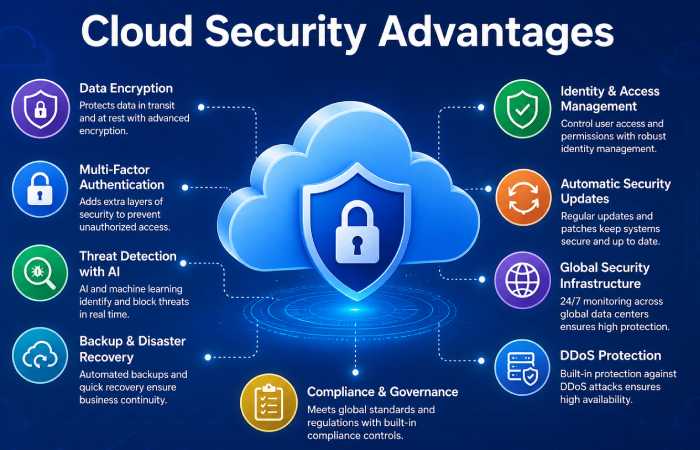
Another key motivator for entering the cloud in 2026 will be the significantly enhanced safety guarantees in the cloud. While in the past, many companies have avoided the storage of vital data in the cloud.
Today, “cloud service providers spend billions of dollars on the world ‘s most sophisticated security systems,” and “cloud infrastructure is safer than traditional on-premise systems”.
Today, businesses face growing threats such as:
- Ransomware attacks
- Data breaches
- Phishing scams
- Insider threats
- AI-powered cyberattacks
- Identity theft
To combat these risks, major cloud providers use:
- Artificial intelligence
- Automated threat detection
- Advanced encryption
- Global monitoring centers
- Zero-trust security frameworks
Cloud security helps businesses protect:
- Customer data
- Financial information
- Business applications
- Intellectual property
- Employee accounts
- Operational systems
Most businesses do not make economies of scale to protect their data and the costs can be huge. Cloud providers can afford it, and offer it as security services to their customers.
Many professionals rely on cloud comparisons and tutorials when evaluating services and platforms.
Top Cloud Security Advantages
| Cloud Security Advantage | Explanation | Business Benefit | Resource Link |
| Data Encryption | Providers encrypts data at rest and on transit using the advanced encryption standards. | Safeguards important business and customer data from unauthorised viewing. | Google Cloud Encryption Overview |
| Multi-Factor Authentication (MFA) | Adds more layers of security on top of passwords e.g. Moblie authentication or Biometrics. | Lowers the risk of account hijacking; enhances identity protection. | Microsoft Multi-Factor Authentication |
| AI-Powered Threat Detection | Artificial intelligence automatically detects threats by continuously monitoring known and unknown attacked activity in real time. | Ability for faster detection of cyberattacks and automatic application of responses. | IBM AI Cybersecurity Solutions |
| Automatic Security Updates | Cloud providers take care of applying security patches and infrastructure upgrades for you. | Buckie magement and time savings. Reduces risk and decreases workload for IT adjustments. | AWS Security Best Practices |
| Disaster Recovery & Backup | The cloud platform offers automatic system backups and recovery located in several regions. | Quicker recovery after cyber-attacks, hardware crashes, other disasters. | Google Cloud Backup and Disaster Recovery |
| Identity and Access Management (IAM) | Controls user perimissions and limits access by roles & policies. | Contains a useful security feature which prevents unauthorized access and enhances internal security management. | AWS Identity and Access Management |
| Zero-Trust Security Architecture | All users and devices need to be constantly authenticated prior to accessing the systems. | Reduce the insider threats Increase levels of access control. | Microsoft Zero Trust Security |
| Global Security Monitoring | Leading suppliers have 24/7 worldwide cyber security monitoring stations. | Proud to offer Secure software solutions that provide a 365-day-a-year blanket of protection against complex, ever-changing cyber threats around the world. | Google Cloud Security Operations |
| Compliance Support | Cloud systems incorporate standards such as: GDPR, HIPPA, ISO 27001 and PCI-DSS. | Support companies in fulfilling the legislations and the specific security rules from each industry. | IBM Cloud Compliance Center |
Why Cloud Security Matters in 2026
Contemporary businesses are heavily dependent on digital and electronic systems and Internet-based services. A single cyberattack can result in:
- Financial loss
- Reputation damage
- Legal penalties
- Operational downtime
- Customer trust issues
Providers are always upgrading and refining security infrastructure because cyber threats change rapidly every year.
2026, cybersecurity is no longer exclusively an IT issue, it is a business number one survival strategy.
Cost Savings with Cloud Technology
Cost is a fundamental driver for businesses moving to the cloud. Organisations of all sizes, startups, midmarket companies, and Global 1000 firms are using the cloud in 2026 to save money on hardware costs. Just like you get something extra for nothing, cloud computing helps you achieve more for less.
Traditional infrastructure often requires large upfront investments in:
- Physical servers
- Networking equipment
- Data centers
- Cooling systems
- Software licenses
- Maintenance teams
Cloud computing differs from this model as it offers companies the flexibility to only pay for resources that are utilized.
This gives organizations the power to control spending while still accessing enterprise higher-level technologies and infrastructure.
How Cloud Technology Reduces Costs
Cloud computing does away with most of the costs associated with running an on-premise infrastructure.
Rather than acquiring and maintaining hardware themselves, companies lease computational resources from providers like:
- Amazon Web Services (AWS)
- Microsoft Azure
- Google Cloud Platform
- Oracle Cloud
- IBM Cloud
Cloud providers handle:
- Infrastructure maintenance
- Security updates
- Hardware upgrades
- Backup systems
- Power management
This greatly reduces operational costs for businesses.
Modern enterprises are increasingly integrating artificial intelligence in cloud computing to automate workflows and improve operational efficiency.
Cloud Computing vs Traditional Servers
| Feature | Cloud Computing | Traditional Servers |
| Setup Speed | Minutes | Weeks |
| Maintenance | Provider-managed | Self-managed |
| Security | Advanced | Depends on IT team |
| Flexibility | High | Limited |
| Cost | Variable | Fixed |
| Accessibility | Anywhere | Local access |
Future of Cloud Computing
The future of cloud computing is strongly connected with:
- Artificial Intelligence
- Edge computing
- Quantum computing
- Green data centers
- Serverless infrastructure
Understanding future cloud computing trends can help companies prepare for technological advancements.
2026 Trends
- AI-native cloud platforms
- Sustainable cloud operations
- Multi-cloud strategies
- Edge AI processing
- Autonomous cybersecurity
Analysts report massive investments in AI cloud infrastructure across the industry.
Organizations can improve efficiency and scalability by leveraging advanced cloud computing platforms designed for modern business operations.
FAQs
What are some benefits or advantages of cloud computing?
Major benefits include most prominent are scalability, lower costs, remote access, auto updates and better disaster recovery features.
Is Cloud Computing Safe?
Yes. The major providers have encryption, AI monitoring, and compliance.
What can I expect of each platform?
It depends on your needs:
AWS at the enterprise level
Azure for web ecosystems runs through the ecosystems of Microsoft in the professional community.
Google Cloud for AI and analytics
Cost of Cloud computation?
Cloud computing is a much cheaper alternative to hosting physical servers since the company will only pay for what it uses.
What is hybrid cloud?
Hybrid cloud- Hybrid cloud is a combination of other clouds such as the combination of public and private clouds.
Conclusion
With an increasing number of organisations of all sizes implementing the above, the benefits of cloud computing are becoming more pronounced, as it continuously accelerates the efficiency of saving, protecting and innovating for organisations of all sizes.
Convenience to all publishers for small business owners, developers, students and enterprises, cloud computing offers a vast amount of flexibility and performance and will be hard-pressed to match the infrastructure in 2026.
It should also be borne in mind that cloud computing will be central to every aspect of today‘s digital revolution as AI and automation move along.
Kashifa Jafar is a technology writer and contributor at FutureTechExpert with 4+ years of experience in technology writing and content creation.
Read Full Bio of Author →Sameena reviews selected health, wellness, technology, and digital content for clarity, factual presentation, and reader usefulness.
Read Full Bio of Reviewer →