
 Kashifa Jafar
Technology Writer & Contributor
Kashifa Jafar is a technology writer and contributor at FutureTechExpert with 4+ years of experience in technology writing and content creation.
Read Full Bio of Author →
Kashifa Jafar
Technology Writer & Contributor
Kashifa Jafar is a technology writer and contributor at FutureTechExpert with 4+ years of experience in technology writing and content creation.
Read Full Bio of Author →
 Sameena Begum
Health, Technology & Digital Content Reviewer
Sameena reviews selected health, wellness, technology, and digital content for clarity, factual presentation, and reader usefulness.
Read Full Bio of Reviewer →
Sameena Begum
Health, Technology & Digital Content Reviewer
Sameena reviews selected health, wellness, technology, and digital content for clarity, factual presentation, and reader usefulness.
Read Full Bio of Reviewer →
Top Todo List Apps Do you want to be more productive? Do you want to make sure you don‘t forget your important meetings? Everyday to-do list apps provide you with a quick, easy way to store your thoughts, capture your to-do items, stay productive, and put your goals into motion.
The current generation of to do lists are much more sophisticated than just checklists. Today‘s software has reminders, the ability to schedule repeated to do lists, tools for working with other people, integration with other applications, and reports so that you can identify time-wasters and stay on track.
 This article is part of
Productivity Apps Resources
Table of Contents
What is a To-Do List App?
An application specifically created for managing activities and lists, which allows user to set objectives, create and administrate task and monitor their completion.
This is different from classical paper lists, in a way that today‘s apps are synchronizing tasks in different environments, and they are providing intelligent functionalities as:
- Due dates
- Reminders
- Recurring tasks
- Priority levels
- Task categories
- Progress tracking
- Team collaboration
Some popular examples are: Todoist, TickTick, Microsoft To Do, Google Tasks, and Any.do. Apps like these let you juggle your personal and work admin from one place.
Many users pair to-do list software with note-taking apps to capture ideas, meeting notes, and action items in one organized workspace.
Benefits of Using a To-Do List App
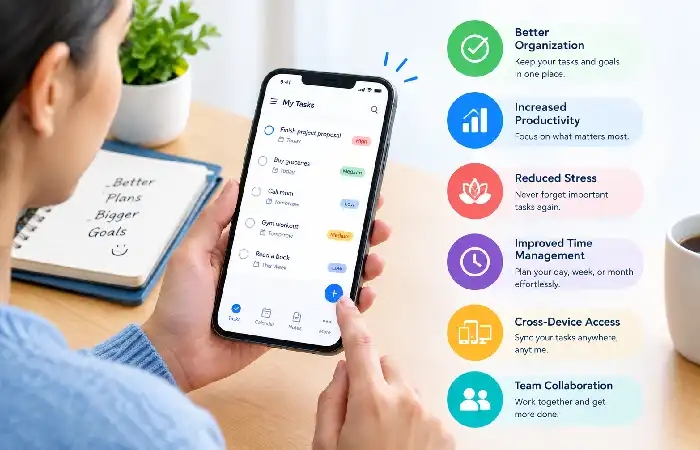
Using a digital task management solution offers several advantages:
Better Organization
Tasks can be organized by projects, deadlines and priorities, minimizing cognitive load.
Increased Productivity
A distinct list of tasks to be undertaken helps users prioritize and focus on what requires immediate attention.
Reduced Stress
External recording of tasks: the fear of forgetting an important task is eliminated.
Improved Time Management
Calendar views and scheduling tools are included in a number of applications.
Cross-Device Access
All synchronized between the different phones smartphones, tablets and desktops
Team Collaboration
Shared task lists and project collaboration are commonly found in many contemporary applications.
Essential Features of To-Do List Apps
When evaluating a to-do list application, consider these essential features:
Task Creation
Gives an easy way to tell the program what to do via natural language.
Due Dates
Set deadlines.
Recurring Tasks
Automate time intensive tasks for repetitive activities like paid bills or weekly meetings.
Priority Levels
Determine urgent and important tasks.
Reminders and Notifications
Get notified ahead of deadlines.
Tags and Categories
Group similar tasks.
Collaboration Tools
Distribute work and share lists with your friends.
Calendar Integration
View tasks with appointments and events.
Creating a task list is only the first step; time management apps help users prioritize activities, allocate time effectively, and meet deadlines consistently.
How to Organize Daily Tasks
A detailed task list makes the process more efficient and helps prevent to overwhelm.
Create Categories
Separate tasks into areas such as:
- Work
- Personal
- Health
- Family
- Finance
Break Large Tasks into Smaller Steps
Instead of writing:
Build website
Use:
Create homepage
Write content
Design navigation
Test for mobile responsiveness
Use Time Blocks
Designate certain time frames in the day for working uninterrupted.
Review Daily
Spend 5 minutes in the morning, and 5 minutes in the evening looking at your list of things to do.
How to Set Task Priorities
Not every task warrants it.
A simple priority framework:
| Priority | Meaning |
| High | Urgent and important |
| Medium | Important but not urgent |
| Low | Nice to complete |
Many productivity experts recommend using the Eisenhower Matrix:
- Urgent + Important → Do now
- Important + Not Urgent → Schedule
- Urgent + Not Important → Delegate
- Neither → Eliminate
Some of the top apps now have integrated priority structures to make this easier.
Businesses often integrate to-do list tools with project management apps to coordinate team workflows, track milestones, and manage complex projects.
Using Reminders and Notifications
Reminders are useful to avoid missing deadlines or forgetting commitments.
Best practices include:
- They can also set reminders for 15–30 minutes prior to meetings.
- Utilize repeated prompts for behaviors.
- Using location: Develop location-based reminders when possible.
- Prevent from being burdened with numerous notifications that lead to alert fatigue.
Intelligent reminders or notifications are one of the most useful features of today‘s productivity tools.
Daily vs Weekly To-Do Lists
Daily To-Do Lists
Best for:
- Immediate tasks
- Focused execution
- Managing current priorities
Advantages:
- Clear direction
- Reduced overwhelm
- Finished quicker.
Weekly To-Do Lists
Best for:
- Long-term planning
- Project management
- Strategic priorities
Advantages:
- Improved distribution of the work.
- Improved scheduling
- Greater flexibility
Most productive users use a hybridization of both techniques by planning weekly and then working daily.
Many professionals combine task lists with focus and productivity apps to minimize distractions and improve concentration during deep work sessions.
How to Choose the Right To-Do List App
The right app for you will vary depending on the way you like to work and your preferences.
Choose Todoist If:
- You want a superior set of productivity tools.
- Just BulliedYou have various on the go.
Choose TickTick If:
- I require inbuilt kalenders and concentrationfeatures.
Select Microsoft To Do If:
- Using Microsoft 365 & Outlook.
Choose Google Tasks If:
- You! you‘re doing a lot inside Gmail and Google Calendar.
Choose Any.do If:
- You like to have daily planning arranged for you.
Try out 2 to 3 apps for a week, and rank usability, features and integrations before making a commitment.
While basic to-do lists are useful for personal organization, task management apps offer advanced features such as automation, collaboration, and progress tracking.
Common To-Do List Mistakes

Avoid these common productivity killers:
Creating Massive Task Lists
Having to do too many things takes away ones drive and concentration.
Ignoring Priorities
Without prioritising, a list can be confusing.
Not Reviewing Tasks
Waiting causes your system to be clogged up with a lot of aged tasks.
Overcomplicating Organization
Having too many folders, tags and labels can result in excessive inconvenience.
Forgetting to Schedule Work
Zero time unscheduled tasks rarely completed.
To-do list software is one of the most widely used categories of productivity apps, helping users stay organized, manage priorities, and boost efficiency.
FAQ
Amidst the multitude of free to-do list applications available in 2026, which one stands out as the top choice?
Free supremacy is preserved by Microsoft To Do (and Outlook Tasks) and Google Tasks. With generous free plans, TickTick and Todoist are good premium alternatives.
Are there advantages to following a to-do list in an application rather than on paper?
Digital apps provide reminders, synchronization, collaboration, and automation that are impossible to find with paper planners.
How many task need I to put on a daily to-do list.
Most productivity geeks advocate dividing your time among 3 –7 most important tasks every day.
Do-do list apps impose productivity?
Yes. Studies and users’ experience show that the visibility, the prioritization and reminders of tasks are beneficial. This provide users with a less stressful and more productive life.
Is there anything a team can use a to-do list application?
Yes. The application offers a lot of other applications that help support sharing projects and assigning tasks.
Conclusion
To-do list applications have grown into full-fledged productivity systems that enable you and your team to keep organized, effectively prioritize, and deliver results more efficiently. From Todoist and TickTick to Microsoft To Do, Google Tasks or Any.do all of them work well as long as you find the best one for your work style and stick to it.
Used in conjunction, these tools of scheduling, task prioritizing, setting reminders, and ongoing reviewing can elevate a basic to do list to an effective system of productivity that will stand the test of time.
Kashifa Jafar is a technology writer and contributor at FutureTechExpert with 4+ years of experience in technology writing and content creation.
Read Full Bio of Author →Sameena reviews selected health, wellness, technology, and digital content for clarity, factual presentation, and reader usefulness.
Read Full Bio of Reviewer →